Bypass Instance "Require admin approval for new sign-ups" restriction by abusing Group SAML SSO
A non-admin user could bypass the instance's sign-up restrictions (including disabled sign-up and required admin approval) by configuring Group SAML with their own identity provider. When a user from that IdP logged in via the group SSO link, GitLab automatically created and signed in a new account without admin approval.

GitLab
Originally disclosed on GitLab
- Fixed in 17 hours
- Disclosed after 17 hours
⚠️ Please read the process on how to fix security issues before starting to work on the issue. Vulnerabilities must be fixed in a security mirror.
HackerOne report #1946303 by ricardobrito on 2023-04-13, assigned to @rshambhuni:
Report | Attachments | How To Reproduce
Report
Backgroud
In self-managed gitlab instances, account creation is controlled by the admin of the instance. If the setting: sign-up enabled is on, then anyone who visits https://your-instance-url/users/sign_in can create an account. BUT the user who created the account cannot log in without the instance administrator's approval. Here is a typical example of account creation:
As we can see, a newly created user needs the instance administrator's approval in order to be able to login to new accounts created on the instance:
If the setting sign-up enabled is on is off, then users cannnot register accounts by themselves.
Summary
I have found a way for non-admin users to create as many accounts as they want, without the admin's approval and even when sign-up enabled is off:
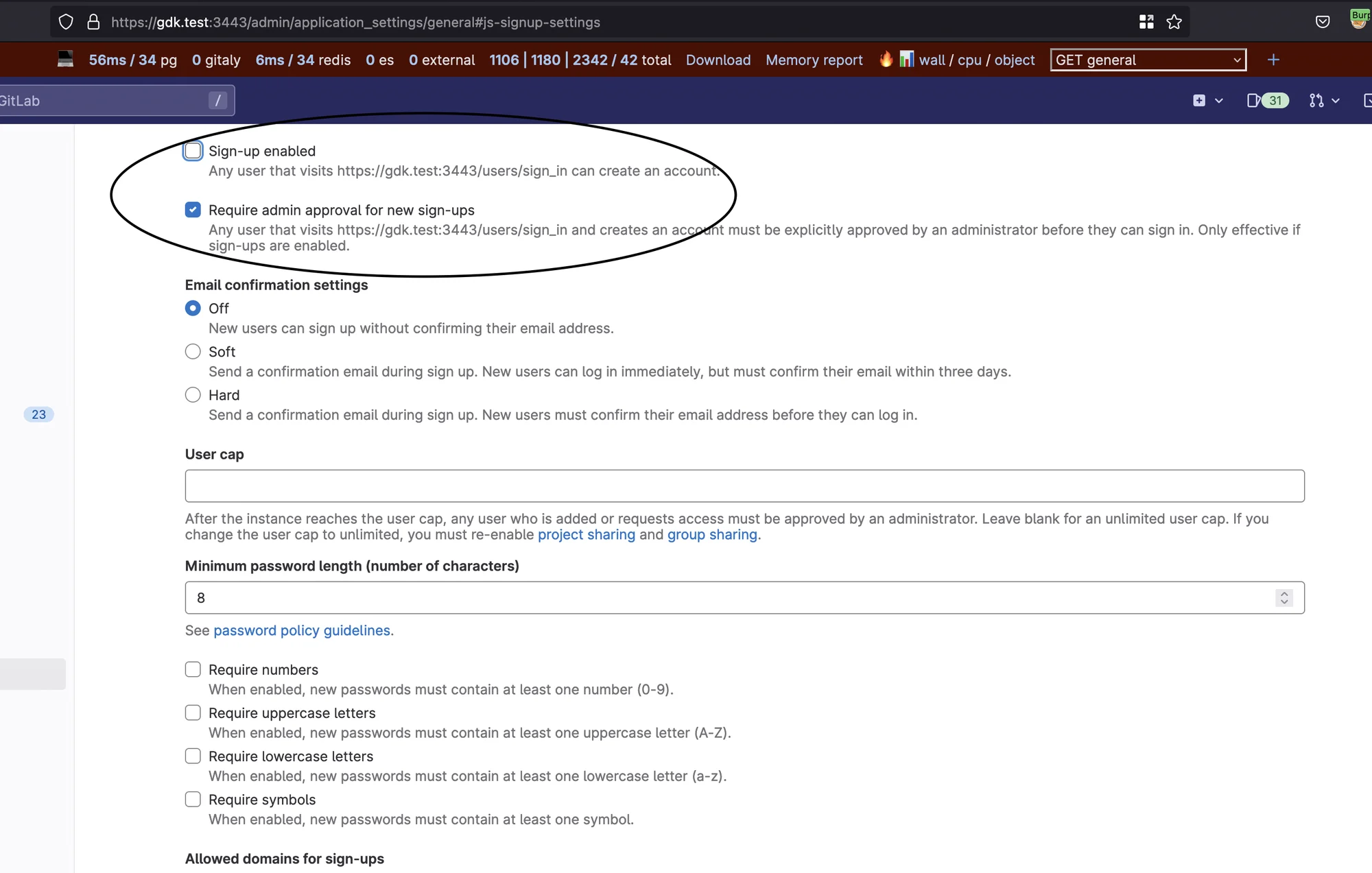
By abusing Group SAML, a non admin user can create new accounts at will. This is accomplished by creating an Idp with the accounts that he wants to add to Gitlab, and then by using the sso link, the user can login to the SAML group and if the user provided by the Idp does not exist on GItlab, it is automatically created and signed in without the admin approval.
POC:
Steps to reproduce
As the admin of the instance, make sure that you have the following configuration on sign-up restrictions:
sign-up enabled is off To prevent users from signing up at will
Require admin approval for new sign-ups is on to make sure that newly created users need explicit admin approval before being able to login.
- As a non-admin user, create a group and configure SAML (the instructions for this can be obtained from this link
- Configure your Idp with a few users that you would like to create in the gitlab instance.
- Open a private session and access the group sso link e.g.
https://gdk.test:3443/groups/non-admin-group/-/saml/sso - Press the button to sign-in with the group, and then login in the Idp with the account that you would like to create on gitlab.
- The account is created on Gitlab and you are redirected to the group page.
- A non-admin user has bypassed the sign-up restrictions, created and logged in a new account without the admin approval.
Impact and Attack Scenarios
Scenario 1
- Let's say the instance admin decides to ban a user who is part of a group which is set up with sso.
- The admin goes to the admin panel and sets the status of the user to banned because he does not want the user to be able to access Giltab anymore.
- Now the user can create another account in the Idp and using the group sso link (as shown in the poc video above) he can create a new Gitlab account and have access to the instance.
Scenario 2
- Let's say the instance admin has disabled
sign-up enabledand explicitly enabledRequire admin approval for new sign-upsbecause he wants to be able to know every time a new account is created and wants to be able to only allow account he has explicitly approved (on sign up). - A non admin user could easily create multiple accounts (as shown in the POC video) by abusing the Group SAML SSO.
Impact
A non-admin user is capable of bypassing sign-up restrictions by abusing Group SAML SSO, allowing him to create and signin gitlab accounts without admin approval. Approved accounts are capable to access git reporsitories, access the API and be added to groups and projects, therefore an admin who has explicitly set require admin approval for new sign-ups would want it to work as expected.
Attachments
Warning: Attachments received through HackerOne, please exercise caution!
- account-creation.mov
- account-approval.mov
- Screenshot_2023-04-14_at_1.56.21_AM.png
- admin-restrictions-bypass.mov
How To Reproduce
Please add reproducibility information to this section:
Not written yet. The AI write-up for this report has not been written yet. The Original tab links to the source.
How it worked
Root cause
Likely, the SAML SSO account creation flow did not enforce the instance's sign-up restrictions (such as requiring admin approval) when automatically provisioning new users.
Impact
A non-admin user could create and sign in to multiple GitLab accounts without admin approval, even when sign-up was disabled, and these accounts could access repositories, the API, and be added to groups and projects.
What the attacker needed
Non-admin user with group creation rights; ability to configure a SAML identity provider; sign-up restrictions enabled on instance
How it was found
- As a non-admin user, create a group and configure SAML.
- Configure the identity provider with users to be created in GitLab.
- Open a private session and access the group SSO link.
- Sign in with the group and log in to the identity provider with the desired account.
- The account is created on GitLab and you are redirected to the group page.
Explained by bugbounty.wiki with AI from the original and checked against quotes from it; it can still be wrong. Read the original before relying on a detail.
Not written yet. The AI write-up for this report has not been written yet. The Original tab links to the source.
GitLab instances can be configured to require admin approval for new accounts. This report shows that a non-admin user could set up a SAML identity provider for a group and then use the group's single sign-on link to create new accounts that skip the approval step.
What is Access control?
A user can do something their role should not allow: reach an admin function, act on a feature they have not paid for, or skip a permission check. IDOR is the special case where the object belongs to someone else.

