Bypass: Malicious Developer can Read Protected Caches from Unprotected Branches using CACHE_FALLBACK_KEY
The GitLab Runner's cache fallback key sanitisation only trims trailing slashes and backslashes, so a developer on an unprotected branch can append '/./' to a protected cache key and still read the protected cache. This lets a malicious developer access sensitive data stored in caches of protected branches.

GitLab
Originally disclosed on GitLab
- Fixed in 8 months
- Disclosed after 8 months
⚠️ Please read the process on how to fix security issues before starting to work on the issue. Vulnerabilities must be fixed in a security mirror.
HackerOne report #2855623 by ninjafit on 2024-11-20, assigned to @kmorrison1:
Report | Attachments | How To Reproduce
Report
Hello team!
I noticed a fix went out today 2024-11-20 for Malicious Developer can Read Protected Caches from Unprotected Branches using CACHE_FALLBACK_KEY in gitlab-runner v17.6.0 that is not sufficient enough as an attacker can bypass the sanitizeCacheFallbackKey method to gain access to the protected cache through the use of a payload like: /./

I decided to submit a new report since this will help the GitLab security team with tracking purposes based on their guidance in other reports I've seen like Original Report & Bypass Report by [@]yvvdwf.
Looking at the Remove trailing "/" from cache fallback keys merge request, the fix that was implemented was the inclusion of a method sanitizeCacheFallbackKey that returns a slice of the string s, with all trailing Unicode code points contained in cutset " /\\" removed.
https://gitlab.com/gitlab-org/gitlab-runner/-/blob/main/shells/abstract.go?ref_type=heads#L189-191
func sanitizeCacheFallbackKey(fallbackKey string) string {
	return strings.TrimRight(fallbackKey, " /\\")
}
The issue here, is the fact that we can use a payload like sensitive-cache-protected/./ that'll return sensitive-cache-protected/.
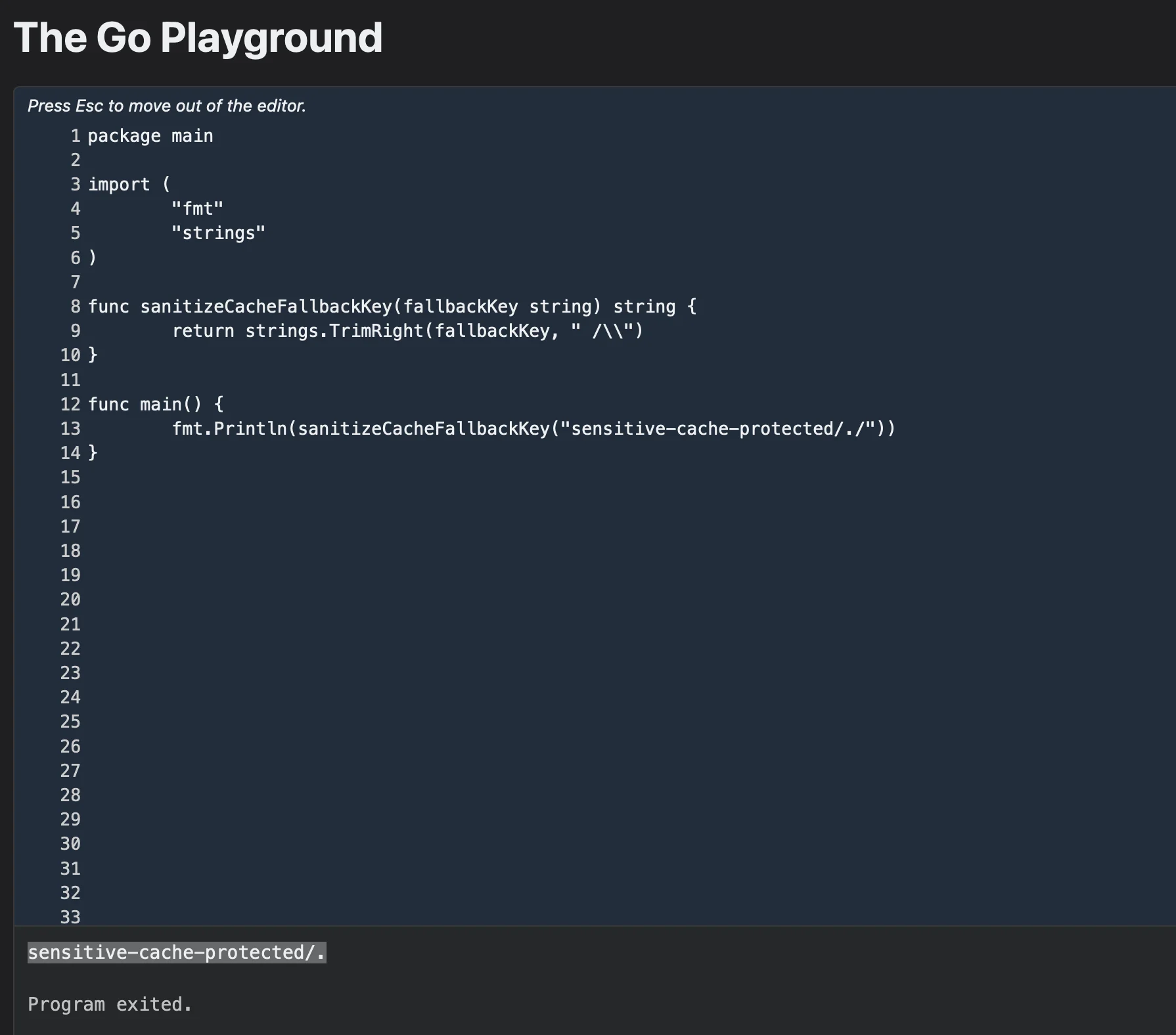
This will be considered valid and will allow an attacker to pull contents of a protected cache from an unprotected branch.
Steps to reproduce
Since the fix is not yet available in Gitlab.com until probably the next few days when the shared runners are updated to v17.6.0, what we can do in the meantime is use the output of sanitizeCacheFallbackKey and set it as the fallback cache key to see if the resulting output sensitive-cache-protected/. is still valid and can access the protected cache.
Preconditions:
- A GitLab project with at least one protected branch (e.g.,
main) and one unprotected branch (e.g.,maliciousBranch). - Two users as members, one with
Ownerrole and the other withDeveloperrole. The developer will serve as our attacker. - CI/CD pipelines enabled for the project.
As the Owner user on the protected branch (main):
- Create a
.gitlab-ci.ymlfile that stores sensitive data in the cache:
stages:
  - build

build_job:
  stage: build
  script:
    - echo "Sensitive data from protected branch" > secret.txt
  cache:
    key: sensitive-cache
    paths:
      - secret.txt
- Commit and push the changes to the
mainbranch. - Run the pipeline to store
secret.txtin the protected cache.
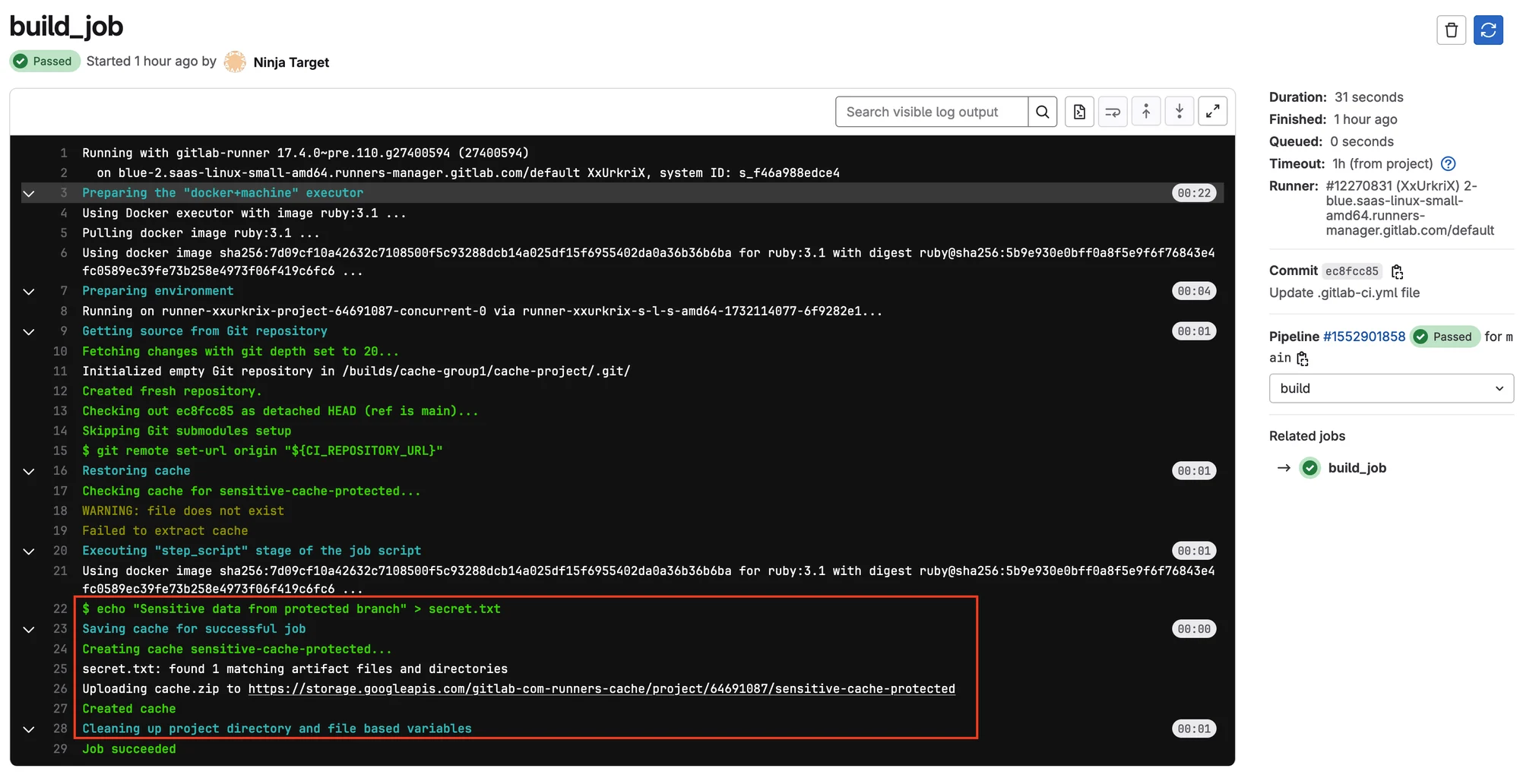
As the Developer user on the unprotected branch (maliciousBranch):
- Create a
.gitlab-ci.ymlfile that attempts to access the protected cache by appending the resulting output fromsanitizeCacheFallbackKeysensitive-cache-protected/.to the cache key:
stages:
  - retrieve

variables:
  CACHE_FALLBACK_KEY: "sensitive-cache-protected/."

retrieve_job:
  stage: retrieve
  cache:
    key: invalid-cache
    paths:
      - secret.txt
    policy: pull
  script:
    - cat secret.txt
- Commit and push the changes to the
maliciousBranchbranch. - Run the pipeline on the
maliciousBranchbranch.
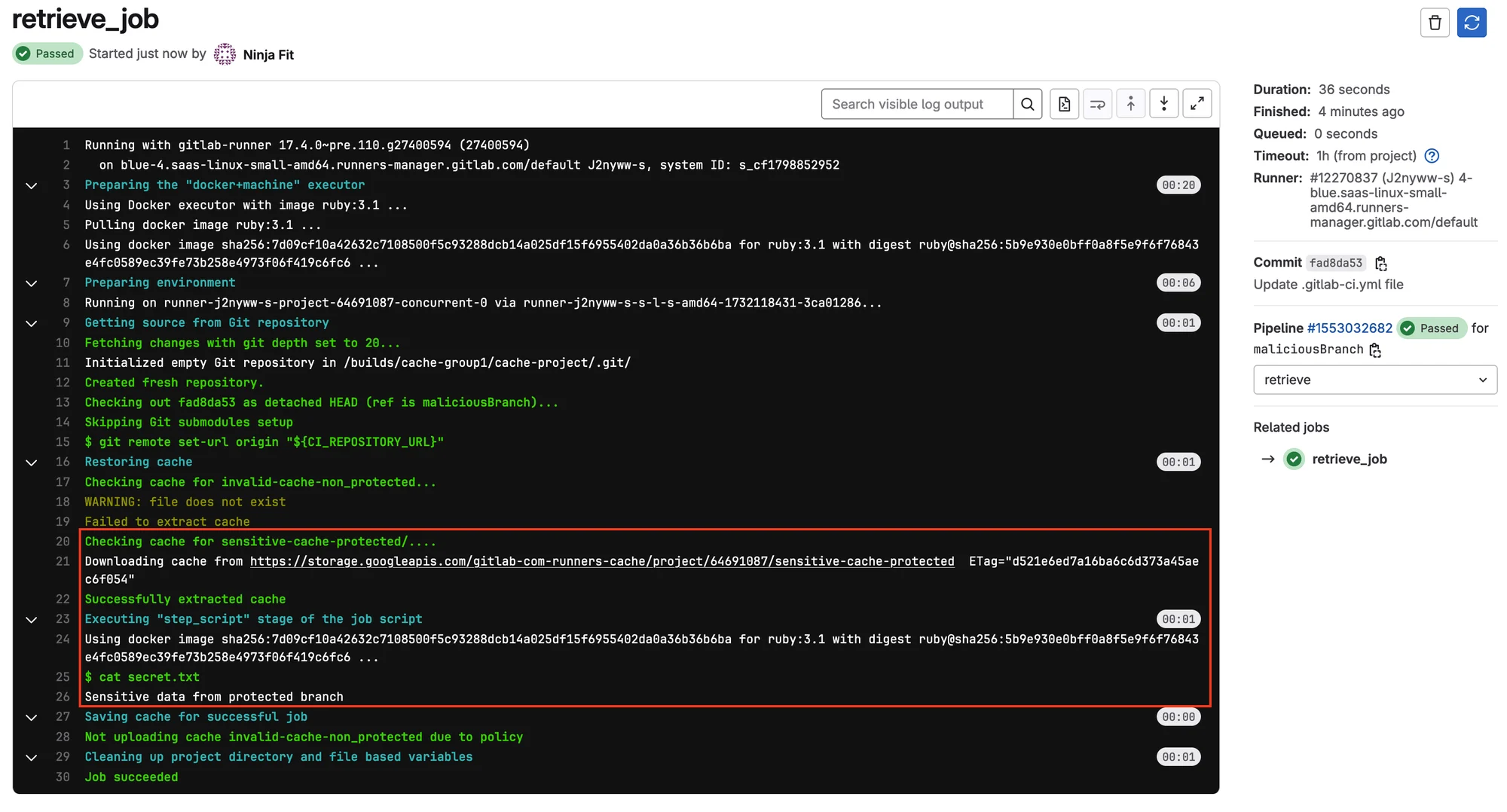
Expected Result:
- After the sanitization, the unprotected branch should not have access to
secret.txtfrom the protected cache, and the script should output "cat: secret.txt: No such file or directory".
Actual Result:
- The unprotected branch still successfully retrieves
secret.txtfrom the protected cache after sanitization and outputs its contents, demonstrating unauthorized access.
Video POC
What is the current bug behavior?
Unprotected branches can access caches from protected branches by manipulating the fallback cache key further after the fix. The protection mechanism fails to prevent this unauthorized access when a /./ is appended to the cache key, as shown in this log trail:
What is the expected correct behavior?
The cache protection mechanism should prevent unprotected branches from accessing caches of protected branches, regardless of modifications to the cache key. Attempting to access a protected cache from an unprotected branch should result in a cache miss, and sensitive data should remain inaccessible.
Output of checks
This bug will happen on GitLab.com when the shared runners are updated to v17.6.0.
Note: The vulnerability stems from the following code in GitLab runner's cache handling:
https://gitlab.com/gitlab-org/gitlab-runner/-/blob/main/shells/abstract.go?ref_type=heads#L189-191
func sanitizeCacheFallbackKey(fallbackKey string) string {
	return strings.TrimRight(fallbackKey, " /\\")
}
Impact
This vulnerability allows unauthorized access to sensitive data stored in caches of protected branches. Attackers with access to unprotected branches can exploit this flaw to read confidential information, leading to potential data breaches and compromising the integrity of protected environments.
Attachments
Warning: Attachments received through HackerOne, please exercise caution!
- Screenshot_2024-11-20_at_7.35.22_AM.png
- image.png
- image.png
- image.png
- gitlab-runner-cache-suffix-bypass.mov
How To Reproduce
Please add reproducibility information to this section:
Not written yet. The AI write-up for this report has not been written yet. The Original tab links to the source.
How it worked
Root cause
The sanitisation function only removes trailing slashes and backslashes, so a path like 'sensitive-cache-protected/./' becomes 'sensitive-cache-protected/.' which is still treated as the protected cache key.
Impact
A developer with access to an unprotected branch could read sensitive data stored in the cache of a protected branch, leading to potential data breaches.
What the attacker needed
GitLab project with protected and unprotected branches; Developer role on the project; CI/CD pipelines enabled
The fix
The sanitisation should be strengthened so that sequences like '/./' cannot be used to bypass the protected cache restriction.
How it was found
- As the Owner, create a .gitlab-ci.yml on the protected branch that stores a secret file in a cache with key 'sensitive-cache'.
- Commit and push to the protected branch and run the pipeline to populate the protected cache.
- As the Developer, create a .gitlab-ci.yml on an unprotected branch that sets CACHE_FALLBACK_KEY to 'sensitive-cache-protected/.' and uses a different cache key with policy pull.
- Commit and push to the unprotected branch and run the pipeline.
- Observe that the secret file from the protected cache is retrieved and its contents are printed.
Explained by bugbounty.wiki with AI from the original and checked against quotes from it; it can still be wrong. Read the original before relying on a detail.
Not written yet. The AI write-up for this report has not been written yet. The Original tab links to the source.
In GitLab, a protected branch is one that only certain people can change, and its CI cache is meant to be private. A developer who is not allowed to push to that branch could still read its cache by setting a special fallback cache key that the runner fails to clean properly. This means they can see files that were supposed to be secret.
What is Access control?
A user can do something their role should not allow: reach an admin function, act on a feature they have not paid for, or skip a permission check. IDOR is the special case where the object belongs to someone else.

