Cache for protected branches is not isolated and can be used to gain code execution on future jobs.
The CI/CD cache was not isolated between protected and unprotected branches, so a user with developer permissions could poison the cache for a protected branch. This allowed them to execute arbitrary code in the context of the protected branch and potentially backdoor the final build.

GitLab
Originally disclosed on GitLab
- Fixed in 12 months
- Disclosed after 12 months
HackerOne report #1182375 by wapiflapi on 2021-05-02, assigned to @ankelly:
Report | Attachments | How To Reproduce
Report
Summary
Citing https://docs.gitlab.com/ee/ci/caching/
GitLab CI/CD provides a caching mechanism that can be used to save time when your jobs are running. [...] The most common use case of caching is to avoid downloading content like dependencies or libraries repeatedly between subsequent runs of jobs.
The protected status of the branch on which the pipeline is running is not taken into account. This means that a user with developer permissions, or any permissions allowing them to run a pipeline, could poison the cache and backdoor those "dependencies or libraries", and get code execution in the context of a protected branch and even in the context of the final build that will be deployed to other environments.
Steps to reproduce
- Set-up a gitlab project with the following
.gitlab-ci.ymlfile on themasterbranch which is protected by default.
cache:
  # This is recommended in https://docs.gitlab.com/ee/ci/caching/
  # It is considered "safe from accidentally overwriting the cache".
  key: "$CI_JOB_NAME-$CI_COMMIT_REF_SLUG"

  paths:
    - critical_binary

stages:
  - test

test:
  stage: test
  image: ubuntu
  script:
    - echo "Building critical_binary if it isn't cached."
    - if [ ! -f critical_binary ]; then echo 'echo critical_binary is safe' > critical_binary; else echo "Reusing cached critical_binary."; fi;
    - echo "Executing critical_binary."
    - sh ./critical_binary
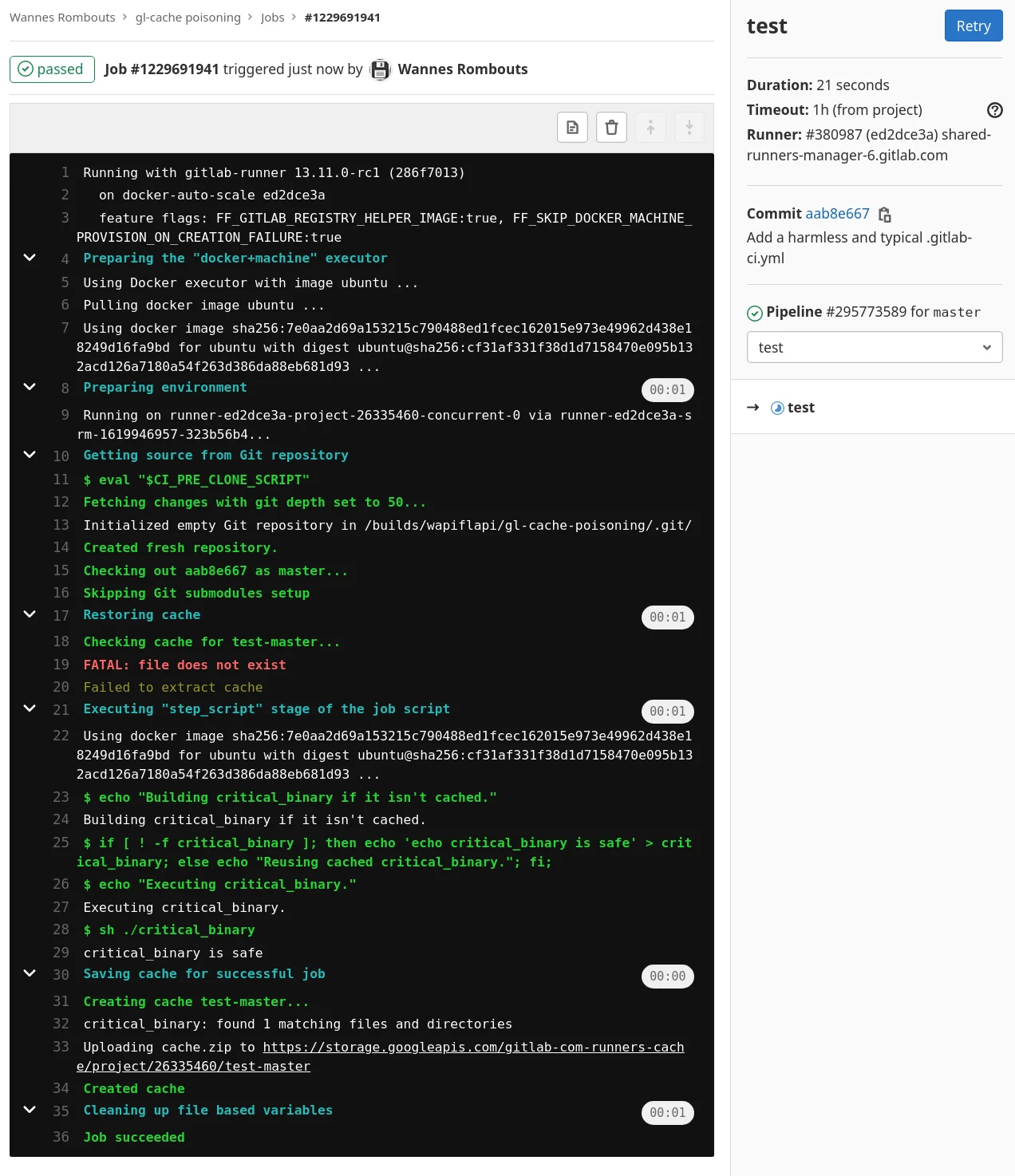
- Observe that the pipeline ran successfully and that it contains
critical_binary is safe.
- Create a new branch
feature/cache-poisoning, edit the.gitlab-ci.ymlfile to the following:
cache:
  # If the key is random it would still be possible to poison the cache
  # once the pipeline started because it shows the key. It would
  # become a race condition, it's probably easy to inject in
  # between long running jobs.
  key: "test-master"  # Easy to guess this one.

  paths:
    - critical_binary

stages:
  - test

test:
  stage: test
  image: ubuntu
  script:
    - echo "Overwriting critical_binary with evil code."
    - echo 'echo critical_binary is evil' > critical_binary
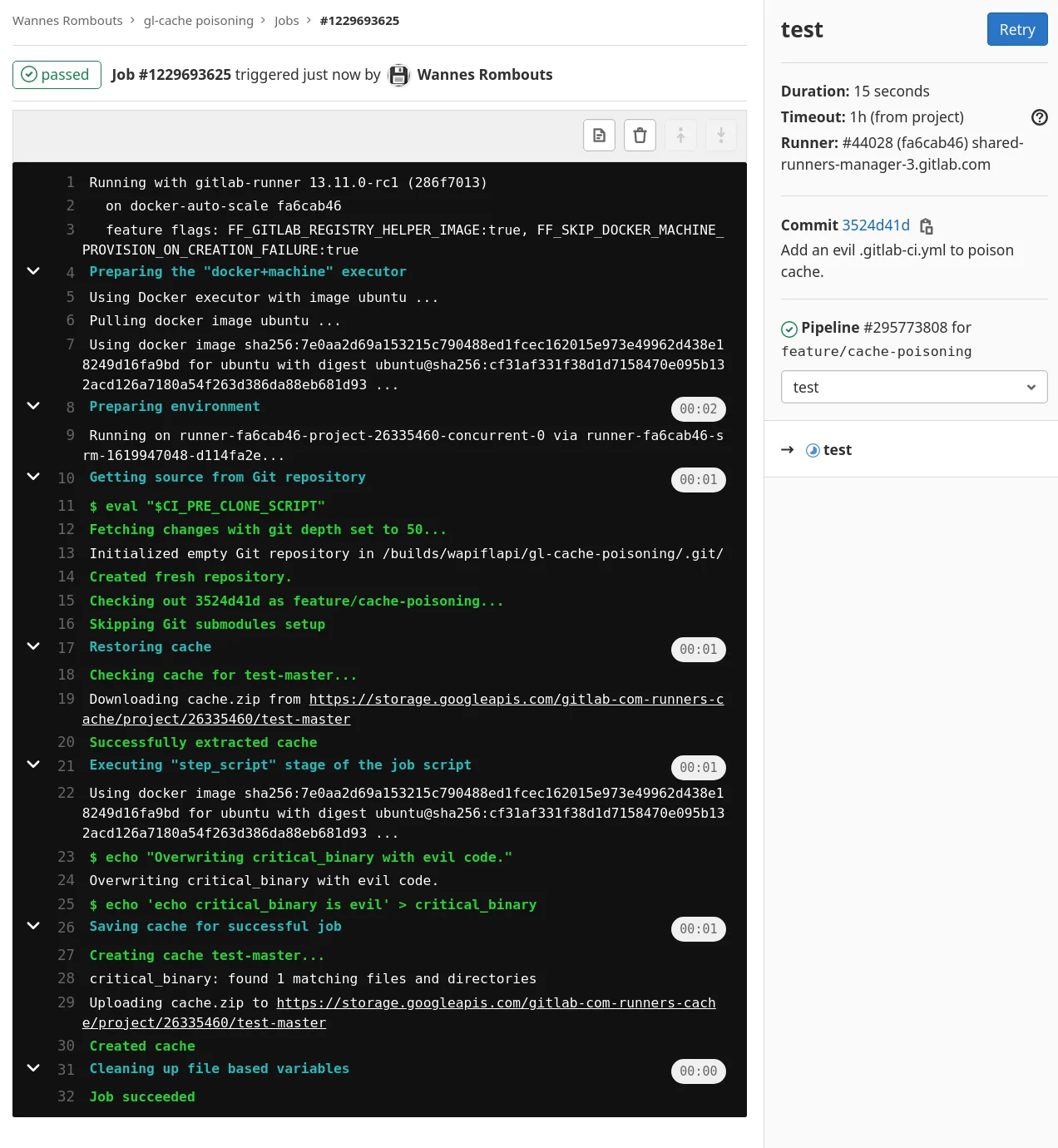
- Observe that the pipeline for
feature/cache-poisoningran successfully and it containsOverwriting critical_binary with evil code.
- Start a new pipeline for
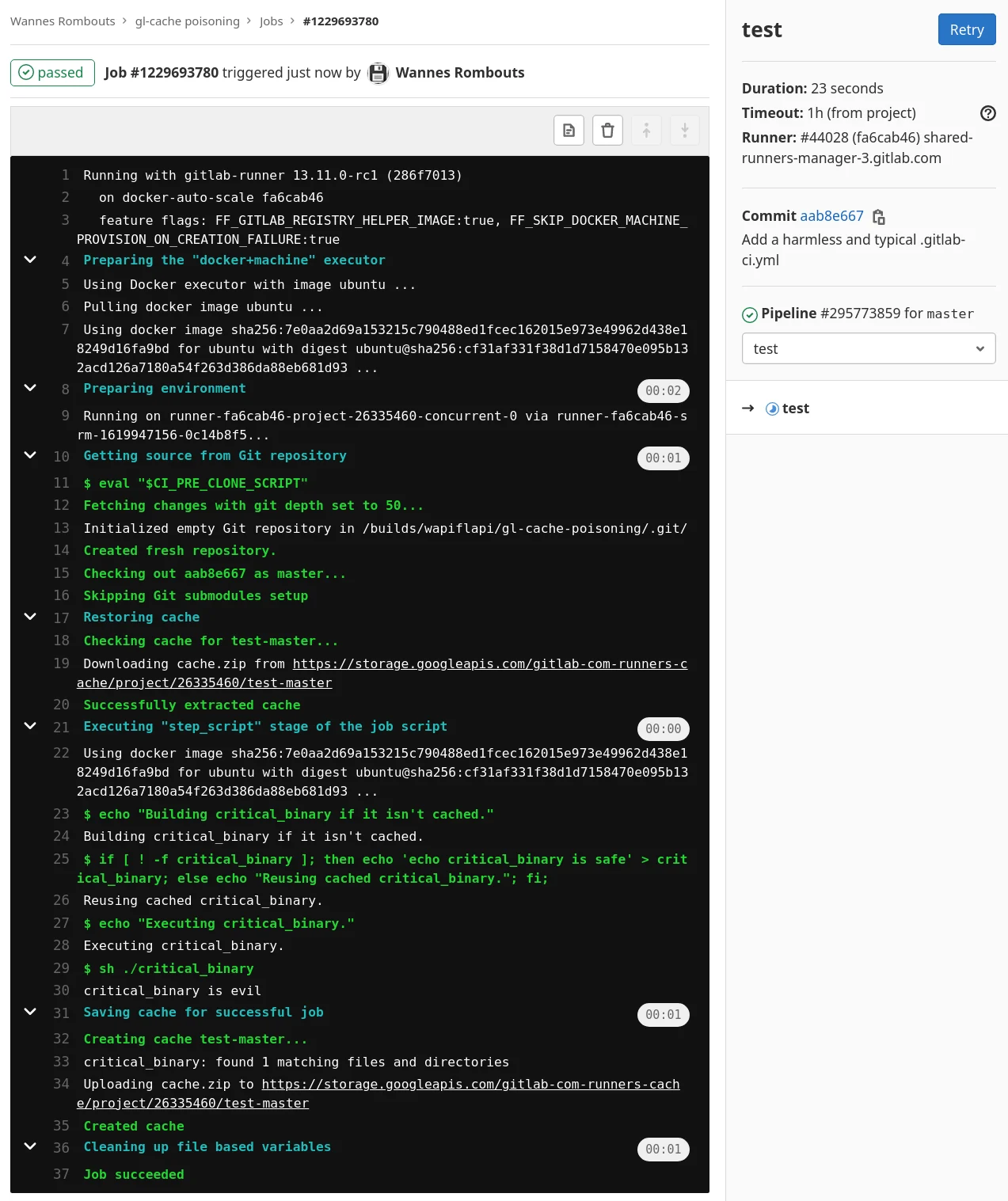
master, observer that it now outputscritical_binary is evil, showing that its cache has been poisoned and arbitrary code execution onprotectedbranch has been achieved by a user with only the privileges to run a pipeline for theunprotectedbranchfeature/cache-poisoning.
Impact
If a user has enough privilege to push code and trigger a pipeline on any branch (eg: they are a developer), then they can poison the cache for a protected branch and execute arbitrary code. This elevates their privilege considerably. For example:
- A developer could leak sensitive information from protected environnement variables. (deploy tokens, registry access, AWS tokens, etc.)
- A developer could alter the build process and backdoor the final product without detection because they wouldn't be touching the git repo.
Examples
In addition to the previous explanation of how to reproduce this, I set-up a demo project on gitlab.com.
Relevant URLs:
- The project: https://gitlab.com/wapiflapi/gl-cache-poisoning/
- job on master before poisoning: https://gitlab.com/wapiflapi/gl-cache-poisoning/-/jobs/1229691941
You can seecritical_binary is safe. - job on feature/poison triggered by a "developer": https://gitlab.com/wapiflapi/gl-cache-poisoning/-/jobs/1229693625
You can seeOverwriting critical_binary with evil code. - New pipeline on master after the poisoning: https://gitlab.com/wapiflapi/gl-cache-poisoning/-/jobs/1229693780
Now we seecritical_binary is evilwithout any code changes on theprotectedmasterbranch.
What is the current bug behavior?
Jobs running for an unprotected branch can overwrite the cache for a those running on a protected branch.
What is the expected correct behavior?
Jobs running for an unprotected branch should not be able to influence those running on a protected branch.
Cache for protected and unprotected branches should be separate. Maybe cache keys should have a forced prefix indicating the privilege with which the job is running.
Relevant logs and/or screenshots
N/A
Output of checks
This bug happens on GitLab.com
Impact
(Copied from Impact in summary.)
If a user has enough privilege to push code and trigger a pipeline on any branch (eg: they are a developer), then they can poison the cache for a protected branch and execute arbitrary code. This elevates their privilege considerably. For example:
- A developer could leak sensitive information from protected environnement variables. (deploy tokens, registry access, AWS tokens, etc.)
- A developer could alter the build process and backdoor the final product without detection because they wouldn't be touching the git repo.
Attachments
Warning: Attachments received through HackerOne, please exercise caution!
- Screenshot_from_2021-05-02_11-17-51.png
- Screenshot_from_2021-05-02_11-19-44.png
- Screenshot_from_2021-05-02_11-20-45.png
How To Reproduce
Please add reproducibility information to this section:
Not written yet. The AI write-up for this report has not been written yet. The Original tab links to the source.
How it worked
Root cause
The cache key did not include the protected status of the branch, so jobs on unprotected branches could write to the same cache used by protected branches.
Impact
A developer could poison the cache for a protected branch and execute arbitrary code, potentially leaking sensitive information from protected environment variables or backdooring the final product without detection.
What the attacker needed
GitLab project with CI/CD; Attacker has developer role; Protected branch exists
The fix
The report suggests separating caches for protected and unprotected branches, e.g. by prefixing keys with privilege level.
How it was found
- Set up a GitLab project with a .gitlab-ci.yml on the protected master branch that caches a file and executes it.
- Run the pipeline on master to populate the cache with a safe file.
- Create an unprotected branch and modify the .gitlab-ci.yml to use the same cache key and overwrite the cached file with malicious content.
- Run the pipeline on the unprotected branch to poison the cache.
- Run a new pipeline on the protected master branch and observe that it executes the malicious file from the cache.
Explained by bugbounty.wiki with AI from the original and checked against quotes from it; it can still be wrong. Read the original before relying on a detail.
Not written yet. The AI write-up for this report has not been written yet. The Original tab links to the source.
In GitLab, a protected branch is one that only certain people can change, like the main branch. The CI/CD cache is a way to save files between jobs to speed things up. The bug was that a less privileged user could write to the cache used by a protected branch, so when the protected branch ran, it would use the attacker's file and run their code.
What is Access control?
A user can do something their role should not allow: reach an admin function, act on a feature they have not paid for, or skip a permission check. IDOR is the special case where the object belongs to someone else.

