Change project visibility to a restricted option
A non-privileged user could change a project's visibility to a restricted level via the API, bypassing administrator restrictions. This allowed setting projects to public even when the administrator had disallowed it.
 Originally disclosed on HackerOne
- Triaged in 22 hours
- Fixed in 9 months
- Paid in 4 months
- Disclosed after 11 months
Summary
When a GitLab administrator (on gitlab.com or a private instance) has restricted a project visibility option, the project visibility can still be changed to that option. This can be done using the API route. The same applies to groups. They can also be set to (for example) internal on the public gitlab.com website.
Steps to reproduce
(1. A GitLab instance administrator restricts the project visibility option 'internal', 'private' or 'public'. In this example, I will use the 'internal' option) 2. A non-privileged user creates a project (in this example, the id is 27236) and generates an access token for their account 3. The non-privileged user makes a PUT request to: '/api/v4/projects/27236' with the following body: '{"visibility": "internal"}' and their access token set in the 'Authorization' header like this: 'Bearer <access-token>'. 4. The non-privileged user should now have their project visibility set to internal, even though this should not be possible.
(5. The same actions can be applied to groups)
Impact
When an administrator of a GitLab instance would like to keep all projects private or internal (for example, for universities and schools), students should not be able to modify their project visibility to public. This is also the case for our school. (I got permission to test this on my schools GitLab instance.) I cannot visit any project on my schools GitLab instance without logging in, except for one of my projects, which I have set to 'public'.
Examples
This bug is project related, but I do not know if settings (including project visibility) get exported with the project.
Tested GitLab versions: 13.7 and 13.8
Link to my project: https://gitlab.com/s4nderdevelopment/url-shortener
What is the current bug behavior?
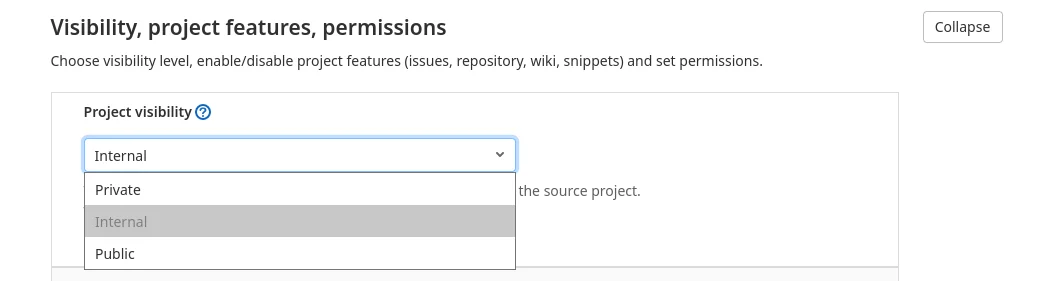
When the PUT API request was made, the response code is 200 and the response body shows the project with the updated option. Also, on the project settings page, the grayed-out visibility option (restricted option) is selected.
What is the expected correct behavior?
The API response should have the status code 403 if a restricted project visibility was selected. Also, the option should not be updated in the project settings.
Relevant logs and/or screenshots
I added a screenshot as an attachment.
Output of checks
This bug happens on GitLab.com
Results of GitLab environment info
The bug was also present on my test GitLab instance, so i executed sudo gitlab-rake gitlab:env:info:
System information
System:         Debian 10
Proxy:          no
Current User:   git
Using RVM:      no
Ruby Version:   2.7.2p137
Gem Version:    3.1.4
Bundler Version:2.1.4
Rake Version:   13.0.1
Redis Version:  5.0.9
Git Version:    2.29.0
Sidekiq Version:5.2.9
Go Version:     unknown

GitLab information
Version:        13.7.4-ee
Revision:       368b4fb2eee
Directory:      /opt/gitlab/embedded/service/gitlab-rails
DB Adapter:     PostgreSQL
DB Version:     12.4
URL:            http://DEBIAN-VM-S4NDER.local
HTTP Clone URL: http://DEBIAN-VM-S4NDER.local/some-group/some-project.git
SSH Clone URL:  [email protected]:some-group/some-project.git
Elasticsearch:  no
Geo:            no
Using LDAP:     no
Using Omniauth: yes
Omniauth Providers:

GitLab Shell
Version:        13.14.0
Repository storage paths:
- default:      /var/opt/gitlab/git-data/repositories
GitLab Shell path:              /opt/gitlab/embedded/service/gitlab-shell
Git:            /opt/gitlab/embedded/bin/git
Impact
When an administrator of a GitLab instance would like to keep all projects private or internal (for example, for universities and schools), students should not be able to modify their project visibility to public. This is also the case for our school. (I got permission to test this on my schools GitLab instance.) I cannot visit any project on my schools GitLab instance without logging in, except for one of my projects, which I have set to 'public'.
Attachments
Context
GitLab lets an instance administrator restrict which visibility levels users may pick for projects and groups. On a school or university instance, for example, an administrator may want to forbid public so that nothing becomes readable without logging in, or forbid internal so that only explicitly shared users can see a project. The restriction is meant to apply to everyone who is not an administrator.
The report shows that the restriction is enforced in the web interface but not on the API. A non-privileged user can still set a project, or a group, to a visibility level the administrator has restricted, by calling the API directly. The researcher tested this on gitlab.com and on a private instance running GitLab 13.7.4-ee, and states the bug was present on both. They also report testing versions 13.7 and 13.8.
Setup
The preconditions are simple:
- A GitLab instance administrator restricts one of the project visibility options:
internal,privateorpublic. The report usesinternalas the example. - A non-privileged user account exists and can create a project and generate a personal access token.
The researcher also had permission to test on their school's GitLab instance, which is where the practical consequence showed up. No special tooling is described; the whole interaction is a single API call made with the user's own token.
Finding it
The visibility restriction is a UI-level control. The project settings page greys out the restricted option, but the API endpoint that updates a project accepts a visibility value independently of that control. The same applies to groups. The question the report answers is whether the server re-checks the instance-level restriction when the value arrives through the API rather than through the settings form. It does not.
Exploitation
Step 1: restrict a visibility option
An instance administrator restricts the project visibility option internal, private or public. In the example, internal is restricted. This is the normal administrative action that is supposed to make the option unavailable to ordinary users.
Step 2: create a project and a token
A non-privileged user creates a project. In the example the project id is 27236. The user then generates an access token for their own account. Nothing privileged is involved: the token belongs to the same unprivileged user who owns the project.
Step 3: send the update through the API
The user makes a PUT request to the project endpoint with the restricted visibility in the body and the token in the Authorization header as a bearer token:
The endpoint is the standard project update route. The body sets visibility to the value the administrator restricted. The Authorization header carries the user's own token, so the request is authorised as that user, not as an administrator.
Step 4: observe the result
The response code is 200, and the response body shows the project with the updated option. The project visibility is now internal, even though the administrator restricted that option. On the project settings page, the greyed-out visibility option, the restricted one, is shown as selected.
The screenshot shows the project settings page with the restricted visibility option greyed out but selected, which is the visible trace of the API having accepted a value the UI would not offer.
Step 5: the same for groups
The report states that the same actions can be applied to groups. Groups can also be set to a restricted option such as internal on the public gitlab.com website.
Root cause
The report does not include code or a patch, so the mechanism is only implied. The likely cause is that the instance-level visibility restriction is applied when rendering and validating the settings form, but the API update path for projects and groups does not consult the same restriction before persisting the visibility attribute. The API accepts any value the model allows, and the model's own validation does not know about the administrator's instance-wide restriction. Because the request is made with the user's own valid token and the user owns the project, no authorisation check fails; the missing piece is the policy check against the restricted visibility list.
Impact
The impact is a violation of the administrator's intended visibility policy. Where an administrator wants to keep all projects private or internal, for example at universities and schools, users should not be able to make their projects public. The researcher's own school is such a case: they could not visit any project on the school instance without logging in, except one of their own projects, which they had set to public. That is the concrete consequence: content the administrator intended to keep behind authentication becomes reachable without it.
The report hedges on one point: the bug is project related, and the researcher does not know whether settings, including project visibility, get exported with the project. The platform rated the issue medium with a CVSS score of 6.5 and a bounty of 1370.00 USD.
Fix
The report states the expected behaviour rather than a patch: the API response should have status code 403 if a restricted project visibility was selected, and the option should not be updated in the project settings. In other words, the API update path for projects and groups should enforce the same instance-level visibility restriction as the UI, and reject the request instead of persisting the value.
Variants to test
- Group update endpoint. Send the same restricted
visibilityvalue to the group update route with an unprivileged token. A positive result is a200with the group showing the restricted visibility. - Project creation. Try creating a project with the restricted visibility in the creation request rather than updating an existing one. A positive result is a created project whose visibility is the restricted value.
- Other restricted settings. If the instance restricts other project or group attributes in the UI, send them through the API. A positive result is the API accepting a value the settings page refuses.
- Export and import. The researcher did not determine whether visibility travels with an exported project. Export a project set to a restricted visibility and import it elsewhere on the same instance, then check the resulting visibility.
Hunting notes
This class of bug hides wherever a product enforces a policy in the presentation layer and exposes a second write path through an API. The signal during recon is a settings page with greyed-out or hidden options: those options are the ones to try against the API with an ordinary account. The researcher showed the restriction being bypassed on their school's instance and stated the expected status code and unchanged state. The report also notes the bug on both gitlab.com and a private instance.
What happened, in plain words
GitLab is a website where people store and share code projects. Every project has a visibility setting that decides who can see it. The three common levels are private (only people you invite), internal (anyone with an account on that GitLab server) and public (anyone on the internet, no login needed).
A person who runs a GitLab server, called an administrator, can switch off one or more of those levels for everyone else. A school might switch off public so that no student can accidentally publish coursework to the whole internet, or switch off internal so that only people explicitly invited can see a project. The idea is simple: if the administrator has switched a level off, ordinary users should not be able to pick it.
This report shows that the switch-off only works in the normal web page. There is a second way to change a project's visibility, through the API, and that second way ignores the administrator's restriction. An ordinary user, with no special rights, can send a request to the API and set their project to a level the administrator has forbidden. The same is true for groups, which are folders that hold several projects.
The researcher tested this on the public gitlab.com service and on a private GitLab server running version 13.7.4-ee, and says the bug was present on both. They also mention testing versions 13.7 and 13.8. The platform rated the issue medium severity, with a CVSS score of 6.5 and a bounty of 1370.00 USD.
Background you need first
A few ideas come up again and again, so here they are from zero.
The web interface versus the API. When you click around a website, your browser asks the server for pages and the server sends back pages with buttons and forms. That is the web interface, sometimes called the UI (user interface). An API (application programming interface) is a second door into the same server, meant for programs rather than people. Instead of a page with a form, you send a short structured message and get a short structured answer back, usually in a format called JSON, which looks like {"key": "value"}. Both doors lead to the same data, but they are separate pieces of code, and a rule enforced on one door is not automatically enforced on the other. A useful comparison: a building with a front desk that checks your badge and a side door that nobody watches. The rule exists, but only at one entrance.
Requests and methods. Every interaction with a web server is an HTTP request. The request has a method that says what kind of action it is. GET means "give me something". PUT means "replace or update this thing with what I am sending". So a PUT request to a project is how a program changes that project's settings.
Endpoints and paths. The address a request goes to is called an endpoint. In GitLab, API addresses start with /api/v4/, and a particular project is addressed by its numeric id, for example /api/v4/projects/27236. The number at the end identifies which project you mean, the same way a house number identifies a house on a street.
Tokens. A website normally knows who you are because your browser carries a cookie, a small piece of data the server gave you when you logged in. Programs do not use cookies comfortably, so APIs use a token instead: a long secret string that stands in for your password. You generate it once in your account settings and then send it with every request. Anyone who has the token can act as you, which is why tokens are treated like passwords. In this report the token is sent in an Authorization header, a labelled line attached to the request, in the form Bearer <access-token>. "Bearer" means "whoever carries this token is the user".
Status codes. Every response starts with a three-digit number. 200 means "OK, done". 403 means "forbidden, you are not allowed to do that". These numbers matter because they are how a program, and a tester, can tell whether an action was accepted or refused.
The vulnerability class. The platform labels this a violation of secure design principles. In plain terms, that means the product's design put a security rule in the wrong place. The rule ("this visibility level is forbidden") was built into the settings page rather than into the part of the server that actually stores the value. Anything that reaches the storage part by another route skips the rule. This is sometimes called enforcing a policy in the presentation layer: the check lives in what you see, not in what protects the data.
Setting up the test
Only two things need to be true before the test can run:
- An administrator of the GitLab server restricts one of the project visibility options:
internal,privateorpublic. The report usesinternalas its example. - There is an ordinary user account, one with no administrator rights, that can create a project and generate a personal access token.
The researcher also had permission to test on their school's GitLab server, and that is where the real-world consequence showed up. No special tools are described anywhere in the report. The whole interaction is one API call, made with the user's own token.
Finding it
The visibility restriction is a control in the web page only. On the project settings page the forbidden option appears greyed out, meaning you can see it but cannot click it. But the API endpoint that updates a project accepts a visibility value on its own, without looking at that greyed-out control at all. Groups behave the same way.
The question the report answers is this: when the value arrives through the API instead of through the settings form, does the server check the administrator's restriction again? The answer is no.
Carrying out the test
Step 1: restrict a visibility option
The administrator restricts the project visibility option internal, private or public. In the example, internal is the one restricted. This is the normal administrative action that is supposed to make the option unavailable to ordinary users. It is the starting condition of the whole test: without a restriction in place there is nothing to bypass.
Step 2: create a project and a token
An ordinary user creates a project. In the example the project id is 27236. The user then generates an access token for their own account. Nothing privileged is involved here: the token belongs to the same unprivileged user who owns the project. That matters, because it means any success later in the test cannot be explained by the user having extra rights.
Step 3: send the update through the API
The user sends a PUT request to the project endpoint, with the restricted visibility in the body and the token in the Authorization header as a bearer token:
Line by line:
PUT /api/v4/projects/27236says "update the project whose id is 27236".PUTis the update method,/api/v4/is the API's address prefix, and27236is the project's number.Authorization: Bearer <access-token>is the labelled line that carries the user's token. The server reads it, works out which account the token belongs to, and treats the request as coming from that user.<access-token>is a placeholder for the real secret string, which is not reproduced here.- The blank line separates the headers from the body.
{"visibility": "internal"}is the body, in JSON. It says: set thevisibilityfield tointernal, the very value the administrator restricted.
This is the standard project update route, the same one legitimate tools use. The only unusual thing is the value being sent. Because the request is authorised as the ordinary user and that user owns the project, no permission check fails. The check that should fail is the one against the administrator's restricted list, and that check is simply not there on this path.
Step 4: look at the result
The response code is 200, and the response body shows the project with the updated option. The project's visibility is now internal, even though the administrator restricted that option. On the project settings page, the greyed-out visibility option, the restricted one, is shown as selected.
The screenshot shows the project settings page with the restricted visibility option greyed out but selected. That is the visible trace of the API having accepted a value the page itself would never have offered.
Step 5: the same for groups
The report states that the same actions can be applied to groups. Groups can also be set to a restricted option such as internal on the public gitlab.com website.
Why it happens
The report contains no code and no patch, so the exact mechanism is only implied. The likely explanation is that the instance-wide visibility restriction is applied when the settings form is drawn and validated, but the API update path for projects and groups never consults that same restriction before saving the visibility value. The API accepts any value the underlying data model allows, and the model's own validation knows nothing about the administrator's server-wide restriction. Since the request carries the user's own valid token and the user owns the project, no permission check fails. What is missing is the policy check against the list of restricted visibility levels.
What it means in practice
The impact is that the administrator's intended visibility policy is broken. Where an administrator wants to keep all projects private or internal, for example at universities and schools, users should not be able to make their projects public. The researcher's own school is exactly such a case: they could not visit any project on the school server without logging in, except one of their own projects, which they had set to public. That is the concrete consequence: content the administrator meant to keep behind a login becomes reachable without one.
The report is careful on one point: the bug is project related, and the researcher does not know whether settings, including project visibility, get exported with the project.
What the fix should look like
The report describes the expected behaviour rather than a patch. The API response should have status code 403 if a restricted project visibility was selected, and the option should not be updated in the project settings. Put another way, the API update path for projects and groups should enforce the same server-wide visibility restriction as the web page, and refuse the request instead of saving the value.
Other places to try the same idea
- The group update endpoint. Send the same restricted
visibilityvalue to the group update route with an ordinary user's token. A positive result is a200with the group showing the restricted visibility. - Project creation. Try creating a project with the restricted visibility in the creation request rather than updating an existing one. A positive result is a newly created project whose visibility is the restricted value.
- Other restricted settings. If the server restricts other project or group attributes in the web page, send those through the API too. A positive result is the API accepting a value the settings page refuses.
- Export and import. The researcher did not determine whether visibility travels with an exported project. Export a project set to a restricted visibility, import it elsewhere on the same server, and check the resulting visibility.
How to spot this kind of bug
This class of bug hides wherever a product enforces a policy in what it shows you and also offers a second way to write the same data through an API. The signal while looking around is a settings page with greyed-out or hidden options: those options are exactly the ones to try against the API with an ordinary account. The researcher bypassed the restriction on their school's server and stated the expected status code and unchanged state. The report also notes the bug on both gitlab.com and a private server.
Glossary
- API: a second way into a web service, designed for programs rather than people, where short structured messages are sent and answered instead of web pages.
- Administrator: the person who runs a GitLab server and can change server-wide settings, including which visibility levels are allowed.
- Authorization header: a labelled line attached to a request that carries proof of who you are, here a token.
- Bearer token: a token sent with the word "Bearer", meaning whoever carries it is treated as the user it belongs to.
- Cookie: a small piece of data a website stores in your browser so it can recognise you on later requests.
- CVSS score: a standard number from 0 to 10 that rates how severe a security issue is.
- Endpoint: the address a request is sent to, such as
/api/v4/projects/27236. - GitLab: a website and server software for storing and sharing code projects, with visibility settings for projects and groups.
- Group: a container in GitLab that holds several projects and their members.
- HTTP method: the word at the start of a request that says what kind of action it is, such as
GETto read orPUTto update. - Internal (visibility): a visibility level where anyone with an account on that GitLab server can see the project.
- JSON: a simple text format for structured data, written as keys and values in curly braces.
- Presentation layer: the part of a product the user sees and interacts with, such as a settings page, as opposed to the part that stores and protects data.
- Private (visibility): a visibility level where only people explicitly invited can see the project.
- Project: a single code repository in GitLab, with its own settings, members and visibility.
- Public (visibility): a visibility level where anyone on the internet can see the project without logging in.
- PUT: an HTTP method meaning "update or replace this thing with what I am sending".
- Status code: the three-digit number at the start of a response, such as
200for success or403for forbidden. - Token (access token): a long secret string that stands in for a password when a program talks to an API.
- Violation of secure design principles: a weakness where a security rule is built into the wrong part of the product, so another route around it skips the rule.
- Visibility: the setting on a project or group that decides who is allowed to see it.

