Developer can retry pipelines and have them running on parent project despite having `ci_allow_fork_pipelines_to_run_in_parent_project` disabled
A developer could retry a previously created merge request pipeline and have it run in the context of the parent project, even after the setting that allows fork pipelines to run in the parent project was disabled. This could let the developer execute code in the parent project's CI environment.

GitLab
Originally disclosed on GitLab
- Fixed in 44 days
- Disclosed after 44 days
⚠️ Please read the process on how to fix security issues before starting to work on the issue. Vulnerabilities must be fixed in a security mirror.
HackerOne report #2073382 by js_noob on 2023-07-17, assigned to GitLab Team:
Report | Attachments | How To Reproduce
Report
Summary
Hello team, a project owner can allow/disallow merge request pipelines originating from forks to tun in the context of the parent (his project), you can refer to the docs. However, after disabling this, using ci_allow_fork_pipelines_to_run_in_parent_project, a user (not owner) can still retry (i.e. run) previous pipelines that were originated from his fork in the context of the parent project.
Steps to reproduce
As an owner:
- Create a new group and apply the ultimate trial to it
- Create a project in that group, and add a
.gitlab-ci.ymlfile with the following content
build:
  script:
      - echo "Building app..."

validate-merge-request:
  script:
    - echo "Validating merge request..."
  only:
    - merge_requests
- Give developers access to merge on the main branch, Project Settings => Repository => Protected branches
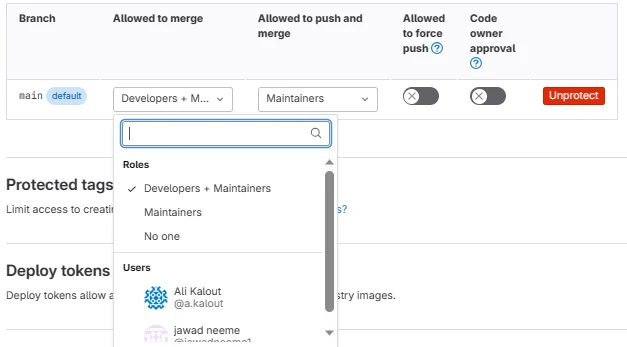
- Invite another user to the group/project (both work) as a developer
As the developer:
- Fork that project into your namespace, edit
.gitlab-ci.yml, and let it match the following
build:
  script:
      - echo "Building app..."

validate-merge-request:
  script:
    - echo "This is added is the fork..."
    - echo "Validating merge request..."
  only:
    - merge_requests
- Create a merge request from your project but with a target branch as the
mainof the project created in step 2 - After creating a merge request, navigate back to your project, and add any change
- Navigate back to the created merge request, navigate to the pipelines tab, and verify the existence of the
Run pipelinebutton
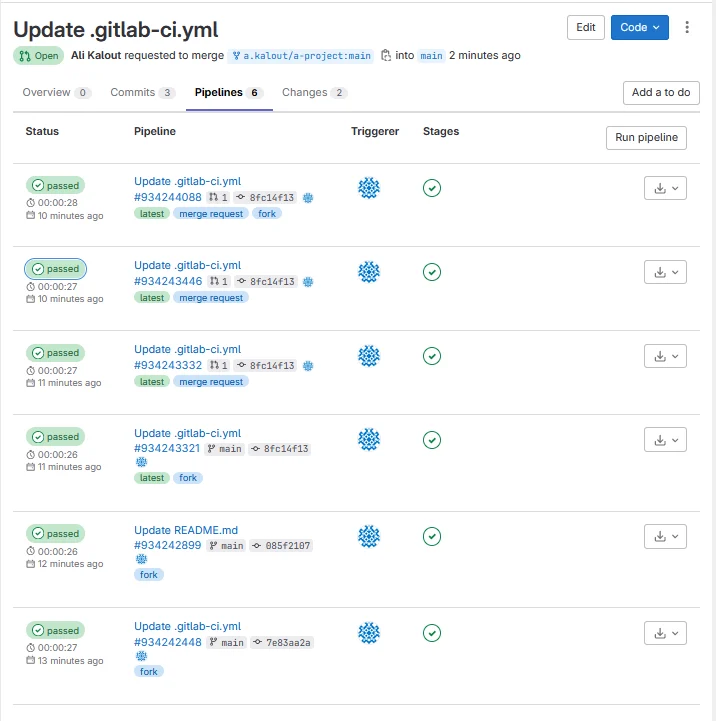
- Press it, and verify that a pipeline is run in the context of the parent project
As the owner:
- Disable
ci_allow_fork_pipelines_to_run_in_parent_projectby sending the following request (you can create PAT https://gitlab.com/-/profile/personal_access_tokens)
curl --request PUT --header "PRIVATE-TOKEN: PAT" --url 'https://gitlab.com/api/v4/projects/PROJECT_ID' --data "ci_allow_fork_pipelines_to_run_in_parent_project=false"
As the developer:
- Repeat step 9, but now verify that the pipeline is running in the context of the fork project
- Navigate to the pipeline created in step 9, and retry it manually
- Verify that it is running in the context of the parent
Examples/POC
What is the current bug behavior?
Retried pipelines run in the context of the parent project.
What is the expected correct behavior?
Retried pipelines should run in the context of the forked project if ci_allow_fork_pipelines_to_run_in_parent_project is disabled.
Output of checks
This bug happens on GitLab.com
Impact
A developer can run pipelines in the context of the parent project despite having ci_allow_fork_pipelines_to_run_in_parent_project disabled.
Proposal
Documentation updates to indicate that old pipelines will run under the same settings for which they were created under.
Attachments
Warning: Attachments received through HackerOne, please exercise caution!
How To Reproduce
Please add reproducibility information to this section:
Not written yet. The AI write-up for this report has not been written yet. The Original tab links to the source.
How it worked
Root cause
Likely, the retry action does not re-check the current project setting and instead uses the original pipeline's context.
Impact
A developer can run pipelines in the parent project's context despite the setting being disabled.
What the attacker needed
A GitLab account; developer role in a project; ability to fork the project; ability to create merge requests
The fix
The report suggests documenting that old pipelines will run under the same settings for which they were created, rather than changing the behaviour.
How it was found
- As an owner, create a group and project with a CI configuration that includes a merge request job.
- Invite another user as a developer.
- As the developer, fork the project and modify the CI configuration.
- Create a merge request from the fork to the parent project's main branch.
- In the fork project, add a change and then navigate to the merge request's pipelines tab and run the pipeline.
- As the owner, disable the setting that allows fork pipelines to run in the parent project.
Explained by bugbounty.wiki with AI from the original and checked against quotes from it; it can still be wrong. Read the original before relying on a detail.
Not written yet. The AI write-up for this report has not been written yet. The Original tab links to the source.
A project owner can allow or disallow fork merge request pipelines running in the parent project. The report shows old pipelines can still be retried and run in the parent context after the setting is disabled.
What is Access control?
A user can do something their role should not allow: reach an admin function, act on a feature they have not paid for, or skip a permission check. IDOR is the special case where the object belongs to someone else.

