Developer with `Manage Protected Branches` custom permission can affect branches set as Protected at the group level Contrary to Documentation
A Developer with the custom permission 'Manage Protected Branches' could add a branch that was already protected at the group level to the project's protected branches list, overriding the group-level protection. This allowed the attacker to push to a branch that should have been protected, potentially deploying malicious code to production.

GitLab
Originally disclosed on GitLab
- Fixed in 49 days
- Disclosed after 49 days
⚠️ Please read the process on how to fix security issues before starting to work on the issue. Vulnerabilities must be fixed in a security mirror.
HackerOne report #3200329 by theluci on 2025-06-13, assigned to @greg:
Report | Attachments | How To Reproduce
Report
Hello, I hope you are doing well.
Background
Gitlab provides a feature to set a few branches as protected in the top-level group.
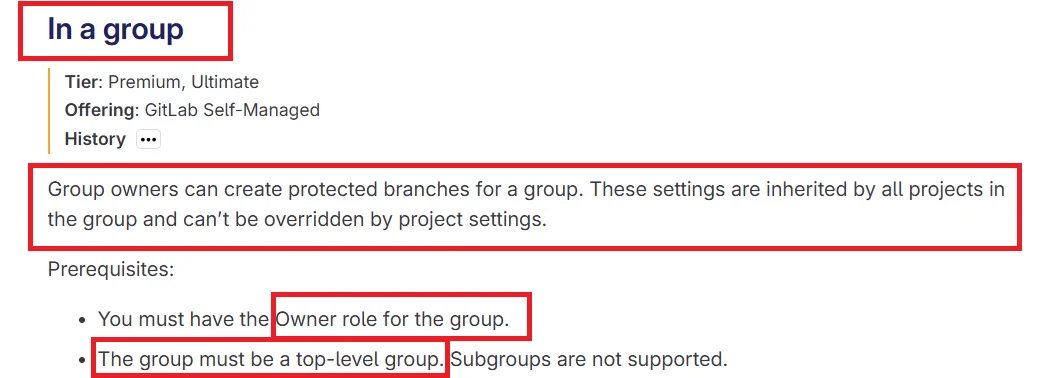
As can be seen from the docs, the protected branches can only be set by the Owner of the top-level group and these settings can’t be overridden by project settings.
However, I found out there is a way to override these settings.
Vulnerability
When a Developer is given Manage Protected Branches custom permission, he can only edit the protected branches for a project.

Branches set as Protected in the top-level group cannot be directly edited.
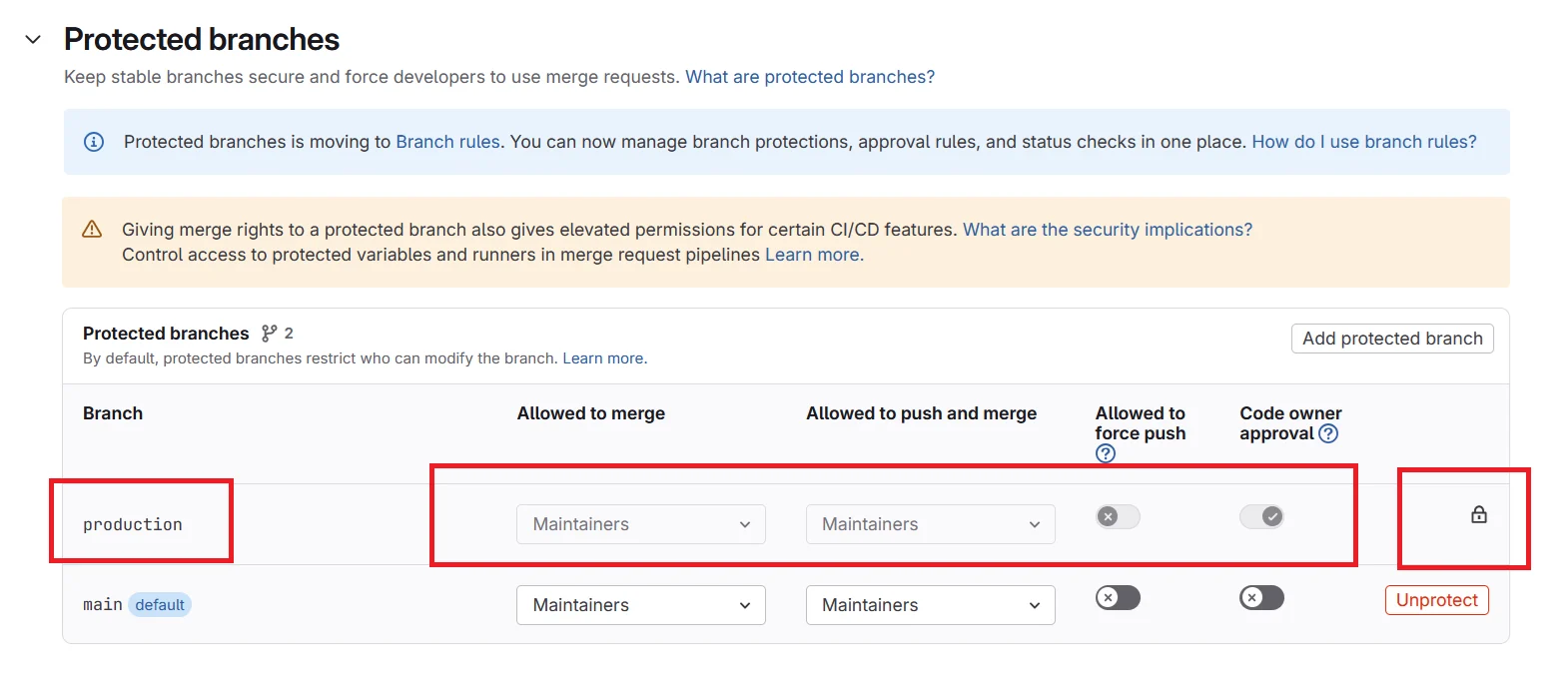
As can be seen, the branch production is set as protected in the top-level group and cannot be edited in project settings.
However, the branch production can be added again in the protected branches list at the project level and can be overridden at the project level in such a way.
Gitlab doesn’t check if production branch has already been added as protected at the group level or not and if so should not be able to be modified at the project level as per the documentation.
Steps to reproduce
victimcreatesvictim-groupand activates ultimate trial.victimgoes tovictim-group, Settings -> Roles and permissions, Clicks on new role.victimadds a new role with the following configuration,
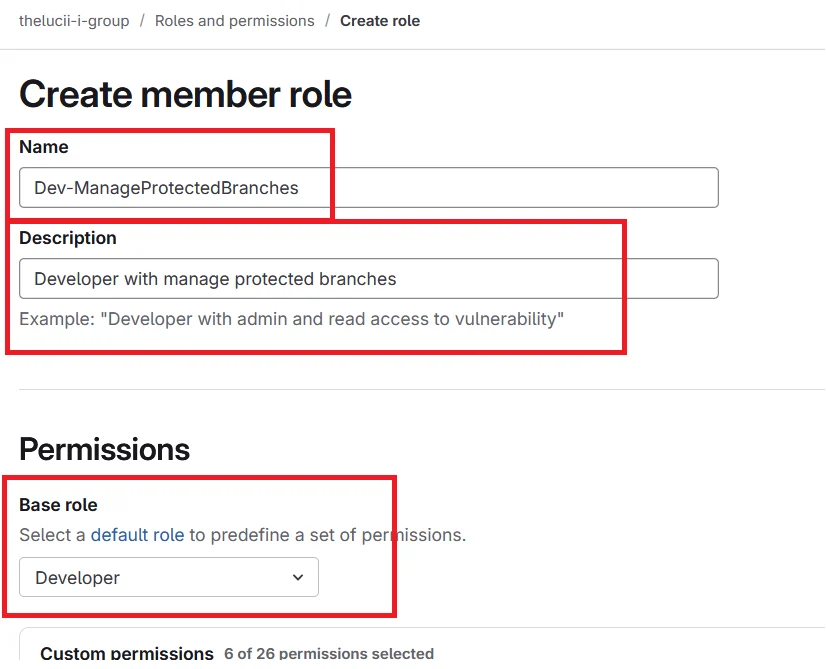
victimgoes tovictim-group, Manage -> Members and addsattackeras Dev-ManageProtectedBranchesvictimgoes tovictim-group, Settings -> Repository, Expand Protected branchesvictimclicks on Add protected branch and adds protected branchproductionwith the following configuration,
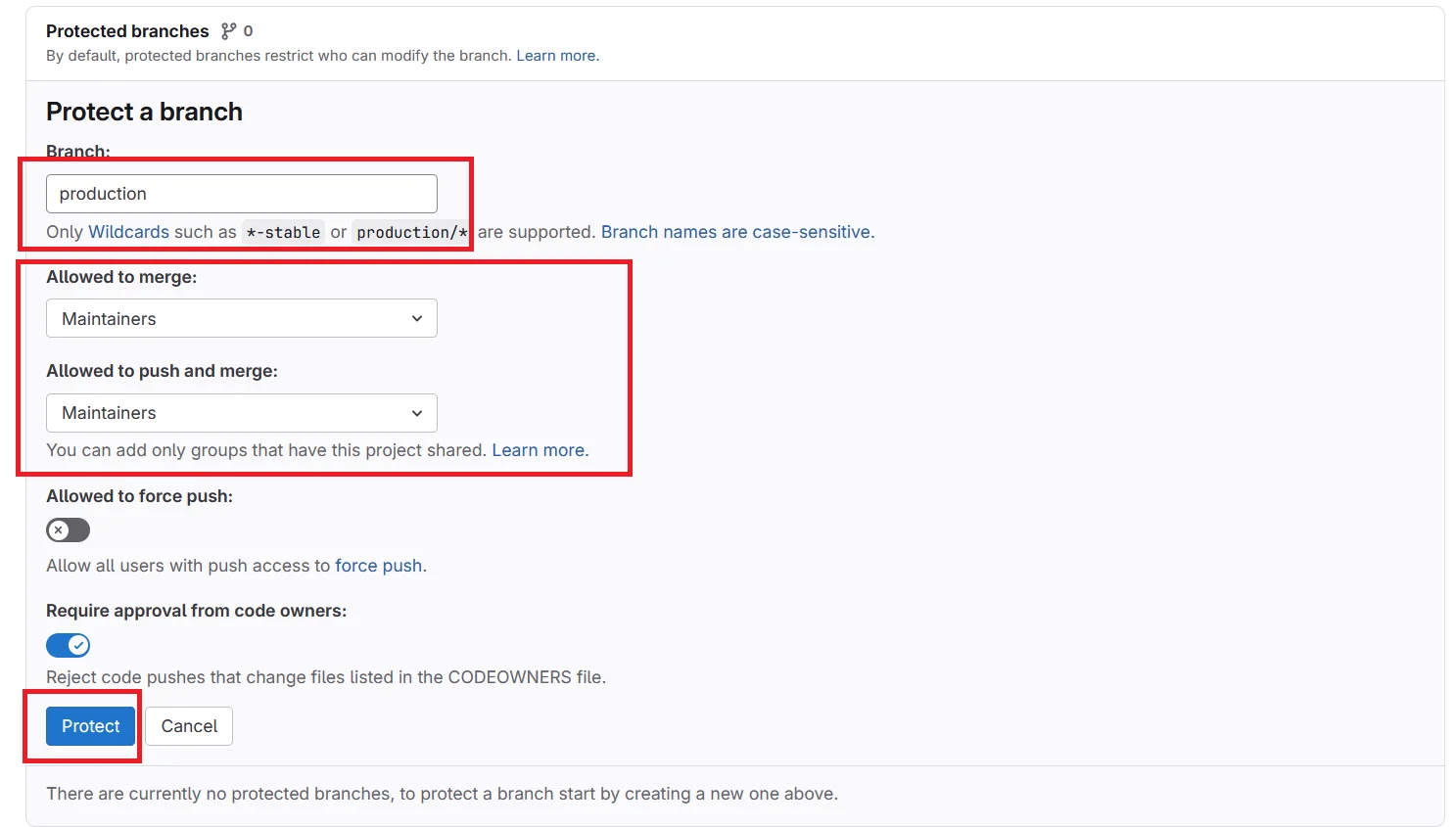
victimcreates a projectvictim-projectinsidevictim-group.victimadds filetest.shwith the following content,
echo “safe code”
attackergoes tovictim-project, Settings -> Repository, Expand Protected branches.
(Note that attacker cannot edit production branch directly and it shows the setting can only be edited at the group level)
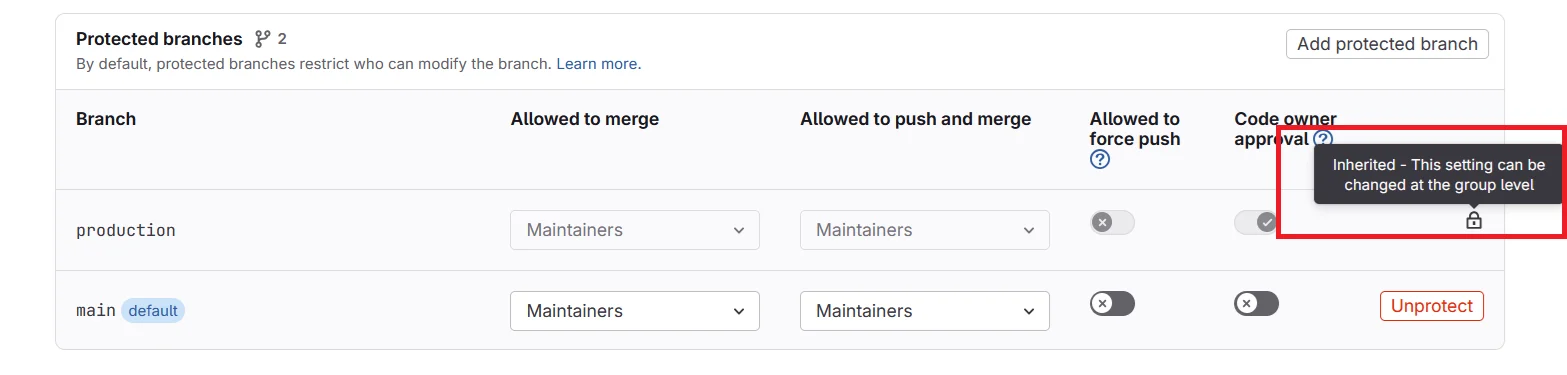
attackerclicks on Add protected branch and add protected branchproductionwith the following configuration,
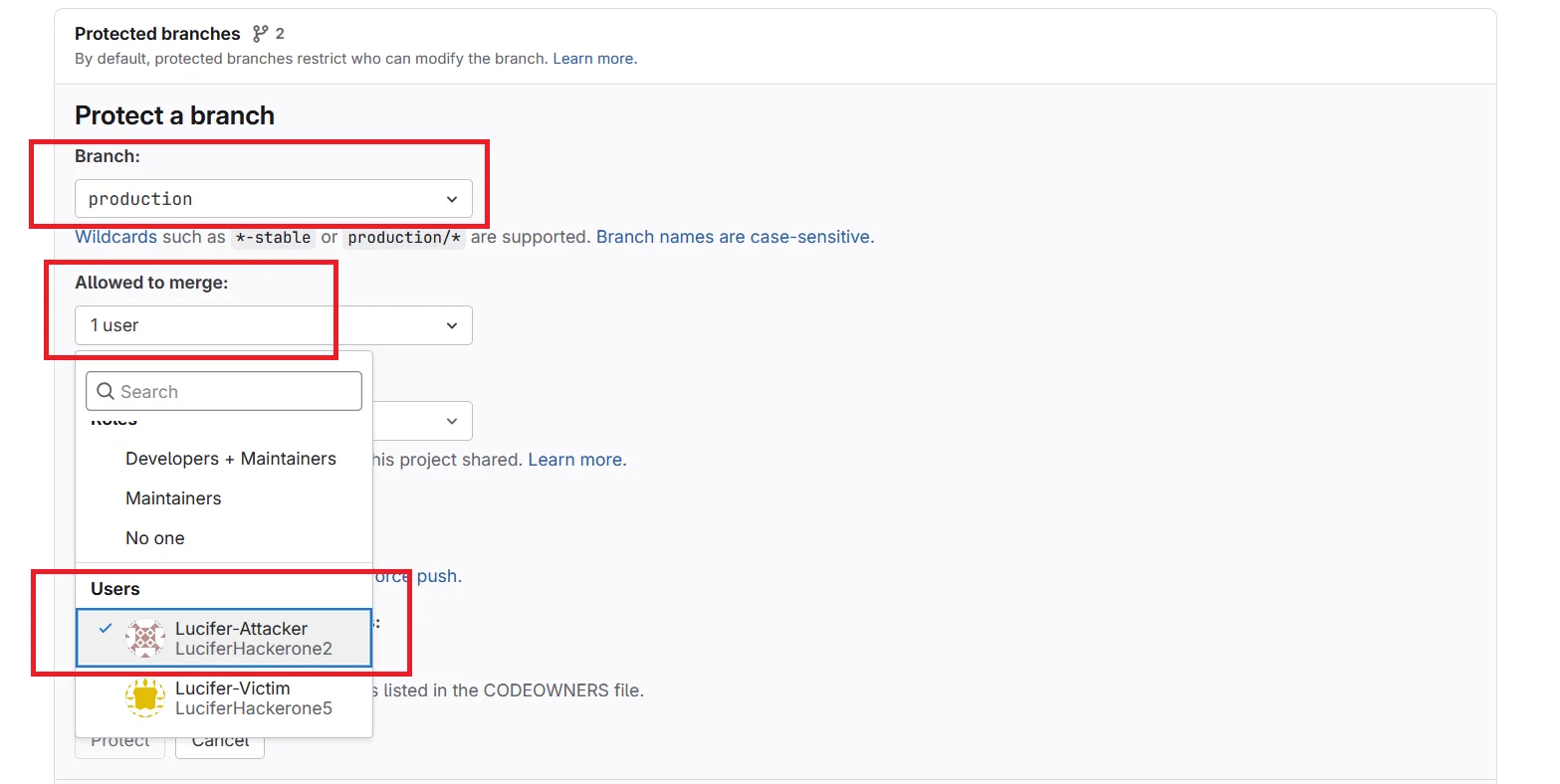
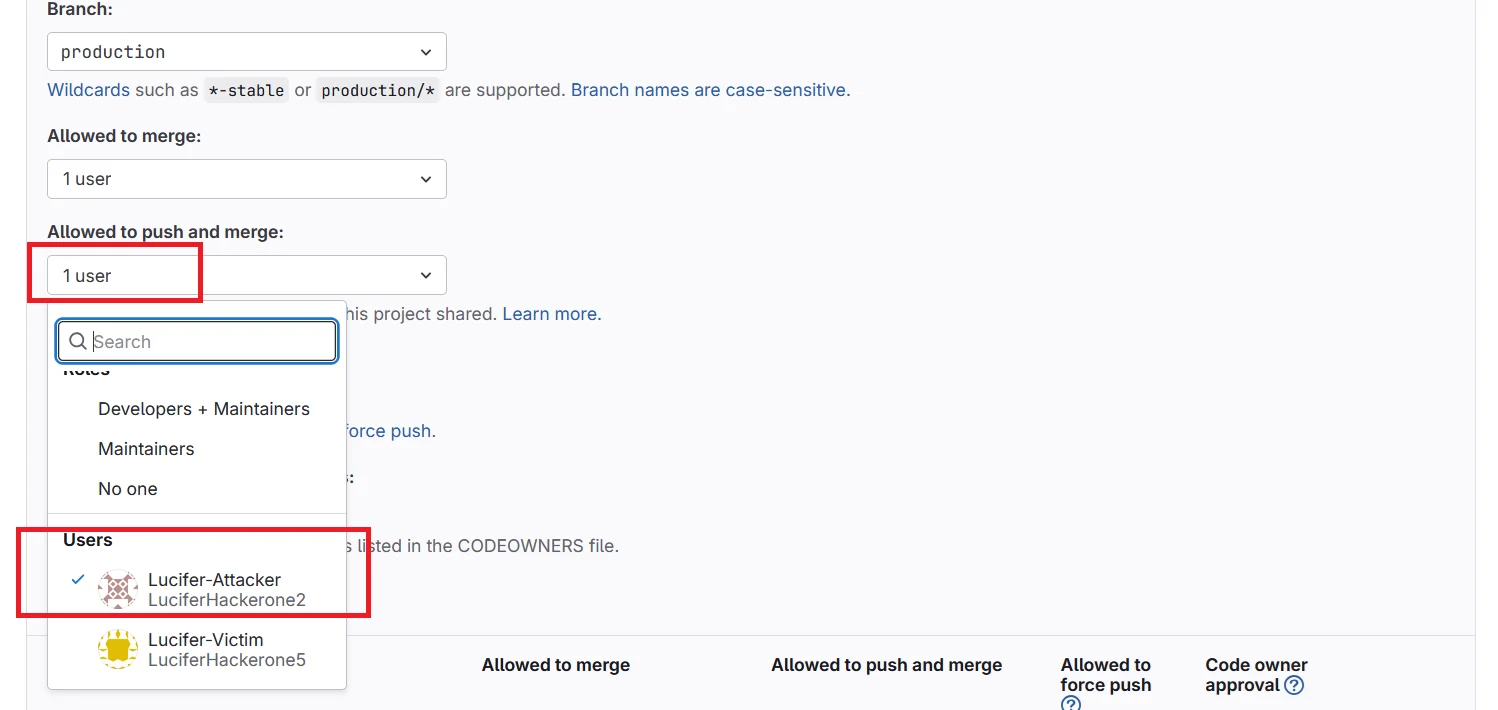
attackercan overrideproductionbranch protected at the group level contrary to documentation.
In a real-world scenario, it might not be main but some development branch like dev protected at the project level while important branches like production or Backup would be protected at the group level.
attackercreates a maliciousproductionbranch.
In a real-world scenario, project might even have auto-deployments deploying malicious production branch to production environment which can wreak havoc.
POC
Examples
This is my POC project, (its visibility is private, let me know your username if you need access)
Output of checks
This bug happens on GitLab.com (Probably on instance too).
Impact
Developer with Manage Protected Branches custom permission can override protected branches set as Protected at the group level Contrary to Documentation.
In a real-world scenario, development branch like dev might be protected at the project level while important branches like production or Backup would be protected at the group level.
attacker being able to override protected branches protected at the group level would have severe consequences. For example, malicious production branch being pushed to production environment.
Attachments
Warning: Attachments received through HackerOne, please exercise caution!
- rp.png
- 11jun-1.png
- 11jun-2.png
- 12jun-1.png
- 12jun-2.png
- 13jun-1.png
- 13jun-2.png
- 13jun-3.png
- 14jun-poc.mp4
How To Reproduce
Please add reproducibility information to this section:
Not written yet. The AI write-up for this report has not been written yet. The Original tab links to the source.
How it worked
Root cause
Likely the application does not check whether a branch is already protected at the group level when a user adds a protected branch at the project level, allowing the project-level setting to override the group-level one.
Impact
An attacker with the custom permission could override group-level protected branches, potentially pushing malicious code to a protected branch and deploying it to production.
What the attacker needed
GitLab Ultimate trial; custom role with Manage Protected Branches; attacker added as member with that role; group-level protected branch exists
How it was found
- Victim creates a group and activates an ultimate trial.
- Victim creates a new custom role with the 'Manage Protected Branches' permission.
- Victim adds the attacker as a member with that custom role.
- Victim adds a protected branch (e.g., 'production') at the group level.
- Victim creates a project inside the group and adds a file.
- Attacker goes to the project's protected branches settings and adds the same branch ('production') again, overriding the group-level protection.
Explained by bugbounty.wiki with AI from the original and checked against quotes from it; it can still be wrong. Read the original before relying on a detail.
Not written yet. The AI write-up for this report has not been written yet. The Original tab links to the source.
In GitLab, protected branches stop people from pushing changes directly. Normally, if a branch is protected at the group level, only the group owner can change that setting, and project settings cannot override it. This report shows that a user with a special permission could still add the same branch to the project's protected list, effectively bypassing the group-level rule.
What is Access control?
A user can do something their role should not allow: reach an admin function, act on a feature they have not paid for, or skip a permission check. IDOR is the special case where the object belongs to someone else.

