Developers can bypass code owners approval by changing a MR's base branch
A developer could bypass code owner approval on a protected branch by changing the merge request's base branch after approval, because the approval persisted. This allowed merging unauthorised changes into the protected branch.

GitLab
Originally disclosed on GitLab
- Fixed in 43 days
- Disclosed after 43 days
⚠️ Please read the process on how to fix security issues before starting to work on the issue. Vulnerabilities must be fixed in a security mirror.
HackerOne report #2109371 by js_noob on 2023-08-14, assigned to @nmalcolm:
Report | Attachments | How To Reproduce
Report
Summary
Hello team, a project owner can set code owners in his project, the code owners' approvals are required on some branches if it was set by the owner. For example, an owner can set 3 users as code owners and require their approval on MRs that has a base branch as main. However, developers can bypass this by by abusing some really weird behavior happening, where if a code owner approved a specific MR the developer can change the base branch to main (which should explicitly require approvals) and the approvals would persist allowing him to merge this code, that should be approved to be merged on a branch other than main.
Steps to reproduce
As an owner:
- Create a new group and apply the ultimate trial to it
- Create a new project in that project
- Create a
CODEOWNERSwith the following content, but replaceYOUR_USERNAMEwith your username
[Code Owners]
* [@]YOUR_USERNAME
- Navigate to Project settings => Repository => Protected branches, and allow
Developers + Maintainersto merge tomain, and also toggle onCode owner approval
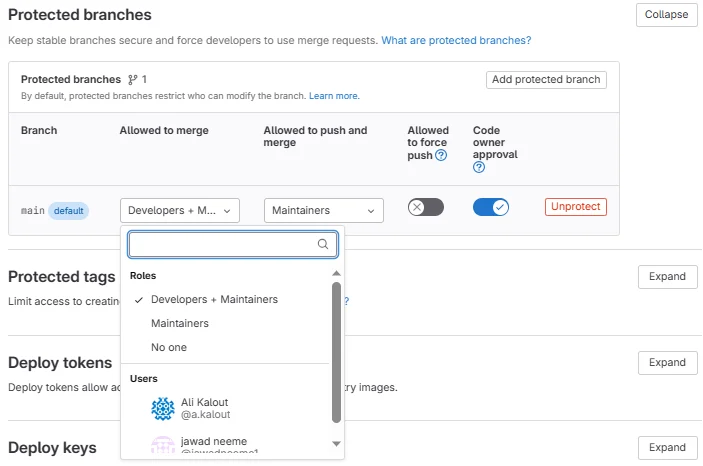
- Navigate to Project settings => Merge requests => Approval settings, check
Prevent approval by author,Prevent approvals by users who add commits, andPrevent editing approval rules in merge requestsand underWhen a commit is added:selectRemove approvals by Code Owners if their files changed
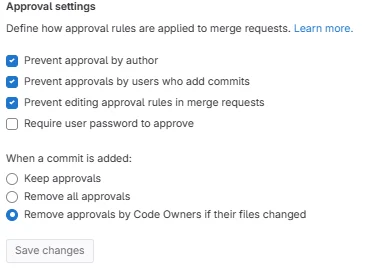
- Invite a developer to the group
As the developer:
- Create a new branch from
maincalleddelete-CODEOWNERSand delete theCODEOWNERSfile (or you can do that in a single step it doesn't matter) - Create another branch from
mainlet's callmy-branchand add any change to theREADME.mdfile - From that branch create a MR with
delete-CODEOWNERSas the base branch
As the owner:
- Approve that newly created MR (at this point the owner is okay to merge these changes into
delete-CODEOWNERSonly and notmain)
As the developer:
- Change the base branch of the MR to
main, and verify that the approval persists - Merge the MR into
main, and verify the success
NOTE: The above bug doesn't work unless the "initial" base branch contains a commit that deletes the CODEOWNERS file, so I am pretty sure there's some weird edge case here leading to this.
Examples/POC
What is the current bug behavior?
Changing the base branch of a MR persists code owners' approvals.
What is the expected correct behavior?
Changing the base branch of a MR should remove code owners' approvals.
Output of checks
This bug happens on GitLab.com
Impact
Unauthorized content is being pushed to protected branches, with impact varying depending on:
- Protected GitLab CI/CD variables content
- Automated CI/CD
Attachments
Warning: Attachments received through HackerOne, please exercise caution!
How To Reproduce
Please add reproducibility information to this section:
Not written yet. The AI write-up for this report has not been written yet. The Original tab links to the source.
How it worked
Impact
Unauthorised content could be pushed to protected branches, potentially affecting protected CI/CD variables and automated pipelines.
What the attacker needed
Ultimate trial or paid plan; Owner sets code owner approval on main; Developer role in group; Initial base branch deletes CODEOWNERS
How it was found
- As owner, create a group and project, add a CODEOWNERS file, protect the main branch with code owner approval enabled, and configure approval settings.
- Invite a developer to the group.
- As developer, create a branch from main that deletes the CODEOWNERS file.
- Create another branch from main with a change to README.md and open a merge request with the first branch as base.
- As owner, approve the merge request.
- As developer, change the base branch to main, verify approval persists, and merge.
Explained by bugbounty.wiki with AI from the original and checked against quotes from it; it can still be wrong. Read the original before relying on a detail.
Not written yet. The AI write-up for this report has not been written yet. The Original tab links to the source.
Code owners are people who must approve changes before they can be merged into certain branches. A developer found that if they first got approval for a merge request targeting a different branch, then changed the target to the protected branch, the approval still counted, letting them merge without proper review.
What is Access control?
A user can do something their role should not allow: reach an admin function, act on a feature they have not paid for, or skip a permission check. IDOR is the special case where the object belongs to someone else.

