Developers can bypass code owners approval on MR
A developer could bypass code owner approval on a merge request by changing the target branch after approval and resolving conflicts to edit the CODEOWNERS file. This allowed the developer to add themselves as a code owner and merge changes without required approval.

GitLab
Originally disclosed on GitLab
- Fixed in 15 days
- Disclosed after 15 days
⚠️ Please read the process on how to fix security issues before starting to work on the issue. Vulnerabilities must be fixed in a security mirror.
HackerOne report #2251872 by salh4ckr on 2023-11-14, assigned to @greg:
Report | Attachments | How To Reproduce
Report
Summary
Hello,
After my report #2236642 closed as informative, I did a deep research and i found that the information in #2236642 was incomplete, what i reported their was the result of an issue i'am going to describe in this report, here i am reporting a behaviour which is allowing malicious developer to bypass merge request approval, please follow all steps described all are must.
I found that when there is 2 branch on a project and every branch has it's codeowner, a malicious developer can use approval from 1branch and create conflicts which will allows him/her to bypass approval and update codeowner file on another.
Steps to reproduce
setup:
video:
.mp4)
As Owner:
- Create a new group and apply the ultimate trial to it.
- Add 2 members with developer permission (DEV1 and DEV2)
- create new branch and name it dev
- Create CODEOWNERS file in main branch and add yourself as codeowner.
* [@]YOUR_USERNAME
- Create CODEOWNERS file in dev branch and add DEV1 as codeowner.
* [@]DEV1
7 .Navigate to Project settings => Repository => Protected branches, and allow Developers + Maintainers to merge to main, and also toggle on Code owner approval.
8.Navigate to Project settings => Repository => Protected branches, and allow Developers + Maintainers to merge to dev_branch, and also toggle on Code owner approval.
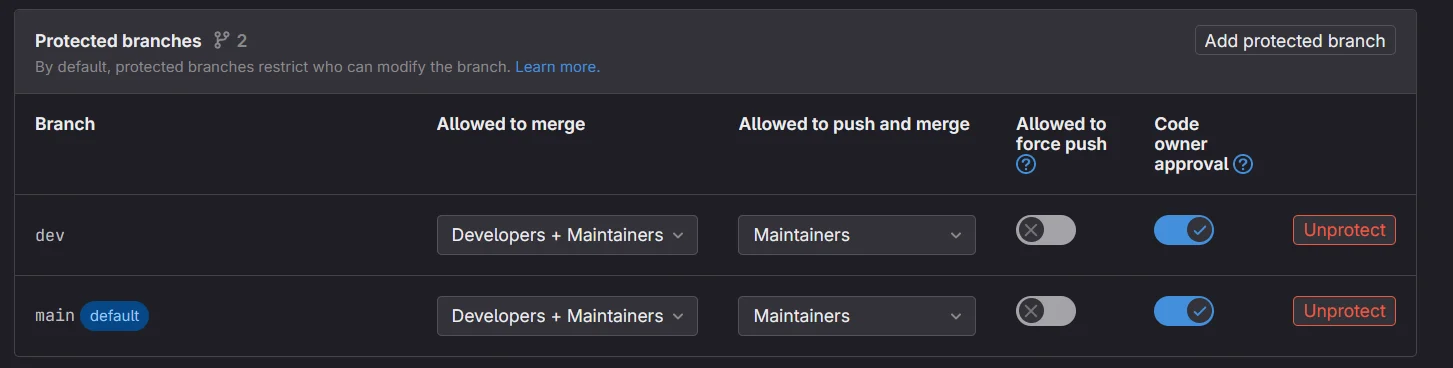
9.Navigate to Project settings => Merge requests => Approval settings, check Prevent approval by author, Prevent approvals by users who add commits, and Prevent editing approval rules in merge requests and under When a commit is added and Remove all approvals.
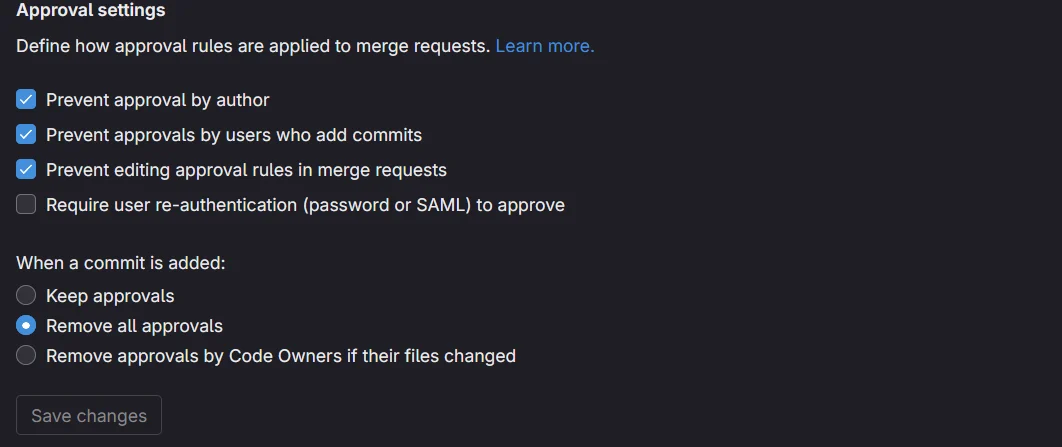
.
ATTACK
video:
.mp4)
As Dev2.
- Go to project > repository and switch from main to dev.
- Click on readme file and edit. and proceed to create merge request.
As Dev1.
- Approve MR created by DEV2
As Dev2.
- Go to MR and click on edit
- Change base branch to main.
- Then click on resolve conflicts.
- Click on edit inline and add dev2 as codeowner.
- Click merge, and you will successfully update codeowner file and update readme at the same time. and next time you will need no approval
Impact
Malicious Devepoper can bypass codeowner approval
Attachments
Warning: Attachments received through HackerOne, please exercise caution!
How To Reproduce
Please add reproducibility information to this section:
Not written yet. The AI write-up for this report has not been written yet. The Original tab links to the source.
How it worked
Impact
A malicious developer could bypass code owner approval and update the CODEOWNERS file, so later no approval is needed.
What the attacker needed
Project with two branches; CODEOWNERS file on each branch; developer permissions for attacker; code owner approval enabled
How it was found
- As owner, set up a project with two branches (main and dev), each with a CODEOWNERS file naming a different code owner, and enable code owner approval on both protected branches.
- As DEV2, create a merge request from the dev branch.
- As DEV1, approve the merge request.
- As DEV2, edit the merge request and change the target branch to main.
- Resolve conflicts by editing the CODEOWNERS file inline to add DEV2 as a code owner.
- Merge the request, updating the CODEOWNERS file and readme, so no approval is needed next time.
Explained by bugbounty.wiki with AI from the original and checked against quotes from it; it can still be wrong. Read the original before relying on a detail.
Not written yet. The AI write-up for this report has not been written yet. The Original tab links to the source.
In GitLab, code owners are people who must approve changes to certain files before they can be merged. This report shows that a developer could get approval on a merge request for one branch, then switch it to another branch and sneak in a change to the file that lists code owners, so they no longer need approval.
What is Access control?
A user can do something their role should not allow: reach an admin function, act on a feature they have not paid for, or skip a permission check. IDOR is the special case where the object belongs to someone else.

