Developers can create pipeline schedules on protected branches even if they don't have access to merge by creating a matching tag
A developer without merge permissions could create a pipeline schedule on a protected branch by first creating a tag with the same name and then manipulating the ref field to remove the refs/tags prefix. This allowed them to run pipelines on protected branches, bypassing branch protection rules.

GitLab
Originally disclosed on GitLab
- Fixed in 4 months
- Disclosed after 4 months
⚠️ Please read the process on how to fix security issues before starting to work on the issue. Vulnerabilities must be fixed in a security mirror.
HackerOne report #2264595 by js_noob on 2023-11-26, assigned to @ngeorge1:
Report | Attachments | How To Reproduce
Report
Summary
Hello team, as a part of the branch protection rules, developers should not be able to run or schedule pipelines on branches they don't have merge permissions to. From the docs
The schedule owner must have the Developer role. For pipelines on protected branches, the schedule owner must be allowed to merge with the branch.
However, a developer can bypass this condition.
This is a bypass of https://hackerone.com/reports/2089517
Steps to reproduce
As an owner:
- Create a project
- Create a new branch called
protected - Navigate to https://gitlab.com/OWNER/PROJECT/-/settings/repository#js-protected-branches-settings and set
Allowed to mergeandAllowed to push and mergetoMaintainerson theprotectedbranch
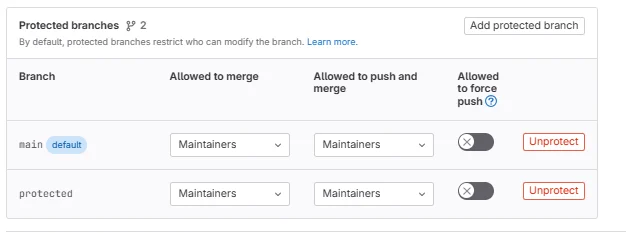
- Add a developer to the project
As the developer
- Navigate to https://gitlab.com/OWNER/PROJECT/-/pipeline_schedules/new
- Try creating a pipeline schedule on
protectedand verify the error - Create a new tag called
protected - Navigate back to https://gitlab.com/OWNER/PROJECT/-/pipeline_schedules/new, create a schedule on the
protectedbranch, and intercept the request. The body of the request should look something similar to the following
{"operationName":"createPipelineSchedule","variables":{"input":{"description":"test","cron":"5 9 * * *","cronTimezone":"Etc/GMT+12","ref":"refs/tags/v1","variables":[],"active":true,"projectPath":"jawadneeme1/poc-project-12871"}},"query":"mutation createPipelineSchedule($input: PipelineScheduleCreateInput!) {\n pipelineScheduleCreate(input: $input) {\n clientMutationId\n errors\n __typename\n }\n}\n"}
- In the
reffield remove therefs/tagsorrefs/headsfrom the ref, and only keepprotected - Verify the success
- Delete the
protectedtag - Verify that the created schedule is on the
protectedbranch
POC
Impact
Developers with no merge access can create pipeline schedules on protected branches.
Attachments
Warning: Attachments received through HackerOne, please exercise caution!
How To Reproduce
Please add reproducibility information to this section:
Not written yet. The AI write-up for this report has not been written yet. The Original tab links to the source.
How it worked
Root cause
Likely the application did not properly validate the ref format when creating a pipeline schedule, allowing a tag reference to be interpreted as a branch reference after removing the prefix.
What the attacker needed
Developer role in a project; Protected branch configured; Ability to create tags
How it was found
- As an owner, create a project and a branch called protected.
- Set allowed to merge and allowed to push and merge to Maintainers on the protected branch.
- Add a developer to the project.
- As the developer, try creating a pipeline schedule on the protected branch and observe the error.
- Create a new tag called protected.
- Create a schedule on the protected branch, intercept the request, and modify the ref field to remove refs/tags or refs/heads, keeping only protected.
Explained by bugbounty.wiki with AI from the original and checked against quotes from it; it can still be wrong. Read the original before relying on a detail.
Not written yet. The AI write-up for this report has not been written yet. The Original tab links to the source.
In GitLab, protected branches are meant to stop people from making changes without permission. A developer found a way to schedule pipelines on those branches by using a tag with the same name and tweaking the request. This let them run code on branches they shouldn't have access to.
What is Access control?
A user can do something their role should not allow: reach an admin function, act on a feature they have not paid for, or skip a permission check. IDOR is the special case where the object belongs to someone else.

