Guest project member can access log of jobs with enabled debug logging
A Guest project member could access the debug log of a CI job after a caching delay, even though the documentation states that only Developer or higher roles should view such logs. An attacker could download the job log file and potentially see sensitive information.

GitLab
Originally disclosed on GitLab
- Fixed in 14 months
- Disclosed after 14 months
HackerOne report #1113405 by jimeno on 2021-02-28, assigned to @ngeorge1:
Report | Attachments | How To Reproduce
Report
Summary
Guest project member can access log of jobs with enabled debugging after some, presumably, caching period. Official documentation says they can't.

GitLab official docs say:
With restricted access to debug logging, only users with developer or higher permissions can view job logs when debug logging is enabled with a variable in:
- The .gitlab-ci.yml file.
- The CI/CD variables set within the GitLab UI.
They provide an example of enabling the debug mode too.
To enable debug logs (traces), set the CI_DEBUG_TRACE variable to true:
job_name:
  variables:
    CI_DEBUG_TRACE: "true"
I decided to test caching mechanisms in GitLab after reading https://gitlab.com/gitlab-org/gitlab/-/issues/289944, which is another caching bug at GitLab that was rewarded and fixed.
Steps to reproduce
-
As userA (victim) create a project and enable GitLab CI for it by adding the following YAML file to it.
YAML image: alpine:latest variables: FOO: bar stages: - test dummy: variables: CI_DEBUG_TRACE: "true" stage: test script: - echo "${FOO}" -
Invite userB (attacker) to your project with Guest role.
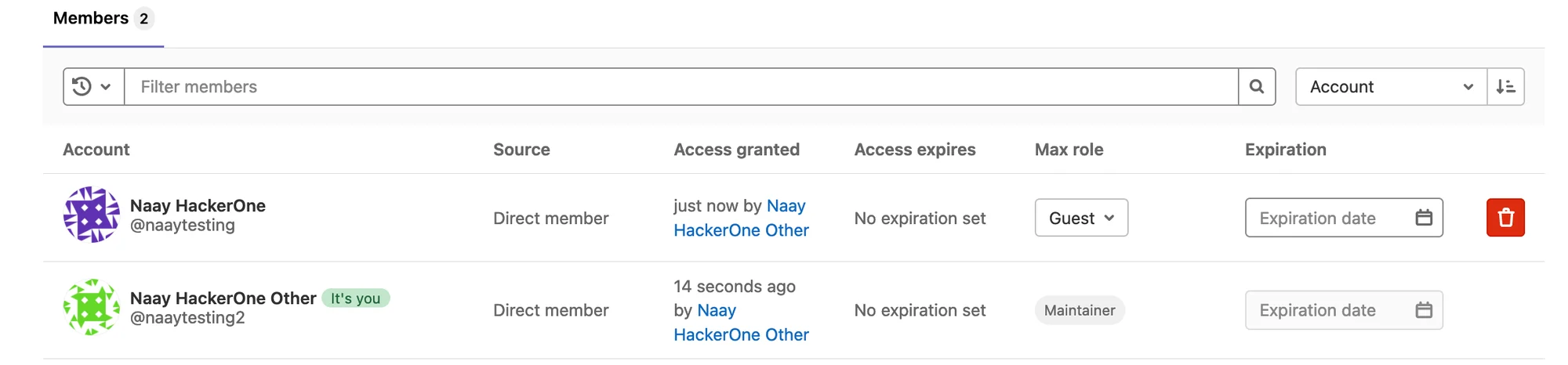
project_members.png From the original on GitLab -
As your victim user, browse to the GraphQL explorer and run the following query in order to find the Job ID. Please note we are only doing this step to find job's ID. In a real world scenario, attacker could omit this step by bruteforcing it (incremental, decimal number). Please, remember to replace
fullPathwith yours (project_author/project_name).GraphQL query infogathering { project(fullPath:"naaytesting2/proje") { pipelines { edges { node { id stages { edges { node { name groups { edges { node { name jobs { edges { node { name detailedStatus { detailsPath } } } } } } } } } } } } } } } -
Grab the Job ID from the
detailsPathvalue in the response. In my case it looks like/naaytesting2/proje/-/jobs/1061991036-->1061991036. -
Wait for at least 2 minutes. As your attacker user, build the final attack URL by replacing the placeholders in this URL:
https://gitlab.com/AUTHOR/PROJECTNAME/-/jobs/JOBID/artifacts/download?file_type=trace. In my case, the final URL looked likehttps://gitlab.com/naaytesting2/proja/-/jobs/1061991036/artifacts/download?file_type=trace. -
Download and open the
job.logfile. -
If victim tries to browse to the job directly, for example at
https://gitlab.com/naaytesting2/proje/-/jobs/1062011620they get an insufficient permissions error.[redacted]
Impact
Roles aren't respected when accessing jobs with debug logging enabled.
Examples
Attached you will find a test repository. However, I don't think this is helpful.
What is the current bug behavior?
Roles aren't respected and Guest members can access jobs they aren't supposed to access.
What is the expected correct behavior?
Guest and Reporter members get a 403/404 response when trying to access jobs they aren't supposed to access.
Relevant logs and/or screenshots
Please, find a detailed step by step reproduction attached to this report.
[redacted]
Output of checks
This bug happens on GitLab.com
Results of GitLab environment info
N/A. Tests performed 2020/02/28 19:00-20:30 Madrid time.
Impact
Roles aren't respected when accessing jobs with debug logging enabled.
Attachments
Warning: Attachments received through HackerOne, please exercise caution!
- [redacted]
- project_members.png
- permissions_doc.png
- [redacted]
Technical proposal
Projects::ArtifactsController#download only checks the read_build policy to determine whether a user has access. When file_type is trace and build.debug_mode?, #download should additionally apply the read_build_trace policy
Not written yet. The AI write-up for this report has not been written yet. The Original tab links to the source.
How it worked
Root cause
Likely the artifacts download endpoint only checks the general read_build permission and does not enforce the stricter read_build_trace permission when debug logging is enabled.
Impact
A Guest member could access debug job logs they are not supposed to access, violating the documented permission model.
What the attacker needed
Victim creates a project with CI debug logging enabled; Attacker is a Guest member of the project; Attacker knows or brute-forces the job ID; Attacker waits at least 2 minutes
The fix
The download endpoint should also check the read_build_trace policy when the file type is trace and debug mode is enabled.
How it was found
- As the victim, create a project and add a CI configuration that enables debug logging for a job.
- Invite the attacker as a Guest member to the project.
- As the victim, use the GraphQL explorer to find the job ID.
- Extract the job ID from the detailsPath in the response.
- Wait at least two minutes, then as the attacker, construct the attack URL to download the trace artifact.
- Download and open the job.log file.
Explained by bugbounty.wiki with AI from the original and checked against quotes from it; it can still be wrong. Read the original before relying on a detail.
Not written yet. The AI write-up for this report has not been written yet. The Original tab links to the source.
In GitLab, a Guest has limited permissions and should not see job logs when debug logging is on. Due to a caching issue, a Guest could still download the log file after waiting a couple of minutes.
What is Access control?
A user can do something their role should not allow: reach an admin function, act on a feature they have not paid for, or skip a permission check. IDOR is the special case where the object belongs to someone else.

