Guest with custom `Admin group member` permissions can approve the users invitation despite user caps
A guest user with a custom role that includes the 'Admin group member' permission could approve pending invitations even when the group's user cap had been reached. This allowed the guest to bypass the intended restriction that only group owners may approve members above the cap.

GitLab
Originally disclosed on GitLab
- Fixed in 7 months
- Disclosed after 7 months
⚠️ Please read the process on how to fix security issues before starting to work on the issue. Vulnerabilities must be fixed in a security mirror.
HackerOne report #2602274 by ashish_r_padelkar on 2024-07-15, assigned to GitLab Team:
Report | Attachments | How To Reproduce
Report
Summary
Hello,
The user cap here https://gitlab.com/groups/<groupName>/-/edit#js-permissions-settings allows owners to setup the maximum numbers of allowed members in a group. If any non owners such as Guest with custom Admin group member permissions adds the members, they need to be approved by group owners only.
However, the non group owners ( eg Guest with custom Admin group member ) too can approve this pending members above user cap using this vulnerability.
Steps to reproduce
- As a group owner, set your maximum user cap as
2athttps://gitlab.com/groups/groupjune2024/-/edit#js-permissions-settingsunderuser capand save.
2.Create a custom role here https://gitlab.com/groups/groupjune2024/-/settings/roles_and_permissions with Guest as basic role and Admin group member permissions. Named this as GuestAdminMember.
3.Add a user UserB here at https://gitlab.com/groups/groupjune2024/-/group_members with GuestAdminMember role.
4.Login as UserB and go to https://gitlab.com/groups/groupjune2024/-/group_members.
- Invite a new gitlab member (Existing user).
6.They are not automatically added and will reside under Pending invitations tab. You will also see a message like below.
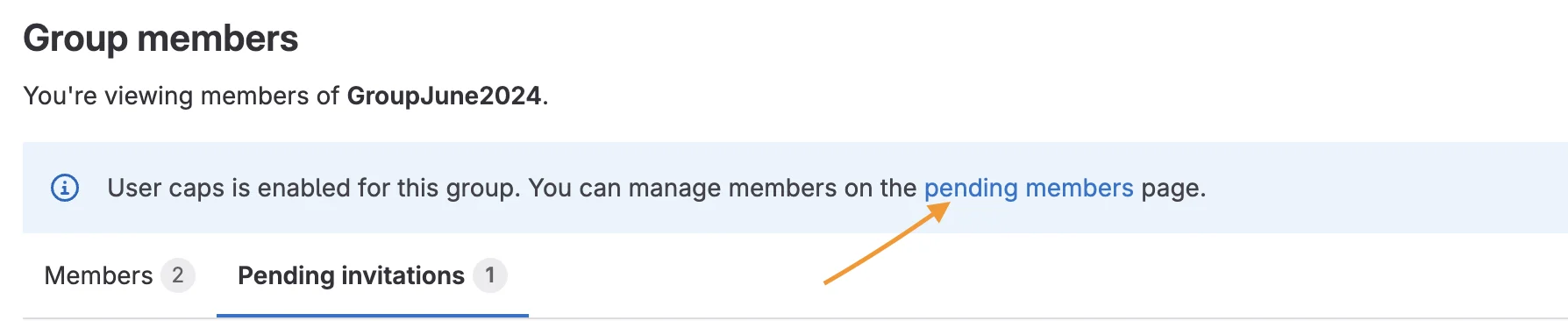
7.Only group owners are allowed to approve these types of users at https://gitlab.com/groups/groupjune2024/-/usage_quotas/pending_members.
8.As a UserB, copy your Cookie and X-Csrf-Token and replace it in below request.
PUT /api/v4/groups/89036276/members/107619688/approve HTTP/2
Host: gitlab.com
Cookie: <Replace_Your_Cookie>
Content-Length: 0
Sec-Ch-Ua: "Not/A)Brand";v="8", "Chromium";v="126", "Google Chrome";v="126"
X-Csrf-Token: <Replace_Your_Token>
Sec-Ch-Ua-Mobile: ?0
User-Agent: Mozilla/5.0 (Macintosh; Intel Mac OS X 10_15_7) AppleWebKit/537.36 (KHTML, like Gecko) Chrome/126.0.0.0 Safari/537.36
Sec-Ch-Ua-Arch: "arm"
Sec-Ch-Ua-Full-Version: "126.0.6478.127"
Accept: application/json, text/plain, */*
Sec-Ch-Ua-Platform-Version: "13.2.1"
X-Requested-With: XMLHttpRequest
Sec-Ch-Ua-Bitness: "64"
Baggage: sentry-environment=gprd,sentry-release=efd75b0e35b,sentry-public_key=f5573e26de8f4293b285e556c35dfd6e,sentry-trace_id=10db2c32dec44573ad24be6d49f72bb6,sentry-sample_rate=0.05,sentry-transaction=groups%3Ausage_quotas%3Apending_members,sentry-sampled=false
Sec-Ch-Ua-Model: ""
Sec-Ch-Ua-Full-Version-List: "Not/A)Brand";v="8.0.0.0", "Chromium";v="126.0.6478.127", "Google Chrome";v="126.0.6478.127"
Sentry-Trace: 10db2c32dec44573ad24be6d49f72bb6-ad57d8996519dd28-0
Sec-Ch-Ua-Platform: "macOS"
Origin: https://gitlab.com
Sec-Fetch-Site: same-origin
Sec-Fetch-Mode: cors
Sec-Fetch-Dest: empty
Referer: https://gitlab.com/groups/groupjune2024/-/usage_quotas/pending_members
Accept-Encoding: gzip, deflate, br
Accept-Language: en-GB,en-US;q=0.9,en;q=0.8
Priority: u=1, i
Here 107619688 is the member ID which you can obtain from response of https://gitlab.com/groups/groupjune2024/-/group_members?tab=invited. Just look for in HTML response with invite array. For POC, you can just copy from owners view for quickly reproducing this if.
For Cookie and X-Csrf-Token , you can copy this value of from Remove Member request as a UserB .
9.Send the request and you should see HTTP/2 204 No Content response.
Go back to https://gitlab.com/groups/groupjune2024/-/group_members and you should see user is approved.
What is the current bug behavior?
Guest with custom permissions can approve the pending invites despite user caps.
What is the expected correct behavior?
Only group owners should be allowed to approve.
Output of checks
This bug happens on GitLab.com
Regards,
Ashish
Impact
Guest with custom Admin group member permissions can approve the users invitation despite user caps
Attachments
Warning: Attachments received through HackerOne, please exercise caution!
How To Reproduce
Please add reproducibility information to this section:
Not written yet. The AI write-up for this report has not been written yet. The Original tab links to the source.
How it worked
Root cause
Likely the approval endpoint did not check that the caller was a group owner, only that they had the 'Admin group member' permission.
What the attacker needed
Group owner sets a user cap; custom role with Admin group member permission; guest user with that role; pending invitation above the cap
How it was found
- As a group owner, set the maximum user cap to 2.
- Create a custom role with Guest as the base role and the 'Admin group member' permission.
- Add a user with that custom role to the group.
- Log in as that user and invite an existing GitLab member.
- The invitation remains pending and is not automatically added.
- As the guest user, send a request to approve the pending member and receive a 204 response.
Explained by bugbounty.wiki with AI from the original and checked against quotes from it; it can still be wrong. Read the original before relying on a detail.
Not written yet. The AI write-up for this report has not been written yet. The Original tab links to the source.
A group owner can set a maximum number of members (a user cap). When someone invites a new member and the cap is reached, the invitation stays pending until an owner approves it. The bug meant that a guest with a special permission could approve those pending invitations themselves, even though only owners should be able to do that.
What is Access control?
A user can do something their role should not allow: reach an admin function, act on a feature they have not paid for, or skip a permission check. IDOR is the special case where the object belongs to someone else.

