Guest with custom role `Admin group member` can ban users
A Guest user holding a custom role with the 'Admin group member' permission could send a crafted ban request to remove any group member, including users with higher roles such as Maintainer. The UI hid the ban option, but the backend endpoint lacked a permission check, so the action succeeded anyway.

GitLab
Originally disclosed on GitLab
- Fixed in 4 months
- Disclosed after 4 months
⚠️ Please read the process on how to fix security issues before starting to work on the issue. Vulnerabilities must be fixed in a security mirror.
HackerOne report #2431597 by ashish_r_padelkar on 2024-03-23, assigned to @kmorrison1:
Report | Attachments | How To Reproduce
Report
Summary
Hello,
As per this document https://docs.gitlab.com/ee/user/group/moderate_users.html#ban-a-user, you need to have owner role to ban a user from group.
However, it is possible for Guest user with custom role permission Admin group member to ban any user from the group using this issue.
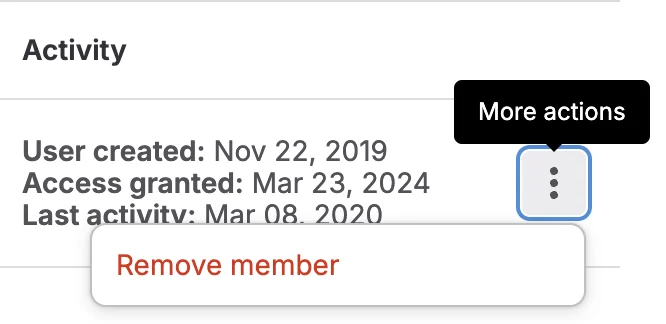
A Owner see the below option but Guest user with custom role permission Admin group member cant see the option in UI which is expected but using backend request , we can perform this action because of missing permission check on the request.
Owner
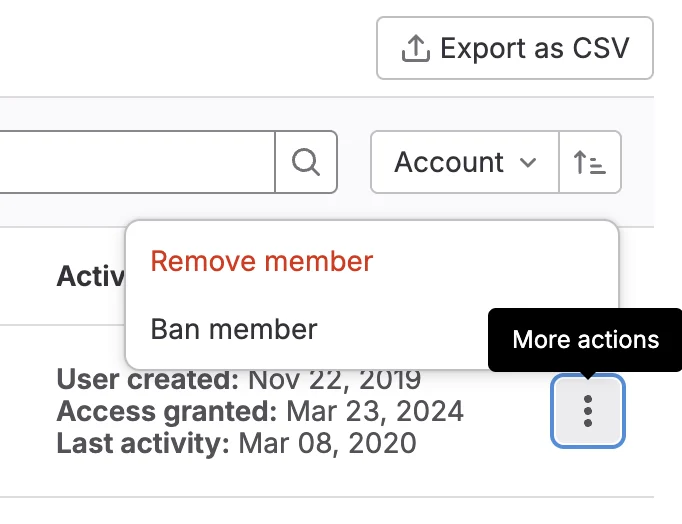
**Guest user with Admin group member **
Steps to reproduce
1.As a group owner , Go to https://gitlab.com/groups/groupmarch2024/-/settings/roles_and_permissions and create a custom role of Guest user with Admin group member permission. Lets name this as GuestGroupAdmin.
2.Now go to https://gitlab.com/groups/groupmarch2024/-/group_members and add 2 members. UserA with GuestGroupAdmin and UserB with Maintainer role.
3.Now as a group owner, you see the option to ban both these users.
4.Login as UserA and go to https://gitlab.com/groups/groupmarch2024/-/group_members . You wont see ban option for users which is expected and working as per documentation.
5.Now grab your Cookie and authenticity_token (you can also use X-Csrf-Token value in this) in below request.
POST /groups/groupmarch2024/-/group_members/98201602/ban HTTP/2
Host: gitlab.com
Cookie: <Replace_Your_Cookie_Here>
Content-Length: 117
Cache-Control: max-age=0
Sec-Ch-Ua: "Chromium";v="122", "Not(A:Brand";v="24", "Google Chrome";v="122"
Sec-Ch-Ua-Mobile: ?0
Sec-Ch-Ua-Platform: "macOS"
Upgrade-Insecure-Requests: 1
Origin: https://gitlab.com
Content-Type: application/x-www-form-urlencoded
User-Agent: Mozilla/5.0 (Macintosh; Intel Mac OS X 10_15_7) AppleWebKit/537.36 (KHTML, like Gecko) Chrome/122.0.0.0 Safari/537.36
Accept: text/html,application/xhtml+xml,application/xml;q=0.9,image/avif,image/webp,image/apng,*/*;q=0.8,application/signed-exchange;v=b3;q=0.7
Sec-Fetch-Site: same-origin
Sec-Fetch-Mode: navigate
Sec-Fetch-User: ?1
Sec-Fetch-Dest: document
Referer: https://gitlab.com/groups/groupmarch2024/-/group_members
Accept-Encoding: gzip, deflate, br
Accept-Language: en-GB,en-US;q=0.9,en;q=0.8

authenticity_token=<Replace_Your_token_Here>&_method=put
Where 98201602 is the ID of UserB here. You can get this ID in HTML response of https://gitlab.com/groups/groupmarch2024/-/group_members (View Source and look for data-members-data).
Send the request and you should see UserB is banned in group.
What is the current bug behavior?
Guest with Admin group member can ban user from the group that too for user having higher permissions.
What is the expected correct behavior?
Only group owner should be able to perform this as per documentation.
Output of checks
This bug happens on GitLab.com
Regards,
Ashish
Impact
Guest with custom role can ban users
Attachments
Warning: Attachments received through HackerOne, please exercise caution!
How To Reproduce
Please add reproducibility information to this section:
Not written yet. The AI write-up for this report has not been written yet. The Original tab links to the source.
How it worked
Root cause
Likely the ban endpoint only checked that the caller had the 'Admin group member' custom permission rather than requiring the group Owner role, so the UI restriction was not enforced server-side.
Impact
A low-privilege Guest with a custom role could ban other group members, including those with higher permissions, disrupting the group.
What the attacker needed
Group owner creates custom role; attacker has Guest account with that role; attacker can capture own session token
How it was found
- As a group owner, create a custom role for a Guest user that includes the 'Admin group member' permission.
- Add one member with that custom role and another member with the Maintainer role.
- Log in as the custom-role Guest and confirm the ban option is not shown in the members page.
- Capture the session cookie and CSRF token, then send a ban request for the Maintainer's member ID.
- Observe that the Maintainer is banned from the group.
Explained by bugbounty.wiki with AI from the original and checked against quotes from it; it can still be wrong. Read the original before relying on a detail.
Not written yet. The AI write-up for this report has not been written yet. The Original tab links to the source.
GitLab lets group owners create custom roles that grant extra abilities to low-privilege users. The web page hid the 'ban' button from such a user, but the server behind the button did not check whether the person was allowed to ban anyone. By sending the request directly, the user could ban other members even though the screen said they could not.
What is Access control?
A user can do something their role should not allow: reach an admin function, act on a feature they have not paid for, or skip a permission check. IDOR is the special case where the object belongs to someone else.

