HTML injection possible with soft email confirmations when Administrator manually confirms attacker email address
An attacker can set an email address containing HTML, and when an administrator manually confirms the email, the HTML is rendered in the confirmation dialog, allowing the attacker to execute limited HTML such as loading an image from a server they control. This could leak the administrator's IP address or alter the dialog content.
 Originally disclosed on HackerOne
- Triaged in 15 days
- Fixed in 3 months
- Paid in 3 months
- Disclosed after 18 months
Summary
Note: This report is similar to #1842867 but has the administrator manually confirming an unconfirmed email on the attacker's behalf, instead of impersonating the attacker's account.
Assuming a GitLab instance is configured to use soft email confirmation settings, an attacker can register an account and login, then change their email to include an HTML payload. If an administrator manually verifies the attacker's email address, the administrator might be subjected to executing some HTML code in the modal confirmation dialog. It appears tags such as <form> and <script> are filtered out before being displayed.
The confirm_user_data method in https://gitlab.com/gitlab-org/gitlab/-/blob/master/app/helpers/users_helper.rb helps demonstrate the conditions required for this to work:
  def confirm_user_data(user)
    message = if user.unconfirmed_email.present?
                _('This user has an unconfirmed email address (%{email}). You may force a confirmation.') % { email: user.unconfirmed_email }
              else
                _('This user has an unconfirmed email address. You may force a confirmation.')
              end

    modal_attributes = Gitlab::Json.dump({
      title: s_('AdminUsers|Confirm user %{username}?') % { username: sanitize_name(user.name) },
      messageHtml: message,
      actionPrimary: {
        text: s_('AdminUsers|Confirm user'),
        attributes: [{ variant: 'confirm', 'data-qa-selector': 'confirm_user_confirm_button' }]
      },
      actionSecondary: {
        text: _('Cancel'),
        attributes: [{ variant: 'default' }]
      }
    })

<rest of function trimmed>
We need to pass the if user.unconfirmed_email.present? check to have the email presented in the dialog. This only seems to occur if the attacker registers an account with soft email confirmations and then changes their e-mail afterward. If the instance has email confirmation changed to Hard after the attacker is setup, this exploit still triggers for this attacker but new registrations appear to follow the else condition (ie. the email is not displayed inside of the dialog).
Steps to reproduce
Prerequisites (Administrator Account):
- Go to the Admin general settings page (http://gitlab.example.com/admin/application_settings/general).
- Expand sign-up restrictions and set "Email confirmation settings" to "Soft".
- Save the changes.
Reproduction Steps (Attacker):
- Register an account on the instance. (ex. Username:
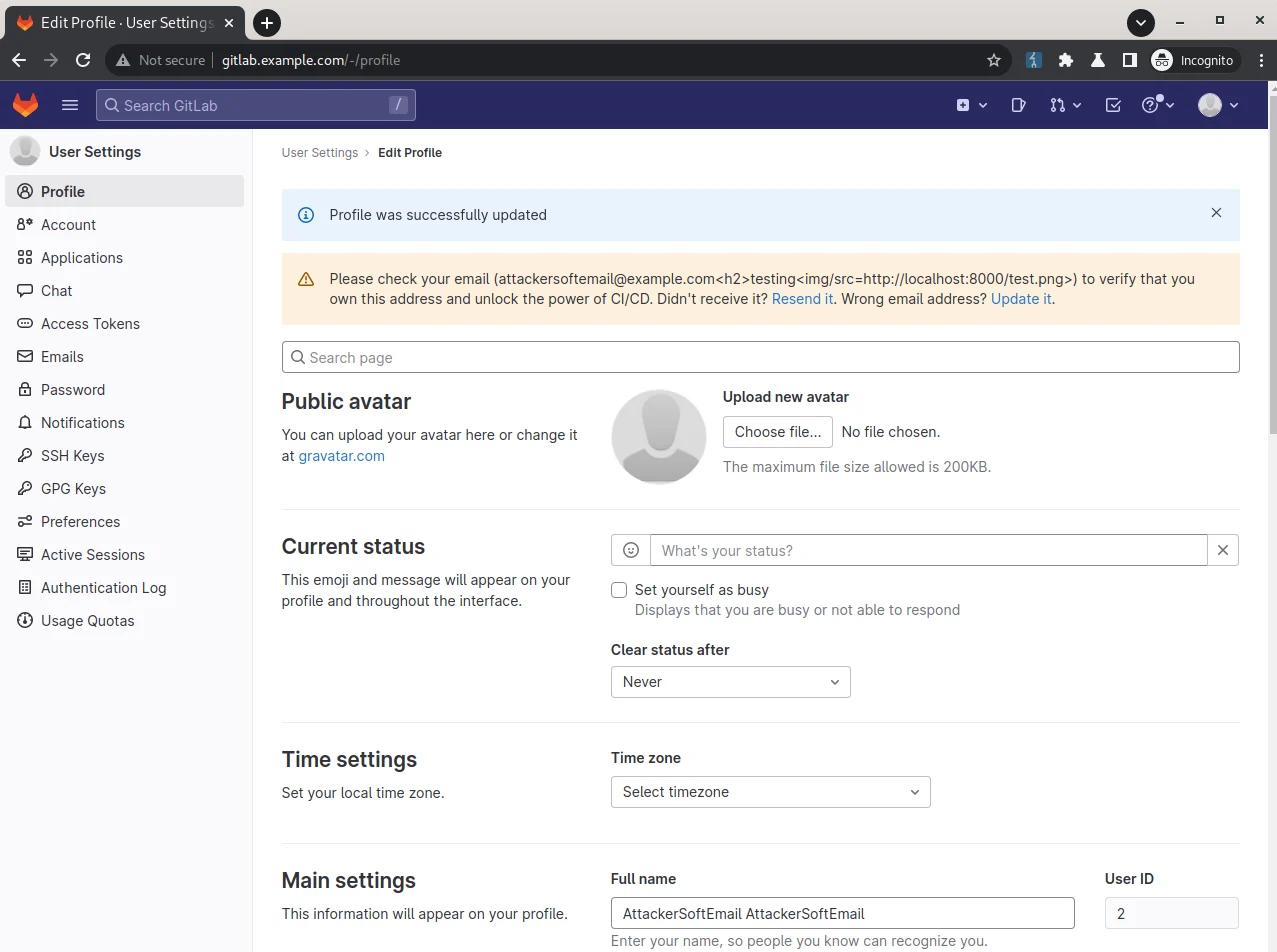
AttackerSoftEmail, Email:[email protected]) - Log into the account. You should now see a message at the top of the screen stating "Please check your email ([email protected]) to verify that you own this address and unlock the power of CI/CD. Didn't receive it? Resend it. Wrong email address? Update it."
- Go to the user's profile (http://gitlab.example.com/-/profile).
- Change the e-mail address by appending
<h2>testing<img/src=http://localhost:8000/test.png>to the end of the address. - Save the changes.
- (Optional) Start a python3 webserver to catch the image web request by running
python3 -m http.serverwithin an empty directory.
Reproduction Steps (Victim Administrator):
- Log into GitLab as an Administrator/root.
- Navigate to the Admin users panel and select the AttackerSoftEmail user (http://gitlab.example.com/admin/users/AttackerSoftEmail).
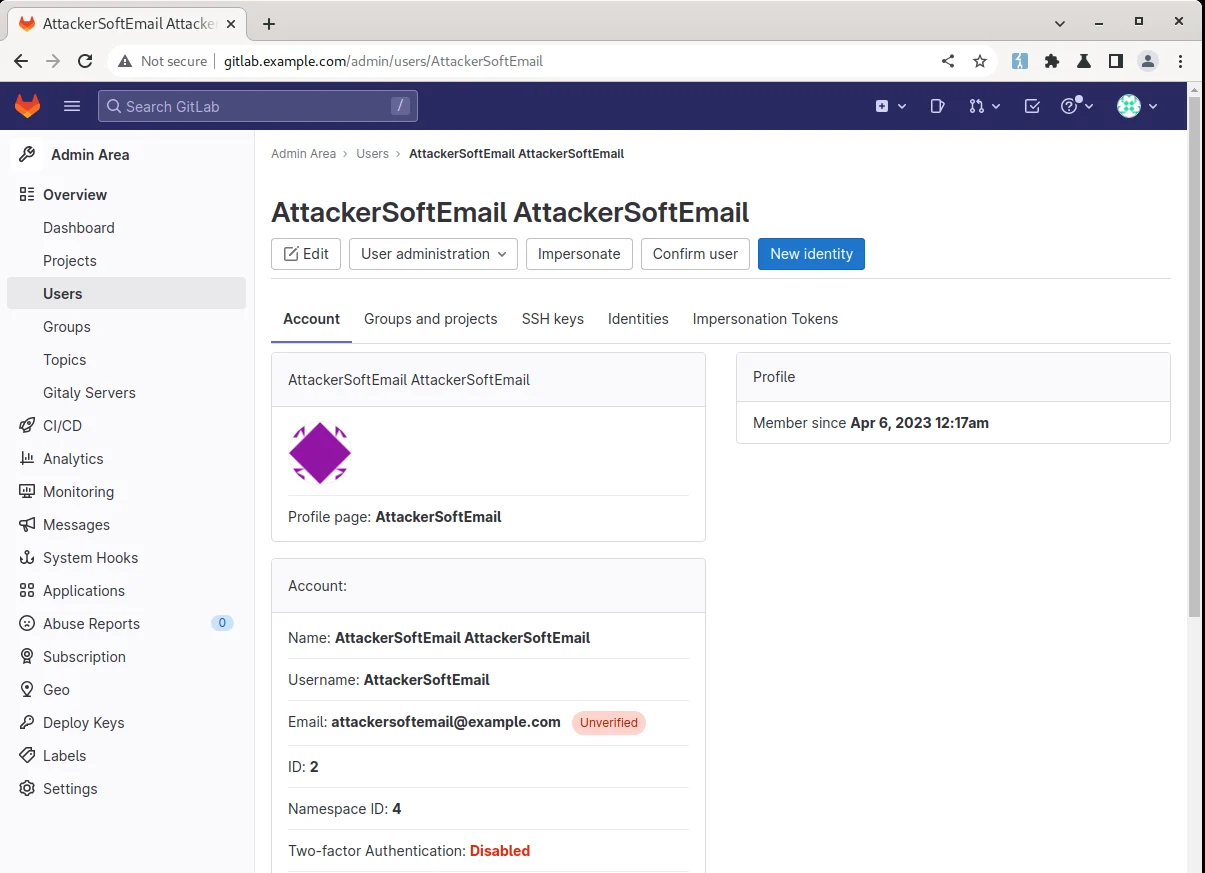
- Note the email address for AttackerSoftEmail does not contain HTML.
- Open the browser dev tools using
F12and navigate to the Network tab. - Click the "Confirm user" button to to confirm the e-mail address.
- Note the dialog text is modified due to the
<h2>header and a broken image appears in the dialog. - Confirm using the network tab that the browser requested
http://localhost:8000/test.pngand returned a 404 if a python server was running.
Impact
Administrators on self-managed instances confirming the attacker's account/email will inadvertently run some HTML if the attacker has not validated their email and the instance is configured to use soft email confirmation during registration.
The Administrator is not made aware of the HTML payload contained in the attacker's email address when viewing the attacker's profile from the administrator user page.
My initial report uses the following reasoning for the CVSS score:
AC:H: An administrator manually confirming a users email address is not likely considered to be normal workflow.
PR:L: Attacker requires an account but does not necessarily require special roles to perform this attack.
UI:R: Administrator needs to confirm the attacker's email address to trigger the payload.
S:U: Impact is localized to the exploitable component.
C:L: Attacker could leak the victim's IP address using <img> or try to convince get the admin to click a link.
I:L: Some information on the page can be altered.
A:N: No Availability impact.
Examples
N/A
What is the current bug behavior?
Attacker's HTML payload is rendered within context of the self-hosted GitLab instance.
What is the expected correct behavior?
HTML code appended to the email address should not be rendered by the browser when an administrator clicks the Confirm user dialog.
Relevant logs and/or screenshots
Attacker updates email address containing HTML payload.
Administrator views the attacker's account in the admin user menu. Note the page does not display the HTML included in the attacker email.
Administrator clicks Confirm user button and the HTML is rendered.
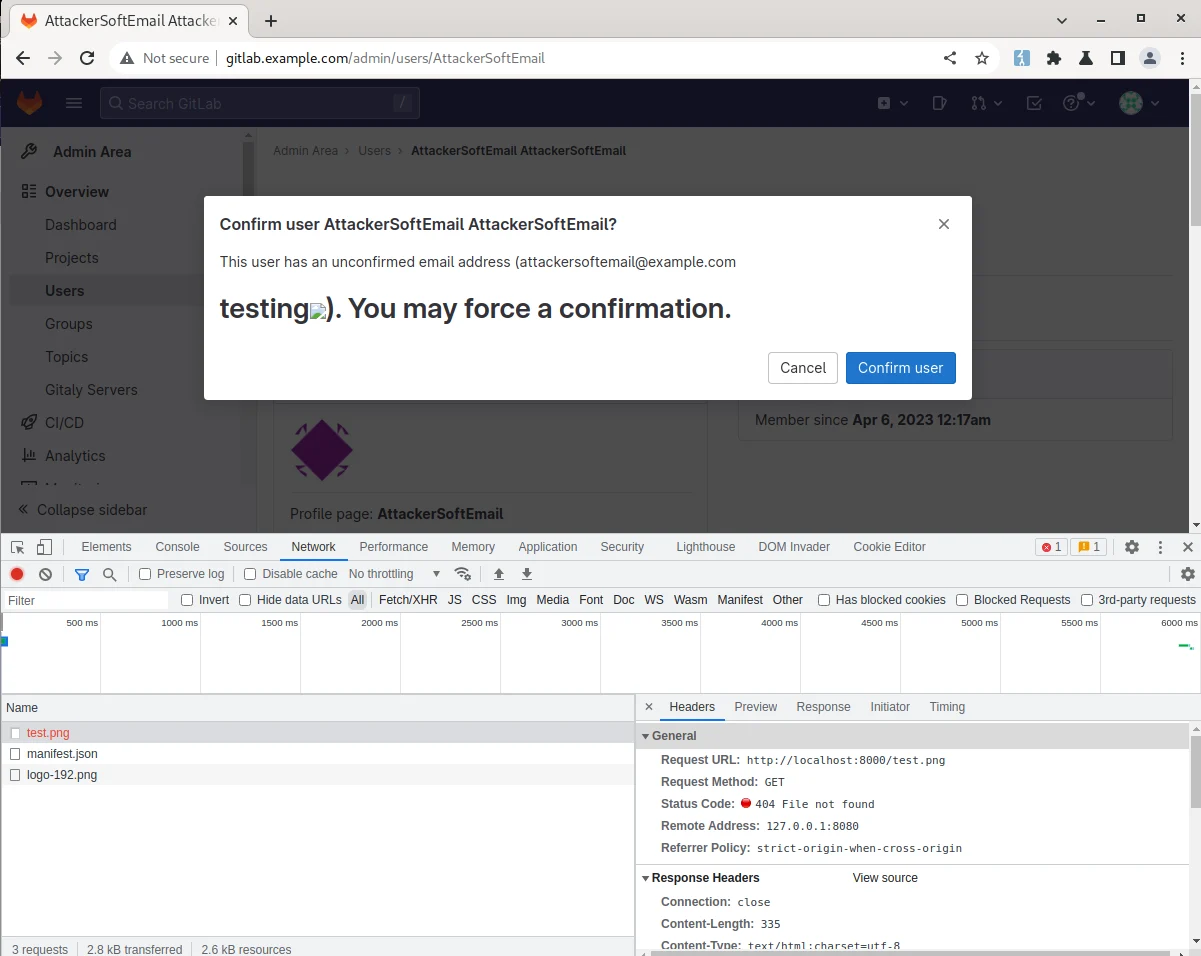
Attacker controlled server obtains victim IP address.

Output of checks
Results of GitLab environment info
root@gitlab:/# gitlab-rake gitlab:env:info

System information
System:
Proxy:		no
Current User:	git
Using RVM:	no
Ruby Version:	3.0.5p211
Gem Version:	3.2.33
Bundler Version:2.3.15
Rake Version:	13.0.6
Redis Version:	6.2.11
Sidekiq Version:6.5.7
Go Version:	unknown

GitLab information
Version:	15.10.2-ee
Revision:	a54d6973eae
Directory:	/opt/gitlab/embedded/service/gitlab-rails
DB Adapter:	PostgreSQL
DB Version:	13.8
URL:		http://gitlab.example.com
HTTP Clone URL:	http://gitlab.example.com/some-group/some-project.git
SSH Clone URL:	[email protected]:some-group/some-project.git
Elasticsearch:	no
Geo:		no
Using LDAP:	no
Using Omniauth:	yes
Omniauth Providers:

GitLab Shell
Version:	14.18.0
Repository storages:
- default: 	unix:/var/opt/gitlab/gitaly/gitaly.socket
GitLab Shell path:		/opt/gitlab/embedded/service/gitlab-shell
root@gitlab:/#
Impact
Administrators on self-managed instances confirming the attacker's account/email will inadvertently run some HTML if the attacker has not validated their email and the instance is configured to use soft email confirmation during registration.
The Administrator is not made aware of the HTML payload contained in the attacker's email address when viewing the attacker's profile from the administrator user page.
My initial report uses the following reasoning for the CVSS score:
AC:H: An administrator manually confirming a users email address is not likely considered to be normal workflow.
PR:L: Attacker requires an account but does not necessarily require special roles to perform this attack.
UI:R: Administrator needs to confirm the attacker's email address to trigger the payload.
S:U: Impact is localized to the exploitable component.
C:L: Attacker could leak the victim's IP address using <img> or try to convince get the admin to click a link.
I:L: Some information on the page can be altered.
A:N: No Availability impact.
Not written yet. The AI write-up for this report has not been written yet. The Original tab links to the source.
How it worked
Impact
An administrator who manually confirms the attacker's email may run limited HTML, potentially leaking their IP address or altering the dialog, but script tags are filtered out.
What the attacker needed
GitLab instance with soft email confirmation; Attacker has an account; Administrator manually confirms email
How it was found
- As administrator, set email confirmation to 'Soft' in admin settings.
- As attacker, register an account and log in.
- Change the email address to include an HTML payload.
- As administrator, go to the admin users panel and select the attacker's user.
- Click 'Confirm user' to confirm the email address.
- Observe that the dialog renders the HTML and makes a request to the attacker's server.
Explained by bugbounty.wiki with AI from the original and checked against quotes from it; it can still be wrong. Read the original before relying on a detail.
Not written yet. The AI write-up for this report has not been written yet. The Original tab links to the source.
When you sign up, you give an email address. The system usually checks it by sending a link. Here, an admin can manually confirm it. The attacker puts special formatting codes (HTML) in their email address. When the admin clicks 'Confirm user', those codes run in the admin's browser, letting the attacker see the admin's IP address or change what the dialog shows.
What is XSS?
Script an attacker supplies runs in another user's browser, on the target's origin, with that user's session.





