New /add_contacts /remove_contacts quick commands susseptible to XSS from Customer Contact firstname/lastname fields
The Customer Relations feature did not escape HTML special characters in contact first and last names, allowing stored XSS. An attacker could execute JavaScript in the context of a user who triggers the /add_contacts or /remove_contacts quick action.
 Originally disclosed on HackerOne
- Triaged in 34 hours
- Fixed in 25 days
- Paid in 34 hours
- Disclosed after 6 months
Summary
In Gitlab 15.0.0 a new Customer Relations feature was added that allows us to use quick actions to find the contact we wish to select.
However, I noticed that if I set the contact's first name or last name to <script>alert(document.domain)</script> we can get the XSS to trigger when we are attempting to use the quick commands to add/remove a contact.
Steps to reproduce
- Create a new group.
- Once the group is created, navigate to the Settings -> General options for the group.
- Expand the section "Permissions and group features" and under "Customer Relations" make sure "Enable customer relations" is selected.
- Return back to the group page. On the left side of the screen a new menu option will appear titled "Customer relations". Select it.
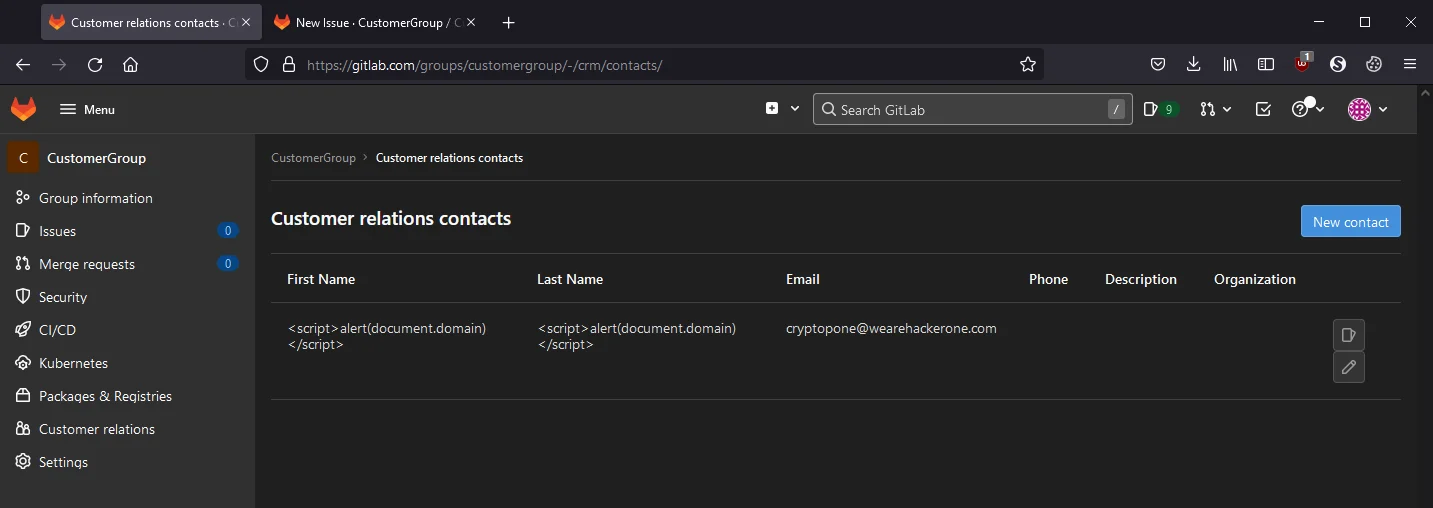
- Create a new contact with "First name" set to "
<script>alert(document.domain)</script>" and "Last name" set to "<script>alert(document.domain)</script>". Provide an email address and save your changes. - The user you created in the previous step should now appear as a contact on the Customer Relations page.
- Go to the create new project URL (https://gitlab.com/projects/new#blank_project) and under Project URL, select the Group you created earlier. Give the project a name Ex. "CustomerProject".
- Once the project has been created on the left side of the project page select "Issues" and then click "New Issue".
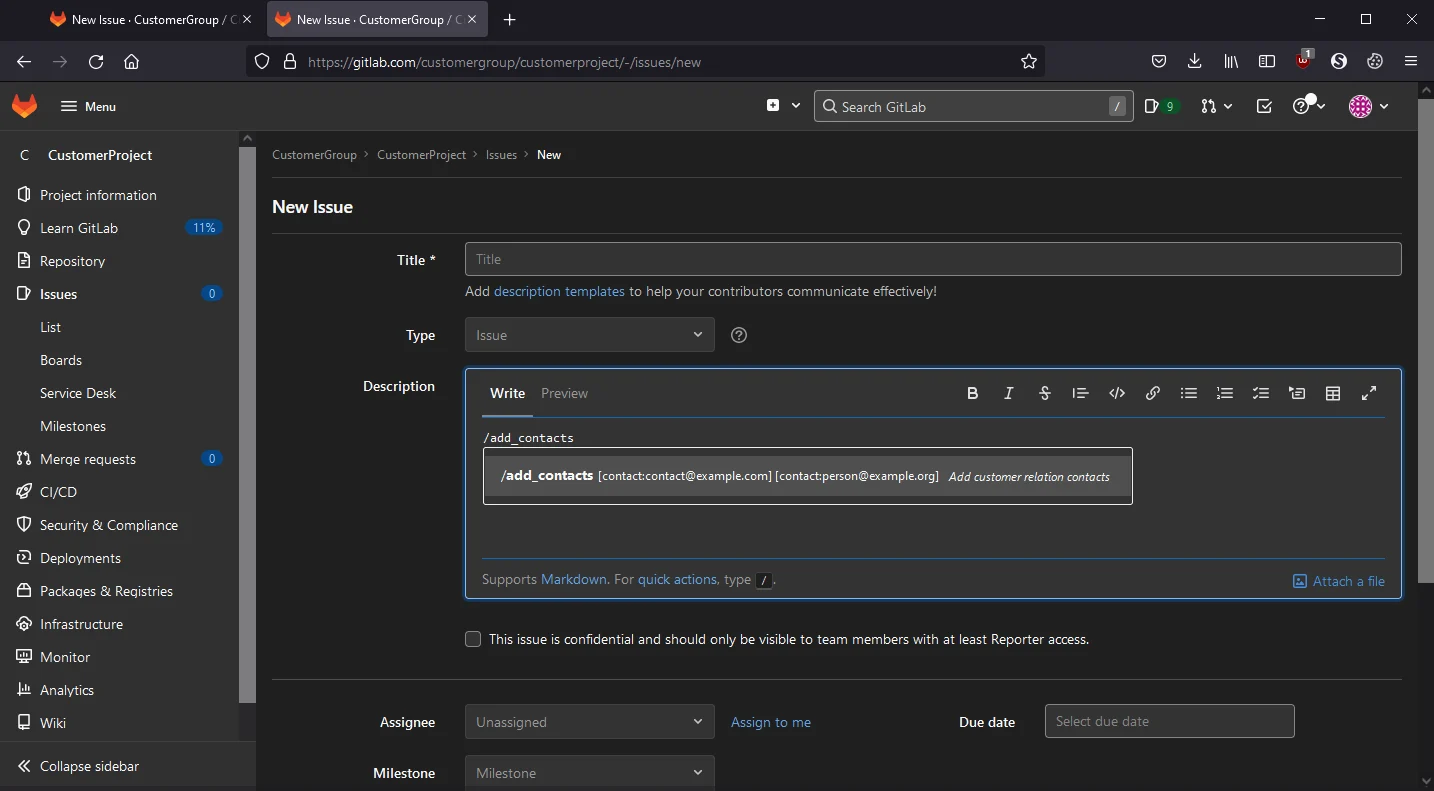
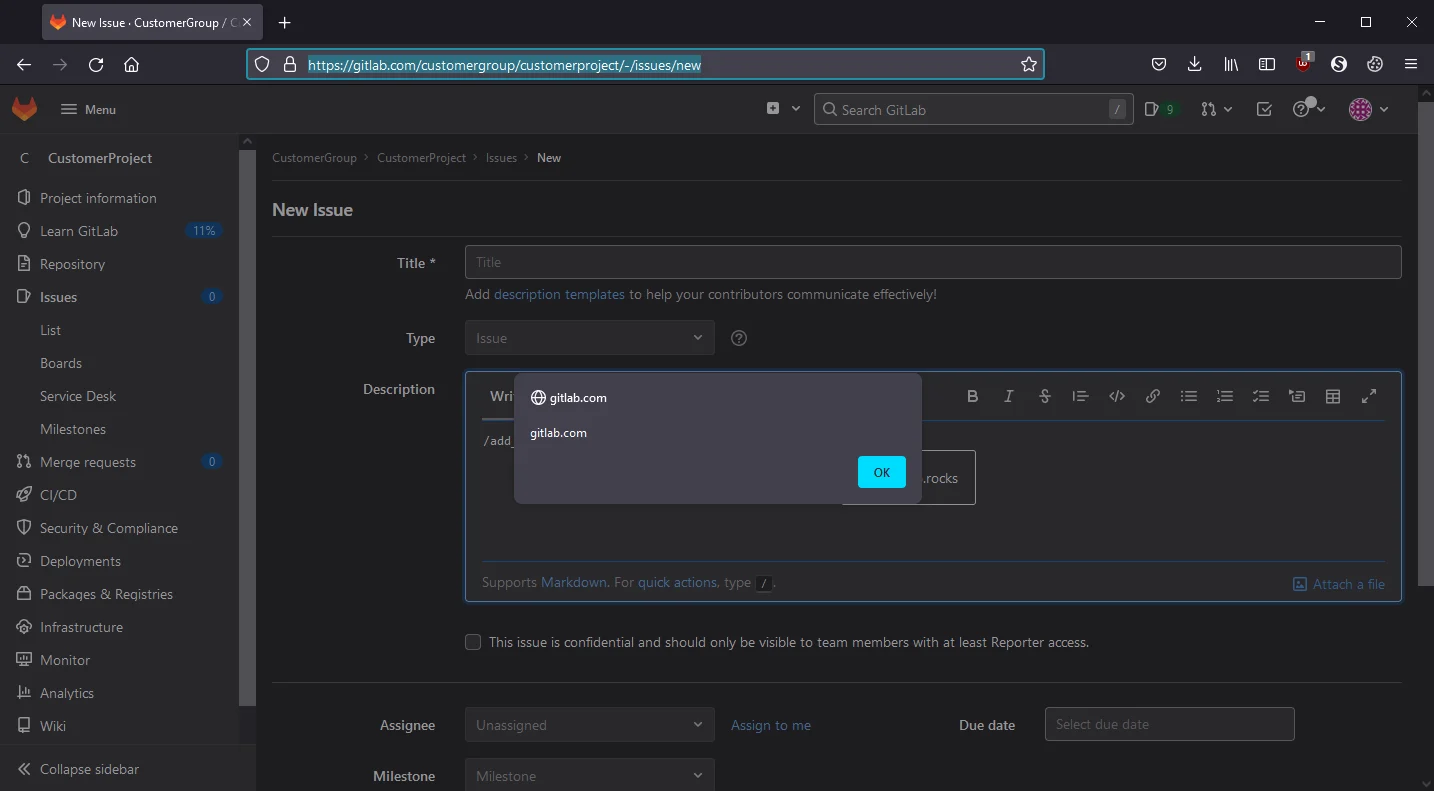
- In the description pane type "/add_contacts" so the popup appears, then press "enter" to trigger the XSS.
Impact
Users attempting to utilize the quick commands /add_contacts or /remove_contacts could inadvertently trigger XSS while attempting to add/remove a customer to an issue.
Examples
This bug was discovered originally on my self-hosted 15.0.0 but is reproducible on gitlab.com.
Create a contact with the payload in firstname and lastname fields
Create a new issue and type "/add_contacts" in the markdown text area to trigger the popup to appear
Press enter, which will trigger the XSS when attempting to load the list of contacts
What is the current bug behavior?
The HTML special characters are not escaped, allowing an iframe to be injected into the page with XSS.
What is the expected correct behavior?
The HTML special characters would be escaped and shown in the diagram.
Output of checks
This bug is reproducible on Gitlab.com
Results of GitLab environment info
System:         Ubuntu 20.04
Proxy:          no
Current User:   git
Using RVM:      no
Ruby Version:   2.7.5p203
Gem Version:    3.1.4
Bundler Version:2.2.33
Rake Version:   13.0.6
Redis Version:  6.2.6
Sidekiq Version:6.4.0
Go Version:     unknown

GitLab information
Version:        15.0.0-ee
Revision:       3b397c17532
Directory:      /opt/gitlab/embedded/service/gitlab-rails
DB Adapter:     PostgreSQL
DB Version:     12.10
URL:            http://gitlab-pentest4.example.com
HTTP Clone URL: http://gitlab-pentest4.example.com/some-group/some-project.git
SSH Clone URL:  [email protected]:some-group/some-project.git
Elasticsearch:  no
Geo:            no
Using LDAP:     no
Using Omniauth: yes
Omniauth Providers:

GitLab Shell
Version:        14.3.0
Repository storage paths:
- default:      /var/opt/gitlab/git-data/repositories
GitLab Shell path:              /opt/gitlab/embedded/service/gitlab-shell```

## Impact

JavaScript execution as the authenticated user when the user attempts to add or remove a contact for the new customer relations feature.
Context
GitLab 15.0.0 introduced a Customer Relations feature. It lets a group manage customer contacts and link them to issues through quick actions. Two of those quick actions, /add_contacts and /remove_contacts, open a popup that lists contacts so the user can pick one to attach to or detach from an issue.
The report targets gitlab.com, and the researcher also reproduced the behaviour on a self-hosted 15.0.0 instance. The weakness is stored cross-site scripting: contact data entered through the Customer Relations UI is rendered unescaped inside the quick action popup.
Setup
No special tooling is described. The preconditions are all configuration and data:
- A group where the Customer Relations feature can be enabled.
- Permission to change the group's Settings -> General options.
- Permission to create contacts, create a project in the group and open issues.
The researcher's self-hosted environment, as reported in the environment info, was GitLab 15.0.0-ee (revision 3b397c17532) on Ubuntu 20.04, Ruby 2.7.5p203, PostgreSQL 12.10, Redis 6.2.6 and Sidekiq 6.4.0. The instance URL in that output is an internal host and is not relevant beyond confirming the version.
Finding it
The quick action flow for contacts renders the first name and last name of each contact. The popup that /add_contacts and /remove_contacts produce renders the first name and last name of each contact. Setting either field to a script payload and then invoking the quick action caused the payload to execute. The report states the HTML special characters are not escaped, which allows an iframe to be injected into the page with XSS.
Exploitation
Step 1: Create a group and enable Customer Relations
Create a new group, open Settings -> General for that group, expand "Permissions and group features" and, under "Customer Relations", select "Enable customer relations".
Step 2: Create a malicious contact
Return to the group page. A new "Customer relations" menu entry appears on the left. Open it and create a contact with both name fields set to the payload:
<script>alert(document.domain)</script>
Provide an email address and save. The contact now appears on the Customer Relations page.
The screenshot shows the contact creation form with the payload placed in the first name and last name fields.
Step 3: Create a project and an issue
Go to the new project URL:
https://gitlab.com/projects/new#blank_project
Under Project URL select the group created earlier, give the project a name such as "CustomerProject" and create it. On the project page open "Issues" and click "New Issue".
Step 4: Trigger the quick action
In the description pane type /add_contacts. The popup appears; press Enter to trigger the XSS.
The screenshot shows the issue description with /add_contacts typed and the contact popup opening.
Pressing Enter loads the list of contacts, and the stored payload executes at that point.
Root cause
The contact's first name and last name are rendered into the quick action popup without HTML special characters being escaped. The injected markup runs in the GitLab page, so the JavaScript executes as the authenticated user who opened the popup. The report describes the concrete result as an iframe being injected into the page alongside the XSS. The expected behaviour is that HTML special characters are escaped and shown as text in the popup.
Impact
An authenticated user who tries to add or remove a contact on an issue through /add_contacts or /remove_contacts can inadvertently trigger the stored payload. The result is JavaScript execution as that user. The report frames the impact in exactly those terms: execution in the context of the user performing the quick action, not a separate privilege escalation.
Fix
Escape the HTML special characters in the contact first name and last name when they are rendered in the quick action popup, so the values are displayed as text rather than parsed as markup. The report does not describe the patch that was applied.
Variants to test
- Other quick actions that render user-controlled names or titles in a popup. A positive result is a payload executing when the popup loads its list.
- Other fields on the contact record, such as organisation or any free-text attribute shown in the same list. A positive result is the same execution path through a different stored field.
- The
/remove_contactsflow specifically, since the report names both commands as affected. A positive result is execution when the removal popup loads. - The same contact data rendered in other views, such as the Customer Relations list itself. A positive result is execution on a page other than the issue quick action popup.
Hunting notes
New features that introduce a picker or autocomplete backed by stored records are a good place to look: the popup often renders record fields with less care than the main list view. During recon, enable the feature on a test group, create a record with a harmless marker such as <b>x</b> in each text field, and watch whether the marker is rendered as markup or as literal text wherever the record is listed. The payload is stored in the contact record and fires when a user invokes the quick action.
What happened, in plain words
GitLab is a website where teams keep their code and track work. In version 15.0.0 it gained a feature called Customer Relations, which lets a group keep a list of customer contacts and attach those contacts to issues (GitLab's task or ticket pages).
Two shortcuts, called quick actions, were added for this: /add_contacts and /remove_contacts. When you type one of them into an issue description, a small popup opens listing your contacts so you can pick one to add or remove.
The researcher found that the first name and last name of a contact were placed into that popup without being made safe. If someone saved a contact whose name was a piece of JavaScript, the popup would run that JavaScript in the browser of whoever opened it. This kind of bug is called stored cross-site scripting: "stored" because the harmful text is saved on the server first, and "cross-site scripting" because a page ends up running code that the site's authors did not intend.
A useful comparison: imagine a noticeboard where anyone can pin a note. If the person who copies notes onto the official board does not check what is written, someone can pin a note saying "shout the word BANANA", and the next person who reads the board out loud will shout it. The site here copied the contact name onto its own page without checking, so the browser obeyed it.
Context
GitLab 15.0.0 introduced a Customer Relations feature. It lets a group manage customer contacts and link them to issues through quick actions. Two of those quick actions, /add_contacts and /remove_contacts, open a popup that lists contacts so the user can pick one to attach to or detach from an issue.
A quick action is a short command you type into a text box, starting with a slash, that the site recognises and turns into an action instead of plain text. A popup is a small window drawn on top of the page. A contact is simply a record with a name, an email address and similar details.
The report targets gitlab.com, and the researcher also reproduced the behaviour on a self-hosted 15.0.0 instance. Self-hosted means the software is installed on the researcher's own server rather than used on GitLab's public website. The weakness is stored cross-site scripting: contact data entered through the Customer Relations UI is rendered unescaped inside the quick action popup. "Rendered unescaped" means the browser is handed the text as if it were part of the page's instructions, rather than as plain words to display.
Setup
No special tooling is described. The preconditions are all configuration and data:
- A group where the Customer Relations feature can be enabled. A group is a container that holds projects and members.
- Permission to change the group's Settings -> General options.
- Permission to create contacts, create a project in the group and open issues.
The researcher's self-hosted environment, as reported in the environment info, was GitLab 15.0.0-ee (revision 3b397c17532) on Ubuntu 20.04, Ruby 2.7.5p203, PostgreSQL 12.10, Redis 6.2.6 and Sidekiq 6.4.0. These are the pieces of software GitLab runs on: Ubuntu is the operating system, Ruby runs the main application, PostgreSQL is the database that stores data, Redis and Sidekiq handle background jobs. The instance URL in that output is an internal host and is not relevant beyond confirming the version.
Finding it
The researcher was looking at the new quick action flow for contacts. The popup that /add_contacts and /remove_contacts produce renders the first name and last name of each contact. Setting either field to a script payload and then invoking the quick action caused the payload to execute. A payload here is simply the piece of text that carries the harmful instruction. The report states the HTML special characters are not escaped, which allows an iframe to be injected into the page with XSS. HTML special characters are characters such as < and > that tell a browser "this is markup, not text". An iframe is a box inside a page that loads another page; injecting one is a visible sign that the browser treated the text as markup.
Exploitation
Step 1: Create a group and enable Customer Relations
Create a new group, open Settings -> General for that group, expand "Permissions and group features" and, under "Customer Relations", select "Enable customer relations".
This step enables the feature so the contact menu and quick actions are available. Until it is enabled, the contact menu and the quick actions do not exist, so there is nothing to attack.
Step 2: Create a malicious contact
Return to the group page. A new "Customer relations" menu entry appears on the left. Open it and create a contact with both name fields set to the payload:
<script>alert(document.domain)</script>
Line by line: <script> is the opening tag that tells a browser "everything until the closing tag is code to run". alert(document.domain) is the code itself: alert opens a small dialog box, and document.domain is the address of the page currently open, so the box shows which site the code is running on. </script> closes the tag. The payload opens a dialog showing the domain of the page it runs on.
Provide an email address and save. The contact now appears on the Customer Relations page.
The screenshot shows the contact creation form with the payload placed in the first name and last name fields.
Step 3: Create a project and an issue
Go to the new project URL:
https://gitlab.com/projects/new#blank_project
This is the address of GitLab's "new project" page. The part after the # is a fragment that tells the page to start on the blank project option. A project is where code and issues live; an issue is a page for a task, bug or discussion.
Under Project URL select the group created earlier, give the project a name such as "CustomerProject" and create it. On the project page open "Issues" and click "New Issue".
Step 4: Trigger the quick action
In the description pane type /add_contacts. The popup appears; press Enter to trigger the XSS.
Typing the command makes GitLab offer the popup, and pressing Enter confirms it. At that moment the popup loads the list of contacts. Because the saved name is not escaped, the browser treats it as code and runs it.
The screenshot shows the issue description with /add_contacts typed and the contact popup opening.
Pressing Enter loads the list of contacts, and the stored payload executes at that point.
Root cause
The contact's first name and last name are rendered into the quick action popup without HTML special characters being escaped. Escaping means converting characters like < into a safe written form so the browser shows them as text instead of acting on them. The injected markup runs in the GitLab page, so the JavaScript executes as the authenticated user who opened the popup. The origin is the combination of scheme, host and port that a browser uses to decide which site a piece of code belongs to; code running in GitLab's origin is treated as GitLab's own code. The session is the logged-in state the site keeps for you, usually tied to a cookie, which is a small piece of data the browser sends with every request so the server knows who you are. The report describes the concrete result as an iframe being injected into the page alongside the XSS. The expected behaviour is that HTML special characters are escaped and shown as text in the popup.
Impact
An authenticated user who tries to add or remove a contact on an issue through /add_contacts or /remove_contacts can inadvertently trigger the stored payload. Authenticated means logged in. The result is JavaScript execution as that user. The report frames the impact in exactly those terms: execution in the context of the user performing the quick action, not a separate privilege escalation. In plain words, the code runs as the victim, in their logged-in session.
Fix
Escape the HTML special characters in the contact first name and last name when they are rendered in the quick action popup, so the values are displayed as text rather than parsed as markup. The report does not describe the patch that was applied.
Variants to test
- Other quick actions that render user-controlled names or titles in a popup. A positive result is a payload executing when the popup loads its list.
- Other fields on the contact record, such as organisation or any free-text attribute shown in the same list. A positive result is the same execution path through a different stored field.
- The
/remove_contactsflow specifically, since the report names both commands as affected. A positive result is execution when the removal popup loads. - The same contact data rendered in other views, such as the Customer Relations list itself. A positive result is execution on a page other than the issue quick action popup.
Hunting notes
New features that introduce a picker or autocomplete backed by stored records are a good place to look: the popup often renders record fields with less care than the main list view. A picker is a control that lets you choose an item from a list, and autocomplete is the behaviour where suggestions appear as you type. During recon, enable the feature on a test group, create a record with a harmless marker such as <b>x</b> in each text field, and watch whether the marker is rendered as markup or as literal text wherever the record is listed. Recon means the early exploration of a target to see what it offers. The marker is harmless on purpose: <b> only makes text bold, so if the text turns bold you know the site is treating your input as markup, which is the first sign of this bug. The payload is stored in the contact record and fires when a user invokes the quick action. A reflection would be a payload that only appears back to the person who sent it; a stored one waits in the database and fires for others.
Glossary
- Quick action: a short slash command typed into a text box that the site turns into an action.
- Popup: a small window drawn on top of a page.
- Contact: a saved record with a customer's name, email and similar details.
- Group: a container in GitLab that holds projects and members.
- Project: a place in GitLab where code and issues live.
- Issue: a page for a task, bug or discussion.
- Stored cross-site scripting (XSS): a bug where harmful text is saved on the server and later run as code in someone's browser.
- Payload: the piece of text that carries the harmful instruction.
- HTML special characters: characters such as
<and>that a browser reads as markup rather than text. - Escaping: converting such characters into a safe written form so they display as text.
- Rendering: the process of turning data into what you see on the page.
- iframe: a box inside a page that loads another page.
- Origin: the scheme, host and port that a browser uses to decide which site code belongs to.
- Session: the logged-in state a site keeps for you, usually tied to a cookie.
- Cookie: a small piece of data the browser sends with requests so the server knows who you are.
- Authenticated: logged in.
- Self-hosted: software installed on your own server rather than used on the vendor's website.
- Recon: early exploration of a target to see what it offers.
- Picker / autocomplete: a control that lets you choose from a list, often showing suggestions as you type.
- Reflection: a payload that only comes back to the person who sent it, rather than being stored for others.




