Attacker is able to create,Edit & delete notes and leak the title of a victim's private personal snippet
An attacker could create, edit, and delete notes on a victim's private personal snippet by manipulating the noteable_type parameter, leaking the snippet's title. The attacker could also enumerate snippet titles due to sequential IDs.
 Originally disclosed on HackerOne
- Triaged in 5 days
- Fixed in 4 months
- Paid in 5 days
- Disclosed after 7 months
Summary
An attacker is able to create new notes for a victim's private personal snippet. This attack leaks the title of the snippet on the attacker's activity page. The attacker is also able to edit/delete the note using the "id" value that is returned from the server after creating the comment, as they are the owner for the note.
I believe this attack is achieved by utilizing https://gitlab.com/gitlab-org/gitlab/-/blob/master/app/finders/notes_finder.rb when posting a comment within a project they control.
  def noteables_for_type(noteable_type)
    case noteable_type
    when "issue"
      IssuesFinder.new(@current_user, project_id: @project.id).execute # rubocop: disable CodeReuse/Finder
    when "merge_request"
      MergeRequestsFinder.new(@current_user, project_id: @project.id).execute # rubocop: disable CodeReuse/Finder
    when "snippet", "project_snippet"
      SnippetsFinder.new(@current_user, project: @project).execute # rubocop: disable CodeReuse/Finder
    when "personal_snippet"
      PersonalSnippet.all
    else
      raise "invalid target_type '#{noteable_type}'"
    end
  end
By changing the POST parameter noteable_type from "issue" to "personal_snippet" the server doesn't perform the project check when attempting to create the note and as a result the comment is posted to the victim's personal snippet.
Steps to reproduce
Reproduction steps require two accounts representing an attacker and a victim
Victim Setup:
- Log in and navigate to https://gitlab-instance.example.com/dashboard/snippets then click the "New snippet" button.
- Set the title of the Personal Snippet to "Private Victim Snippet", and supply a filename (ex. "test-victim-file.txt") with file contents "test file contents".
- Ensure the visibility level is set to "Private" and click "Create Snippet".
- Make a note of the ID for the snippet in the URL bar. We will refer to this value as VICTIM_SNIPPETID. The attacker will need it in their steps.
Attacker Setup and Create New Note on Personal Snippet:
- Log in to GitLab and navigate to https://gitlab-instance.example.com/dashboard/projects and create a new private project for the attack (I named mine "PrivateAttackerProject").
- Create a new issue (I created an issue with title "Attacker Issue").
- Open up the issue that was just created (ie. https://gitlab-instance.example.com/attacker/privateattackerproject/-/issues/1).
- Scroll down to "Activity" and create a new note. I used the text
@attacker was here. - Prepare BurpSuite to intercept the request and then click "Comment". We want the request that looks like
/attacker/privateattackerproject/notes?target_id=6&target_type=issuewith post body looking like{"note":{"noteable_type":"Issue","noteable_id":6,"internal":false,"note":"@attacker was here"}}. - Send the intercepted POST request to Burp Repeater for easier testing.
- Update target_type in the target resource from
target_type=issuetotarget_type=personal_snippet. - Set the target_id in the target resource from
target_id=6totarget_id=VICTIM_SNIPPETID(Replacing VICTIM_SNIPPETID with the id that was generated for the victim). - The POST request should now look similar to
POST /attacker/privateattackerproject/notes?target_id=VICTIM_SNIPPETID&target_type=personal_snippet HTTP/2 - Send the request and review the response. A new note will be created under the private snippet.
Attacker editing a note they created previously
Note: When the attacker creates the note in the previous steps, an id value is returned in the response. This can also be obtained by the victim by copying the link to the note and making a note of the id (ex. https://gitlab-pentest2.example.com/-/snippets/3#note_7)
- Have the attacker create a new note within the issue they created. We can then edit/delete this note and intercept the request in BurpSuite.
- To edit the note on the personal snippet:
Take the original edit request:
PUT /attacker/privateattackerproject/notes/8 HTTP/2
Host: gitlab-pentest2.example.com
<Rest of headers>

{"target_type":"issue","target_id":7,"note":{"note":"test2"}}
Modify the body of the post so '"target_type"="personal_snippet"' and '"target_id"=VICTIM_SNIPPETID'
PUT /attacker/privateattackerproject/notes/8 HTTP/2
Host: gitlab-pentest2.example.com
<Rest of headers>

{"target_type":"personal_snippet","target_id":3,"note":{"note":"test2"}}
Attacker deleting a note they created previously
- To delete the note on the personal snippet:
Take the original delete note request:
DELETE /attacker/privateattackerproject/notes/8 HTTP/2
Host: gitlab-pentest2.example.com
<Rest of headers>
Update the id in the request to point to the note id in the personal snippet (Attacker must be the owner of the note).
DELETE /attacker/privateattackerproject/notes/7 HTTP/2
Host: gitlab-pentest2.example.com
<Rest of headers>
Impact
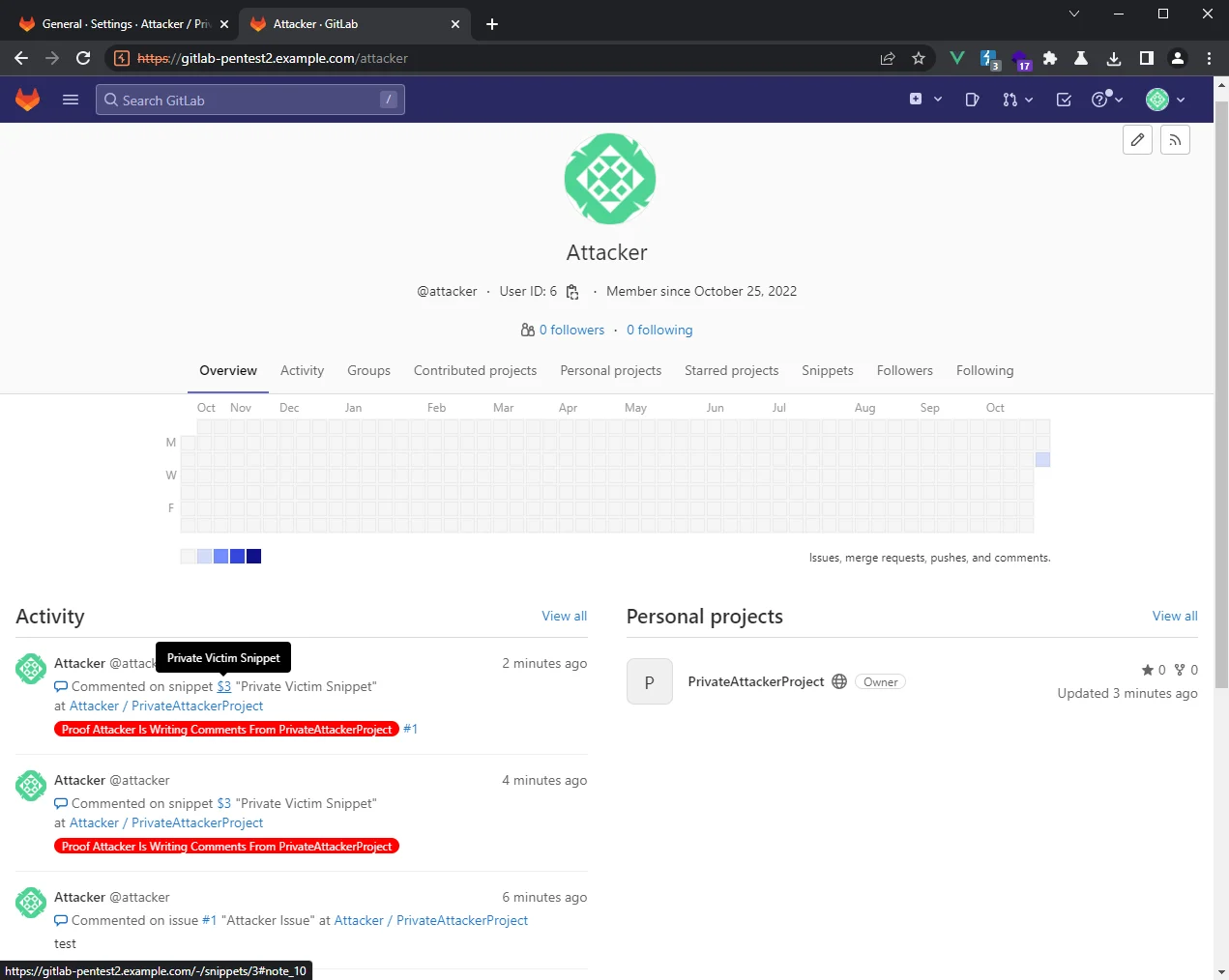
If the victim refreshes the snippet they will see a comment from the attacker. If the attacker visits their profile page (ie. https://gitlab-pentest2.example.com/attacker) and views activity, they will confirm if they reached the comment and can obtain the title of the private snippet.
Since snippet ids are sequential, an attacker could in theory create a snippet, then iterate from 1 to the snippet number of their own snippet and obtain the titles of all personal snippets.
The attacker is also able to update a note they have created and modify text and/or delete the note itself by intercepting the "Edit comment" and "Delete comment" requests within the issue and repeating the steps above. The attacker could delete their notes after collecting the titles for example to cover their tracks.
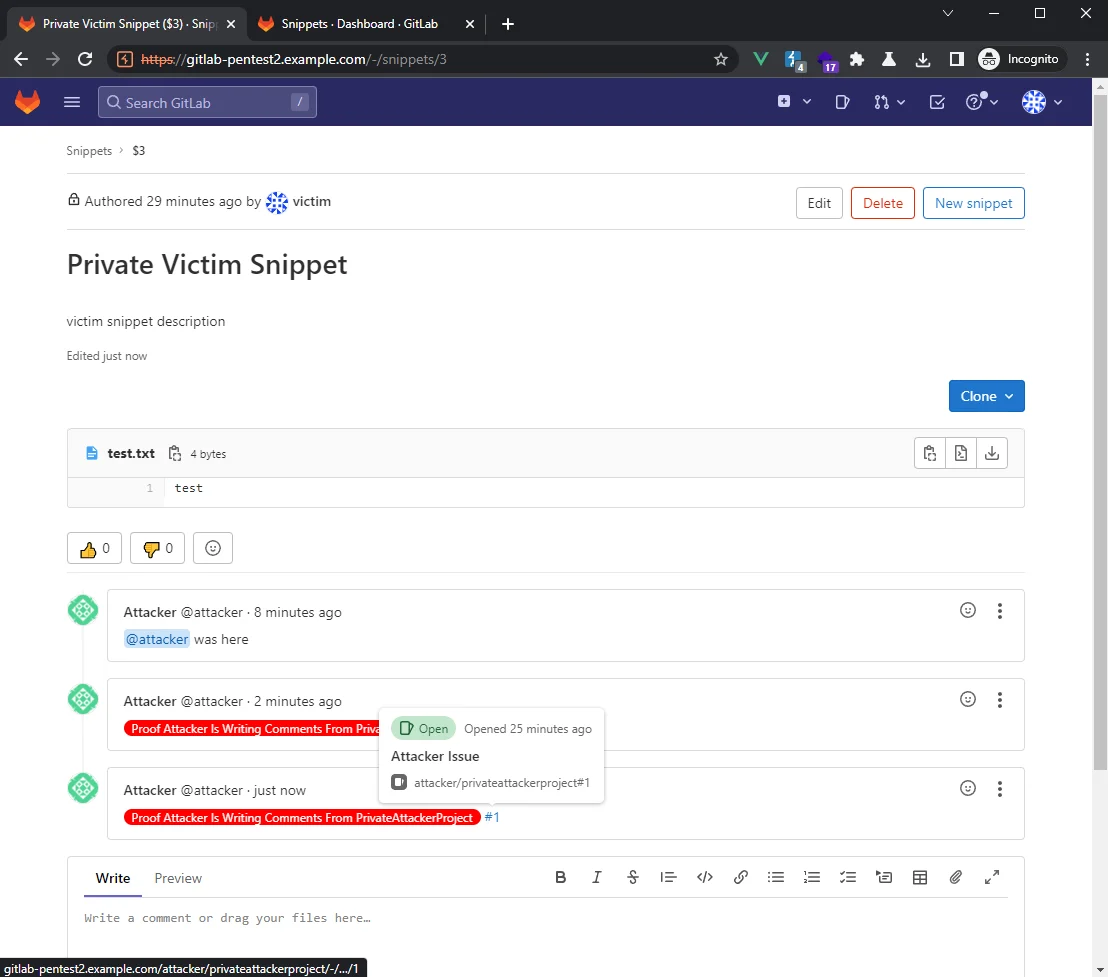
If the attacker makes their project public or internal and uses a label or references the issue in the comment, the victim will be able to see the label from the attacker's project. This helps provide further proof of a successful attack and may be used for social engineering.
Examples
This bug is also reproducible on GitLab.com Victim Snippet: https://gitlab.com/-/snippets/2436054 Attacker Issue: https://gitlab.com/Cryptopone/MyPrivateProject/-/issues/1
What is the current bug behavior?
When the attacker posts a note to the victim's private snippet, the attacker will be able to obtain the title of the snippet.
What is the expected correct behavior?
The server should return an error message when attempting to create a note for a personal snippet the attacker does not own.
Relevant logs and/or screenshots
Attacker viewing their activity page to obtain the title of the victim's private personal snippet.
Victim seeing notes that have been posted by an attacker. Note the linked issue links back to the attacker's project where they conducted the attack.
Output of checks
This bug happens on GitLab.com)
Results of GitLab environment info
System information
System:         Ubuntu 20.04
Proxy:          no
Current User:   git
Using RVM:      no
Ruby Version:   2.7.5p203
Gem Version:    3.1.6
Bundler Version:2.3.15
Rake Version:   13.0.6
Redis Version:  6.2.7
Sidekiq Version:6.4.2
Go Version:     unknown

GitLab information
Version:        15.5.1-ee
Revision:       7344dd2631a
Directory:      /opt/gitlab/embedded/service/gitlab-rails
DB Adapter:     PostgreSQL
DB Version:     12.10
URL:            https://gitlab-pentest2.example.com
HTTP Clone URL: https://gitlab-pentest2.example.com/some-group/some-project.git
SSH Clone URL:  [email protected]:some-group/some-project.git
Elasticsearch:  no
Geo:            no
Using LDAP:     no
Using Omniauth: yes
Omniauth Providers:

GitLab Shell
Version:        14.12.0
Repository storage paths:
- default:      /var/opt/gitlab/git-data/repositories
GitLab Shell path:              /opt/gitlab/embedded/service/gitlab-shell
Impact
When the attacker posts a note to the victim's private snippet, the attacker will be able to obtain the title of the snippet.
If the attacker makes their project public or internal and creates a note with a label or references to an issue in the comment, the victim will be able to see the label from the attacker's project. This could be used as a social engineering vector to obtain the file contents of a snippet (or simply scare the victim into thinking the snippet is public).
Context
GitLab hosts personal snippets: small pieces of text or files that a user can keep private, internal or public. A personal snippet belongs to a single user rather than to a project, and it can carry notes (comments) in the same way issues and merge requests do. The report looks at the endpoint that creates, edits and deletes those notes when they are attached to a project resource, and at what happens when the noteable_type is changed to point at a personal snippet instead.
The researcher tested against a self-hosted instance and confirmed the same behaviour on GitLab.com. The disclosed report is rated medium (CVSS 5.4), classified as an insecure direct object reference, and was paid a bounty of 1730.00 USD.
Setup
Two accounts are needed: an attacker and a victim. The attacker also needs a private project of their own, because the note requests are sent under that project's path. Burp Suite is used to intercept and replay the requests.
The self-hosted environment reported by the researcher:
System information
System:         Ubuntu 20.04
Proxy:          no
Current User:   git
Using RVM:      no
Ruby Version:   2.7.5p203
Gem Version:    3.1.6
Bundler Version:2.3.15
Rake Version:   13.0.6
Redis Version:  6.2.7
Sidekiq Version:6.4.2
Go Version:     unknown

GitLab information
Version:        15.5.1-ee
Revision:       7344dd2631a
Directory:      /opt/gitlab/embedded/service/gitlab-rails
DB Adapter:     PostgreSQL
DB Version:     12.10
URL:            https://gitlab-pentest2.example.com
HTTP Clone URL: https://gitlab-pentest2.example.com/some-group/some-project.git
SSH Clone URL:  [redacted]:some-group/some-project.git
Elasticsearch:  no
Geo:            no
Using LDAP:     no
Using Omniauth: yes
Omniauth Providers:

GitLab Shell
Version:        14.12.0
Repository storage paths:
- default:      /var/opt/gitlab/git-data/repositories
GitLab Shell path:              /opt/gitlab/embedded/service/gitlab-shell
Finding it
The researcher focused on app/finders/notes_finder.rb, specifically the method that resolves which objects a note may be attached to for a given noteable_type:
  def noteables_for_type(noteable_type)
    case noteable_type
    when "issue"
      IssuesFinder.new(@current_user, project_id: @project.id).execute # rubocop: disable CodeReuse/Finder
    when "merge_request"
      MergeRequestsFinder.new(@current_user, project_id: @project.id).execute # rubocop: disable CodeReuse/Finder
    when "snippet", "project_snippet"
      SnippetsFinder.new(@current_user, project: @project).execute # rubocop: disable CodeReuse/Finder
    when "personal_snippet"
      PersonalSnippet.all
    else
      raise "invalid target_type '#{noteable_type}'"
    end
  end
The issue and merge request branches scope the lookup to @project.id, and the snippet branches scope it to @project. The personal_snippet branch does not: it returns PersonalSnippet.all. The researcher's reasoning is that by changing the POST parameter noteable_type from issue to personal_snippet, the server skips the project check when creating the note, and the comment ends up on the victim's personal snippet.
Exploitation
Step 1: create the victim's private snippet
- Log in and navigate to
https://gitlab-instance.example.com/dashboard/snippets, then click "New snippet". - Set the title to "Private Victim Snippet" and supply a filename (for example
test-victim-file.txt) with contentstest file contents. - Set the visibility level to "Private" and click "Create Snippet".
- Note the snippet ID from the URL bar. This is
VICTIM_SNIPPETID, which the attacker needs.
Step 2: create the attacker's project and issue
- Log in as the attacker and navigate to
https://gitlab-instance.example.com/dashboard/projects, then create a new private project (the researcher named theirsPrivateAttackerProject). - Create a new issue (the researcher used the title "Attacker Issue").
- Open the issue, for example
https://gitlab-instance.example.com/attacker/privateattackerproject/-/issues/1. - Scroll to "Activity" and create a new note. The researcher used the text
@attacker was here.
Step 3: capture the note creation request
Prepare Burp Suite to intercept, then click "Comment". The request of interest looks like /attacker/privateattackerproject/notes?target_id=6&target_type=issue, with a body like:
{"note":{"noteable_type":"Issue","noteable_id":6,"internal":false,"note":"@attacker was here"}}
Send the intercepted POST request to Burp Repeater for easier testing.
Step 4: retarget the request to the victim's snippet
- Change
target_type=issuetotarget_type=personal_snippetin the query string. - Change
target_id=6totarget_id=VICTIM_SNIPPETID, using the ID generated for the victim's snippet.
The request should now look similar to:
POST /attacker/privateattackerproject/notes?target_id=VICTIM_SNIPPETID&target_type=personal_snippet HTTP/2
Send it and review the response: a new note is created under the private snippet.
Step 5: edit the note
When the attacker creates the note, an id value is returned in the response. The victim can also obtain it by copying the link to the note, for example https://gitlab-pentest2.example.com/-/snippets/3#note_7.
- Have the attacker create a new note within their issue, then edit or delete it and intercept the request in Burp Suite.
- Take the original edit request:
PUT /attacker/privateattackerproject/notes/8 HTTP/2
Host: gitlab-pentest2.example.com
<Rest of headers>

{"target_type":"issue","target_id":7,"note":{"note":"test2"}}
- Modify the body so that
"target_type"is"personal_snippet"and"target_id"isVICTIM_SNIPPETID:
PUT /attacker/privateattackerproject/notes/8 HTTP/2
Host: gitlab-pentest2.example.com
<Rest of headers>

{"target_type":"personal_snippet","target_id":3,"note":{"note":"test2"}}
Step 6: delete the note
- Take the original delete request:
DELETE /attacker/privateattackerproject/notes/8 HTTP/2
Host: gitlab-pentest2.example.com
<Rest of headers>
- Update the ID in the request to point to the note ID on the personal snippet. The attacker must be the owner of the note.
DELETE /attacker/privateattackerproject/notes/7 HTTP/2
Host: gitlab-pentest2.example.com
<Rest of headers>
Root cause
The personal_snippet branch of noteables_for_type returns PersonalSnippet.all instead of restricting the lookup to snippets the current user is allowed to see, as the issue, merge request and project snippet branches do with their project scoping. The note creation path therefore accepts a target_id pointing at any personal snippet, including a private one owned by another user, and the note is written against it. The attacker, as the owner of the note they just created, can also modify or remove it by retargeting the edit and delete requests.
Impact
When the attacker posts a note to the victim's private snippet, the attacker can obtain the title of the snippet. The victim, on refreshing the snippet, sees a comment from the attacker.
The attacker's activity page shows the note and thereby the title of the victim's private personal snippet.
The victim sees the notes posted by the attacker; the linked issue points back to the attacker's project where the attack was carried out.
Because snippet IDs are sequential, an attacker could in theory create a snippet and then iterate from 1 up to their own snippet's number to obtain the titles of all personal snippets.
The attacker can also update a note they created, changing its text, or delete it, by intercepting the "Edit comment" and "Delete comment" requests within the issue and repeating the steps above. Deleting the notes after collecting titles, for example, would cover their tracks.
If the attacker makes their project public or internal and uses a label or references the issue in the comment, the victim can see the label from the attacker's project. This provides further proof of a successful attack and may be used for social engineering, for instance to obtain the file contents of a snippet or to scare the victim into thinking the snippet is public.
The researcher also reproduced the bug on GitLab.com, with a victim snippet at https://gitlab.com/-/snippets/2436054 and an attacker issue at https://gitlab.com/Cryptopone/MyPrivateProject/-/issues/1.
Fix
The expected behaviour, as stated in the report, is that the server returns an error message when attempting to create a note for a personal snippet the attacker does not own. The report does not describe the change that was made.
Variants to test
- Try other values of
noteable_typeon the same endpoint and check whether any branch resolves objects without a project or ownership scope. A positive result is a note appearing on an object the attacker cannot otherwise access. - Apply the same retargeting to the edit and delete requests, changing
target_typeandtarget_idin the body. A positive result is a note on a foreign object being modified or removed. - On other GitLab-style note endpoints, look for finder methods that return a global relation (such as
Model.all) rather than one scoped to the current user or project. A positive result is a note created against an object outside the attacker's projects.
Hunting notes
This kind of bug tends to hide in polymorphic endpoints where a type parameter selects which finder runs, and where one branch of the type switch is written differently from the others. During recon, watch for request parameters such as target_type and target_id that are accepted from the client, and compare how each type value is handled. The researcher demonstrated impact by showing the leaked title on the attacker's own activity page and the note visible to the victim, and by noting that sequential IDs allow enumeration of titles across all personal snippets.
What happened, in plain words
GitLab is a website where people store code and text. One of its features is the snippet: a small piece of text or a file that a user can save. A snippet can be private (only you see it), internal (people on your GitLab instance see it) or public (anyone sees it). A personal snippet belongs to one person, not to a project. Like issues and merge requests, a snippet can carry notes, which are just comments.
Normally, when you write a comment on something, the website checks that the thing belongs to you or to a project you can access. In this report, the researcher found that one specific kind of comment request skips that check. By changing one word in the request, an attacker can post a comment onto a stranger's private snippet. The comment shows up on the attacker's own activity page, and that page displays the snippet's title. So the attacker learns the title of a private snippet they should never have seen. The attacker can also edit and delete the comment afterwards.
The report was rated medium severity (CVSS 5.4), classified as an insecure direct object reference (IDOR), and paid a bounty of 1730.00 USD. The researcher tested on a self-hosted GitLab instance and confirmed the same behaviour on GitLab.com.
A few words before we start, because they come up constantly:
- A request is the message your browser sends to a website when you click something. It has a method (like GET to read, POST to create, PUT to change, DELETE to remove), a path (which page or feature), sometimes a query string (extra values after a
?), and sometimes a body (data sent along, often in JSON format). - An endpoint is the address on the server that handles a particular kind of request. Think of it as a specific counter in a large office: you walk to the right counter to get a specific service.
- JSON is a way of writing data as text, using curly braces and
"key": valuepairs. It is how many websites send structured data back and forth. - Burp Suite is a tool that sits between your browser and the website. It lets you pause a request before it leaves, look at it, change it, and send it again. Burp Repeater is the part of Burp that lets you resend the same request over and over with small changes.
- An ID is a number the website gives to each object (each snippet, each comment, each issue). IDs are often sequential: 1, 2, 3, and so on.
- IDOR means the website takes an ID from the user and uses it to fetch an object without checking that this user is allowed to see that object. It is like a hotel giving you a key card that opens any room whose number you type in.
Setup
You need two accounts: one playing the attacker, one playing the victim. The attacker also needs a private project of their own, because the comment requests are sent under that project's address. Burp Suite is used to pause and replay the requests.
The researcher's self-hosted test environment reported these details:
System information
System:         Ubuntu 20.04
Proxy:          no
Current User:   git
Using RVM:      no
Ruby Version:   2.7.5p203
Gem Version:    3.1.6
Bundler Version:2.3.15
Rake Version:   13.0.6
Redis Version:  6.2.7
Sidekiq Version:6.4.2
Go Version:     unknown

GitLab information
Version:        15.5.1-ee
Revision:       7344dd2631a
Directory:      /opt/gitlab/embedded/service/gitlab-rails
DB Adapter:     PostgreSQL
DB Version:     12.10
URL:            https://gitlab-pentest2.example.com
HTTP Clone URL: https://gitlab-pentest2.example.com/some-group/some-project.git
SSH Clone URL:  [redacted]:some-group/some-project.git
Elasticsearch:  no
Geo:            no
Using LDAP:     no
Using Omniauth: yes
Omniauth Providers:

GitLab Shell
Version:        14.12.0
Repository storage paths:
- default:      /var/opt/gitlab/git-data/repositories
GitLab Shell path:              /opt/gitlab/embedded/service/gitlab-shell
This block is just a printout of what software the server runs. The System information part lists the operating system (Ubuntu 20.04) and the versions of the tools GitLab depends on, such as Ruby (the programming language GitLab is written in), Redis and Sidekiq (background job tools). The GitLab information part lists the GitLab version (15.5.1-ee), the database (PostgreSQL 12.10) and the instance's web address. The GitLab Shell part lists the component that handles Git over SSH. None of this is needed to understand the bug; it is there so anyone reproducing the test knows what was running.
Finding it
The researcher looked at a file in GitLab's source code called app/finders/notes_finder.rb. A finder is a piece of code whose job is to look up objects in the database. This particular finder decides which objects a note may be attached to, based on a value called noteable_type. The relevant method is:
  def noteables_for_type(noteable_type)
    case noteable_type
    when "issue"
      IssuesFinder.new(@current_user, project_id: @project.id).execute # rubocop: disable CodeReuse/Finder
    when "merge_request"
      MergeRequestsFinder.new(@current_user, project_id: @project.id).execute # rubocop: disable CodeReuse/Finder
    when "snippet", "project_snippet"
      SnippetsFinder.new(@current_user, project: @project).execute # rubocop: disable CodeReuse/Finder
    when "personal_snippet"
      PersonalSnippet.all
    else
      raise "invalid target_type '#{noteable_type}'"
    end
  end
Line by line:
def noteables_for_type(noteable_type)declares a method that takes one input,noteable_type, which is a word describing what kind of thing the note is being attached to.case noteable_typestarts a list of possibilities, like a switchboard: depending on the word, a different branch runs.when "issue"handles the case where the note is on an issue. It callsIssuesFinder.new(@current_user, project_id: @project.id).execute, which means: look up issues, but only those in the current project (@project.id) and only those the current user (@current_user) is allowed to see. The# rubocop: disable CodeReuse/Findercomment is just a note to a code-checking tool, not part of the logic.when "merge_request"does the same for merge requests, again restricted to the current project.when "snippet", "project_snippet"does the same for project snippets, restricted to the current project (project: @project).when "personal_snippet"is the odd one out. It returnsPersonalSnippet.all, which means every personal snippet in the whole database, with no restriction to the current user or project.elsecatches any other word and raises an error saying the type is invalid.
The issue, merge request and project snippet branches all narrow the lookup to the current project. The personal snippet branch does not narrow anything. The researcher's reasoning is that if you change the noteable_type value in the request from issue to personal_snippet, the server skips the project check when creating the note, and the comment ends up on the victim's personal snippet.
Exploitation
Step 1: create the victim's private snippet
- Log in as the victim and go to
https://gitlab-instance.example.com/dashboard/snippets, then click "New snippet". - Set the title to "Private Victim Snippet" and give it a filename (for example
test-victim-file.txt) with contentstest file contents. - Set the visibility level to "Private" and click "Create Snippet".
- Look at the address bar and note the snippet's ID. This number is called
VICTIM_SNIPPETIDfrom now on, and the attacker needs it.
Why this step: the attacker needs a target. A private snippet owned by someone else is exactly the kind of object the attacker should not be able to touch.
Step 2: create the attacker's project and issue
- Log in as the attacker, go to
https://gitlab-instance.example.com/dashboard/projects, and create a new private project (the researcher named theirsPrivateAttackerProject). - Create a new issue (the researcher used the title "Attacker Issue").
- Open the issue, for example
https://gitlab-instance.example.com/attacker/privateattackerproject/-/issues/1. - Scroll to "Activity" and write a new note. The researcher used the text
@attacker was here.
Why this step: the comment request is sent under the attacker's own project address. The attacker needs a legitimate comment of their own to capture, so they can then change it into the malicious one.
Step 3: capture the note creation request
Set Burp Suite to intercept traffic, then click "Comment". The request of interest looks like /attacker/privateattackerproject/notes?target_id=6&target_type=issue, with a body like:
{"note":{"noteable_type":"Issue","noteable_id":6,"internal":false,"note":"@attacker was here"}}
What this shows:
- The path
/attacker/privateattackerproject/notesis the endpoint that creates notes, under the attacker's project. - The query string
?target_id=6&target_type=issuesays: attach the note to object number 6, which is an issue. - The body is JSON.
"noteable_type":"Issue"says the target is an issue."noteable_id":6says which issue (number 6)."internal":falsemeans it is a normal comment, not an internal one."note":"@attacker was here"is the text of the comment.
Send the intercepted POST request to Burp Repeater so you can resend it with changes.
Step 4: retarget the request to the victim's snippet
- In the query string, change
target_type=issuetotarget_type=personal_snippet. - Change
target_id=6totarget_id=VICTIM_SNIPPETID, using the ID you noted for the victim's snippet.
The request should now look similar to:
POST /attacker/privateattackerproject/notes?target_id=VICTIM_SNIPPETID&target_type=personal_snippet HTTP/2
Line by line:
POSTis the method used to create something new./attacker/privateattackerproject/notesis still the attacker's own project path, so the request looks like it belongs to the attacker.target_id=VICTIM_SNIPPETIDnow points at the victim's snippet instead of the attacker's issue.target_type=personal_snippettells the server to use the personal snippet branch of the finder, the one that does not check the project.HTTP/2is just the version of the web protocol being used.
Send it and look at the response: a new note is created under the private snippet.
Step 5: edit the note
When the attacker creates the note, the server returns an id value in the response. The victim can also find it by copying the link to the note, for example https://gitlab-pentest2.example.com/-/snippets/3#note_7 (the #note_7 part is the note's ID).
- Have the attacker create a new note inside their own issue, then edit or delete it and intercept the request in Burp Suite.
- Take the original edit request:
PUT /attacker/privateattackerproject/notes/8 HTTP/2
Host: gitlab-pentest2.example.com
<Rest of headers>

{"target_type":"issue","target_id":7,"note":{"note":"test2"}}
Line by line:
PUTis the method used to change an existing object./attacker/privateattackerproject/notes/8means: change note number 8, which lives under the attacker's project.Host: gitlab-pentest2.example.comnames the server being talked to.<Rest of headers>is a placeholder for the other headers (cookies, content type and so on) that the browser sends automatically.- The blank line separates the headers from the body.
- The body says: the target is an issue (
"target_type":"issue"), specifically issue 7 ("target_id":7), and the new note text istest2.
- Change the body so that
"target_type"is"personal_snippet"and"target_id"isVICTIM_SNIPPETID:
PUT /attacker/privateattackerproject/notes/8 HTTP/2
Host: gitlab-pentest2.example.com
<Rest of headers>

{"target_type":"personal_snippet","target_id":3,"note":{"note":"test2"}}
Here the only changes are the two values in the body: the type is now personal_snippet and the ID is 3 (the victim's snippet ID in this example). The note number in the path stays the same, because the attacker still owns that note and is allowed to edit it. The trick is that the note is now being re-pointed at the victim's snippet.
Step 6: delete the note
- Take the original delete request:
DELETE /attacker/privateattackerproject/notes/8 HTTP/2
Host: gitlab-pentest2.example.com
<Rest of headers>
Line by line:
DELETEis the method used to remove something./attacker/privateattackerproject/notes/8means: delete note number 8 under the attacker's project.- The
Hostheader and<Rest of headers>placeholder work as before. There is no body, because a delete request does not need one.
- Change the ID in the request to point at the note ID on the personal snippet. The attacker must be the owner of the note.
DELETE /attacker/privateattackerproject/notes/7 HTTP/2
Host: gitlab-pentest2.example.com
<Rest of headers>
Here the note number in the path is changed from 8 to 7, which is the note the attacker created on the victim's snippet. Because the attacker owns that note, the server lets them delete it.
Root cause
The personal_snippet branch of noteables_for_type returns PersonalSnippet.all instead of restricting the lookup to snippets the current user is allowed to see, the way the issue, merge request and project snippet branches restrict theirs to the current project. The note creation path therefore accepts a target_id pointing at any personal snippet, including a private one owned by another user, and the note is written against it. The attacker, as the owner of the note they just created, can also modify or remove it by retargeting the edit and delete requests.
In everyday terms: the front desk is supposed to check that the room number you give belongs to you before handing over a key. For most room types it does. For one room type it just hands over the key to whatever number you say.
Impact
When the attacker posts a note to the victim's private snippet, the attacker can obtain the title of the snippet. The victim, on refreshing the snippet, sees a comment from the attacker.
The attacker's activity page shows the note and thereby the title of the victim's private personal snippet.
The victim sees the notes posted by the attacker; the linked issue points back to the attacker's project where the attack was carried out.
Because snippet IDs are sequential, an attacker could in theory create a snippet and then iterate from 1 up to their own snippet's number to obtain the titles of all personal snippets. Sequential IDs are like house numbers on a street: if you know one, you can guess the neighbours. Here, the attacker can simply try every number in turn.
The attacker can also update a note they created, changing its text, or delete it, by intercepting the "Edit comment" and "Delete comment" requests within the issue and repeating the steps above. Deleting the notes after collecting titles, for example, would cover their tracks.
If the attacker makes their project public or internal and uses a label or references the issue in the comment, the victim can see the label from the attacker's project. This provides further proof of a successful attack and may be used for social engineering, which means manipulating a person rather than a machine: for instance to obtain the file contents of a snippet, or to scare the victim into thinking the snippet is public.
The researcher also reproduced the bug on GitLab.com, with a victim snippet at https://gitlab.com/-/snippets/2436054 and an attacker issue at https://gitlab.com/Cryptopone/MyPrivateProject/-/issues/1.
Fix
The expected behaviour, as stated in the report, is that the server returns an error message when attempting to create a note for a personal snippet the attacker does not own. The report does not describe the change that was made.
Variants to test
- Try other values of
noteable_typeon the same endpoint and check whether any branch resolves objects without a project or ownership scope. A positive result is a note appearing on an object the attacker cannot otherwise access. - Apply the same retargeting to the edit and delete requests, changing
target_typeandtarget_idin the body. A positive result is a note on a foreign object being modified or removed. - On other GitLab-style note endpoints, look for finder methods that return a global relation (such as
Model.all) rather than one scoped to the current user or project. A positive result is a note created against an object outside the attacker's projects.
Hunting notes
This kind of bug tends to hide in polymorphic endpoints, meaning endpoints that accept several different object types through one parameter, where a type parameter selects which finder runs, and where one branch of the type switch is written differently from the others. During recon (the early phase of looking around a target), watch for request parameters such as target_type and target_id that are accepted from the client, and compare how each type value is handled. The researcher demonstrated impact by showing the leaked title on the attacker's own activity page and the note visible to the victim, and by noting that sequential IDs allow enumeration of titles across all personal snippets.
Glossary
- API: a set of addresses and rules a website exposes so that programs (and tools like Burp) can talk to it directly, without going through the normal pages.
- Body: the part of a request that carries data, often in JSON, separate from the address and headers.
- Burp Repeater: the part of Burp Suite that lets you resend a captured request many times with small edits.
- Burp Suite: a tool that sits between your browser and a website so you can pause, inspect, change and resend requests.
- Bounty: money paid by a company to a researcher who reports a valid security bug.
- CVSS: a standard scoring system for the severity of a security bug, from 0 to 10.
- DELETE: the request method used to remove something.
- Endpoint: the specific address on a server that handles a particular kind of request.
- Enumeration: trying values one after another (for example IDs 1, 2, 3) to discover what exists.
- Finder: a piece of code whose job is to look up objects in a database.
- GET: the request method used to read something.
- Header: extra information attached to a request, such as the host name or cookies.
- Host: the header that names the server a request is being sent to.
- HTTP/2: a version of the web protocol used between browsers and servers.
- ID: a number the website gives to each object so it can be referred to.
- IDOR (insecure direct object reference): a bug where the website takes an ID from the user and fetches the object without checking that this user is allowed to see it.
- Internal (visibility): a visibility level where people on the same GitLab instance can see the object.
- Issue: a GitLab item used to track a task or bug, which can carry comments.
- JSON: a text format for structured data, using curly braces and
"key": valuepairs. - Merge request: a GitLab item used to propose and discuss changes to code.
- Method: the verb of a request (GET, POST, PUT, DELETE) saying what kind of action is wanted.
- Note: a comment attached to an issue, merge request or snippet.
- Noteable type: the word telling GitLab what kind of object a note is attached to (issue, merge request, snippet, personal snippet).
- Path: the part of a request address that names the feature, for example
/attacker/privateattackerproject/notes. - Personal snippet: a snippet that belongs to one user rather than to a project.
- Polymorphic endpoint: an endpoint that accepts several different object types through one parameter.
- POST: the request method used to create something new.
- Private (visibility): a visibility level where only the owner (and people explicitly allowed) can see the object.
- Project: a container in GitLab holding code, issues and other items, with its own members and permissions.
- Public (visibility): a visibility level where anyone can see the object.
- PUT: the request method used to change an existing object.
- Query string: the extra values after a
?in an address, such astarget_id=6&target_type=issue. - Recon: the early phase of looking around a target to find what it exposes.
- Request: the message your browser (or a tool) sends to a website asking it to do something.
- Response: the message the website sends back.
- Sequential IDs: IDs that go up by one each time, so knowing one lets you guess the others.
- Snippet: a small piece of text or a file saved on GitLab.
- Social engineering: manipulating a person rather than a machine, for example to get them to reveal something or to scare them.
- Source code: the human-written instructions that make up a program.
- Visibility level: the setting that decides who can see a snippet or project (private, internal or public).


