HTMLi in new gitlab application Oauth page (/oauth/authorize) leading to ATO
The GitLab OAuth authorization page rendered the application name without sanitisation, allowing HTML and JavaScript injection. An attacker could create a malicious OAuth application and trick a victim into visiting the authorization URL, causing stored XSS where CSP is absent.

GitLab
Originally disclosed on GitLab
- Fixed in 3 months
- Disclosed after 3 months
⚠️ Please read the process on how to fix security issues before starting to work on the issue. Vulnerabilities must be fixed in a security mirror.
HackerOne report #2567533 by joaxcar on 2024-06-20, assigned to @cmaxim:
Report | Attachments | How To Reproduce
Report
Summary
There is an HTML injection and XSS in the new https://gitlab.com/oauth/authorize page.
Sorry for the sparse report. Found this when I was supposed to go to bed. The XSS outlined here will only trigger without CSP but I hope to be able to bypass it when I wake up
Steps to reproduce
- Go to https://gitlab.com/oauth/applications
- Create a new application with the name
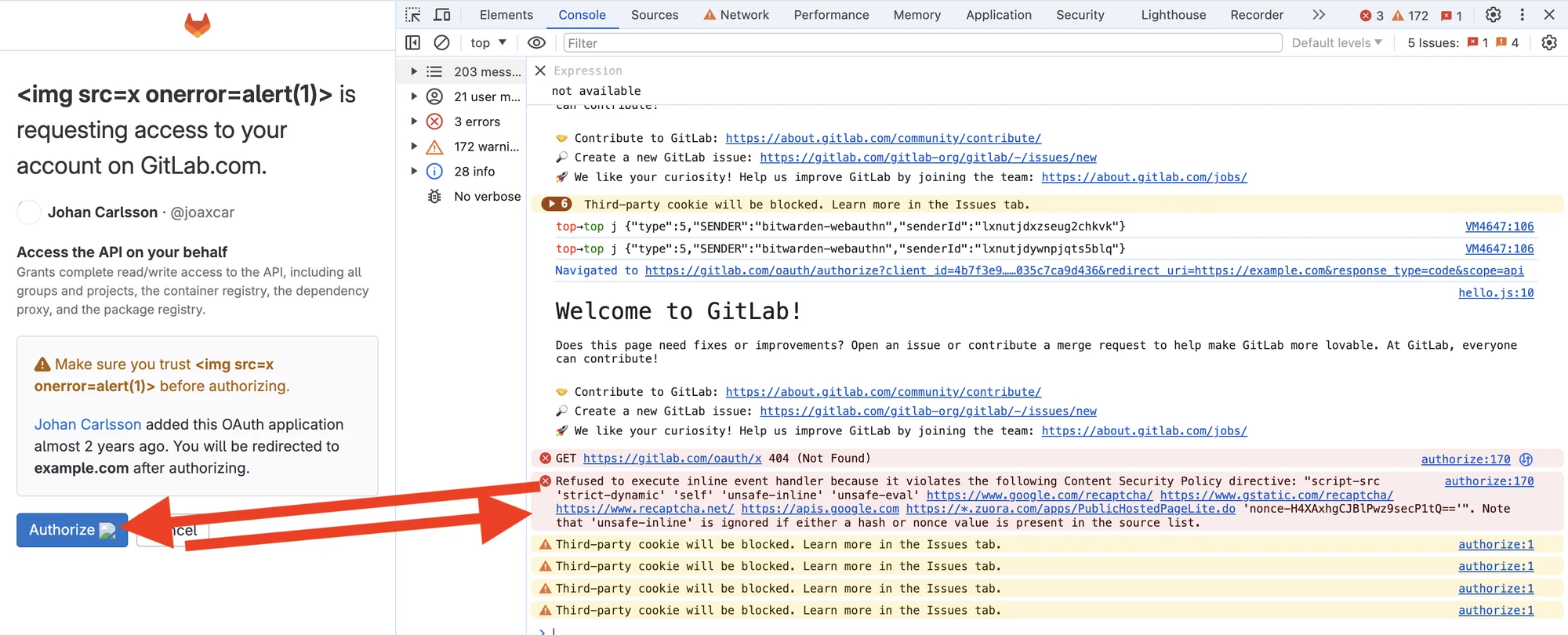
<img src=x onerror=alert(1)>add the other fields. Redirect URL ashttps://example.comand scope asapi - Click create, take note of the application ID
- Now visit (replace APP ID)
https://gitlab.com/oauth/authorize?client_id=APP_ID&redirect_uri=https://example.com&response_type=code&scope=api
Open devtools and see the XSS blocked by CSP on gitlab.com, firing on self hosted
Impact
Stored XSS
What is the current bug behavior?
Application name rendered without sanitization
What is the expected correct behavior?
Name should be sanitized.
Output of checks
This bug happens on GitLab.com
Impact
Stored XSS
Attachments
Warning: Attachments received through HackerOne, please exercise caution!
How To Reproduce
Please add reproducibility information to this section:
Not written yet. The AI write-up for this report has not been written yet. The Original tab links to the source.
How it worked
Root cause
The application name was rendered without sanitisation on the OAuth authorization page.
What the attacker needed
Attacker can create an OAuth application; victim visits a crafted OAuth authorize URL; CSP must be absent or bypassed
The fix
The application name should be sanitised before rendering.
How it was found
- Go to the OAuth applications page and create a new application.
- Set the application name to an HTML payload that triggers an alert, and set the redirect URL and scope.
- After creating the application, note its ID.
- Visit the OAuth authorize URL with the application ID and parameters.
- Observe the XSS: blocked by CSP on gitlab.com but firing on self-hosted instances.
Explained by bugbounty.wiki with AI from the original and checked against quotes from it; it can still be wrong. Read the original before relying on a detail.
Not written yet. The AI write-up for this report has not been written yet. The Original tab links to the source.
When you create an OAuth application on GitLab, you give it a name. That name was shown on the authorization page without being cleaned, so if the name contained HTML code, the browser would run it as part of the page. This lets an attacker run their own JavaScript in the victim's browser when the victim visits a specially crafted link, but only where CSP is absent.
What is XSS?
Script an attacker supplies runs in another user's browser, on the target's origin, with that user's session.



