Import project from Github matching branch protection rules with unverified email allowing developer to impersonate and bypass protected branch rules
When importing a GitHub project into GitLab, branch protection rules are imported and GitHub users allowed to bypass pull requests are mapped to GitLab users by email. GitLab maps unverified email addresses, so a malicious developer can add a legitimate GitHub user's email to their GitLab account and gain push access to the protected branch.

GitLab
Originally disclosed on GitLab
- Fixed in 40 days
- Disclosed after 40 days
⚠️ Please read the process on how to fix security issues before starting to work on the issue. Vulnerabilities must be fixed in a security mirror.
HackerOne report #1874671 by vaib25vicky on 2023-02-15, assigned to @cmaxim:
Report | Attachments | How To Reproduce
Report
Summary
When we import Github project into Gitlab then branch protection rules of github are also imported.
They are defined as described in the documentation.(https://docs.gitlab.com/ee/user/project/import/github.html#branch-protection-rules-and-project-settings)
One of the rule is
"Require a pull request before merging - Allow specified actors to bypass required pull requests"
This rule in Gitlab adds users in the Allowed to push list of branch protection settings
It is done by mapping Github user email address to the Gitlab user email address.
The bug here is that Gitlab user unverified email address gets mapped to the Github user. This allows a malicious developer of the project to gain write access(allowed to push) to the protected branch.
This bug allows a malicious developer to add himself toAllowed to push list of branch protection settings by impersonating a legitimate Github user using unverified email address.
The attack scenario is like:
- Github repository has a branch protection rule "Require a pull request before merging - Allow specified actors to bypass required pull requests"
- Github user FOO is allowed to bypass required pull requests
- Gitlab user BAR adds FOO Github user email address to his Gitlab account.
This is an unverified email address.
- Gitlab owner imports Github repository, branch protection rule also gets imported.
- Gitlab user BAR gets mapped to the Github user FOO using unverified email address.
- Gitlab user BAR gains push access to the protected branch
PoC
Gives me your Github username, I will add you to my test organization so that you can import my test repository https://github.com/the-umm/supreme-bassoon
My test repository has following branch protection rule in placed
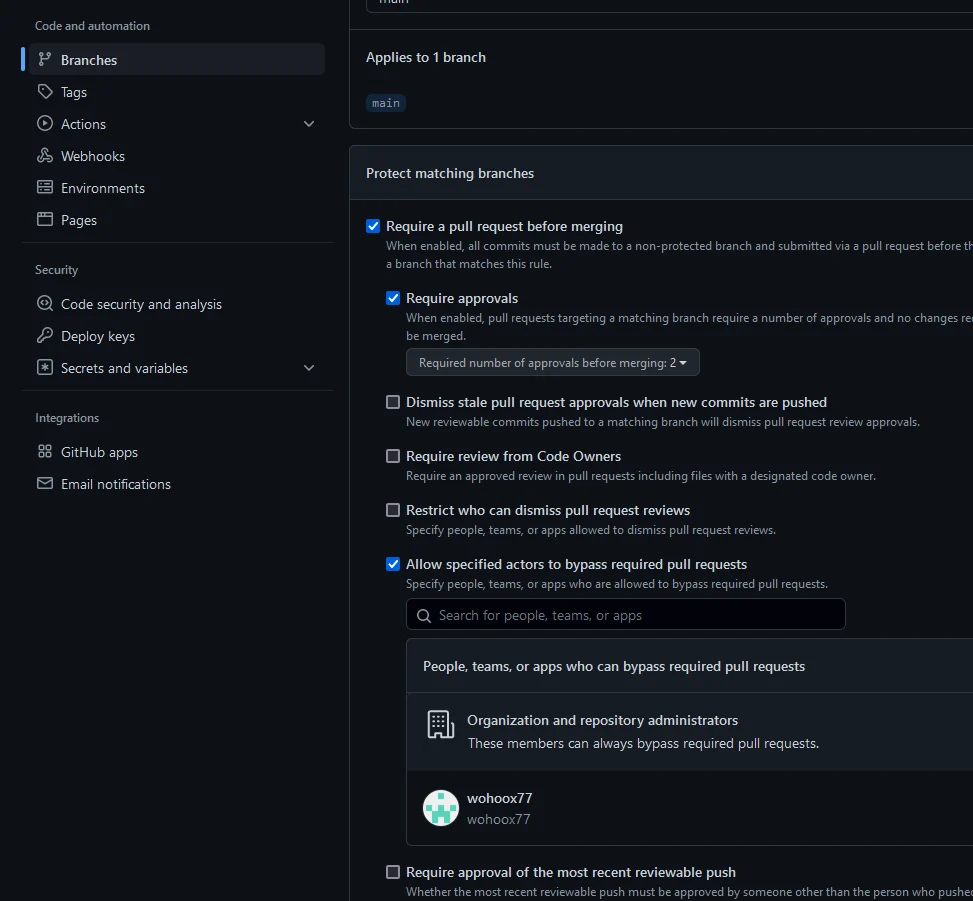
wohoox77 user has verified email address [email protected] in Github.
You need to do below steps in Gitlab.com
FOOis an owner and creates a new Gitlab group and opt for Ultimate trial from billing page- Lets say you have another developer role user
BARin your Group members BARadds email address[email protected]. This is a secondary and unverified email address in the account.FOOimports Github repository the-umm/supreme-bassoon and after repository is importedBARuser gains Allowed to push access to the protected branch. You can check it by going over gitlab protected branch page https://gitlab.com/<group-name>/<proj-name>/-/settings/repository
This shows that Gitlab mapped the unverified email address of the BAR user to the Github user wohoox77 and gives BAR access to the protected branch.
Video
Impact
This bug allows a malicious developer to add himself toAllowed to push list of branch protection settings by impersonating a legitimate Github user using unverified email address.
Attachments
Warning: Attachments received through HackerOne, please exercise caution!
How To Reproduce
Please add reproducibility information to this section:
Not written yet. The AI write-up for this report has not been written yet. The Original tab links to the source.
How it worked
Root cause
Likely the import process maps GitHub users to GitLab users by email without checking whether the email is verified.
Impact
A malicious developer could add themselves to the 'Allowed to push' list of branch protection settings by impersonating a legitimate GitHub user using an unverified email address, gaining push access to the protected branch.
What the attacker needed
GitLab Ultimate trial; Owner and developer roles in a GitLab group; GitHub repository with branch protection rule; Attacker knows a GitHub user's email
How it was found
- An owner creates a new GitLab group and starts an Ultimate trial.
- A developer user adds the GitHub user's email address as a secondary, unverified email in their GitLab account.
- The owner imports the GitHub repository with the branch protection rule.
- After import, the developer user gains 'Allowed to push' access to the protected branch.
Explained by bugbounty.wiki with AI from the original and checked against quotes from it; it can still be wrong. Read the original before relying on a detail.
Not written yet. The AI write-up for this report has not been written yet. The Original tab links to the source.
When you import a GitHub project into GitLab, GitLab copies over rules that control who can push to protected branches. One rule lets certain GitHub users bypass pull request requirements. GitLab tries to match those GitHub users to GitLab accounts by email address, but it also uses email addresses that have not been verified. So a developer can add someone else's email to their own GitLab account and be treated as that person, gaining push access to the protected branch.
What is Access control?
A user can do something their role should not allow: reach an admin function, act on a feature they have not paid for, or skip a permission check. IDOR is the special case where the object belongs to someone else.

