Inconsistent documentation for visibility of `time tracking report` of private projects
The time tracking report for issues in private projects was visible to users with the Guest role, even though documentation stated that at least the Reporter role was required. An attacker with a Guest account could view time estimates and spent time on private project issues.

GitLab
Originally disclosed on GitLab
- Fixed in 7 months
- Disclosed after 7 months
Per https://gitlab.com/gitlab-org/gitlab/-/issues/336535#note_633423449, we want to update the documentation to reflect that the Guest role can view the time tracking report. Original report included below for context
HackerOne report #1266959 by ashish_r_padelkar on 2021-07-17, assigned to GitLab Team:
Report | Attachments | How To Reproduce
Report
Summary
Hello,
As per this document https://docs.gitlab.com/ee/user/project/time_tracking.html#view-a-time-tracking-report , You must have at least the **Reporter** role for a project. to view time tracking report.
Also, as per this document https://docs.gitlab.com/ee/user/permissions.html guest users can only see time tracking report of public and internal projects and not private projects.
However, guest users can see time tracking report from all projects irrespective visibility set. ie. they can see from private projects too!. Looks like either this need documentation changes or proper permission check.
Steps to reproduce
- Create a private project .
- Create a public issue and add estimates and spend time in quick actions (in markdown editor) using below commands so that
time tracking reportgets generated for the issue.
    /estimate 1mo 2w 3d 4h 5m
    /spend 1mo 2w 3d 4h 1m
- Login as
Guestuser in this project and navigate to issue created above. - As per the documents referenced above, the
time tracking reportshouldn't be visible for this user as project is private. However, you can click on thetime tracking reportavailable on the right side bar of the issue! - You can see the time tracking report in popup!
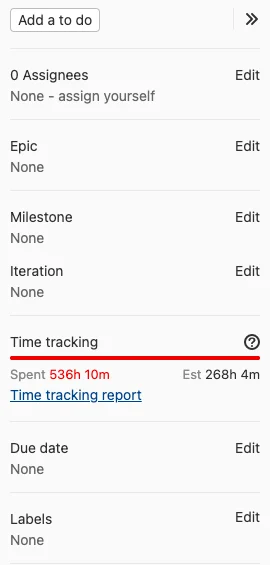
What is the current bug behavior?
Guest user can see time tracking report on issues from private projects too which is against the documentation!
What is the expected correct behavior?
Only reporters or higher role should be able to view this time tracking report in private project!
Output of checks
This bug happens on GitLab.com GitLab Enterprise Edition 14.1.0-pre 10813d3bc2b
Regards,
Ashish
Impact
Guest user can see time tracking report on issues from private projects too which is against the documentation!
Severity is set as per CVSS calculated on hackerone report
Attachments
Warning: Attachments received through HackerOne, please exercise caution!
How To Reproduce
Please add reproducibility information to this section:
Not written yet. The AI write-up for this report has not been written yet. The Original tab links to the source.
How it worked
Root cause
Likely the permission check for viewing the time tracking report did not enforce the documented role requirement for private projects.
Impact
A Guest user could view time tracking reports on issues from private projects, which is against the documentation.
What the attacker needed
A GitLab account with Guest role in a private project; a public issue with time tracking data
The fix
The documentation was updated to reflect that the Guest role can view the time tracking report.
How it was found
- Create a private project.
- Create a public issue and add estimates and spent time using quick actions so that a time tracking report is generated.
- Log in as a Guest user in the project and navigate to the issue.
- Click on the time tracking report in the right sidebar and see it in a popup.
Explained by bugbounty.wiki with AI from the original and checked against quotes from it; it can still be wrong. Read the original before relying on a detail.
Not written yet. The AI write-up for this report has not been written yet. The Original tab links to the source.
In GitLab, projects can be private, and users have roles like Guest or Reporter. The documentation said only Reporters and above should see time tracking reports on private projects, but Guests could see them too. This means someone with lower permissions could access information they were not supposed to see.
What is Access control?
A user can do something their role should not allow: reach an admin function, act on a feature they have not paid for, or skip a permission check. IDOR is the special case where the object belongs to someone else.

