Maintainer can change the visibility of Project and Group
A maintainer of a private project or group could change its visibility to public or internal by supplying a crafted visibility value that bypassed the permission check. This allowed a maintainer to expose private projects and groups without the required owner permission.

GitLab
Originally disclosed on GitLab
- Fixed in 3 months
- Disclosed after 3 months
HackerOne report #1536559 by suruli on 2022-04-10, assigned to GitLab Team:
Report | Attachments | How To Reproduce
Report
Hi, According to gitlab docs, api and web_ui, a maintainer of a project is restricted from changing its visibility. The check for user permission is done after making sure the new_visibility is different from current_visibilty level of the project.
###  gitlab-development-kit/gitlab/app/services/concerns/update_visibility_level.rb

def valid_visibility_level_change?(target, new_visibility)
    return true unless new_visibility

    new_visibility_level = Gitlab::VisibilityLevel.level_value(new_visibility)

    if new_visibility_level != target.visibility_level_value   #target.visibility_level_value is 0 for private projects and groups
      unless can?(current_user, :change_visibility_level, target) &&
          Gitlab::VisibilityLevel.allowed_for?(current_user, new_visibility_level)

        deny_visibility_level(target, new_visibility_level)
        return false
      end
    end

    true
 end
###  gitlab-development-kit/gitlab/lib/gitlab/visibility_level.rb

PRIVATE  = 0 unless const_defined?(:PRIVATE)
INTERNAL = 10 unless const_defined?(:INTERNAL)
PUBLIC   = 20 unless const_defined?(:PUBLIC)

 def string_options
        {
          'private'  => PRIVATE,
          'internal' => INTERNAL,
          'public'   => PUBLIC
        }
end

def level_value(level)
        return level.to_i if level.to_i.to_s == level.to_s && string_options.key(level.to_i)

        string_options[level] || PRIVATE
 end
The level_value method returns 0 (the value of PRIVATE) for any input except 10, 20, 'internal', 'public'. For a private project or group, passing the new_visibility as 20r to the method level_value will return 0 that bypasses the check for user permission and then '20r'.to_i is 20 (PUBLIC) will be assigned as project visibility.
Requirements:
- Two gitlab accounts (Eg, victim_account and attacker_account).
- Burp or similar.
Steps to reproduce
Victim:
- Login to victim_account and goto
New project>Create blank project - Give any
Project name. Make sureProject URLhas victim's username and clickCreate project
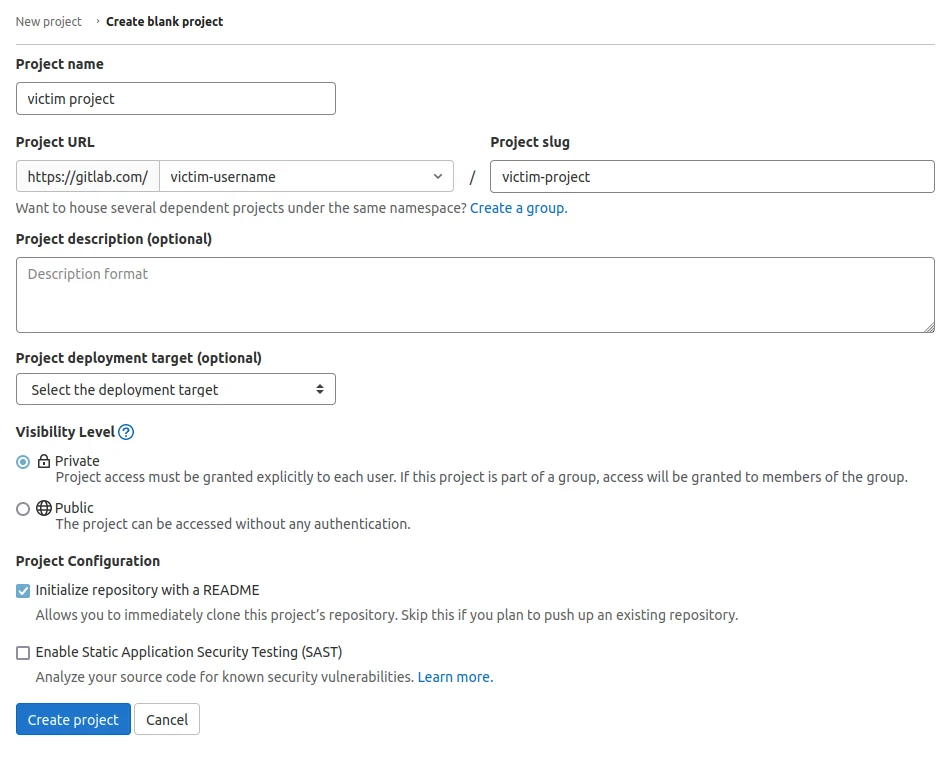
- Visit the created project and goto
Project Information>Membersfrom the side menu. Clickinvite members. - Enter the attacker_account's username or email address. Select the role
Maintainerand clickInvite.
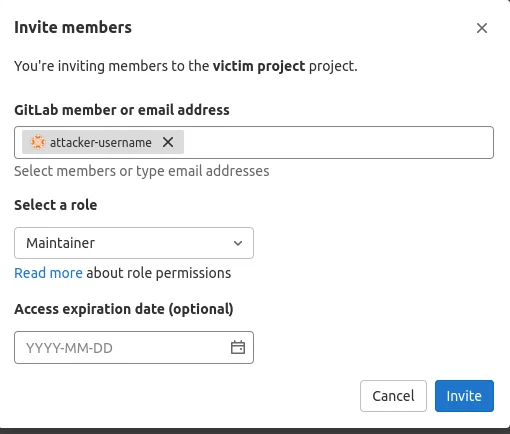
Attacker:
- Visit the victim's project from attacker_account.
- Goto
Settings>Generalfrom side menu. - Expand
Visibility, project features, permissionssection. - Turn the Burp intercept on and click
Save changesat the bottom of that section.

Example Request
POST /victim-namespace/victim-project-slug HTTP/2
.
.
.
.
.
-----------------------------31179005449602053611562110226
Content-Disposition: form-data; name="_method"

patch
-----------------------------31179005449602053611562110226
Content-Disposition: form-data; name="update_section"

js-shared-permissions
-----------------------------31179005449602053611562110226
Content-Disposition: form-data; name="project[request_access_enabled]"

true
-----------------------------31179005449602053611562110226
Content-Disposition: form-data; name="project[project_feature_attributes][issues_access_level]"

20
-----------------------------31179005449602053611562110226
.
.
.
-----------------------------31179005449602053611562110226--
- Add the following value to the request along with the form boundary and
Sendthe request.
Content-Disposition: form-data; name="project[visibility_level]"

20r
Other visibility levels can also be set by replacing the value 20r with following values.
current visibility > input > resulting visibility
private>20r>public
private>10r>internal
public > public > private
internal > internal > private
- Refresh the page to see the change of
Project visibility.
The same steps can be repeated for Groups as well.
What is the current bug behavior?
user permission is checked after the check for inequality of new and current visibility level.
What is the expected correct behavior?
user permission should be checked before the check for inequality.
Installed fresh gitlab instance from https://about.gitlab.com/install/#ubuntu on the date of the report.
Impact
A Maintainer can change:
Visibility of Projects and Groups in Self-managed Gitlab instance.
Visibility of Projects in gitlab.com.
Attachments
Warning: Attachments received through HackerOne, please exercise caution!
How To Reproduce
Please add reproducibility information to this section:
Not written yet. The AI write-up for this report has not been written yet. The Original tab links to the source.
How it worked
Root cause
The permission check was performed after comparing the new visibility level to the current one, and the comparison could be bypassed by a value that was interpreted as the current level but later converted to a different level.
What the attacker needed
Attacker has a GitLab account; victim invites attacker as Maintainer; attacker can intercept HTTP requests
The fix
The permission check should be performed before comparing the new and current visibility levels.
How it was found
- Log in as the victim and create a new blank project.
- Invite the attacker account as a Maintainer.
- As the attacker, go to the project's Settings > General and expand the visibility section.
- Intercept the save request with a proxy.
- Add a form field for project[visibility_level] with a crafted value and send the request.
- Refresh the page to see the changed project visibility.
Explained by bugbounty.wiki with AI from the original and checked against quotes from it; it can still be wrong. Read the original before relying on a detail.
Not written yet. The AI write-up for this report has not been written yet. The Original tab links to the source.
In GitLab, a maintainer is a user role that can manage a project but should not be able to change who can see it. The code that checks if you are allowed to change visibility had a flaw: it compared the new visibility value to the current one before checking your permission, and a specially crafted value made the comparison think nothing was changing. So the permission check was skipped, and the project became public.
What is Access control?
A user can do something their role should not allow: reach an admin function, act on a feature they have not paid for, or skip a permission check. IDOR is the special case where the object belongs to someone else.

