NPM registry accepts OAuth2 tokens despite 2FA (docs mismatch)
The GitLab NPM registry accepted OAuth2 access tokens for authentication even when two-factor authentication (2FA) was enforced, contrary to documentation. An attacker with a stolen OAuth2 token could access private packages without needing the user's 2FA.

GitLab
Originally disclosed on GitLab
- Fixed in 6 months
- Disclosed after 6 months
HackerOne report #902073 by fushbey on 2020-06-18, assigned to @kaunghtet:
Summary
Hi, there is a bug on NPM registry authentication which makes 2FA security layer, in these reports I learned PAT and 2FA are two separate things, however I was impressed to read about an exception:
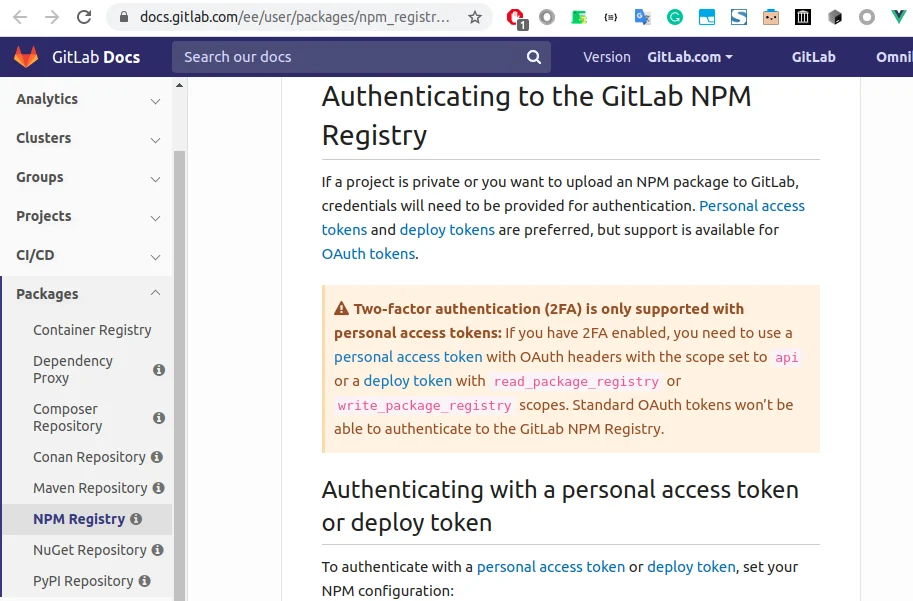
NPM registry does separate 2FA from other authentication means and states OAuth2 tokens won't work, I decided to test that statement, and my finding is, the registry does accept OAuth2 tokens in both situations:
- 2FA is enforced by a private group (containing the NPM registry), but the user did not set 2FA yet. It is that moment where he gets redirected to 2FA setup page.
- 2FA is already setup by the user.
I am not used to set up private repositories so I am not confident reporting this, I tried dozens of times before, clearing the cache, and the issue still reproduces, so I am sure there is a bug here. You tell me if I did something wrong.
Steps to reproduce
1 - UserA creates a private group called: private-node-group
2 - UserA generates a PAT for him(select all scopes for convenience)
3 - UserA creates a project in that group called node-project
4 - UserA creates an npm package and pushes it to the registry:
$ mkdir node-project && cd node-project
$ npm init
$ cat "console.log('Hello 1.0');" > app.js
# I am gonna show how the interesting files look like
$ cat package.json

{
  "name": "[@]private-node-group/node-project",
....
  "publishConfig": {
    "[@]private-node-group:registry": "http://YOUR_GITLAB_HOSTNAME/api/v4/projects/11/packages/npm/"
  }

$ cat .npmrc

[@]private-node-group:registry=http://YOUR_GITLAB_HOSTNAME/api/v4/packages/npm/
//YOUR_GITLAB_HOSTNAME/api/v4/packages/npm/:_authToken=<User'sA PAT>
//YOUR_GITLAB_HOSTNAME/api/v4/projects/11/packages/npm/:_authToken=<UserA's PAT>
4 - Publish it
$ npm publish
6 - UserA enforces 2FA for the group
7 - UserA invites userB as Reporter (this PoC uses npm install as an example so we need the userB to be able to download)
8 - Let's simulate the UserB was logged In to a third party OAuth2 app which had an access token of him:
8.1 - Create an OAuth2 app with any user, for convenience set redirect uri to http://doesnotexist/
8.2 - As UserB go to the consent page of that newly created OAuth2 app, replace the values:
https://YOUR_GITLAB_HOSTNAME/oauth/authorize?client_id=APP_ID&redirect_uri=http://doesnotexist/&response_type=code&state=notthatrandom
8.3 Accept the app as UserB
8.4 The browser shows an error as doesnotexist .... well, does not exist. But the OAuth2 code is in the URL bar, copy it, and exchange it with an OAuth2 access token:
curl -s -X POST https://YOUR_GITLAB_HOSTNAME/oauth/token -d 'client_id=APP_ID&client_secret=APP_SECRET&code=RETURNED_CODE&grant_type=authorization_code&redirect_uri=http://doesnotexist/'
9 - Now we have an OAuth2 access token for UserB and we did not setup 2FA, let's see if it works(later we check with 2FA setup):
$ mkdir node-consumer && cd node-consumer
# this is how my .npmrc looks like
$ cat .npmrc

[@]private-node-group:registry=http://YOUR_GITLAB_HOSTNAME/api/v4/packages/npm/
//YOUR_GITLAB_HOSTNAME/api/v4/packages/npm/:_authToken=<Users'B OAUTH2 ACCESS TOKEN FROM STEP 8.4>
//YOUR_GITLAB_HOSTNAME/api/v4/projects/11/packages/npm/:_authToken=<Users'B OAUTH2 ACCESS TOKEN FROM STEP 8.4>
10 - Let's see if we can install packages, since UserB is Reporter he can access the registry page and just copy from there the command which is:
npm i [@]private-node-group/node-project

npm WARN Failed to parse json
npm WARN Trailing comma in object at 11:1
npm WARN }
npm WARN ^
npm WARN File: /pocs/node-consumer/package.json
npm WARN node-consumer No description
npm WARN node-consumer No repository field.
npm WARN node-consumer No README data
npm WARN node-consumer No license field.
root@ee:/pocs/node-consumer#
6.5 For some reason my package gets some kind of warning but the package is installed:
$ tree node_modules

node_modules/
└── [@]private-node-group
    └── node-project
        ├── app.js
        └── package.json

2 directories, 2 files
11 - Ok, now go to 2FA setup page, set up 2FA and retest step 10. It still works
Impact
Malicious/Compromised Gitlab applications can authenticate to an NPM registry on a user's behalf regardless of 2FA.
Standard OAuth tokens won’t be able to authenticate to the GitLab NPM Registry.
This statement is not applicable.
What is the current bug behavior?
NPM registry don't reject the authentication attempt using OAuth2 access tokens.
What is the expected correct behavior?
NPM registry should reject the authentication attempt using OAuth2 access tokens.
Impact
Read above.
Attachments
Warning: Attachments received through HackerOne, please exercise caution!
Not written yet. The AI write-up for this report has not been written yet. The Original tab links to the source.
How it worked
Root cause
Likely the NPM registry authentication logic did not check whether the token was an OAuth2 token and allowed it despite 2FA enforcement.
Impact
A malicious or compromised OAuth2 application could authenticate to the NPM registry on a user's behalf regardless of 2FA, potentially accessing private packages.
What the attacker needed
A GitLab account; ability to create OAuth2 applications; a user who has authorised an OAuth2 app
The fix
The NPM registry should reject authentication attempts using OAuth2 access tokens.
How it was found
- Create a private group and a project in it.
- Generate a personal access token (PAT) for the user.
- Publish an npm package to the registry using the PAT.
- Enforce 2FA for the group and invite another user as Reporter.
- Obtain an OAuth2 access token for the second user via an OAuth2 app.
- Use the OAuth2 token to install the package, both before and after setting up 2FA.
Explained by bugbounty.wiki with AI from the original and checked against quotes from it; it can still be wrong. Read the original before relying on a detail.
Not written yet. The AI write-up for this report has not been written yet. The Original tab links to the source.
Two-factor authentication (2FA) adds a second step to logging in, like a code from your phone. The NPM registry is a place to store and share code packages. The report found that a different kind of login token (OAuth2) could still be used to download private packages even when 2FA was turned on, so someone who stole that token could get in without the second step.
What is Access control?
A user can do something their role should not allow: reach an admin function, act on a feature they have not paid for, or skip a permission check. IDOR is the special case where the object belongs to someone else.

