Privileges escalation to access to Gitlab Pages when it is set "Only Project Members"
GitLab Pages access control set to 'Only Project Members' did not restrict access for users authenticated via Google Auth who were not members of the group or project. An attacker with a Google account could view the supposedly private GitLab Pages site.

GitLab
Originally disclosed on GitLab
- Fixed in 4 months
- Disclosed after 4 months
⚠️ Please read the process on how to fix security issues before starting to work on the issue. Vulnerabilities must be fixed in a security mirror.
HackerOne report #3250156 by mateuszek on 2025-07-13, assigned to @katwu:
Report | Attachments | How To Reproduce
Report
1. Description:
In general I found a bit weird behaviour of Gitlab system.
I created the Gitlab Pages.
Then in group settings I set:
Pages access control
Restrict access to only project members on all group projects
(When enabled, all projects in the group and its subgroups become visible only to members.)
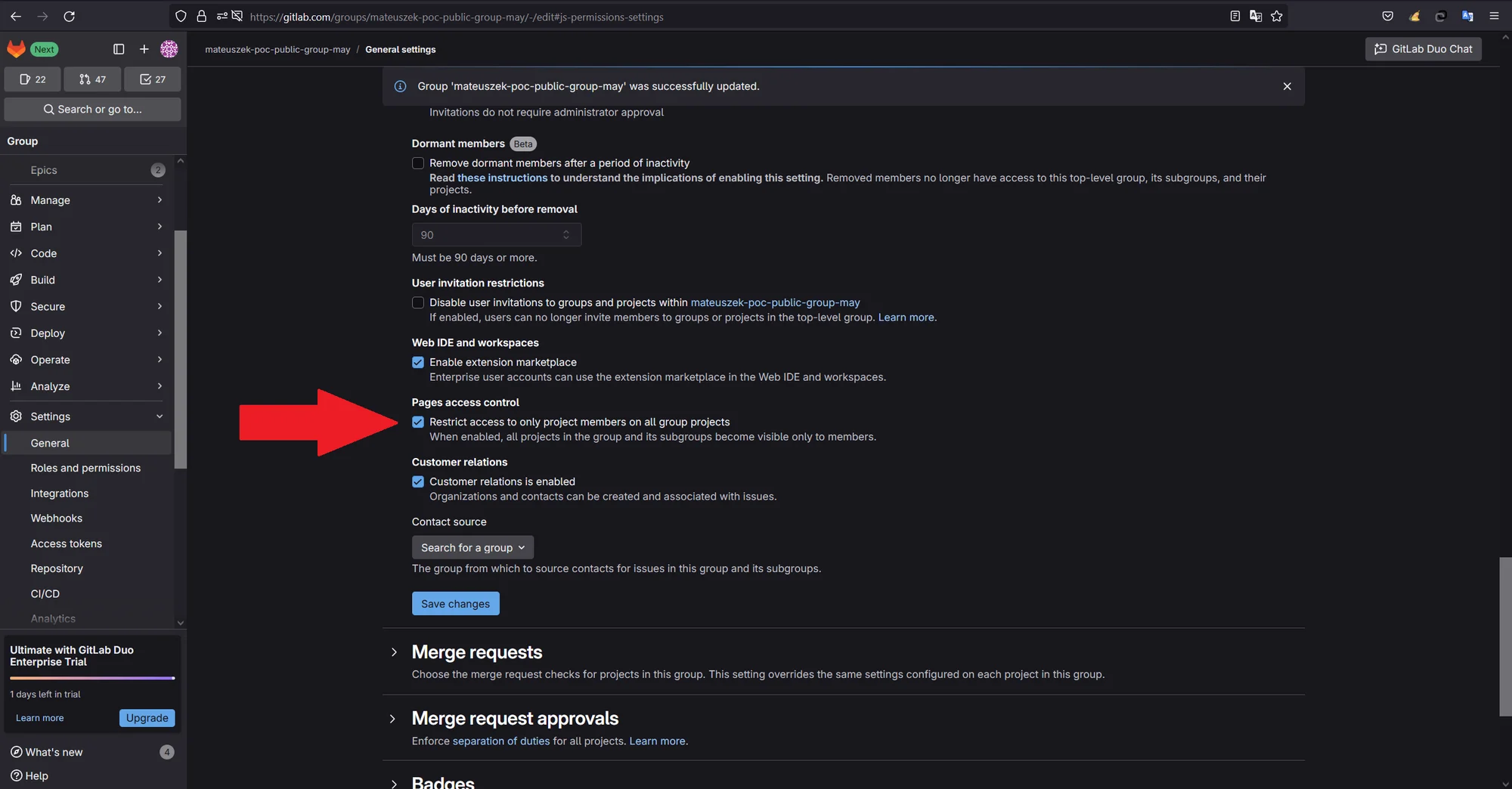
Then I noticed that when I logged into Gitlab by Google Auth as not member of the group and project then I have access to the Gitlab Pages that I created without any problems.
Next I checked the settings in the PoC project:
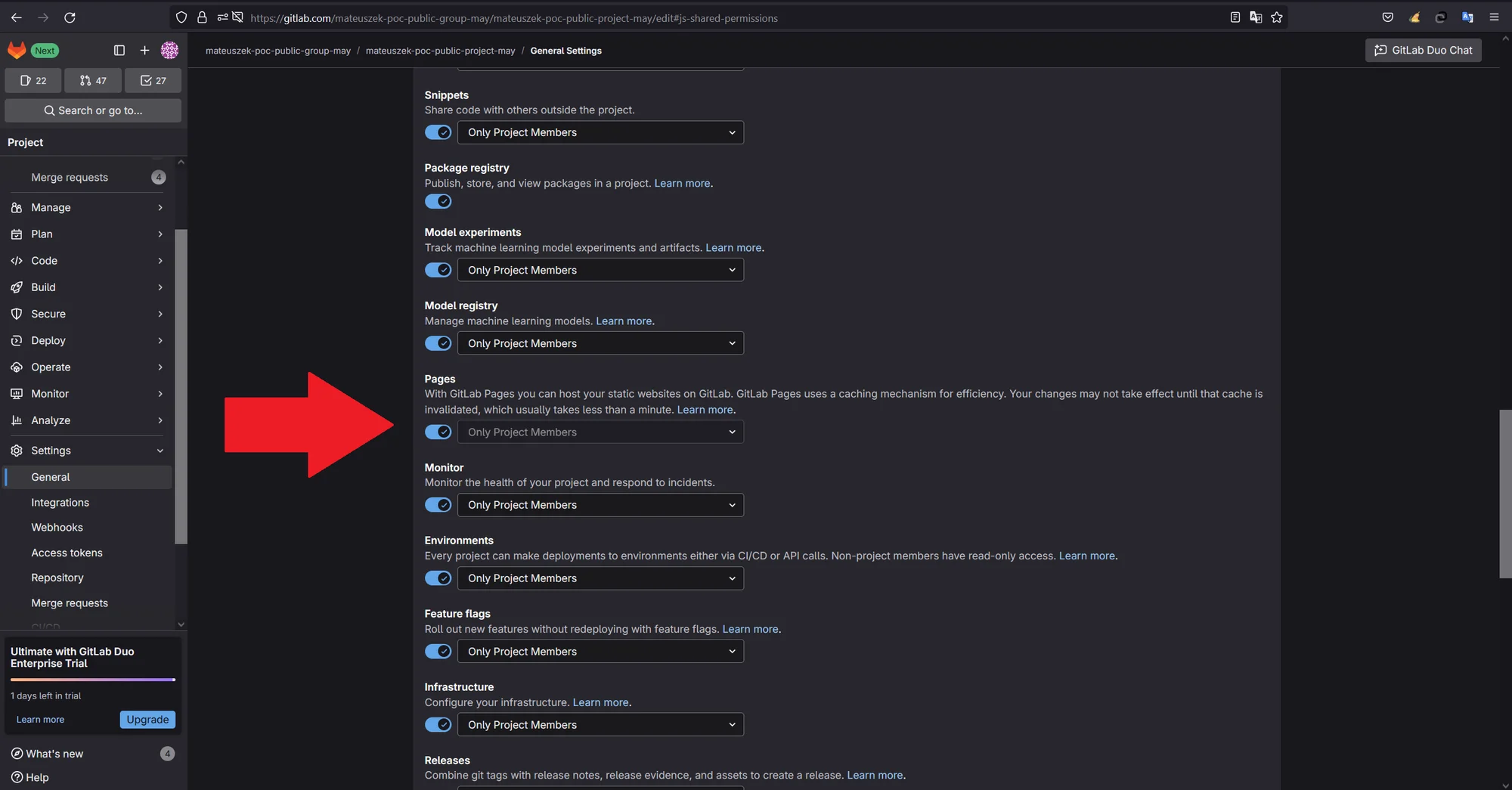
Everything looks fine BUT logged into Gitlab users by Google Auth have access to my Gitlab Pages without any problems :)

2. Scenario:
2.1. Short scenario for confirmation:
- Login to the Gitlab cloud by Google Auth then try to enter to the below my Gitlab Pages:
https://mateuszek-poc-public-project-may-67e224.gitlab.io
You should have access to this page without any problems.
2.2. Long confirmation:
- Create the Gitlab Pages in your project e.g.: from the below tutorial:
https://about.gitlab.com/blog/build-a-new-website-in-a-few-easy-steps-with-gitlab-pages/
2. In the public group settings go to: Settings -> General -> Permissions and group features -> Pages access control - check that checkbox
3. In the public project (project inside PoC group) settings go to: Settings -> General -> Visibility, project features, permissions -> Pages and notice that it should set as Only Project Members
4. Enter to the PoC created Gitlab Pages from the second account that login to Gitlab cloud by Google Auth
Best regards,
Mateusz
Impact
- Privileges escalation to access to Gitlab Pages when it is set "Only Project Members"
Attachments
Warning: Attachments received through HackerOne, please exercise caution!
How To Reproduce
Please add reproducibility information to this section:
Not written yet. The AI write-up for this report has not been written yet. The Original tab links to the source.
How it worked
What the attacker needed
GitLab Pages enabled; Pages access control set to 'Only Project Members'; Attacker has a Google account linked to GitLab
How it was found
- Create a GitLab Pages site in a project.
- In the public group settings, enable 'Pages access control' under Permissions and group features.
- In the public project settings, set Pages visibility to 'Only Project Members'.
- Log in to GitLab via Google Auth with a second account that is not a member of the group or project.
- Visit the GitLab Pages URL and observe that access is granted.
Explained by bugbounty.wiki with AI from the original and checked against quotes from it; it can still be wrong. Read the original before relying on a detail.
Not written yet. The AI write-up for this report has not been written yet. The Original tab links to the source.
GitLab Pages lets you host a website from a project. The setting 'Only Project Members' is meant to make that website private to people in the project. The report says that people who logged in with Google could still see the site even though they were not project members, so the privacy setting did not work as expected.
What is Access control?
A user can do something their role should not allow: reach an admin function, act on a feature they have not paid for, or skip a permission check. IDOR is the special case where the object belongs to someone else.

