Project maintainer can escalate to Project owner using project access token rotate API
A project maintainer could rotate a project access token created by a project owner, obtaining a new token with owner-level privileges. This allowed the maintainer to escalate their permissions to project owner.

GitLab
Originally disclosed on GitLab
- Fixed in 5 months
- Disclosed after 5 months
⚠️ Please read the process on how to fix security issues before starting to work on the issue. Vulnerabilities must be fixed in a security mirror.
HackerOne report #2058934 by ashish_r_padelkar on 2023-07-09, assigned to @nmalcolm:
Report | Attachments | How To Reproduce
Report
Summary
Hello,
Project Access tokens can be created at https://gitlab.com/<NameSpace>/<ProjectName>/-/settings/access_tokens. Project owner can create project access token with OWNER role where as Project maintainer can create upto Maintainer role only.
Also, once PAT (Project access token) is created, its visible only while creating . If project owner creates PAT with OWNER role, maintainer wont be able to see the token so they can not use the token of owner scope which works correctly.
However, using rotate API of the PAT, maintainer can see generate the new token which will have owner role as token was by project owner previously.
Steps to reproduce
1.Login as a project Owner and go to https://gitlab.com/<NameSpace>/<ProjectName>/-/settings/access_tokens.
2.Create a new token with Owner role and API scope.
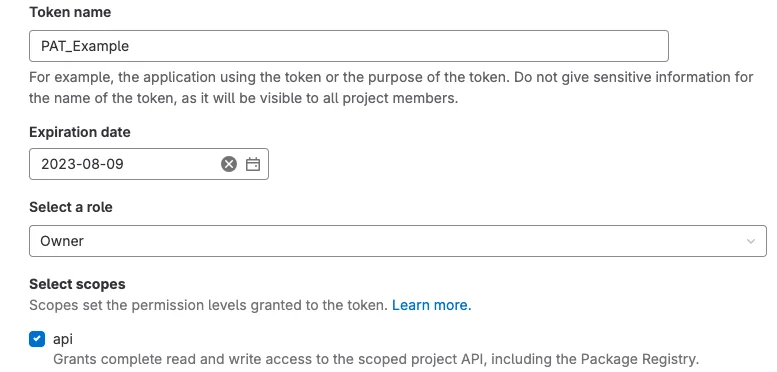
3.Now login as maintainer of the same project and go to https://gitlab.com/<NameSpace>/<ProjectName>/-/settings/access_tokens. You see that project owner has created a PAT but you can just see the name of the token , its role and scope but cant see the token itself.This means you cant use the token that has higher scope than your role which is working correctly and as expected.
4.Now create your personal access token here https://gitlab.com/-/profile/personal_access_tokens with API scope.
5.Visit https://gitlab.com/api/v4/projects/<ID>/access_tokens/ and note the ID of the PAT created by project owner.
6.Now replace these values in below curl request.
curl --request POST --header "PRIVATE-TOKEN: glpat-YourpersonalToken" "https://gitlab.com/api/v4/projects/<ProjectID>/access_tokens/<PAT_ID>/rotate"
7.You see that you rotated the Project access token created by project owner and you see the value of new token in response with ROLE as 50 which means project owner.This means you can use this new token with project Owner role as project maintainer and escalate your privileges.
What is the current bug behavior?
Maintainers can use PAT rotate API to generate new token which may have owner role and escalate their privileges.
What is the expected correct behavior?
If PAT has owner role then only project owners should be able to rotate the PAT.
Output of checks
This bug happens on GitLab.com GitLab Enterprise Edition 16.2.0-pre e124cf77951
Regards,
Ashish
Impact
Project maintainer can escalate to Project owner using project access token rotate API.
Project Owner has more capabilities then Maintainers , hence confidentiality and integrity rated as high in CVSS
Attachments
Warning: Attachments received through HackerOne, please exercise caution!
How To Reproduce
Please add reproducibility information to this section:
Proposal
See https://gitlab.com/gitlab-org/gitlab/-/issues/418878#note_1475837442 for the desired behaviour for PrAT/GrAT and service account rotation behaviour
Not written yet. The AI write-up for this report has not been written yet. The Original tab links to the source.
How it worked
Root cause
The token rotation API did not check whether the user performing the rotation had sufficient privileges compared to the token's role.
What the attacker needed
Maintainer role on the project; owner-created project access token exists; personal access token with API scope
How it was found
- Log in as a project owner and go to the project's access tokens settings page.
- Create a new project access token with the Owner role and API scope.
- Log in as a maintainer of the same project and go to the same access tokens settings page; note that the owner's token is listed but its value is hidden.
- Create a personal access token with API scope.
- Use the API to list project access tokens and note the ID of the owner-created token.
- Send a POST request to the token rotation endpoint for that token ID using the personal access token; the response contains a new token with owner role.
Explained by bugbounty.wiki with AI from the original and checked against quotes from it; it can still be wrong. Read the original before relying on a detail.
Not written yet. The AI write-up for this report has not been written yet. The Original tab links to the source.
In GitLab, a project owner can create special access tokens with high permissions. A maintainer, who has lower permissions, should not be able to see or use those tokens. However, a flaw in the token rotation feature let a maintainer generate a new version of the owner's token, effectively giving them the owner's power.
What is Access control?
A user can do something their role should not allow: reach an admin function, act on a feature they have not paid for, or skip a permission check. IDOR is the special case where the object belongs to someone else.

