Project maintainers can bypass group's merge request approval policy `block_branch_modification` setting
A project maintainer could delete approval rules that were created by a group-level security policy, even though the policy was meant to block branch modifications. This allowed the maintainer to push unapproved code to a protected branch and potentially disclose the group's CI/CD variables.

GitLab
Originally disclosed on GitLab
- Fixed in 29 days
- Disclosed after 29 days
⚠️ Please read the process on how to fix security issues before starting to work on the issue. Vulnerabilities must be fixed in a security mirror.
HackerOne report #2520947 by js_noob on 2024-05-26, assigned to @cmaxim:
Report | Attachments | How To Reproduce
Report
Summary
Hello team, group owners can create scan result policies with the block_branch_modification setting, which blocks all project owners/maintainers from pushing code to a branch directly, unless approved. From the docs
When enabled, prevents a user from removing a branch from the protected branches list, deleting a protected branch, or changing the default branch if that branch is included in the security policy. This ensures users cannot remove protection status from a branch to merge vulnerable code.
However, this is bypassable.
NB: This report is very similar to #2280292 (same impact but different scenario), however, I realized that the corresponding GitLab issue is tagged with severity 2 while I was paid as a medium, so I believe this should be high as well. 😉
Steps to reproduce
As a group owner:
- Create a new group, and apply the ultimate trial to it
- Navigate to https://gitlab.com/groups/GROUP/-/security/policies/new?type=approval_policy, and create a policy while having the same options as the following, but of course replace the user with the owner
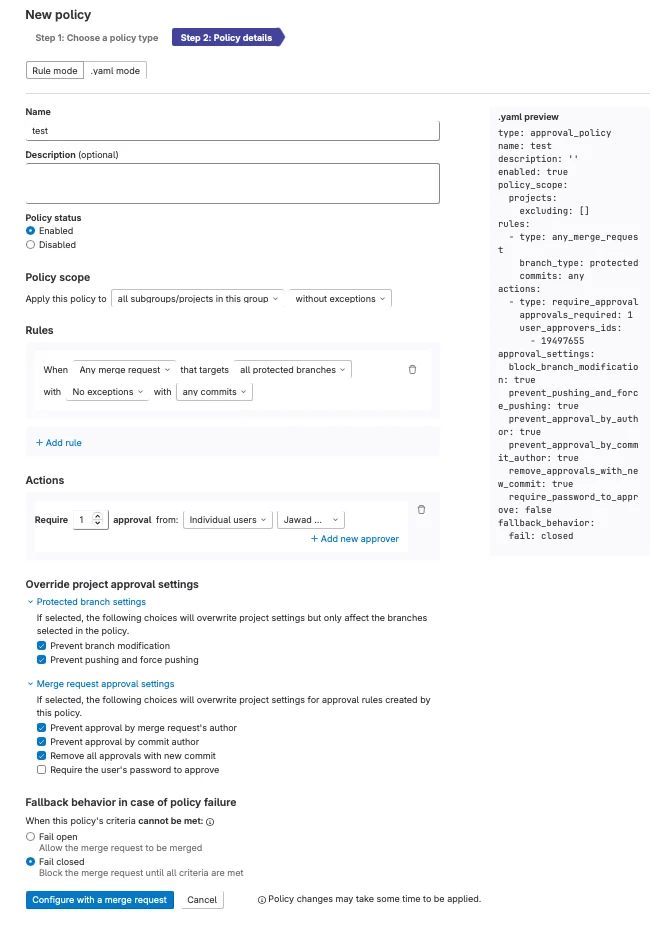
- Create a project in that group
- Invite a maintainer to that project (not to the group)
As the project maintainer:
- Verify that you can't push code to the
mainbranch - Create a new branch with some code, create an MR to the
mainbranch, and verify that it needs approval - Navigate to https://gitlab.com/-/graphql-explorer, run the following query, and grab the approval rule ID (has the form of
id://gitlab/ApprovalProjectRule/ID
query Project {
  project(fullPath: "test-group-12891821/1") {
    id
    namespace {
      id
    }
    branchRules {
      nodes {
        id
        isDefault
        isProtected
        name
        approvalRules {
          nodes {
            id
            name
            approvalsRequired
          }
        }
      }
    }
  }
}
- Run the following mutation, using the ID grabbed above
mutation ApprovalRuleDelete {
  approvalProjectRuleDelete(
    input: {id: "ID_FROM_STEP_7"}
  ) {
    approvalRule {
      id
    }
  }
}
- Verify that the MR created doesn't need any approval
POC
What is the current bug behavior?
Users can delete approval rules associated with security policies.
What is the expected correct behavior?
Users shouldn't be able to delete approval rules associated with security policies.
Output of checks
This bug happens on GitLab.com
Impact
Users can push unapproved code to protected branches, ultimately allowing project maintainers to disclose group's CI/CD variables.
Attachments
Warning: Attachments received through HackerOne, please exercise caution!
How To Reproduce
Please add reproducibility information to this section:
Implementation Plan
diff --git a/ee/app/graphql/mutations/approval_project_rules/delete.rb b/ee/app/graphql/mutations/approval_project_rules/delete.rb
index 3c5fb4e44db4..03cd7220d158 100644
--- a/ee/app/graphql/mutations/approval_project_rules/delete.rb
+++ b/ee/app/graphql/mutations/approval_project_rules/delete.rb
@@ -24,6 +24,8 @@ def resolve(id:)
           approval_rule: (approval_rule if result.success?),
           errors: approval_rule.errors.full_messages
         }
+      rescue Gitlab::Access::AccessDeniedError
+        raise_resource_not_available_error!
       end
     end
   end
diff --git a/ee/app/services/approval_rules/project_rule_destroy_service.rb b/ee/app/services/approval_rules/project_rule_destroy_service.rb
index 854f843c9f71..74dd64ed8e8b 100644
--- a/ee/app/services/approval_rules/project_rule_destroy_service.rb
+++ b/ee/app/services/approval_rules/project_rule_destroy_service.rb
@@ -11,6 +11,8 @@ def initialize(approval_rule, current_user)
     end

     def execute
+      raise Gitlab::Access::AccessDeniedError if originates_from_security_policy?
+
       ApplicationRecord.transaction do
         # Removes only MR rules associated with project rule
         remove_associated_approval_rules_from_unmerged_merge_requests
@@ -23,6 +25,10 @@ def execute

     private

+    def originates_from_security_policy?
+      rule.security_orchestration_policy_configuration_id?
+    end
+
     def success
       audit_deletion
Not written yet. The AI write-up for this report has not been written yet. The Original tab links to the source.
How it worked
Impact
A project maintainer could push unapproved code to a protected branch, which could lead to disclosure of the group's CI/CD variables.
What the attacker needed
Group owner creates a security policy; project maintainer role; ultimate trial or license
The fix
The fix adds a check that raises an access denied error when an approval rule originates from a security policy, preventing its deletion.
How it was found
- As a group owner, create a group with an ultimate trial and add a scan result policy with block_branch_modification enabled.
- Create a project in the group and invite a maintainer to the project only.
- As the maintainer, verify that pushing to the main branch is blocked and that a merge request needs approval.
- Use the GraphQL explorer to query the project's branch rules and obtain the approval rule ID.
- Run an approvalProjectRuleDelete mutation with that ID.
- Verify that the merge request no longer requires approval.
Explained by bugbounty.wiki with AI from the original and checked against quotes from it; it can still be wrong. Read the original before relying on a detail.
Not written yet. The AI write-up for this report has not been written yet. The Original tab links to the source.
A security policy can require that changes to important branches be approved before they are merged. The bug let a project maintainer remove that approval requirement using a GraphQL request, so they could merge their own code without review.
What is Access control?
A user can do something their role should not allow: reach an admin function, act on a feature they have not paid for, or skip a permission check. IDOR is the special case where the object belongs to someone else.

