Reading Wiki pages where it is forbidden by issue description "Compare with previous version" feature
A public issue's 'Compare with previous version' feature revealed the title of a wiki page that was restricted to project members only. An unauthenticated user could read the wiki page title by viewing the issue's version history.

GitLab
Originally disclosed on GitLab
- Fixed in 20 hours
- Disclosed after 20 hours
⚠️ Please read the process on how to fix security issues before starting to work on the issue. Vulnerabilities must be fixed in a security mirror.
HackerOne report #2849174 by mateuszek on 2024-11-18, assigned to GitLab Team:
Report | Attachments | How To Reproduce
Report
1. Description:
I found a scenario where unauthorized actor can read wiki pages where it is forbidden by issue description "Compare with previous version" feature - [screenshot1.png]
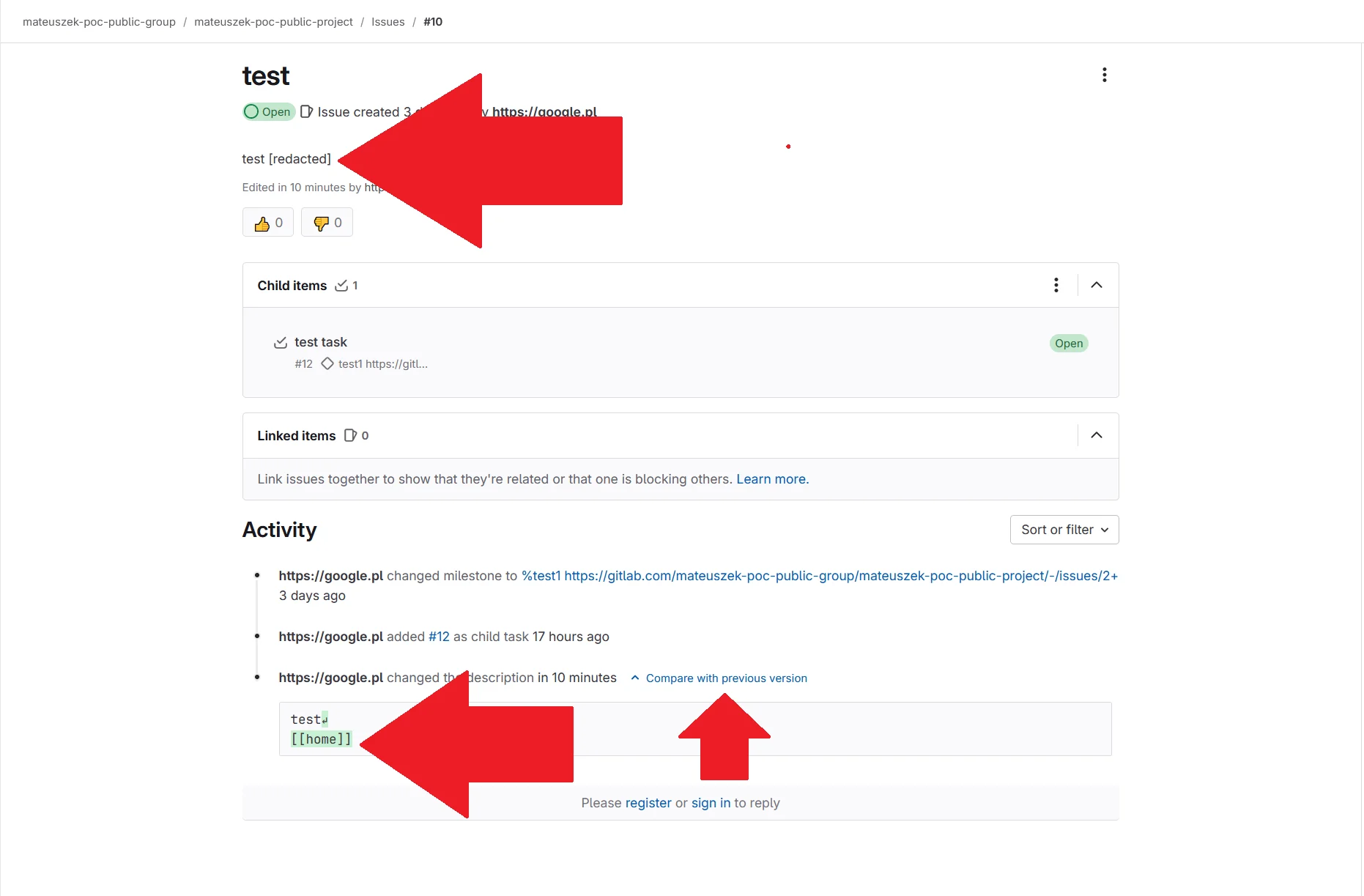
2. Scenario:
I use Gitlab Ultimate Trial in Gitlab Cloud
2.1. Actors:
User A - owner of the public group A and owner of the public project A_PROJ (project inside group A)
User B - for example just Internet user - even not registered Gitlab user
2.2. Steps:
- User A - in public project A_PROJ go to:
Plan->Wikiand create the Wiki Page - User A - in public project A_PROJ go to:
Plan->Issuesand create the public issue with title and description (e.g.:title:test,description:test) - User A - in public project A_PROJ go to:
Settings->General->Visibility, project features, permissions->Wikiand set this option toOnly Project Members - User A - go to the PoC created issue and change the description of the issue - mention there the PoC created wiki page by
[[<wiki_page_title>]] - User B - go to the PoC public issue and notice that you see in the description of the issue
[REDACTED]- expected behaviour - you don't have access to wiki pages of this project - User B - in the PoC public issue click in the activity where User A changed the issue description
Compare with previous version- notice that the system will show you the wiki page title without any problems - [screenshot1.png] - Reading Wiki pages where it is forbidden by issue description "Compare with previous version" feature
Best regards,
Mateusz
Impact
- Reading Wiki pages where it is forbidden by issue description "Compare with previous version" feature
Attachments
Warning: Attachments received through HackerOne, please exercise caution!
How To Reproduce
Please add reproducibility information to this section:
Not written yet. The AI write-up for this report has not been written yet. The Original tab links to the source.
How it worked
What the attacker needed
Public project; wiki visibility set to members only; public issue with wiki link in description
How it was found
- Create a wiki page in a public project.
- Create a public issue with a title and description.
- Set the project's wiki visibility to 'Only Project Members'.
- Edit the issue description to mention the wiki page using double brackets.
- As an unauthenticated user, view the public issue and see the wiki link is redacted.
- Click 'Compare with previous version' on the issue activity to see the wiki page title.
Explained by bugbounty.wiki with AI from the original and checked against quotes from it; it can still be wrong. Read the original before relying on a detail.
Not written yet. The AI write-up for this report has not been written yet. The Original tab links to the source.
A wiki page was set to be visible only to project members, but a public issue's version history showed its title to anyone. This let outsiders learn the name of a supposedly private page.
What is Access control?
A user can do something their role should not allow: reach an admin function, act on a feature they have not paid for, or skip a permission check. IDOR is the special case where the object belongs to someone else.

