Removed author of the merge request can still edit merge request’s approval rules using API
A removed project member who authored a merge request could still edit that merge request's approval rules through the API, even though the UI correctly blocked this. This could allow the attacker to remove required approvals and merge malicious changes to a protected branch.

GitLab
Originally disclosed on GitLab
- Fixed in 8 months
- Disclosed after 8 months
⚠️ Please read the process on how to fix security issues before starting to work on the issue. Vulnerabilities must be fixed in a security mirror.
HackerOne report #2980839 by theluci on 2025-02-07, assigned to GitLab Team:
Report | Attachments | How To Reproduce
Report
Hello, I hope you are doing well.
I found that the author of the merge request, removed from the project can still edit merge request’s approval rules using API even when the option isn’t available when using UI.
Vulnerability
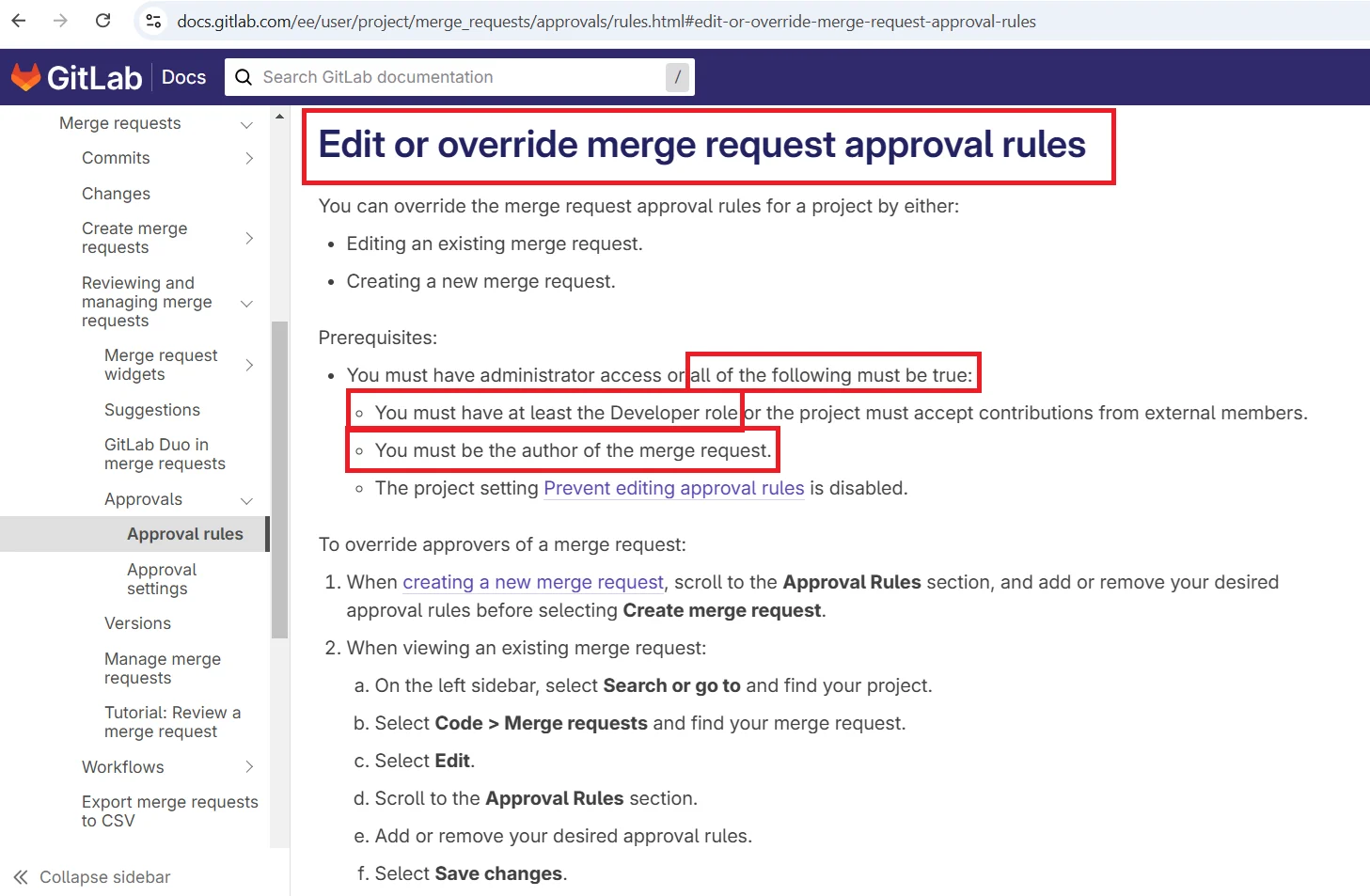
According to docs, to override the merge request’s approval rules, You must have at least the Developer role in the project.
If the author of the merge request is removed from the project and tries to edit approval rules of the merge request, he can not do so using UI
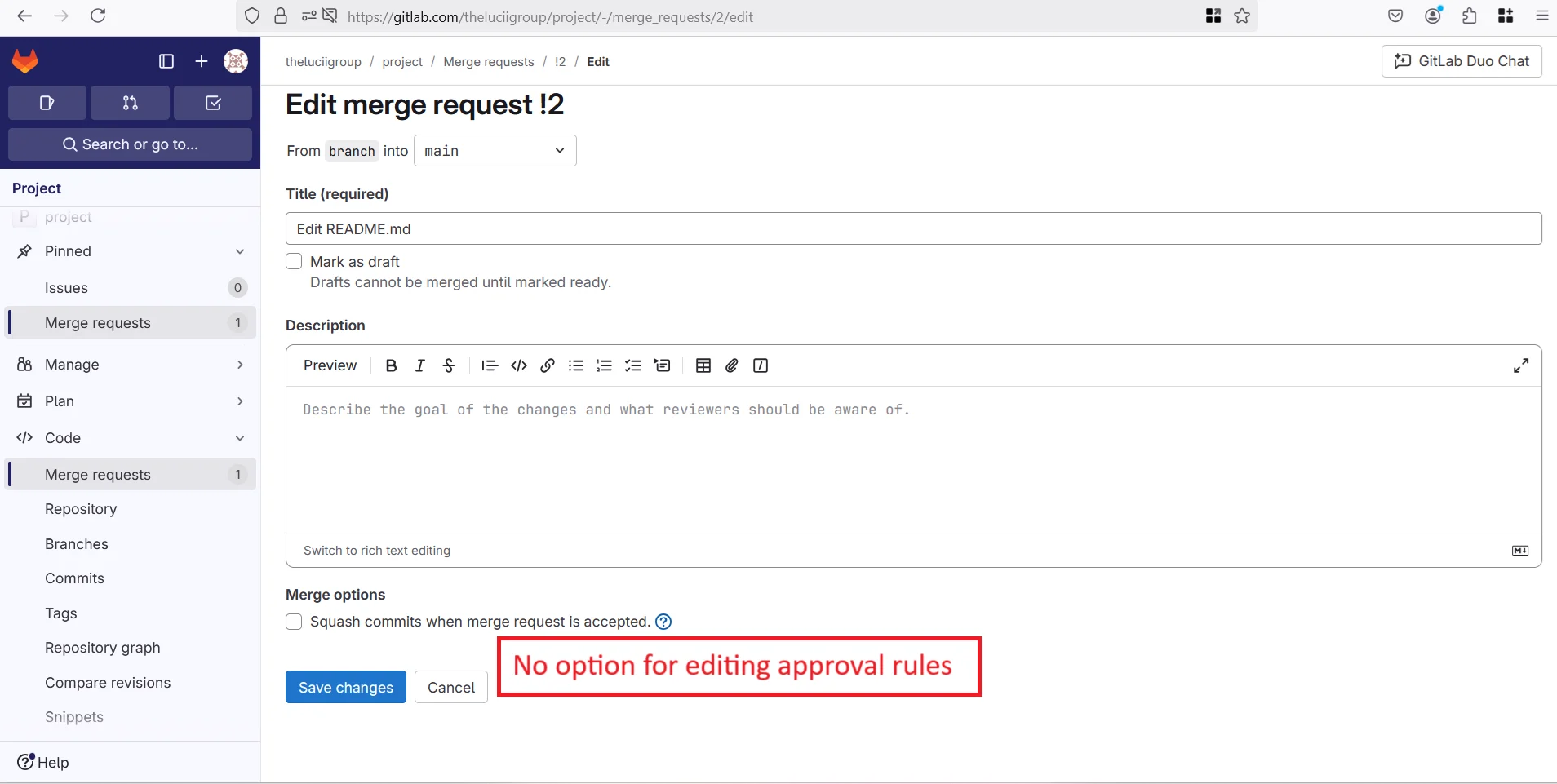
Which is correct and as per the documentation.
However, the check isn’t ensured when using API.
That is, an author of the merge request, removed from the project can still override merge request’s approval rules using API contrary to documentation.
Steps to reproduce
victimcreates a public groupvictim-groupand starts Ultimate trial.victimnavigates to Manage --> Members,
victiminvitesvictim-memberas a Maintainer tovictim-groupvictiminvitesattackeras a Developer tovictim-group
victimcreates a public projectvictim-projectinsidevictim-group.
(Initialize repository with a README)victimnavigates to Settings --> Merge requests, scrolls down to Merge request approvals,
victimsets the Minimum required approvals to 2.victimclicks Add approval rule and selects the following configuration,
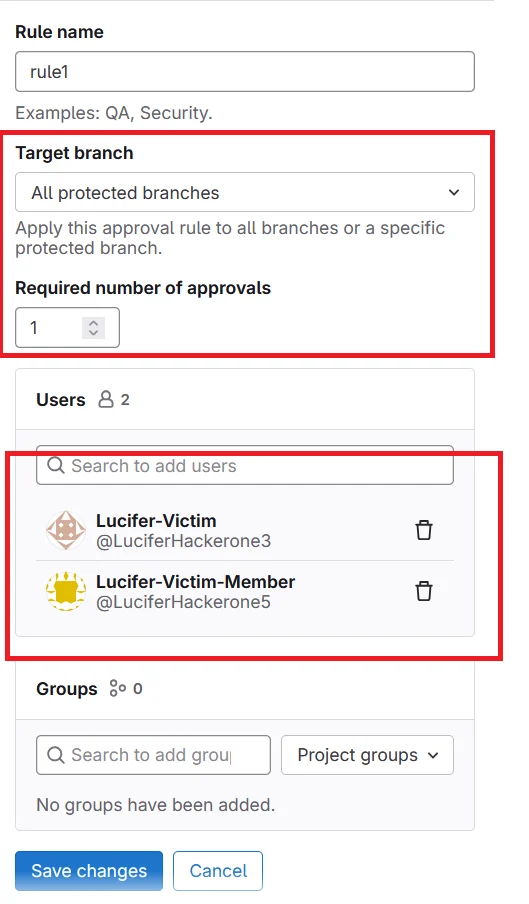
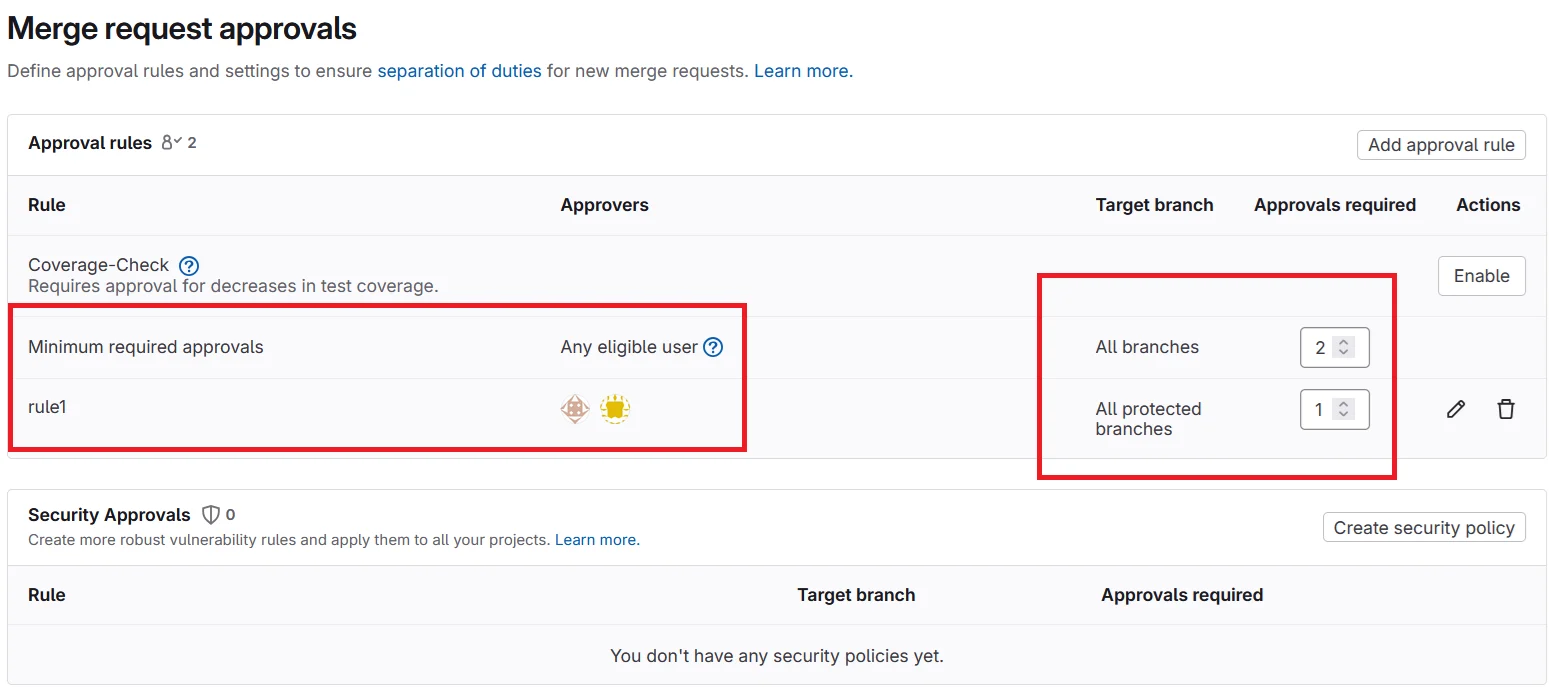
victimselects the following configuration,
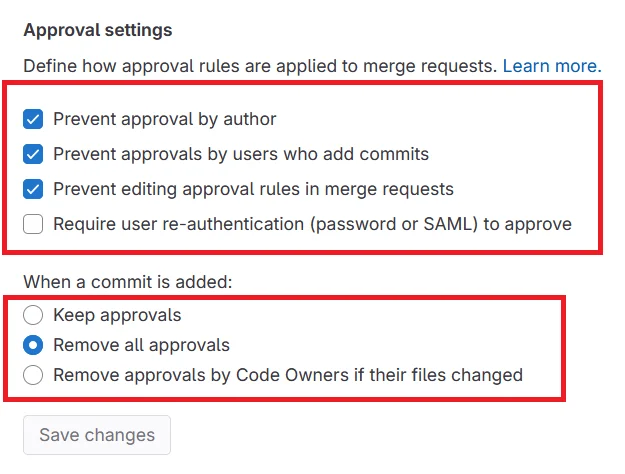
At this point, victim does not allow approval rules overriding and every merge request must be properly approved before being merged.
attackervisitsvictim-project, creates a new branchanotherand makes some malicious changes.attackercreates a merge request fromanotherbranch tomain.victimvisitsvictim-project, navigates to Code --> Merge requests and selects the merge request. (Created in step 6)victimsets the merge request to auto-merge.
victim hopes to merge the request after the required approval criteria has been met but not yet as to investigate/review the code further.
attackervisitsvictim-project, navigates to Code --> Merge requests, selects the merge request (Created in step 6) and marks it as Draft.victimvisitsvictim-group, navigates to Manage --> Members and Removesattacker.victimvisitsvictim-project, navigates to Settings --> Merge requests, scrolls down to Merge request approvals and uncheck Prevent editing approval rules in merge requests.
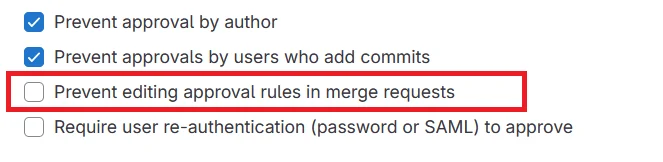
Now, victim allows approval rules overriding as only high role trustworthy members are in project and if required they can edit approval rules.
<------------------------------------Important----------------------------------------------->
These members already have enough permissions to visit Settings and edit approval rules if required, so giving them permission to override approval rules isn’t a security concern.
Please note that while attacker was a part of the project approval rules overriding were not allowed.
In a real-world scenario, approval rules overriding would only be allowed in a very trusting environment, where members may already have enough permission to edit approval rules from Setting if required.
Thus, for an attacker, not part of the project, to be able to edit a merge request’s approval rules is a grave security concern.
<----------------------------------------------------------------------------------------------->
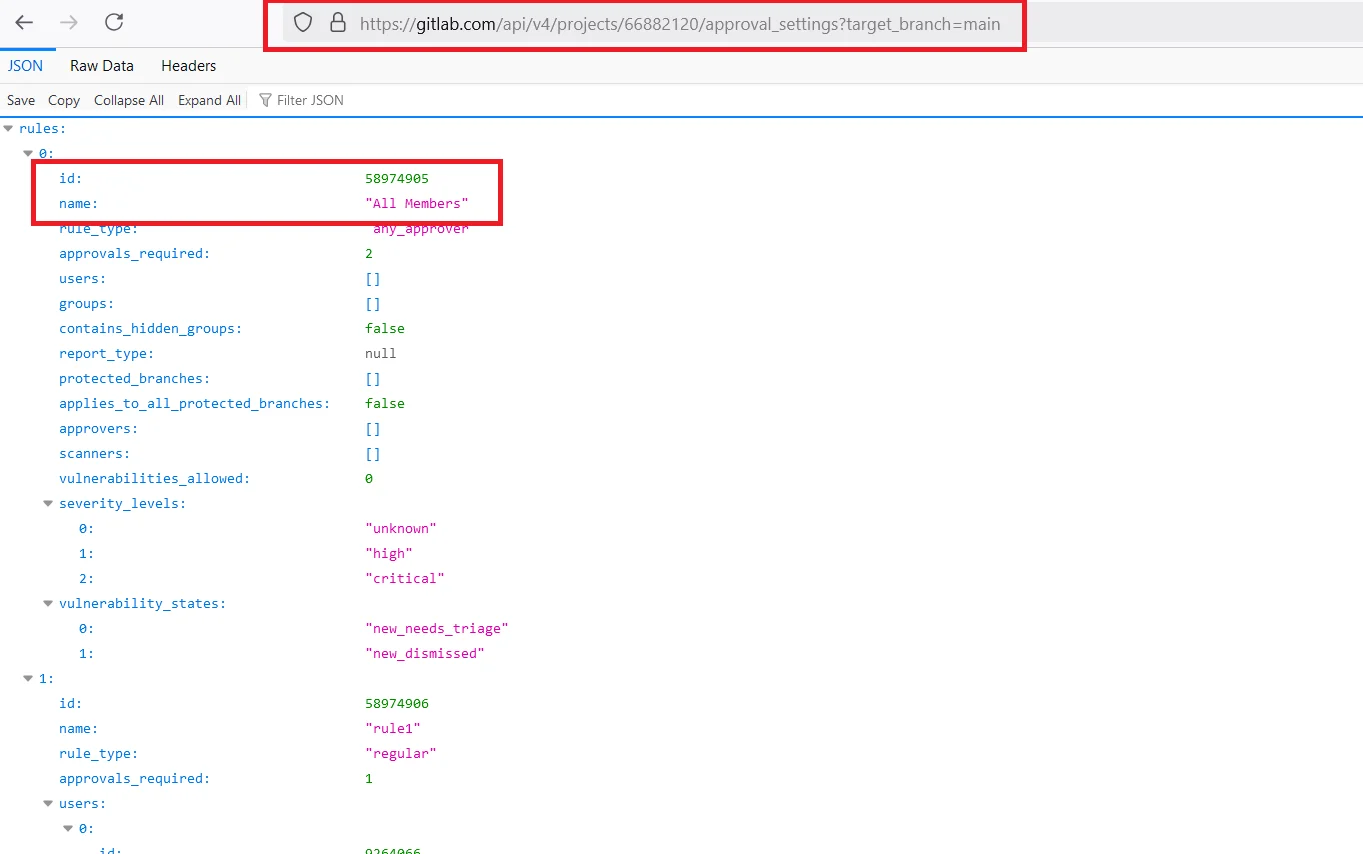
attackervisitshttps://gitlab.com/api/v4/projects/<victim-project-id>/approval_settings?target_branch=main
attackernotes theidofAll Members
attackervisitsvictim-project, navigates to Code --> Merge requests and selects the merge request. (Created in step 6)attackerclicks on Edit and unchecks Draft
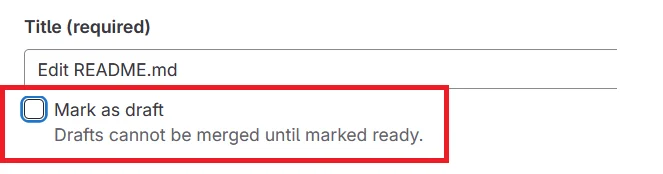
attackerclicks on Save changes but intercepts the request.attackeradds the following to the body of the request,
&merge_request%5Bapproval_rules_attributes%5D%5B%5D%5Bapproval_project_rule_id%5D=<ID_All_Members>&merge_request%5Bapproval_rules_attributes%5D%5B%5D%5Bapprovals_required%5D=0&merge_request%5Bapproval_rules_attributes%5D%5B%5D%5Bname%5D=&merge_request%5Bapproval_rules_attributes%5D%5B%5D%5Buser_ids%5D%5B%5D=&merge_request%5Bapproval_rules_attributes%5D%5B%5D%5Bgroup_ids%5D%5B%5D=
Please be sure to replace ID_All_Members with the ID noted in step 12.
<redacted>
attackerforwards the request.
attacker is able to edit approval rules using API despite not being a part of the project.
- Merge request is merged.
POC
<redactec>
Output of checks
This bug happens on GitLab.com (Probably on instance too)
Impact
An author of the merge request, removed from the project can still override merge request’s approval rules using API (even though the option isn’t available when using UI) contrary to documentation, which in worst-case scenario may merge malicious changes to the protected branch.
Attachments
Warning: Attachments received through HackerOne, please exercise caution!
- 1feb-5.png
- 1feb-6.png
- 6feb-1.png
- 6feb-2.png
- 6feb-3.png
- 6feb-4.png
- 6feb-5.png
- 7feb-1.png
- <redacted>
- <redacted>
How To Reproduce
Please add reproducibility information to this section:
Not written yet. The AI write-up for this report has not been written yet. The Original tab links to the source.
How it worked
Root cause
Likely the API endpoint for updating a merge request did not check whether the user still had permission to edit approval rules, while the UI did enforce that check.
Impact
The attacker could override approval rules and potentially merge malicious changes to a protected branch, bypassing required approvals.
What the attacker needed
Attacker is a project member (Developer); attacker authors a merge request; victim enables approval rule overriding; attacker is removed from project
How it was found
- Victim creates a group and project, invites attacker as Developer, and configures merge request approvals with a minimum of 2 and overriding disabled.
- Attacker creates a branch with malicious changes and opens a merge request to main.
- Victim sets the merge request to auto-merge.
- Attacker marks the merge request as Draft.
- Victim removes attacker from the group and unchecks 'Prevent editing approval rules in merge requests', allowing overriding.
- Attacker uses the API to get the ID of the 'All Members' approval rule, then intercepts the request to save changes on the merge request and adds parameters to set approvals_required to 0 for that rule, and forwards it.
Explained by bugbounty.wiki with AI from the original and checked against quotes from it; it can still be wrong. Read the original before relying on a detail.
Not written yet. The AI write-up for this report has not been written yet. The Original tab links to the source.
In GitLab, merge requests often need a certain number of approvals before they can be merged. The person who wrote the merge request should not be able to change those approval rules, especially after they have been removed from the project. Here, the website interface stopped them, but the API (a way for programs to talk to GitLab) did not, so they could still change the rules and get their code merged without proper review.
What is Access control?
A user can do something their role should not allow: reach an admin function, act on a feature they have not paid for, or skip a permission check. IDOR is the special case where the object belongs to someone else.

