"Require Code Owner approval" bypass using unverified email addresses
GitLab's CODEOWNERS feature mapped email addresses to accounts without verifying email ownership, so an attacker could add an unverified email listed in a CODEOWNERS file to their own account and become a code owner. This allowed a developer to bypass the 'Require Code Owner approval' rule and merge changes to a protected branch.

GitLab
Originally disclosed on GitLab
- Fixed in 4 months
- Disclosed after 4 months
HackerOne report #1237750 by vaib25vicky on 2021-06-18, assigned to H1 Triage:
Report | Attachments | How To Reproduce
Report
Summary:
CODEOWNERS files allows unverified email addresses when mapping addresses to Gitlab usernames.
If a CODEOWNERS file contains email addresses that do not have an associated Gitlab account then
an attacker can add that email address to their account and become a codeowner.
This allows malicious members to bypass the “Require Code Owner approval” check on protected branches.
Details:
Protected branch rules allow owner of the project to restrict who can push and merge to the branch
One of that rule is "Require Code Owner approval"
Code Owner file is a file which tells who can approve the merge request and
after approval the code can be push to the protected branches
This approval applies to everyone including maintainers of the project
Code owner file syntax allows defining members with usernames and emails
(https://docs.gitlab.com/ee/user/project/code_owners.html#the-syntax-of-code-owners-files)
* [@]default-codeowner

###  We can also specify "multiple tab or space" separated codeowners:
* [@]multiple [@]code [@]owners  email_address@owners

###  Rules defined later in the file take precedence over the rules
*.rb [@]ruby-owner
After creating code owner file, Gitlab will map the username and email addresses
to Gitlab account. However, email verification is not checked which allows a malicious
user to impersonate as a valid different code owner user and bypass code owner rule
Steps to reproduce:
Code owner is premium feature so you probably have to opt for free trial
Go to your Group > Settings > Billing and start your free trial
Project
- lets say project named is
h1-project - Add 3 members - A-main(Maintainer), B-dev, C-dev (developers)
- Add a readme file
README.md
Codeowners approval rule on protected branch
- Add a CODEOWNERS file named
CODEOWNERS
*.md [@]A-main [email protected]
- Go to project settings
https://gitlab.com/<namespace>/<h1-project>/-/settings/repository
and edit your main protected branch setting like shown in image
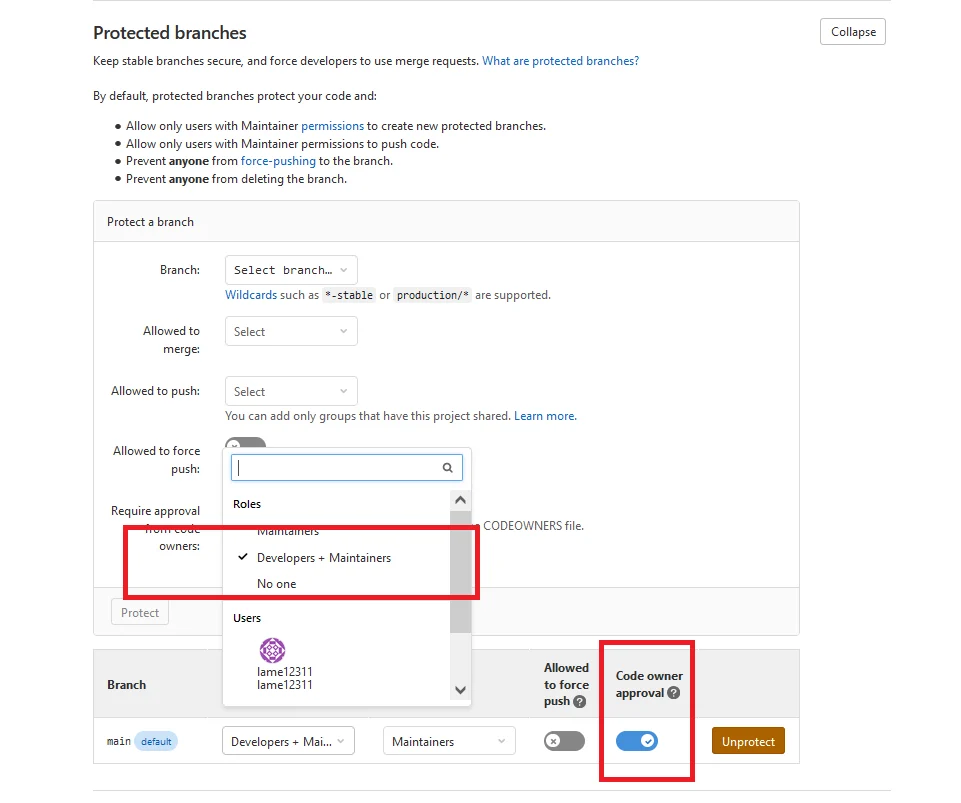
Bypass Require Code Owner approval
Codeowner file clearly state that any changes to *.md file require approval from
[@]A-main and [email protected] before merge and push
C-devadd the email[email protected]to his account which is an unverified emailB-devedit the fileREADME.mdand created a new merge requestC-devgoes to the merge request page, and he can now easily approve and merge
the code to the protected branch as C-dev who is NOT a codeowner of the file
Impact
"Require Code Owner approval" bypass using unverified email addresses on protected branches which allow malicious user to merge and push code to the protected branches where he was restricted
Attachments
Warning: Attachments received through HackerOne, please exercise caution!
How To Reproduce
Please add reproducibility information to this section:
Not written yet. The AI write-up for this report has not been written yet. The Original tab links to the source.
How it worked
Root cause
Likely, GitLab did not verify ownership of email addresses before using them to map CODEOWNERS entries to user accounts.
Impact
A malicious developer could bypass the 'Require Code Owner approval' rule and merge code to a protected branch where they were restricted.
What the attacker needed
GitLab Premium (free trial); Project with protected branch and CODEOWNERS; Attacker is a project member (developer)
How it was found
- Create a project and add three members: a maintainer, and two developers.
- Add a CODEOWNERS file that lists a maintainer's username and an email address that has no GitLab account.
- Enable the 'Require Code Owner approval' rule on the main protected branch.
- As one developer, add the unverified email address from the CODEOWNERS file to your own account.
- As the other developer, edit a file covered by the CODEOWNERS rule and open a merge request.
- The first developer can now approve and merge the merge request, bypassing the code owner requirement.
Explained by bugbounty.wiki with AI from the original and checked against quotes from it; it can still be wrong. Read the original before relying on a detail.
Not written yet. The AI write-up for this report has not been written yet. The Original tab links to the source.
A CODEOWNERS file lists who must approve changes to certain files. GitLab matched email addresses in that file to user accounts but did not check that the user actually owned the email. An attacker could add the email to their own account and then approve changes they should not be able to.
What is Access control?
A user can do something their role should not allow: reach an admin function, act on a feature they have not paid for, or skip a permission check. IDOR is the special case where the object belongs to someone else.

