GitLab's GitHub integration is vulnerable to SSRF vulnerability
The GitHub integration in GitLab followed HTTP redirects when sending commit status updates, allowing an attacker to make the server send POST requests to internal network addresses. This could be used to access cloud metadata services and potentially execute commands on the machine.

- Triaged in 11 days
- Fixed in 9 months
- Paid in 9 months
- Disclosed after 9 months
The GitHub service is vulnerable to a SSRF vulnerability. An attacker may be able to leverage this to make arbitrary POST requests in a GitLab instance's internal network. It can also be used to connect to cloud provider's instance metadata API, which may result in the ability to execute commands on the machine.
Proof of concept
In order to reproduce the SSRF, follow the steps below.
- Sign in as any user
- Create a new project
- Add a
.gitlab-ci.ymlfile with the following contents:
.gitlab-ci.yml
# This file is a template, and might need editing before it works on your project.
# see https://docs.gitlab.com/ce/ci/yaml/README.html for all available options

# you can delete this line if you're not using Docker
image: busybox:latest

before_script:
  - echo "Before script section"
  - echo "For example you might run an update here or install a build dependency"
  - echo "Or perhaps you might print out some debugging details"

after_script:
  - echo "After script section"
  - echo "For example you might do some cleanup here"

build1:
  stage: build
  script:
    - echo "Do your build here"

test1:
  stage: test
  script:
    - echo "Do a test here"
    - echo "For example run a test suite"

test2:
  stage: test
  script:
    - echo "Do another parallel test here"
    - echo "For example run a lint test"

deploy1:
  stage: deploy
  script:
    - echo "Do your deploy here"
- Before a minute to make sure the pipelines are created based on the GitLab CI configuration file
- Set up the GitHub integration and an external repository URL that is under your control (e.g. http://remote_ip/1/2)
- Click the the
Test settings and save changesbutton - Observe a request being made to the endpoint that looks something like this:
POST /api/v3/repos/1/2/statuses/5509244fe4919b85f5c1e0e1a2340805055c32d9 HTTP/1.1
Accept: application/vnd.github.v3+json
User-Agent: Octokit Ruby Gem 4.9.0
Content-Type: application/json
Authorization: token 1
Accept-Encoding: gzip;q=1.0,deflate;q=0.6,identity;q=0.3
Connection: close
Host: remote_ip
Content-Length: 158

{"context":"ci/gitlab/master","description":"Pipeline passed on GitLab","target_url":"https://gitlab.com/jobertabma/123/pipelines/36992118","state":"success"}
- respond with a 302 Found response that redirects back to the internal network using the
Locationheader:
Response
HTTP/1.1 302 Found
Location: http://127.0.0.1/
Connection: Close
Content-Length: 0
- Observe the response of
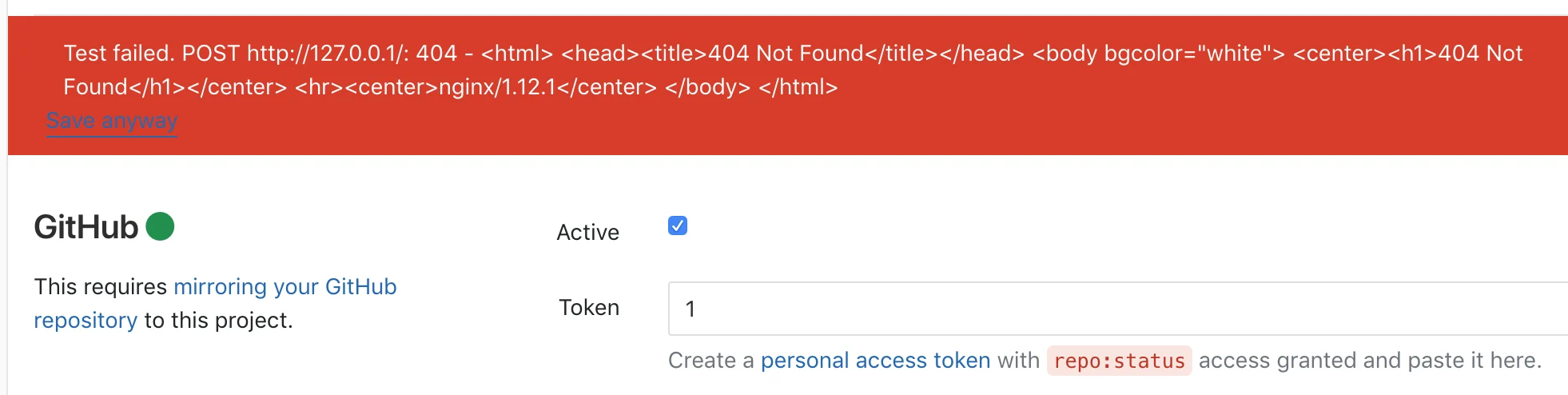
127.0.0.1(port 80) being returned in the UI through the error message:
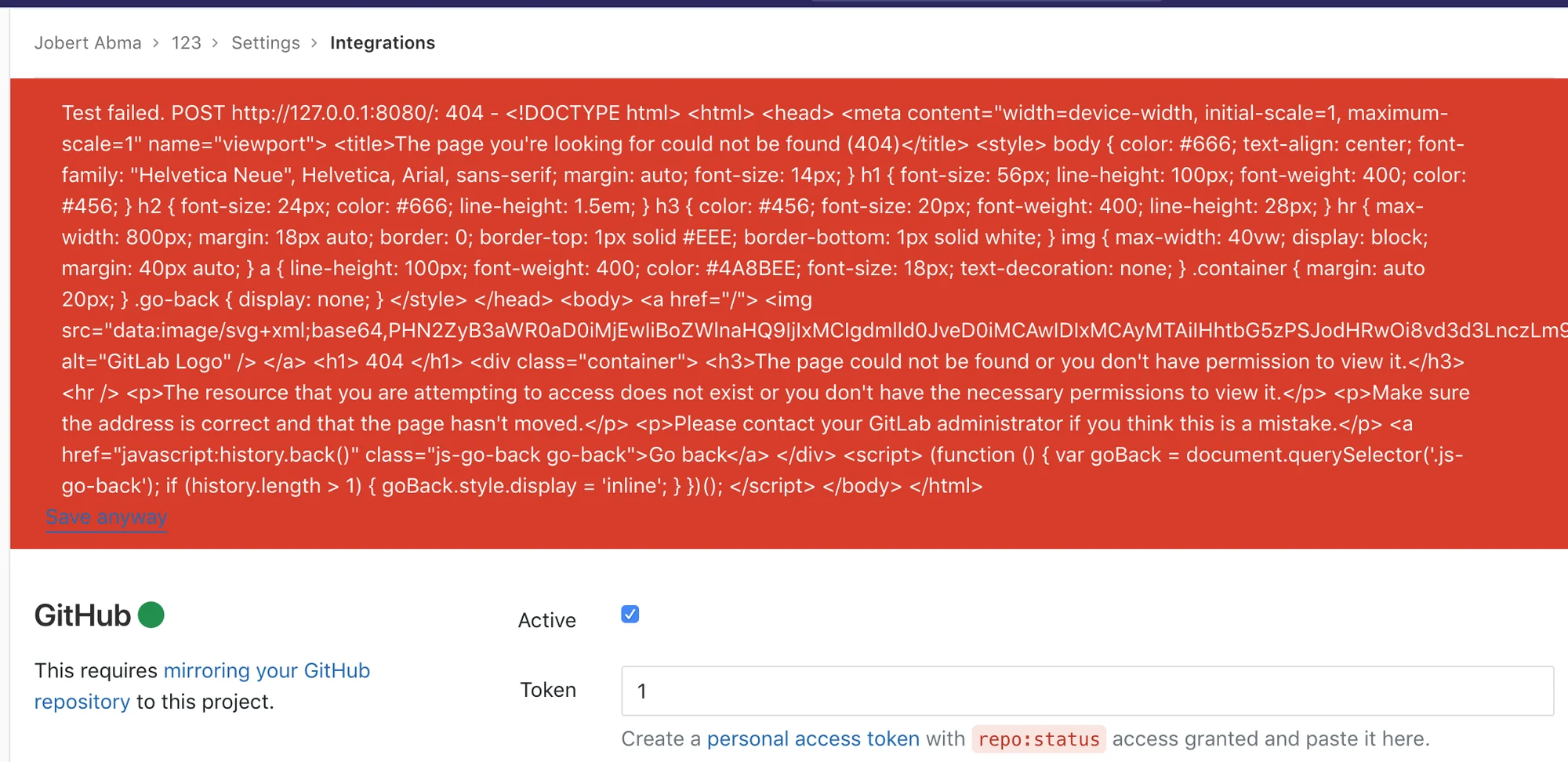
- Or, port 8080:
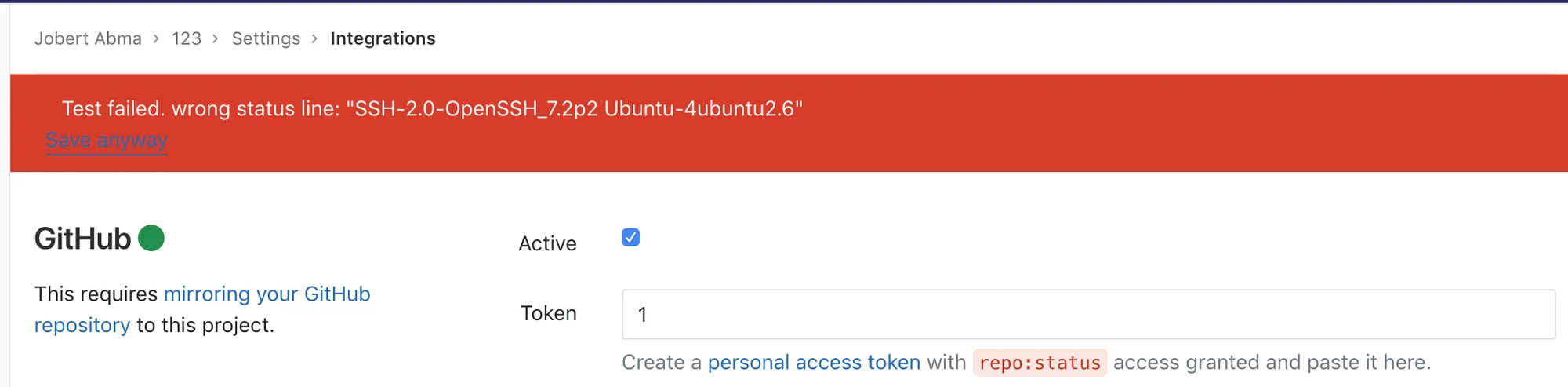
- Or, port 22:
Impact
An attacker may be able to leverage this to make arbitrary POST requests in a GitLab instance's internal network. It can also be used to connect to cloud provider's instance metadata API, which may result in the ability to execute commands on the machine.
Context
GitLab's GitHub integration lets a project mirror its pipeline status to a GitHub repository. When the integration is configured and tested, GitLab sends a commit status to the configured GitHub repository endpoint, so that the build result appears against the relevant commit on GitHub. The proof of concept shows that a redirect from the configured server is followed to an internal address, which turns the integration into a server-side request forgery (SSRF) primitive inside the GitLab instance's network.
The researcher's summary is blunt: the GitHub service is vulnerable to SSRF, an attacker may be able to make arbitrary POST requests in a GitLab instance's internal network, and it can also be used to reach a cloud provider's instance metadata API, which may result in command execution on the machine.
Setup
The preconditions are modest. The researcher signs in as any user, creates a new project, and adds a CI configuration so that a pipeline exists and has a commit status to report. The GitHub integration is then pointed at an external repository URL under the attacker's control. No special role is described beyond an ordinary signed-in user.
Finding it
The integration makes an outbound HTTP request to a URL the user supplies. The interesting question is what happens when that server answers with a redirect: if GitLab's HTTP client follows the Location header without validating the destination, the user-supplied URL becomes a way to make the GitLab server issue requests to hosts it can reach but the user cannot. The proof of concept confirms that the redirect is followed, and the response of the internal target is returned in the UI through an error message, which turns the blind SSRF into a readable one.
Exploitation
Step 1: create a project with a pipeline
Sign in as any user and create a new project. Add a .gitlab-ci.yml file with the following contents:
# This file is a template, and might need editing before it works on your project.
# see https://docs.gitlab.com/ce/ci/yaml/README.html for all available options

# you can delete this line if you're not using Docker
image: busybox:latest

before_script:
  - echo "Before script section"
  - echo "For example you might run an update here or install a build dependency"
  - echo "Or perhaps you might print out some debugging details"

after_script:
  - echo "After script section"
  - echo "For example you might do some cleanup here"

build1:
  stage: build
  script:
    - echo "Do your build here"

test1:
  stage: test
  script:
    - echo "Do a test here"
    - echo "For example run a test suite"

test2:
  stage: test
  script:
    - echo "Do another parallel test here"
    - echo "For example run a lint test"

deploy1:
  stage: deploy
  script:
    - echo "Do your deploy here"
This is the stock template with four jobs across build, test and deploy stages. Its purpose here is simply to produce pipelines, and therefore commit statuses, that the integration will report.
Step 2: wait for the pipeline
Wait about a minute to make sure the pipelines are created based on the GitLab CI configuration file. The integration sends a status for a commit, so a pipeline must exist first.
Step 3: configure the GitHub integration
Set up the GitHub integration and an external repository URL that is under your control, for example http://remote_ip/1/2. The host is the attacker's server, which receives the status request.
Step 4: trigger the request
Click the Test settings and save changes button. GitLab makes a request to the endpoint that looks something like this:
POST /api/v3/repos/1/2/statuses/[redacted] HTTP/1.1
Accept: application/vnd.github.v3+json
User-Agent: Octokit Ruby Gem 4.9.0
Content-Type: application/json
Authorization: token 1
Accept-Encoding: gzip;q=1.0,deflate;q=0.6,identity;q=0.3
Connection: close
Host: remote_ip
Content-Length: 158

{"context":"ci/gitlab/master","description":"Pipeline passed on GitLab","target_url":"https://gitlab.com/jobertabma/123/pipelines/36992118","state":"success"}
The request is a GitHub commit status update: the path carries the owner, repository and commit SHA, the body carries the context, description, target URL and state. The User-Agent identifies the client as Octokit Ruby Gem 4.9.0, and the Authorization header carries a token. The Host is the attacker-controlled server, which is the point: the attacker sees the full request and can answer it however they like.
Step 5: redirect into the internal network
Respond with a 302 Found that redirects back to the internal network using the Location header:
HTTP/1.1 302 Found
Location: http://[redacted]/
Connection: Close
Content-Length: 0
Because the client follows the redirect, a request is made to [redacted] from the GitLab server's network position.
Step 6: read the internal response
The response of [redacted] on port 80 is returned in the UI through the error message:
The same technique works against other ports. Port 8080:
And port 22:
The screenshots show the internal service's response surfacing in GitLab's error output, which is what makes this a readable SSRF rather than a blind one.
Root cause
The integration accepts a user-supplied repository URL and its HTTP client follows redirects to arbitrary destinations, including loopback addresses and internal hosts. The redirect target is followed to an internal address, so the configured URL effectively extends to wherever that URL points next. The report does not describe the specific code path or any defence that was present, so the precise mechanism is likely a redirect-following HTTP client without host validation.
Impact
An attacker may be able to leverage this to make arbitrary POST requests in a GitLab instance's internal network. It can also be used to connect to a cloud provider's instance metadata API, which may result in the ability to execute commands on the machine. The readable error output widens this from blind request forgery to disclosure of internal responses, as the port 80 and 8080 examples show. The conditions are any signed-in user able to create a project, plus a pipeline to generate a status.
Fix
The report does not describe the fix that was applied. What the behaviour calls for is restricting where the integration's HTTP client may connect, in particular refusing redirects to loopback, link-local and internal addresses, and validating the destination of every redirect rather than only the initially configured URL.
Variants to test
- Point the repository URL at your own server and answer with a
302whoseLocationishttp://[redacted]/. A positive result is the loopback response appearing in the UI error message. - Repeat with internal ports such as
8080and22. A positive result is a response or banner from those services in the error output. - Redirect to a cloud metadata address. The report states this may be reachable but does not show a result.
Hunting notes
This kind of bug hides in integrations and webhooks where the user supplies a URL and the server fetches it: repository mirrors, status integrations, importers and test buttons. The signal during recon is any feature that makes an outbound request to an address you control and reports the result back. The researcher showed impact by turning the request into a readable one: the internal response is reflected in the UI, and the same primitive reaches the metadata API, which is what makes the case for command execution. That combination, arbitrary internal POST plus readable responses plus a metadata path, is what carries the report.
What happened, in plain words
GitLab is a website where teams keep their code and run automated jobs on it. One of its features, the GitHub integration, lets a GitLab project send a short status message to a GitHub repository, so that people watching the GitHub side can see whether the latest build passed or failed. To do that, GitLab's own server makes an outgoing web request to an address that the user types into a settings form.
The researcher found that this outgoing request can be tricked. If the address the user typed answers with a redirect (a standard web reply that says "not here, go to this other address instead"), GitLab's server obediently follows it, even when the new address points at something inside GitLab's own private network that the user could never reach from their browser. That is the bug class called server-side request forgery, or SSRF: you make a server send a request on your behalf, to a place you are not allowed to go yourself.
Because the reply from that internal address is then shown back to the user inside an error message, the attacker does not just fire blind requests; they can read what came back. The researcher demonstrated this against internal ports 80 and 8080, and notes that the same trick could reach a cloud provider's instance metadata API, which may result in the ability to execute commands on the machine.
The pieces you need to know first
Before walking through the steps, here are the ideas the report leans on, explained from scratch.
- A server and a client. Your browser is a client: it asks for pages. The website's computer that answers is the server. In this bug, the interesting client is not your browser but GitLab's own server, which makes requests of its own while you wait.
- An HTTP request. The formal message a client sends to a server: a method (like
GETto read something orPOSTto send something), a path, some headers (extra labelled details) and sometimes a body (the content being sent). - An API. A way for one piece of software to talk to another without a human clicking anything. GitHub has an API that accepts status updates for commits; GitLab calls it on your behalf.
- A token. A long random string that acts like a password for software. When one service calls another, it puts the token in a header so the other side knows the call is authorised. It is not a human password, but it grants access just the same, which is why tokens are treated as secrets.
- A header. A labelled line in a request or response, such as
Host(which site is being asked) orLocation(where to go next). Headers are how the two sides pass instructions. - A redirect. A response with a status code like
302 Foundthat says "the thing you want is elsewhere". TheLocationheader holds the new address, and well-behaved clients go there automatically. - Loopback address.
[redacted]is a special address that always means "this same machine". A request to it never leaves the computer, so it is a way to talk to services that are only listening locally. - A port. One machine can run many services; a port number (80 for ordinary web, 8080 for an alternative web port, 22 for secure shell logins) picks which one you are talking to.
- SSRF (server-side request forgery). Tricking a server into making a request you choose, usually to somewhere you cannot reach directly. A blind SSRF is one where you cannot see the reply; a readable one is where the reply comes back to you somehow.
- Cloud instance metadata API. Cloud providers run a small service on each rented machine, reachable from that machine only, that hands out information about the machine, sometimes including temporary credentials. If an attacker can make the machine ask that service questions, the answers can be very valuable.
- A pipeline and
.gitlab-ci.yml. A pipeline is a series of automated jobs GitLab runs after code changes. The.gitlab-ci.ymlfile in a project describes those jobs. The integration reports the result of a pipeline as a commit status.
Setting up
The requirements are small: the researcher signs in as any ordinary user, creates a new project, and adds a CI configuration so that a pipeline exists and therefore has a status worth reporting. Then the GitHub integration is pointed at an external repository URL that the attacker controls. Nothing beyond a normal signed-in account is described.
Finding it
The integration makes an outgoing request to a URL the user supplies. The question that matters is what happens when that server replies with a redirect. If GitLab's HTTP client follows the Location header without checking where it leads, then the URL you typed becomes a way to make the GitLab server send requests to hosts it can reach but you cannot. The proof of concept confirms this, and the internal target's response is reflected back in the interface through an error message, which turns a blind SSRF into a readable one.
Exploitation
Step 1: create a project with a pipeline
Sign in as any user and create a new project. Add a .gitlab-ci.yml file with the following contents:
# This file is a template, and might need editing before it works on your project.
# see https://docs.gitlab.com/ce/ci/yaml/README.html for all available options

# you can delete this line if you're not using Docker
image: busybox:latest

before_script:
  - echo "Before script section"
  - echo "For example you might run an update here or install a build dependency"
  - echo "Or perhaps you might print out some debugging details"

after_script:
  - echo "After script section"
  - echo "For example you might do some cleanup here"

build1:
  stage: build
  script:
    - echo "Do your build here"

test1:
  stage: test
  script:
    - echo "Do a test here"
    - echo "For example run a test suite"

test2:
  stage: test
  script:
    - echo "Do another parallel test here"
    - echo "For example run a lint test"

deploy1:
  stage: deploy
  script:
    - echo "Do your deploy here"
Line by line, in plain words:
- The lines starting with
#are comments; GitLab ignores them. They are left over from the stock template and explain what the file is. image: busybox:latestsays which ready-made software environment the jobs should run in.busyboxis a tiny toolbox of common commands.before_script:lists commands to run before every job. Here they are justecholines, which print text to the log. They do nothing useful; they exist so the jobs have something to do.after_script:does the same after every job.build1:,test1:,test2:anddeploy1:are four jobs. Each has astage(build, test or deploy) and ascriptlist of commands to run.- Every command is an
echo, so the jobs only print messages. That is deliberate: the point is not to build anything, it is to make pipelines exist so that the integration has a status to send.
Step 2: wait for the pipeline
Wait about a minute so the pipelines are created from the CI configuration file. The integration reports a status for a commit, so a pipeline has to exist first. Without it there would be nothing to report and nothing to trigger.
Step 3: configure the GitHub integration
Set up the GitHub integration and give it an external repository URL that you control, for example http://remote_ip/1/2. The host part is the attacker's own server, which receives the status request. Because the attacker owns that server, the attacker sees the whole request and can answer it however they like, which is the key to the next step.
Step 4: trigger the request
Click the Test settings and save changes button. GitLab makes a request to the endpoint that looks something like this:
POST /api/v3/repos/1/2/statuses/[redacted] HTTP/1.1
Accept: application/vnd.github.v3+json
User-Agent: Octokit Ruby Gem 4.9.0
Content-Type: application/json
Authorization: token 1
Accept-Encoding: gzip;q=1.0,deflate;q=0.6,identity;q=0.3
Connection: close
Host: remote_ip
Content-Length: 158

{"context":"ci/gitlab/master","description":"Pipeline passed on GitLab","target_url":"https://gitlab.com/jobertabma/123/pipelines/36992118","state":"success"}
What each part means:
POST /api/v3/repos/1/2/statuses/[redacted] HTTP/1.1is the request line.POSTmeans "here is data for you". The path is GitHub's API shape for setting a commit status: owner1, repository2, and the long string is the commit identifier.HTTP/1.1is the version of the protocol.Accept: application/vnd.github.v3+jsontells the server the client expects GitHub's JSON format back.User-Agent: Octokit Ruby Gem 4.9.0names the software making the call. Octokit is a library for talking to GitHub, written in the Ruby language, and this is the version string it sends.Content-Type: application/jsonsays the body is JSON, a common text format for structured data.Authorization: token 1is where the token goes. In this test it is a placeholder value, not a real credential.Accept-Encodinglists the compression formats the client can handle, andConnection: closesays the connection can be closed after this exchange.Host: remote_ipis the attacker's server. This is the whole point: the request arrives at a machine the attacker controls.Content-Length: 158states how many bytes the body has.- The body is the status update itself: a
contextlabel, a human-readabledescription, atarget_urlpointing back at the pipeline, and astateofsuccess.
Because the attacker receives this request, they can reply with anything, including a redirect.
Step 5: redirect into the internal network
Respond with a 302 Found that redirects back into the internal network using the Location header:
HTTP/1.1 302 Found
Location: http://[redacted]/
Connection: Close
Content-Length: 0
HTTP/1.1 302 Foundis the status line: the server is saying "the resource is somewhere else".Location: http://[redacted]/is the new address.[redacted]means the same machine the request is running on, so this points at the GitLab server itself.Connection: CloseandContent-Length: 0say the connection ends here and there is no body.
Because the client follows the redirect, a request is made to [redacted], this time from the GitLab server's own network position. That is the forgery: the attacker never touches the internal address, the GitLab server does it for them.
Step 6: read the internal response
The response from [redacted] on port 80 comes back in the interface through the error message:
The same technique works against other ports. Port 8080:
And port 22:
The screenshots show the internal service's response appearing in GitLab's error output. That is what makes this a readable SSRF rather than a blind one: the attacker gets to see the answer, not just cause the request.
Why it works
The integration accepts a repository URL from the user, and its HTTP client follows redirects to any destination, including loopback addresses and internal hosts. The redirect target is followed to an internal address, so the configured URL effectively extends to wherever that URL points next. The report does not describe the specific code path or any defence that was present, so the precise mechanism is likely a redirect-following HTTP client without host validation.
Impact
An attacker may be able to leverage this to make arbitrary POST requests in a GitLab instance's internal network. It can also be used to connect to a cloud provider's instance metadata API, which may result in the ability to execute commands on the machine. The readable error output widens this from blind request forgery to disclosure of internal responses, as the port 80 and 8080 examples show. The conditions are any signed-in user able to create a project, plus a pipeline to generate a status.
Fix
The report does not describe the fix that was applied. What the behaviour calls for is restricting where the integration's HTTP client may connect, in particular refusing redirects to loopback, link-local and internal addresses, and validating the destination of every redirect rather than only the initially configured URL.
Variants to test
- Point the repository URL at your own server and answer with a
302whoseLocationishttp://[redacted]/. A positive result is the loopback response appearing in the UI error message. - Repeat with internal ports such as
8080and22. A positive result is a response or banner from those services in the error output. - Redirect to a cloud metadata address. The report states this may be reachable but does not show a result.
Where to look for this kind of bug
This kind of bug hides in integrations and webhooks where the user supplies a URL and the server fetches it: repository mirrors, status integrations, importers and test buttons. The signal during recon is any feature that makes an outgoing request to an address you control and reports the result back. The researcher showed impact by turning the request into a readable one: the internal response is reflected in the UI, and the same primitive reaches the metadata API, which is what makes the case for command execution. That combination, arbitrary internal POST plus readable responses plus a metadata path, is what carries the report.
Glossary
- API: a way for one piece of software to talk to another, without a human clicking anything.
- Blind SSRF: a server-side request forgery where the attacker cannot see the reply.
- Cloud instance metadata API: a small service on a rented cloud machine, reachable only from that machine, that hands out information about it, sometimes including temporary credentials.
- Commit status: a short message attached to a code commit saying whether a build or test passed.
- Header: a labelled line in an HTTP request or response carrying extra instructions, such as
HostorLocation. - HTTP: the protocol browsers and servers use to exchange requests and responses.
- HTTP client: the software on one machine that sends HTTP requests to another.
- JSON: a common text format for structured data, using curly braces and quoted names.
- Loopback address:
[redacted], a special address that always means the same machine the request is running on. - Pipeline: a series of automated jobs GitLab runs after code changes, described in
.gitlab-ci.yml. - Port: a number that picks which service on a machine you are talking to, such as 80 for ordinary web or 22 for secure shell.
- Redirect: a response such as
302 Foundthat tells the client to go to another address given in theLocationheader. - Server: the computer that answers requests from clients.
- SSRF (server-side request forgery): tricking a server into making a request the attacker chooses, usually to somewhere the attacker cannot reach directly.
- Token: a long random string that acts like a password for software, sent in a header to authorise a call.
- Webhook: a feature where one service automatically sends a request to a URL when something happens.



