Stored DOM XSS through modified emoji list in local-storage
The emoji picker on GitLab reads a local storage object (gl-emoji-map) and inserts its values into the page without sanitisation. An attacker who can modify that object (via another XSS or local access) can execute arbitrary JavaScript in the context of any account later used in the same browser, bypassing CSP.

GitLab
Originally disclosed on GitLab
- Fixed in 7 days
- Disclosed after 7 days
HackerOne report #1318396 by joaxcar on 2021-08-24, assigned to @dcouture:
Report | Attachments | How To Reproduce
Report
Summary
Clarification
This bug requires modification to a victims browsers local storage. This can be achieved by access to the computer (which might be out of scope) but also from leveraging another XSS. If used in conjunction with another XSS it would be to spread laterly on a victims device. "Good practice" sugests that users should not use admin accounts for regular use, this makes it likely that an initial XSS hits a "normal account". This DOM XSS could then be used to "infect" the browser for all subsequent account logins.
The vulnerability
When editing markdown (or other places where emojis are allowed) entering : will pop up the emoji picker list (see image)
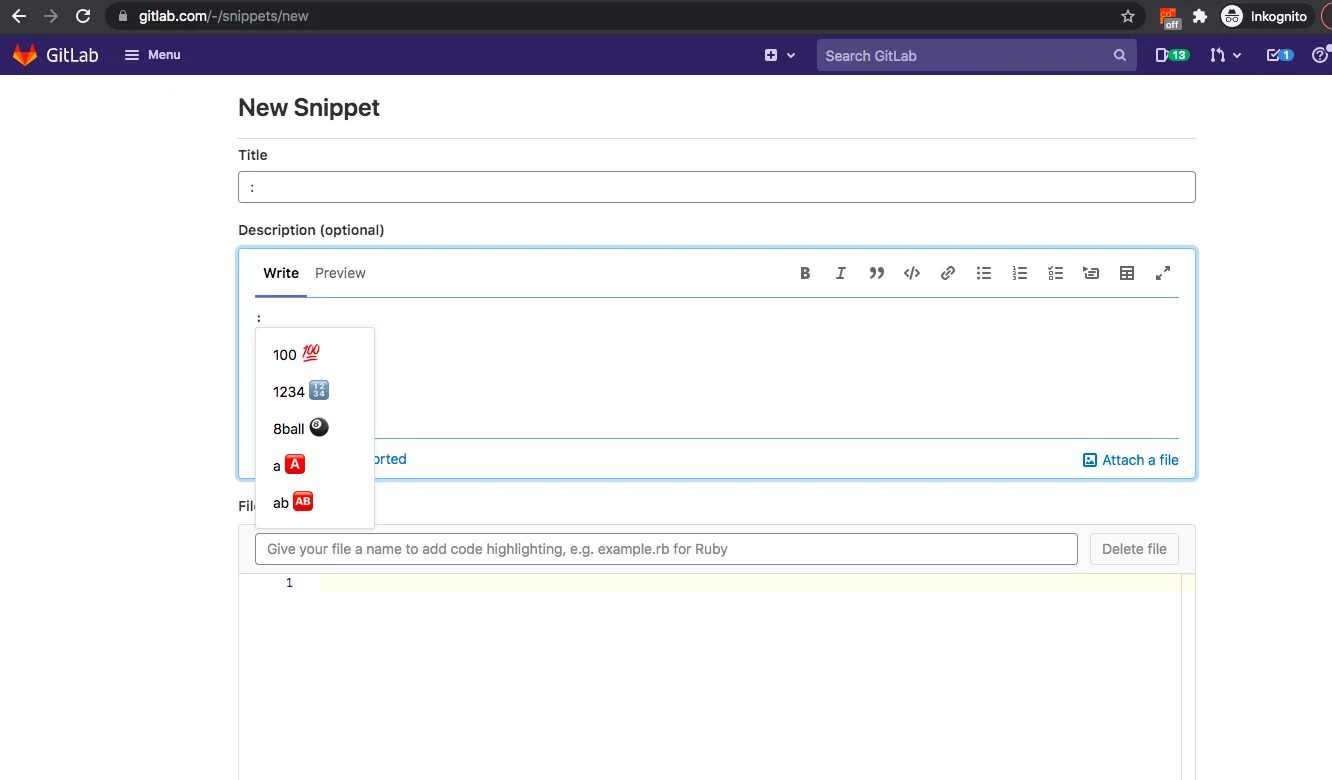
This list is populated by an object stored in Local Storage called gl-emoji-map. Each entry in the map looks like this
100: {
  "c": "symbols",
  "e": "💯",
  "d": "hundred points symbol",
  "u": "6.0"
}
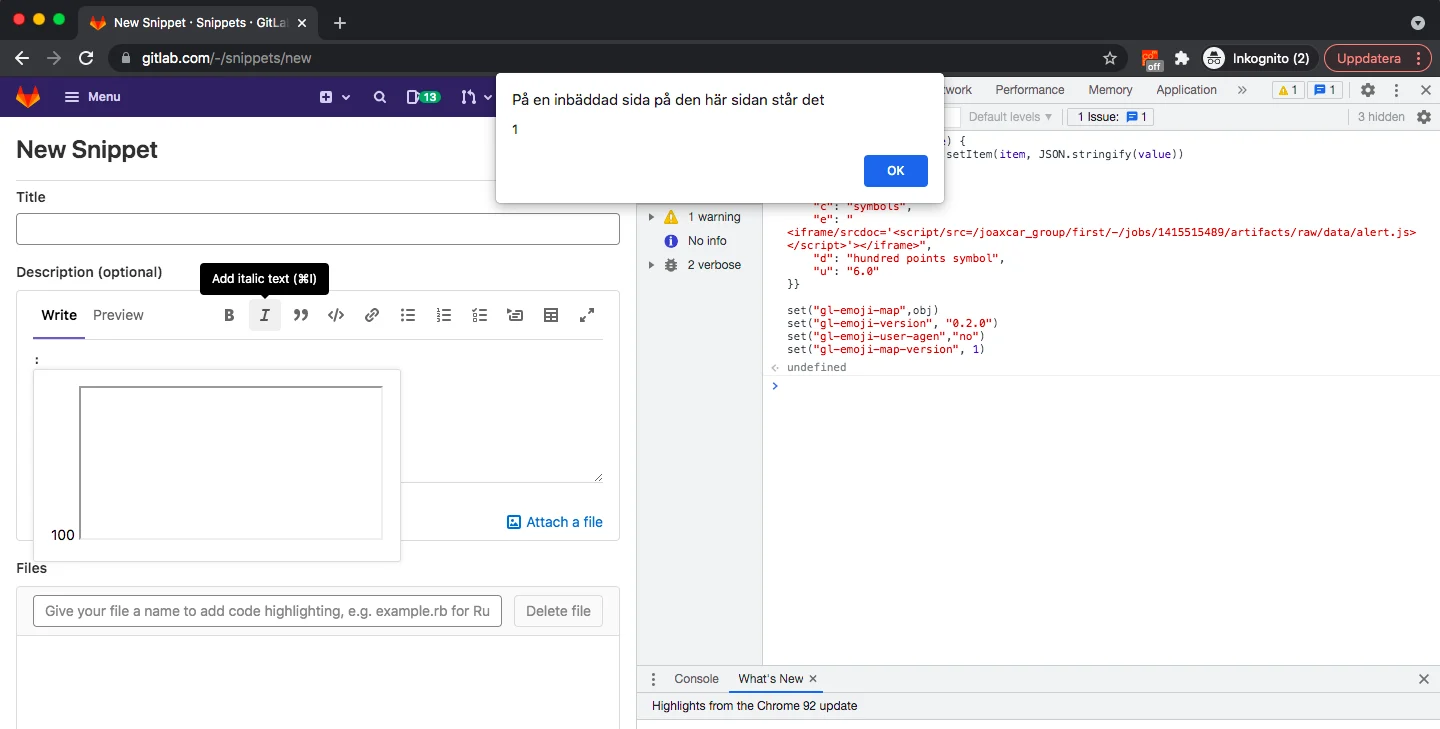
If an attacker changes the e value to a javascript string the string will get inlined into the "picker list" and executed. Like so
100:{
    "c": "symbols",
    "e": "<iframe/srcdoc='<script/src=/joaxcar_group/first/-/jobs/1415515489/artifacts/raw/data/alert.js></script>'></iframe>",
    "d": "hundred points symbol",
    "u": "6.0"
}
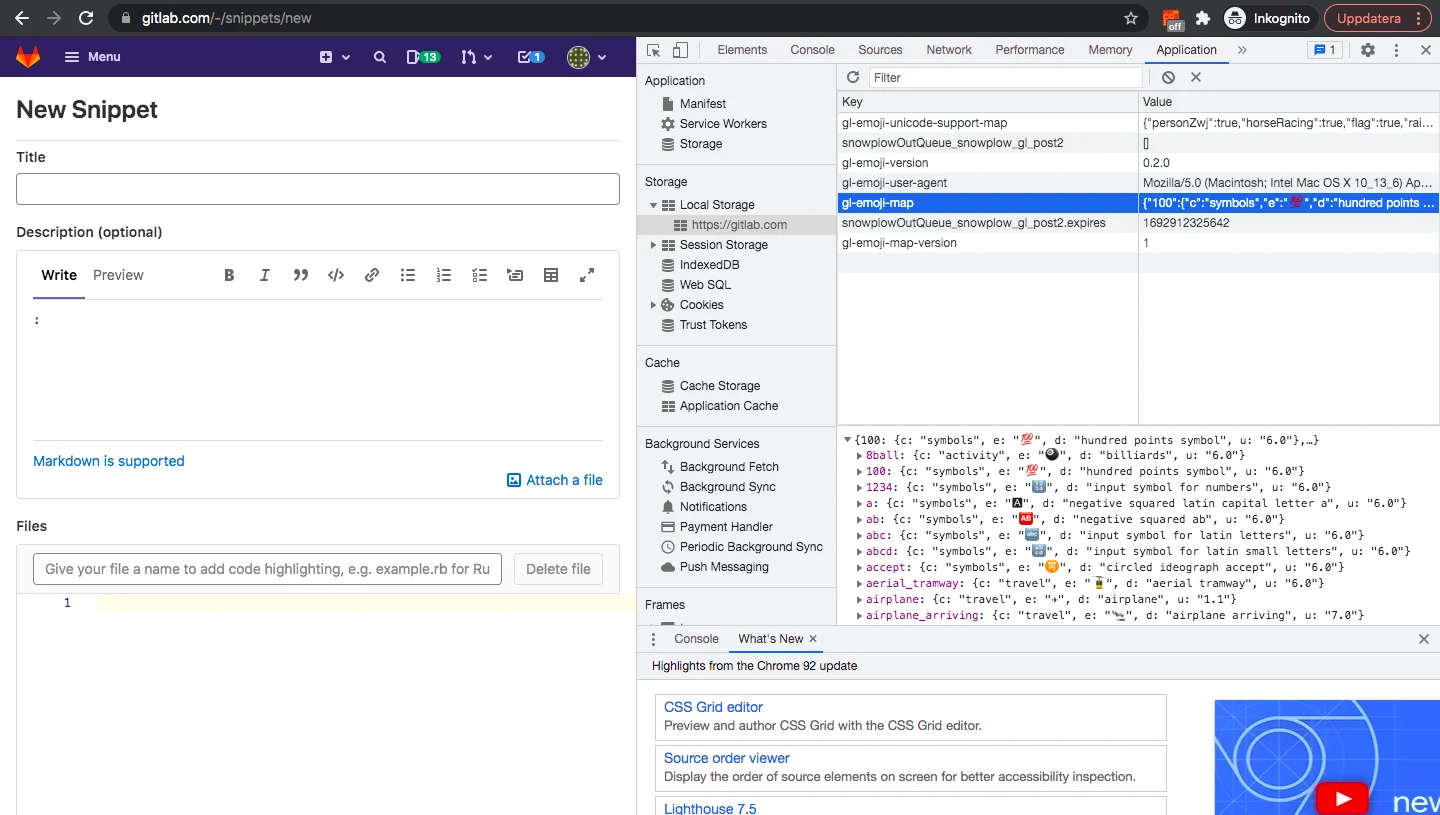
The gl-emoji-map is shared between all user accounts logging in through the same browser. Thus if one account gets targeted by another XSS and that payload "infects" the browsers like this all other accounts run the risk of also get effected. I guess that this lowers the impact quite a lot. But it is defenetly not insignificant.
The XSS bypasses CSP on Gitlab.com
Steps to reproduce
- Go to https://gitlab.com/users/sign_in but do not sign in yet
- Open
devtoolsin the browser (press F12) - Paste in this script
// Helper function
function set(item, value) {
    return localStorage.setItem(item, JSON.stringify(value))
}

// Attacker object
let obj = {100:{
    "c": "symbols",
    "e": "<iframe/srcdoc='<script/src=/joaxcar_group/first/-/jobs/1415515489/artifacts/raw/data/alert.js></script>'></iframe>",
    "d": "hundred points symbol",
    "u": "6.0"
}}

// Set all local storage objects needed even if no user have previously logged in
set("gl-emoji-map",obj)
set("gl-emoji-version", "0.2.0")
set("gl-emoji-user-agen","no")
set("gl-emoji-map-version", 1)
- Log in to Gitlab.com with any user
- Go to https://gitlab.com/-/snippets/new
- Enter
:(a colon) in the field for "Description" - Alert will pop up
Impact
Stored DOM XSS with CSP bypass
What is the current bug behavior?
The local storage object gl-emoji-map is not sanitized when injected into the DOM
What is the expected correct behavior?
The object should be sanitized before injection
Output of checks
This bug happens on GitLab.com
Impact
Stored DOM XSS with CSP bypass that could be used to "infect latterly" between accounts using the same browser. Requires that one account gets affected by another XSS or that the attacker gets access to the user browser.
Attachments
Warning: Attachments received through HackerOne, please exercise caution!
How To Reproduce
Please add reproducibility information to this section:
Not written yet. The AI write-up for this report has not been written yet. The Original tab links to the source.
How it worked
Impact
Stored DOM XSS with CSP bypass that could be used to spread laterally between accounts using the same browser, but requires that one account is already affected by another XSS or that the attacker has access to the user's browser.
What the attacker needed
Attacker can modify victim's local storage; victim uses same browser for multiple accounts
The fix
The object should be sanitised before injection.
How it was found
- Go to the GitLab sign-in page but do not sign in.
- Open the browser developer tools.
- Run a script that sets several local storage keys, including a modified emoji map with a malicious value.
- Sign in to GitLab with any user.
- Go to the new snippet page.
- Type a colon in the Description field; an alert appears.
Explained by bugbounty.wiki with AI from the original and checked against quotes from it; it can still be wrong. Read the original before relying on a detail.
Not written yet. The AI write-up for this report has not been written yet. The Original tab links to the source.
Local storage is a place a website can save data in your browser. GitLab saves the emoji list there, and when you type a colon it reads that list and puts it on the page. If someone can change that saved list, they can put harmful code in it, and the next time any account uses that browser the code runs.
What is XSS?
Script an attacker supplies runs in another user's browser, on the target's origin, with that user's session.



