Stored DOM XSS via Mermaid chart
Mermaid, a diagramming library used by GitLab, fails to sanitise user-supplied theme values in directives, allowing an attacker to inject HTML into a style tag via innerHTML. This leads to stored DOM XSS when a victim views a page containing a malicious Mermaid chart, though CSP on gitlab.com blocks execution.
 Originally disclosed on HackerOne
- Triaged in 3 days
- Fixed in 2 months
- Paid in 3 days
- Disclosed after 5 months
Prologue
Gitlab supports Mermaid as part of GFM to allow users to generate diagrams and flowcharts from text.
In version 8.6.0, Mermaid added a support of directives to add more control over styles(themes) applied to the diagrams.
You can read more about how this works here: https://mermaid-js.github.io/mermaid/#/directives
Syntax for declaring the directive is %%{init: {<JSON_OBJECT>}}%%
Directives can be used to overwrite default theme properties like fontFamily or fontSize to the graph.
Behind the scenes, library takes JSON_OBJECT from directive and merges it with config object. Later that config is used to generate new CSS rules:
  let userStyles = '';
  // user provided theme CSS
  if (cnf.themeCSS !== undefined) {
    userStyles += `\n${cnf.themeCSS}`;
  }
  // user provided theme CSS
  if (cnf.fontFamily !== undefined) {
    userStyles += `\n:root { --mermaid-font-family: ${cnf.fontFamily}}`;
  }
  // user provided theme CSS
  if (cnf.altFontFamily !== undefined) {
    userStyles += `\n:root { --mermaid-alt-font-family: ${cnf.altFontFamily}}`;
  }
Vulnerability description
Problem is that there is no sanitization of user-supplied values, which are added to style tag via innerHTML method afterwards:
  const stylis = new Stylis();
  const rules = stylis(`#${id}`, getStyles(graphType, userStyles, cnf.themeVariables));

  const style1 = document.createElement('style');
  style1.innerHTML = rules;
  svg.insertBefore(style1, firstChild);
This leads to Cross-Site Scripting attack via following directive:
%%{init: { 'fontFamily': '\"></style><img src=x onerror=alert(document.cookie)>'} }%%
Steps to reproduce
- Create an issue in any repository
- Create mermaid diagram with following payload:
%%{init: { 'fontFamily': '\"></style><img src=x onerror=alert(document.cookie)>'} }%%
sequenceDiagram
Alice->>Bob: Hi Bob
Bob->>Alice: Hi Alice
- Save the issue. XSS will be triggered every time a user opens a page with this issue.
PoC
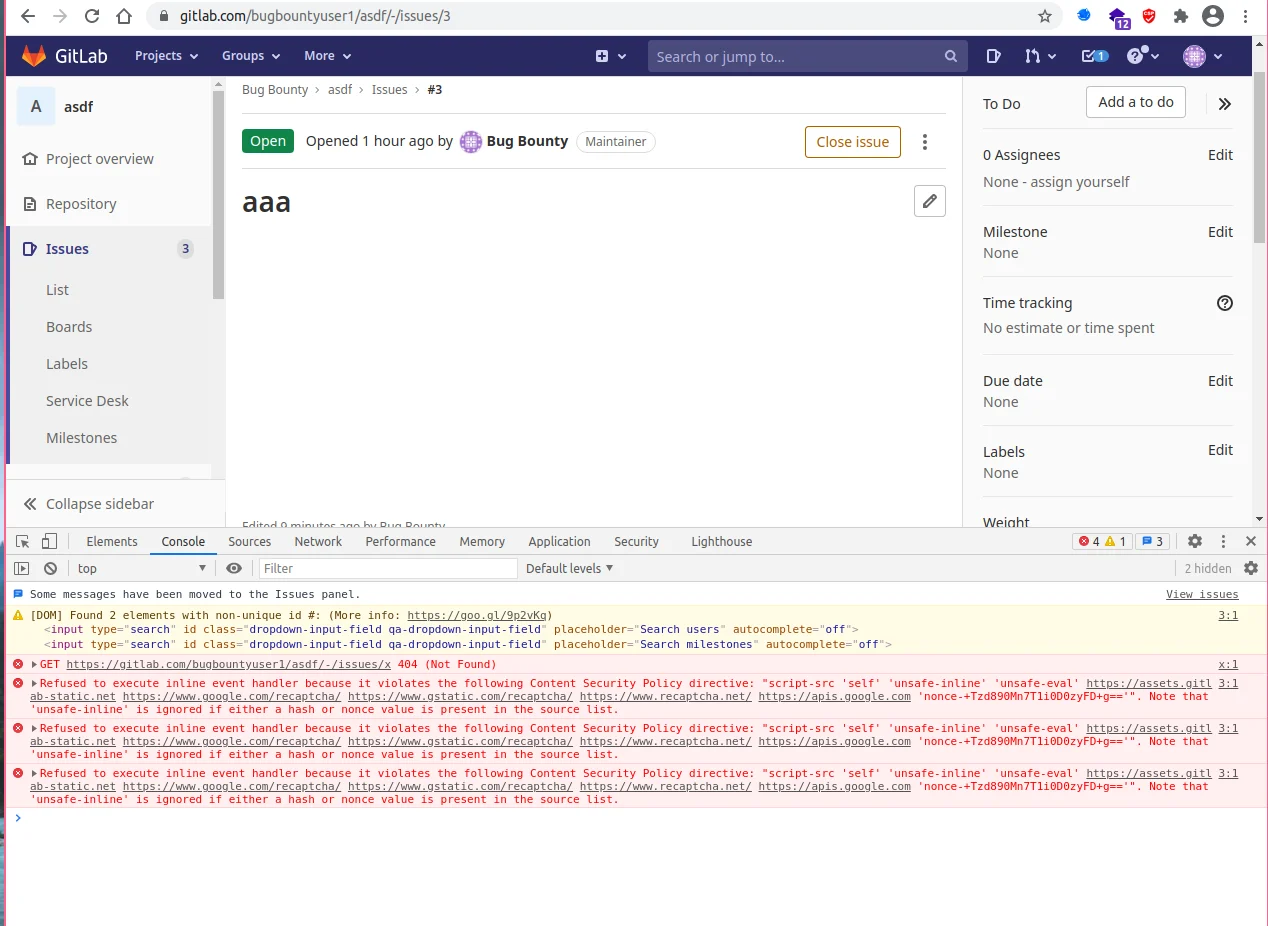
Visit https://gitlab.com/bugbountyuser1/asdf/-/issues/3 You will see CSP errors in the console.
What is the current bug behavior?
Mermaid fails to properly sanitize user-supplied input via directive which leads to XSS.
What is the expected correct behavior?
Mermaid strips/encodes malicious characters, so there is no way to perform XSS attack.
Output of checks
This vulnerability was tested on gitlab.com. CSP blocks XSS from executing, but I have an idea on how to bypass CSP. On a local Gitlab instance with a newer version(same as gitlab.com) of Mermaid, it works too.
Results of GitLab environment info
(For installations with omnibus-gitlab package run and paste the output of:
sudo gitlab-rake gitlab:env:info)
(For installations from source run and paste the output of:
sudo -u git -H bundle exec rake gitlab:env:info RAILS_ENV=production)
Impact
The Impact is standard as for any Stored XSS. User interaction is minimal - the user needs to navigate to a page with a Mermaid chart(issues page, etc). CSP is blocking XSS on gitlab.com, but I can work on XSS bypass if it is needed to show the impact/increase bounty amount. So let me know if you need CSP bypass too.
Context
GitLab supports Mermaid as part of GFM (GitLab Flavoured Markdown), which lets users generate diagrams and flowcharts from text inside issues and other Markdown-rendered pages. Mermaid added support for directives in version 8.6.0, giving users more control over the styles (themes) applied to diagrams. The directive syntax is:
%%{init: {<JSON_OBJECT>}}%%
Directives can overwrite default theme properties such as fontFamily or fontSize for the graph. Behind the scenes, the library takes the JSON_OBJECT from the directive and merges it with the config object. That config is later used to generate new CSS rules:
  let userStyles = '';
  // user provided theme CSS
  if (cnf.themeCSS !== undefined) {
    userStyles += `\n${cnf.themeCSS}`;
  }
  // user provided theme CSS
  if (cnf.fontFamily !== undefined) {
    userStyles += `\n:root { --mermaid-font-family: ${cnf.fontFamily}}`;
  }
  // user provided theme CSS
  if (cnf.altFontFamily !== undefined) {
    userStyles += `\n:root { --mermaid-alt-font-family: ${cnf.altFontFamily}}`;
  }
The target was gitlab.com, and the feature under scrutiny was Mermaid diagram rendering inside Markdown content.
Setup
The vulnerability was tested on gitlab.com. The researcher also tested on a local GitLab instance running a newer version of Mermaid, the same as gitlab.com, and reported that it worked there too. The report does not describe any special account, role or tooling beyond the ability to create an issue in a repository.
Finding it
The researcher noticed that user-supplied values from the Mermaid directive are not sanitised before being added to a style tag via the innerHTML method. The relevant code is:
  const stylis = new Stylis();
  const rules = stylis(`#${id}`, getStyles(graphType, userStyles, cnf.themeVariables));

  const style1 = document.createElement('style');
  style1.innerHTML = rules;
  svg.insertBefore(style1, firstChild);
Because the values from the directive flow into userStyles and then into the style element's innerHTML, a crafted fontFamily value can break out of the style context and inject markup. That looked wrong because the directive is fully user-controlled text inside a Markdown document.
Exploitation
Step 1: Create an issue
Create an issue in any repository. This is the container for the Markdown that will be rendered.
Step 2: Add a Mermaid diagram with the payload
Create a Mermaid diagram with the following payload:
%%{init: { 'fontFamily': '\"></style><img src=x onerror=alert(document.cookie)>'} }%%
sequenceDiagram
Alice->>Bob: Hi Bob
Bob->>Alice: Hi Alice
The directive sets fontFamily to a value that closes the surrounding </style> tag and injects an img element whose onerror handler runs alert(document.cookie). The sequenceDiagram lines are ordinary Mermaid content that makes the block a valid diagram.
Step 3: Save the issue
Save the issue. The XSS is triggered every time a user opens a page with this issue.
Proof of concept
The researcher pointed to a live issue at https://gitlab.com/bugbountyuser1/asdf/-/issues/3. On that page, CSP errors appear in the console. The screenshot shows the issue page with the console output:
Root cause
The mistake is the absence of sanitisation of user-supplied values that are added to a style tag via innerHTML. The directive's fontFamily (and, by the same code path, themeCSS and altFontFamily) is concatenated into userStyles, processed by Stylis, and then assigned to style1.innerHTML. Because the value is not stripped or encoded, a value containing </style> terminates the style element and the remainder is parsed as HTML, which is how the img with the onerror handler gets into the DOM. Existing defences did not stop the injection on gitlab.com: CSP blocked the script from executing, but the markup injection itself still occurred, and the researcher stated they had an idea for bypassing CSP.
Impact
The impact is described as standard for any stored XSS. User interaction is minimal: the user only needs to navigate to a page containing a Mermaid chart, such as an issues page. On gitlab.com, CSP blocked the XSS from executing, but the researcher offered to work on a CSP bypass if needed to demonstrate impact or increase the bounty amount.
Fix
The report states the expected correct behaviour: Mermaid should strip or encode malicious characters so there is no way to perform an XSS attack. The report does not describe a specific patch that was applied.
Variants to test
- Try the same directive injection through other theme properties that reach the same code path, such as
themeCSSandaltFontFamily, using a value that closes</style>and injects markup. A positive result is injected HTML appearing in the rendered diagram's DOM. - Try the
fontFamilypayload in other Markdown-rendered contexts where Mermaid is supported, such as issues, merge requests or comments. A positive result is the payload rendering on page load for any viewer. - Try payloads that do not rely on
onerror(for example markup that triggers on load) to see whether CSP still blocks execution. A positive result is script execution despite CSP.
Hunting notes
This kind of bug tends to hide wherever user-controlled text is merged into a configuration object and then written into a style element via innerHTML, especially in diagram and charting libraries that support theme directives. During recon, look for features that accept structured directives or theme overrides inside Markdown, and check whether the values are sanitised before reaching the DOM. The researcher showed impact by demonstrating that the payload is stored and triggers on every page view, and by noting the CSP limitation and offering a bypass.
What happened, in plain words
GitLab is a website where teams keep their code and talk about it. One of the things you can do on GitLab is write text in a special format called Markdown, and inside that text you can draw diagrams using a tool called Mermaid. You type a few lines of text, and Mermaid turns them into a picture, like a flowchart or a sequence of steps.
Mermaid lets you add a small instruction at the top of your diagram to change how it looks, for example which font it uses. That instruction is called a directive. The problem this report describes is that Mermaid took the font name from that instruction and pasted it into the page without checking it first. A malicious person could put a piece of HTML (the language web pages are built from) in the font name, and the browser would treat it as real page content instead of as text. That is a type of bug called Cross-Site Scripting, or XSS for short.
Because the malicious diagram is saved in an issue on GitLab, every person who opens that issue triggers the bug. That makes it a stored XSS: the attack is stored on the server and fires for every visitor.
The pieces you need to know
Before walking through the report, here are the ideas it relies on, explained from zero.
- GitLab: a website for software teams. It hosts code repositories (folders of project files) and lets people discuss work in issues.
- Issue: a page on GitLab where people describe a task, a bug or a question. Anyone with access to a repository can usually create one, and other people can open it to read it.
- Markdown: a simple way of writing formatted text using plain characters. For example,
**bold**becomes bold. GitLab uses its own version called GFM, GitLab Flavoured Markdown. - Mermaid: a library (a bundle of code) that reads a short text description and draws a diagram from it. GitLab includes Mermaid so that diagrams can be written directly inside Markdown.
- Directive: a special line at the top of a Mermaid diagram that changes settings, such as the font or the colour theme. It looks like
%%{init: {...}}%%. - JSON object: a way of writing structured data as text, using curly braces, names and values, for example
{"name": "value"}. The directive contains one of these to hold the settings. - CSS: the language that describes how a web page looks: fonts, colours, sizes. A
styletag in a page holds CSS rules. - DOM: the browser's in-memory model of the page. When JavaScript adds or changes elements, it changes the DOM, and the browser redraws the page.
innerHTML: a JavaScript property that lets code set the contents of an element as raw HTML. The browser parses whatever string you give it as markup, not as plain text. That is exactly why it is dangerous with untrusted input.- Sanitisation: cleaning input so that dangerous characters are removed or turned into harmless text (encoded). Without it, user input can become code.
- XSS (Cross-Site Scripting): a bug where an attacker gets their own HTML or JavaScript into a page that other people view. The attacker's code then runs in the victim's browser, in the context of the trusted site.
- Stored XSS: an XSS where the malicious content is saved on the server (for example in an issue) and served to every visitor, rather than being crafted into a one-off link.
- CSP (Content Security Policy): a rule set a website sends to the browser saying which scripts are allowed to run. It is a defence in depth: even if an attacker injects a script tag, the browser may refuse to execute it.
- Cookie: a small piece of data a website stores in your browser, often used to remember that you are logged in. Stealing a session cookie can let an attacker act as you, which is why the payload in this report tries to read
document.cookie. - Console: the developer tools panel in a browser where errors and messages appear. You can open it with the browser's developer tools.
Context: how Mermaid handles directives
GitLab supports Mermaid as part of GFM, so users can generate diagrams and flowcharts from text inside issues and other Markdown-rendered pages. Mermaid added support for directives in version 8.6.0, giving users more control over the styles (themes) applied to diagrams. The directive syntax is:
%%{init: {<JSON_OBJECT>}}%%
This line is the instruction. init means "initialise with these settings", and the curly braces hold the settings as a JSON object. Everything between %%{ and }%% is read by Mermaid, not shown to the reader as text.
Directives can overwrite default theme properties such as fontFamily or fontSize for the graph. Behind the scenes, the library takes the JSON_OBJECT from the directive and merges it with the config object. That config is later used to generate new CSS rules:
  let userStyles = '';
  // user provided theme CSS
  if (cnf.themeCSS !== undefined) {
    userStyles += `\n${cnf.themeCSS}`;
  }
  // user provided theme CSS
  if (cnf.fontFamily !== undefined) {
    userStyles += `\n:root { --mermaid-font-family: ${cnf.fontFamily}}`;
  }
  // user provided theme CSS
  if (cnf.altFontFamily !== undefined) {
    userStyles += `\n:root { --mermaid-alt-font-family: ${cnf.altFontFamily}}`;
  }
Line by line:
let userStyles = '';creates an empty piece of text that will collect the CSS the user asked for.- The first
ifchecks whether the user supplied athemeCSSsetting. If so, it appends that value touserStyles, preceded by a newline. - The second
ifchecksfontFamily. If present, it appends a CSS rule that sets the--mermaid-font-familyvariable to whatever the user typed. The${...}syntax means "insert the value here". - The third
ifdoes the same foraltFontFamily, a fallback font.
The important detail is that the user's text is inserted directly into a string that will become CSS. There is no check that the text is a safe font name. If the user types something that is not a font name but HTML, it will end up in the CSS string unchanged.
The target was gitlab.com, and the feature under scrutiny was Mermaid diagram rendering inside Markdown content.
Setup: what the researcher used
The vulnerability was tested on gitlab.com. The researcher also tested on a local GitLab instance running a newer version of Mermaid, the same as gitlab.com, and reported that it worked there too. A local instance means GitLab installed on the researcher's own computer, so they could experiment without touching the live site. The report does not describe any special account, role or tooling beyond the ability to create an issue in a repository. In other words, an ordinary user who can write an issue is enough.
Finding it: where the input goes
The researcher noticed that user-supplied values from the Mermaid directive are not sanitised before being added to a style tag via the innerHTML method. The relevant code is:
  const stylis = new Stylis();
  const rules = stylis(`#${id}`, getStyles(graphType, userStyles, cnf.themeVariables));

  const style1 = document.createElement('style');
  style1.innerHTML = rules;
  svg.insertBefore(style1, firstChild);
Line by line:
const stylis = new Stylis();creates an instance of Stylis, a small library that turns CSS text into browser-ready CSS rules.const rules = stylis(...)runs Stylis on the collected styles. The first argument#${id}scopes the rules to the diagram's element, so they only apply inside the diagram. The second argument is the CSS text built earlier, which contains the user'sfontFamilyvalue.const style1 = document.createElement('style');creates a newstyleelement in the page. Astyleelement holds CSS rules.style1.innerHTML = rules;puts the generated CSS into that element usinginnerHTML. This is the dangerous line:innerHTMLparses its input as HTML, not as plain text.svg.insertBefore(style1, firstChild);inserts the newstyleelement into the diagram's SVG (the drawing area) so the rules take effect.
Because the values from the directive flow into userStyles and then into the style element's innerHTML, a crafted fontFamily value can break out of the style context and inject markup. That looked wrong because the directive is fully user-controlled text inside a Markdown document. Anyone who can write an issue can write a directive, so anyone can influence what ends up in innerHTML.
Exploitation: step by step
Step 1: Create an issue
Create an issue in any repository. This is the container for the Markdown that will be rendered. The issue is where the malicious diagram will live, and because issues are shared, other people will open it.
Step 2: Add a Mermaid diagram with the payload
Create a Mermaid diagram with the following payload:
%%{init: { 'fontFamily': '\"></style><img src=x onerror=alert(document.cookie)>'} }%%
sequenceDiagram
Alice->>Bob: Hi Bob
Bob->>Alice: Hi Alice
Line by line:
- The first line is the directive. It sets
fontFamilyto a value that starts with\">, which closes the attribute and thestylecontext, then contains</style>to end the style element, then animgelement. Theimghassrc=x, which points to a file that does not exist, so the browser will fail to load it. When loading fails, theonerrorhandler runs. That handler isalert(document.cookie), which shows a pop-up containing the page's cookies. sequenceDiagramtells Mermaid this is a sequence diagram, a diagram showing messages between participants over time.Alice->>Bob: Hi Bobdraws an arrow from Alice to Bob labelled "Hi Bob".Bob->>Alice: Hi Alicedraws the reply.
The sequenceDiagram lines are ordinary Mermaid content that makes the block a valid diagram. The directive is the attack; the diagram lines are the disguise that gets it processed.
Step 3: Save the issue
Save the issue. The XSS is triggered every time a user opens a page with this issue. This is what makes it stored: the payload is saved on GitLab's servers, and every visitor's browser runs it when the page loads.
Proof of concept
The researcher pointed to a live issue at https://gitlab.com/bugbountyuser1/asdf/-/issues/3. On that page, CSP errors appear in the console. The screenshot shows the issue page with the console output:
The CSP errors are the browser saying it refused to run something. In this case, the injected img with its onerror handler made it into the page, but the CSP rule stopped the handler from executing. The CSP errors show the browser refused to run something; the report does not confirm whether the injected markup reached the page. That distinction matters: the bug is real, and a different payload or a CSP bypass could turn it into code execution.
Root cause: why it works
The mistake is the absence of sanitisation of user-supplied values that are added to a style tag via innerHTML. The directive's fontFamily (and, by the same code path, themeCSS and altFontFamily) is concatenated into userStyles, processed by Stylis, and then assigned to style1.innerHTML. Because the value is not stripped or encoded, a value containing </style> terminates the style element and the remainder is parsed as HTML, which is how the img with the onerror handler gets into the DOM.
A useful comparison: imagine a form where you write your name, and the website prints "Hello, [your name]" on a page. If the website treats your name as plain text, typing <b>Alice</b> shows the literal characters. If it treats your name as HTML, the browser makes the word bold. Now imagine the website puts your name inside a style block. If you type </style><img ...>, you close the style block early and start a new HTML element. That is exactly what happens here.
Existing defences did not stop the injection on gitlab.com: CSP blocked the script from executing, but the markup injection itself still occurred, and the researcher stated they had an idea for bypassing CSP. A CSP bypass means finding a way to make the browser run the injected code despite the policy, for example by using a feature the policy still allows.
Impact: what an attacker could do
The impact is described as standard for any stored XSS. User interaction is minimal: the user only needs to navigate to a page containing a Mermaid chart, such as an issues page. There is no click required, no file to download, no special link. Opening the page is enough.
On gitlab.com, CSP blocked the XSS from executing, but the researcher offered to work on a CSP bypass if needed to demonstrate impact or increase the bounty amount. In a stored XSS where CSP does not block execution, an attacker could read cookies (including session cookies, which would let them act as the victim), read page content, or perform actions on the victim's behalf. The report does not claim any of this happened; it describes the potential.
Fix: what should happen instead
The report states the expected correct behaviour: Mermaid should strip or encode malicious characters so there is no way to perform an XSS attack. Stripping means removing dangerous characters; encoding means turning them into harmless text, so </style> would be displayed as characters rather than treated as the end of a tag. The report does not describe a specific patch that was applied.
Variants to test: where else to look
These are follow-up ideas in the same spirit as the original finding. They are not claims that these worked; they are places a curious tester would look next.
- Try the same directive injection through other theme properties that reach the same code path, such as
themeCSSandaltFontFamily, using a value that closes</style>and injects markup. A positive result is injected HTML appearing in the rendered diagram's DOM. - Try the
fontFamilypayload in other Markdown-rendered contexts where Mermaid is supported, such as issues, merge requests or comments. A positive result is the payload rendering on page load for any viewer. - Try payloads that do not rely on
onerror(for example markup that triggers on load) to see whether CSP still blocks execution. A positive result is script execution despite CSP.
Hunting notes: how to spot this kind of bug
This kind of bug tends to hide wherever user-controlled text is merged into a configuration object and then written into a style element via innerHTML, especially in diagram and charting libraries that support theme directives. During recon (the early phase of looking around a target for interesting features), look for features that accept structured directives or theme overrides inside Markdown, and check whether the values are sanitised before reaching the DOM.
The researcher showed impact by demonstrating that the payload is stored and triggers on every page view, and by noting the CSP limitation and offering a bypass.
Glossary
- API: a defined way for one piece of software to talk to another, like a menu of allowed requests and responses.
- Bounty: a payment a company gives to a researcher who reports a valid security bug.
- Browser console: the panel in a browser's developer tools that shows errors, warnings and messages from the page.
- Config object: a JavaScript object holding settings that a library reads to decide how to behave.
- Cookie: a small piece of data a website stores in your browser, often used to keep you logged in.
- CSP (Content Security Policy): a set of rules a website sends to the browser saying which scripts and resources are allowed, used to limit the damage of injected code.
- CSS: the language that describes how a web page looks, including fonts, colours and layout.
- Directive: a special instruction line at the top of a Mermaid diagram that changes its settings.
- DOM: the browser's in-memory tree of the page's elements, which JavaScript can read and change.
- Encoding: turning special characters into harmless text so they are displayed rather than interpreted.
- GFM (GitLab Flavoured Markdown): GitLab's version of Markdown, with extra features such as Mermaid diagrams.
- GitLab: a website for hosting code and collaborating on software projects, including issues and merge requests.
innerHTML: a JavaScript property that sets an element's contents as raw HTML, which the browser parses as markup.- Issue: a page on GitLab used to describe a task, bug or question, which other people can open and read.
- JavaScript: the programming language that runs in web browsers and makes pages interactive.
- JSON object: a way of writing structured data as text using curly braces, names and values.
- Markdown: a simple text format for writing formatted documents using plain characters.
- Mermaid: a library that draws diagrams from short text descriptions.
- Payload: the specific piece of malicious input an attacker sends to trigger a bug.
- Recon: the early phase of exploring a target to find interesting features and possible weak points.
- Sanitisation: cleaning input so dangerous characters are removed or encoded before use.
- Sequence diagram: a diagram that shows messages passed between participants over time.
- Session cookie: a cookie that identifies your logged-in session, so stealing it can let an attacker act as you.
- Severity: a rating of how serious a bug is, often high, medium or low.
- Stored XSS: a Cross-Site Scripting bug where the malicious content is saved on the server and served to every visitor.
- Stylis: a small library that converts CSS text into browser-ready CSS rules.
- SVG: a format for drawing images using markup, used by Mermaid to render diagrams.
- Theme: a set of style settings, such as fonts and colours, applied to a diagram.
- XSS (Cross-Site Scripting): a bug where an attacker gets their own HTML or JavaScript into a page viewed by other people, so it runs in their browsers.




