Stored XSS in maintenance mode banner message on instances without CSP
The maintenance mode banner message on GitLab instances without CSP allowed an admin to store JavaScript that executed for every user on every page load. An attacker with admin access could steal cookies and impersonate users without the logging that normally accompanies impersonation.

GitLab
Originally disclosed on GitLab
- Fixed in 5 months
- Disclosed after 5 months
⚠️ Please read the process on how to fix security issues before starting to work on the issue. Vulnerabilities must be fixed in a security mirror.
HackerOne report #2051381 by js_noob on 2023-07-05, assigned to @kmorrison1:
Report | Attachments | How To Reproduce
Report
Summary
Hello team, I've found a bug where it allows to save JS that gets executed on the users' end on every navigation. The JS code gets saved in maintenance mode banned message.
NOTE: I know that this requires admin permission for the whole instance, which is reflected in my CVSS calculation, but this shouldn't be allowed. The admin already has a way to impersonate users BUT this action is logged and is monitored by others, this bug allowed him to impersonate these users without any kind of monitoring. I've also tested almost every single "admin-only input" and none of them allow XSS, they're all filtered on the users' UI. As a result, I believe this is neither intended nor acceptable risk.
Steps to reproduce
- Spin up your own GitLab instance
- Navigate to https://gitlab-private.net/admin/application_settings/general, scroll down to
Maintenance mode - Enable it and add the following content in the message input
<svg>
   <script type="text/javascript">
      alert(document.cookie);
   </script>
</svg>
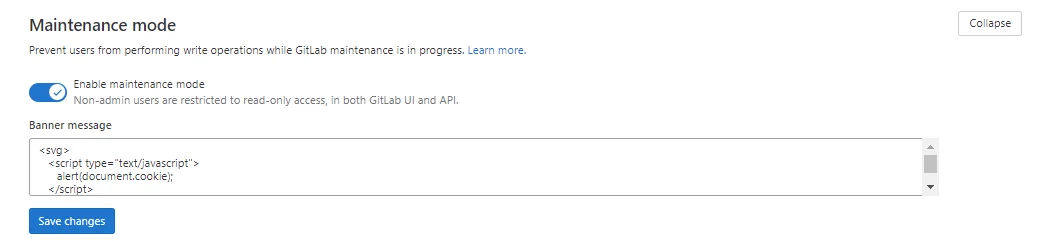
- Signup as any other user, and verify that on every page load, an alert is fired
Examples
Output of checks
I believe this also happens on GitLab, but can't confirm.
Results of GitLab environment info
System information
System:         Debian 11
Proxy:          no
Current User:   git
Using RVM:      no
Ruby Version:   3.0.6p216
Gem Version:    3.4.13
Bundler Version:2.4.14
Rake Version:   13.0.6
Redis Version:  6.2.11
Sidekiq Version:6.5.7
Go Version:     unknown

GitLab information
Version:        16.1.1-ee
Revision:       d3582d7719f
Directory:      /opt/gitlab/embedded/service/gitlab-rails
DB Adapter:     PostgreSQL
DB Version:     13.11
URL:            https://gitlab-xxxxxxxxx.net
HTTP Clone URL: https://gitlab-xxxxxxxxx.net/some-group/some-project.git
SSH Clone URL:  [email protected]:some-group/some-project.git
Elasticsearch:  no
Geo:            no
Using LDAP:     no
Using Omniauth: yes
Omniauth Providers:

GitLab Shell
Version:        14.23.0
Repository storages:
- default:      unix:/var/opt/gitlab/gitaly/gitaly.socket
GitLab Shell path:              /opt/gitlab/embedded/service/gitlab-shell
Impact
Stored XSS allows users to impersonate others, by running stored JS code which leads to stealing user's cookies.
Attachments
Warning: Attachments received through HackerOne, please exercise caution!
How To Reproduce
Please add reproducibility information to this section:
Not written yet. The AI write-up for this report has not been written yet. The Original tab links to the source.
How it worked
Root cause
Likely the maintenance mode message was rendered without proper output encoding or sanitisation, allowing HTML and script tags to execute.
Impact
An admin could run stored JavaScript to steal users' cookies and impersonate them without the usual monitoring, though this only affects instances without CSP.
What the attacker needed
Admin access to the GitLab instance; instance without CSP
How it was found
- Set up a GitLab instance.
- Go to the admin application settings general page and find the maintenance mode section.
- Enable maintenance mode and enter a message containing an SVG with a script tag.
- Sign up as another user and observe that an alert fires on every page load.
Explained by bugbounty.wiki with AI from the original and checked against quotes from it; it can still be wrong. Read the original before relying on a detail.
Not written yet. The AI write-up for this report has not been written yet. The Original tab links to the source.
This is a stored cross-site scripting (XSS) bug. An administrator could put JavaScript code into a message that is shown to all users when the site is in maintenance mode. Because the code was not cleaned, it ran in every visitor's browser, letting the admin steal their session cookies and act as them.
What is XSS?
Script an attacker supplies runs in another user's browser, on the target's origin, with that user's session.



