Stored XSS on Multi-word milestone reference leads to Admin-privilege escalation in certain conditions
A stored cross-site scripting (XSS) vulnerability existed in GitLab's handling of multi-word milestone references in Markdown fields, allowing an attacker to inject script that executes when a victim views an issue. The attacker could create a malicious milestone title and reference it in an issue description, leading to script execution in the victim's browser.

GitLab
Originally disclosed on GitLab
- Fixed in 54 days
- Disclosed after 54 days
HackerOne report #1455036 by ryhmnlfj on 2022-01-20, assigned to @mhenriksen:
Report | Attachments | How To Reproduce
Report
Summary
I found Stored XSS on Multi-word milestone reference in Markdown field.
Admin-privilege escalation can also be achieved by combining this XSS and CSP-bypass at CVE-2021-22242 under certain conditions.
However, the reproduction steps has become too long, so I submit the procedure that does not bypass CSP as the first report for convenience of confirmation and mitigation.
After submitting this first report, I will add the additional report with CSP-bypass and Admin-privilege escalation scenario as comments.
Steps to reproduce (Non-CSP-bypass)
Victim-side 1st steps
- Sign in to GitLab instance as victim-user.
- Create a new public project that everyone can create issue.
- After creating the new issue, log out of this victim's account and start Attacker-side steps.
Attacker-side steps
-
Sign in to GitLab instance as attacker-user.
-
Create a new private project.
-
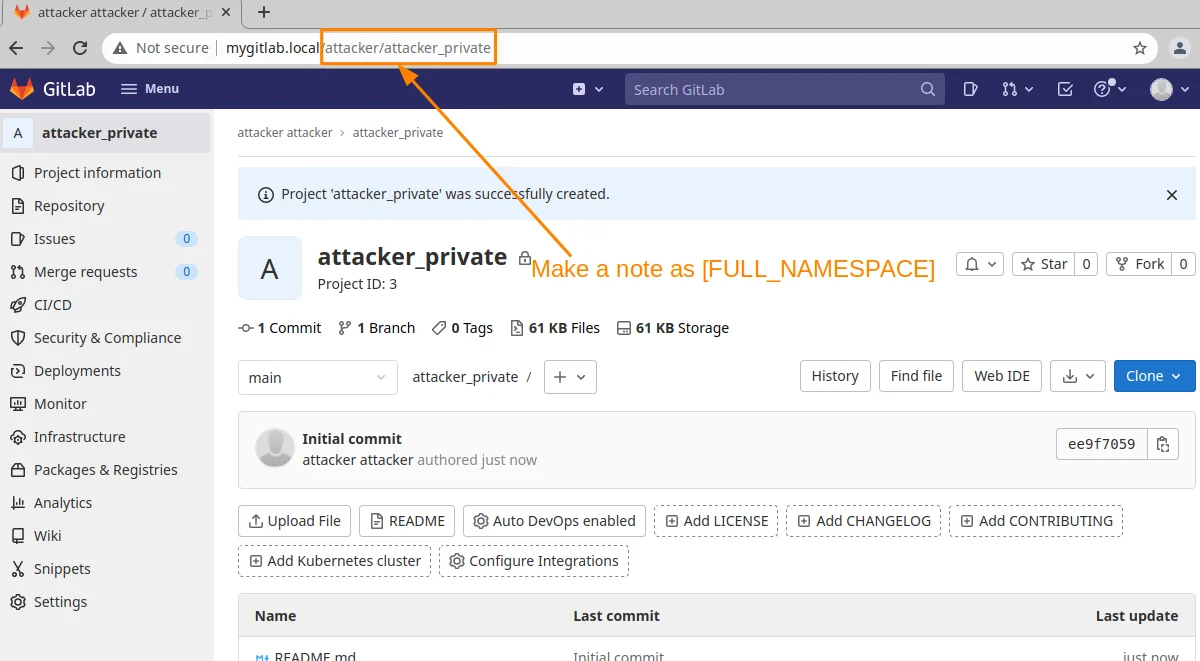
After creating a private project, make a note of the
[FULL_NAMESPACE]from the URL displayed in the address bar of browser.
-
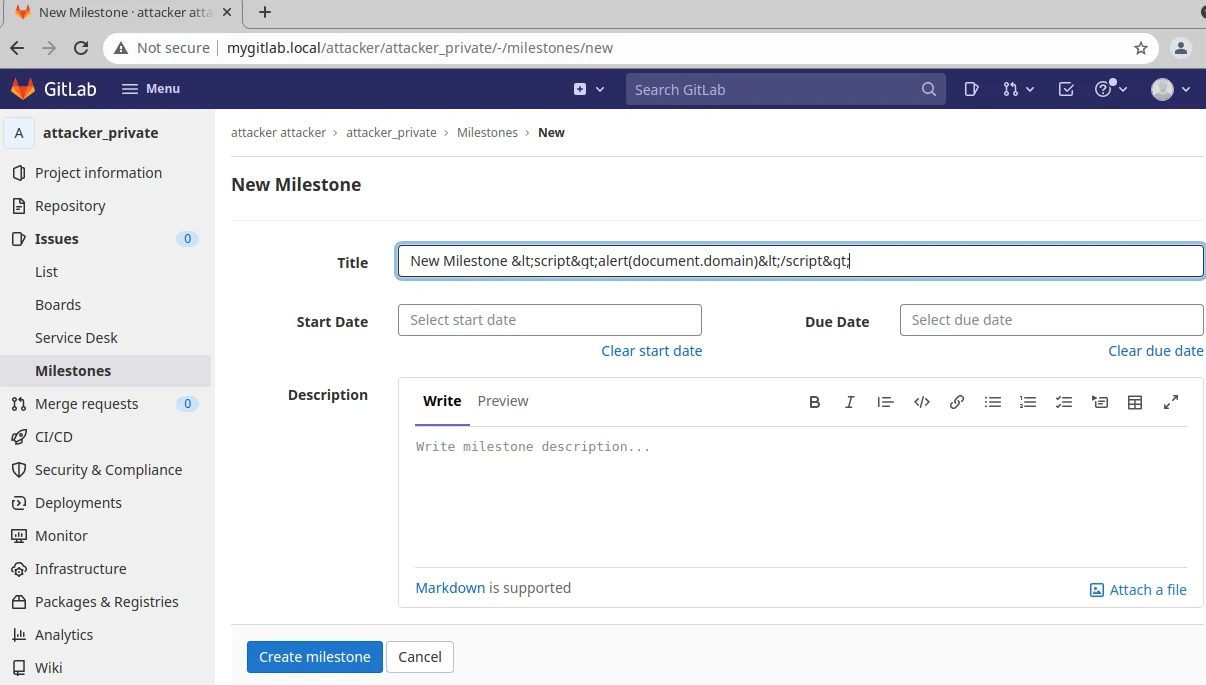
Go to "Issues > Milestones" page and click "New milestone" button.
-
Create a new milestone with the following Title:
New Milestone <script>alert(document.domain)</script>
-
Go to the "Issue" page in the victim's public project prepared at Victim-side 1st step 2.
-
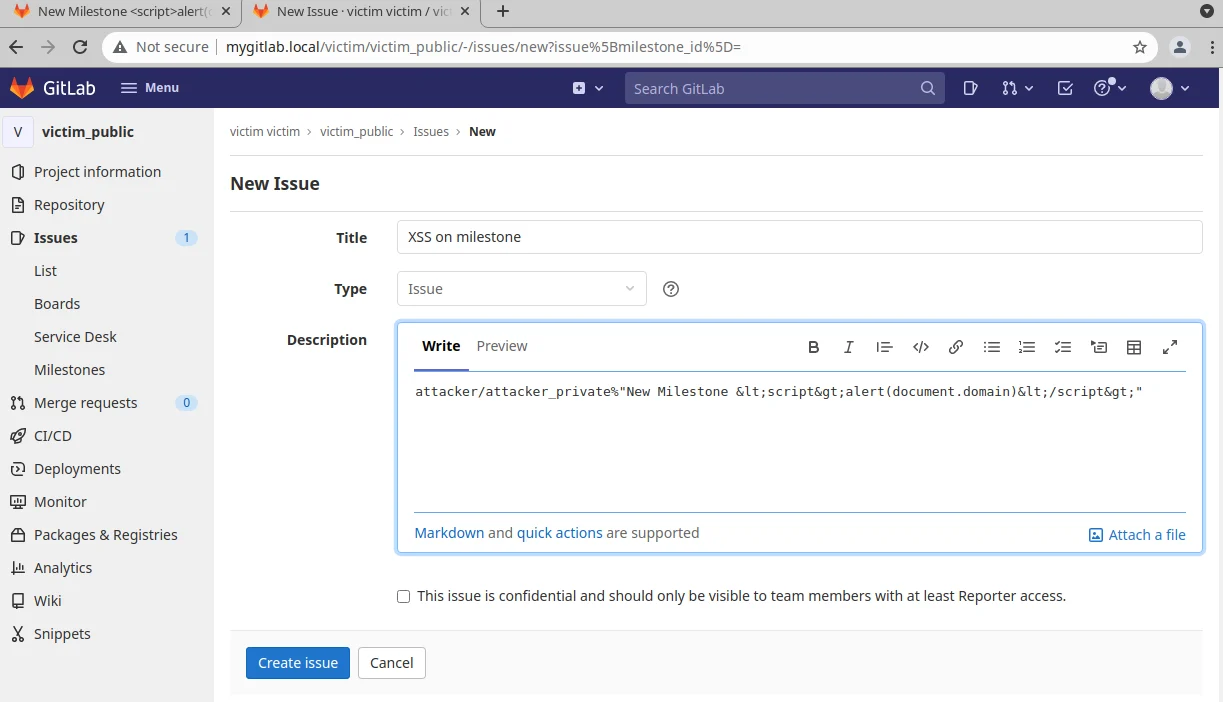
Prepare the description of new issue by replacing the string below.
Replace [FULL_NAMESPACE] with the values you got in Attacker-side step 3.
[FULL_NAMESPACE]%"New Milestone <script>alert(document.domain)</script>"
After replacing, create a new issue with this description.
- Log out of this attacker's account and start Victim-side 2nd steps.
Victim-side 2nd steps
- Sign in to GitLab as victim-user.
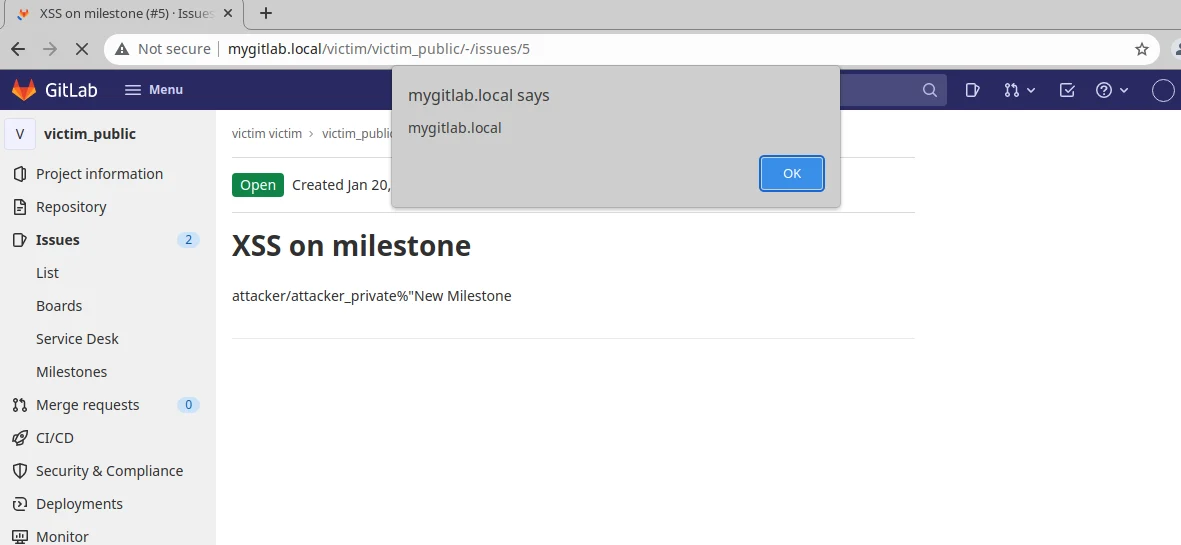
- Go to the issue page created at Attacker-side step 7. The XSS will be executed automatically.
What is the current bug behavior?
There are almost no restrictions on the regular expression that extract String-based multi-word milestone.
https://gitlab.com/gitlab-org/gitlab/-/blob/v14.6.3-ee/app/models/milestone.rb#L63-80
  def self.reference_pattern
    # NOTE: The iid pattern only matches when all characters on the expression
    # are digits, so it will match %2 but not %2.1 because that's probably a
    # milestone name and we want it to be matched as such.
    [@]reference_pattern ||= %r{
      (#{Project.reference_pattern})?
      #{Regexp.escape(reference_prefix)}
      (?:
        (?<milestone_iid>
          \d+(?!\S\w)\b # Integer-based milestone iid, or
        ) |
        (?<milestone_name>
          [^"\s\<]+\b |  # String-based single-word milestone title, or
          "[^"]+"      # String-based multi-word milestone surrounded in quotes
        )
      )
    }x
  end
This regex means that injection is possible with a similar approach to CVE-2020-13338.
"[^"]+" # String-based multi-word milestone surrounded in quotes
What is the expected correct behavior?
I recommend limiting the regular expression that extract Multi-word milestone to the same extent as Single-word milestone.
Relevant logs and/or screenshots
I put references to the screenshots at the appropriate places in this report.
Output of checks
This bug happens on the official Docker installation of GitLab Enterprise Edition 14.6.3-ee.
I used Chromium 96 and Firefox 91 on Xubuntu 20.04 LTS to verify XSS.
I think it can be reproduced on gitlab.com by using CSP-bypassable vector, but I haven't tried it to prevent unexpected accidents.
Results of GitLab environment info
Output of sudo gitlab-rake gitlab:env:info:
System information
System:
Proxy:		no
Current User:	git
Using RVM:	no
Ruby Version:	2.7.5p203
Gem Version:	3.1.4
Bundler Version:2.1.4
Rake Version:	13.0.6
Redis Version:	6.0.16
Git Version:	2.33.1.
Sidekiq Version:6.3.1
Go Version:	unknown

GitLab information
Version:	14.6.3-ee
Revision:	6360adc49de
Directory:	/opt/gitlab/embedded/service/gitlab-rails
DB Adapter:	PostgreSQL
DB Version:	12.7
URL:		http://mygitlab.local
HTTP Clone URL:	http://mygitlab.local/some-group/some-project.git
SSH Clone URL:	[email protected]:some-group/some-project.git
Elasticsearch:	no
Geo:		no
Using LDAP:	no
Using Omniauth:	yes
Omniauth Providers:

GitLab Shell
Version:	13.22.1
Repository storage paths:
- default: 	/var/opt/gitlab/git-data/repositories
GitLab Shell path:		/opt/gitlab/embedded/service/gitlab-shell
Git:		/opt/gitlab/embedded/bin/git
Impact
This Stored XSS can be placed in the various Markdown field, and by using cross-project reference and Multi-word milestone in combination,
the attack target can be easily spread to public project owners and maintainers.
A trial calculation of CVSS in this standard scenario is as follows:
CVSS:3.0/AV:N/AC:L/PR:L/UI:R/S:C/C:H/I:H/A:L
8.9 (High)
After researching for scenarios that extend the attack to admin, I have found that it is possible to attack the admin in impersonation mode.
Admin-Privilege escalation can be achieved by combining a request to stop impersonation mode with a request to User modification API.
Let's assume a scenario where this impersonation mode is often used by admin of GitLab instance and the attack is successful.
Another trial calculation of CVSS is as follows:
CVSS:3.0/AV:N/AC:L/PR:L/UI:R/S:C/C:H/I:H/A:H
9.0 (Critical)
Though I think the impersonation mode is an interesting feature, I'm not sure if it's commonly used.
If it doesn't seem to be used much, please evaluate it as a standard scenario.
Attachments
Warning: Attachments received through HackerOne, please exercise caution!
- Full-namespace-of-private-project.png
- Create-new-milestone.png
- Create-new-issue_milestone.png
- XSS-result_milestone.png
How To Reproduce
Please add reproducibility information to this section:
Not written yet. The AI write-up for this report has not been written yet. The Original tab links to the source.
How it worked
Root cause
The regular expression used to extract multi-word milestone references from Markdown was too permissive, allowing characters like angle brackets that enabled HTML injection.
Impact
This stored XSS could be placed in various Markdown fields and, by using cross-project references and multi-word milestones, the attack could easily spread to public project owners and maintainers; with a CSP bypass, it could lead to admin-privilege escalation under certain conditions.
What the attacker needed
Attacker has a GitLab account; victim has a GitLab account; victim creates a public project; victim views a crafted issue
The fix
The regular expression for extracting multi-word milestones should be limited to the same extent as for single-word milestones.
How it was found
- Victim creates a public project where anyone can create issues.
- Attacker creates a private project and notes its full namespace from the URL.
- Attacker creates a milestone with a title containing a script tag.
- Attacker creates an issue in the victim's public project with a description that references the milestone using the full namespace and the malicious title.
- Victim views the issue, and the script executes automatically.
Explained by bugbounty.wiki with AI from the original and checked against quotes from it; it can still be wrong. Read the original before relying on a detail.
Not written yet. The AI write-up for this report has not been written yet. The Original tab links to the source.
This report describes a stored cross-site scripting (XSS) bug in GitLab. XSS lets an attacker inject malicious code into a web page that other users see, so the code runs in their browsers. Here, an attacker could create a milestone with a harmful name and then trick a victim into viewing an issue that references it, causing the code to run.
What is XSS?
Script an attacker supplies runs in another user's browser, on the target's origin, with that user's session.



