Stored XSS through javascript URL in Analytics dashboards
The GitLab Analytics dashboards 'Top pages' visualization displays page paths as clickable links without validating the URL scheme. An unauthenticated attacker can spoof analytics events to inject a javascript: URL, which, when clicked by a victim, executes arbitrary JavaScript in the context of the GitLab instance, though on GitLab.com this is blocked by CSP.

GitLab
Originally disclosed on GitLab
- Fixed in 2 months
- Disclosed after 2 months
⚠️ Please read the process on how to fix security issues before starting to work on the issue. Vulnerabilities must be fixed in a security mirror.
HackerOne report #2683863 by joaxcar on 2024-08-26, assigned to @cmaxim:
Report | Attachments | How To Reproduce
Report
Summary
When configuring Analytics dashboards (docs) you gain access to some default dashboards and visualizations. One of these visualizations presents a list of Top pages based on view count.
The list contains links to the pages, but only the path is shown.
It's possible for an unauthenticated attacker to spoof these metrics and have them point to a javascript URL instead. On Gitlab.com this will get blocked by CSP, but on a self-hosted instance (maybe behind a proxy or VPN) this CSP might not be configured and the payload will trigger.
To get a victim to click the link the attacker can just spam a lot of "visits" to the fake page and have it end up in top of the "top pages" list.
Steps to reproduce
Even if it gets blocked by CSP on gitlab.com, it's easiest to reproduce it there just to prove the injection. The feature can be configured on a self-hosted server as well
as the victim
- Create a new
Ultimatesubscription usingtrials - In the new group create a new project
- Go to
https://gitlab.com/GROUPNAME/PROJECTNAME/-/analytics/dashboardsand clickSet upto the right ofProduct Analytics - Click the checkbox
I agree to event collection and processing in this region.and selectUse Gitlab-managed provider(this would on selfhosted be set up using custom settings but the end result is still the same, Cube + Snowflake + ClickHouse) - You will land on
https://gitlab.com/GROUPNAME/PROJECTNAME/-/analytics/dashboards/product-analytics-onboardinghere just copy theUsing HTML scripthtml code looking like this
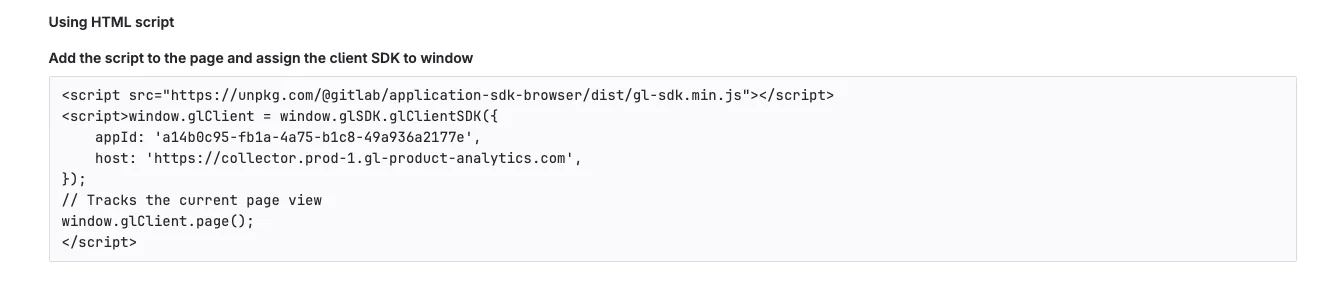
- Host this HTML somewhere (you can use something like JSFiddle for this, just make a note of the URL that is hosting the content) This now simulates the service that you are hosting and monitoring
as the attacker
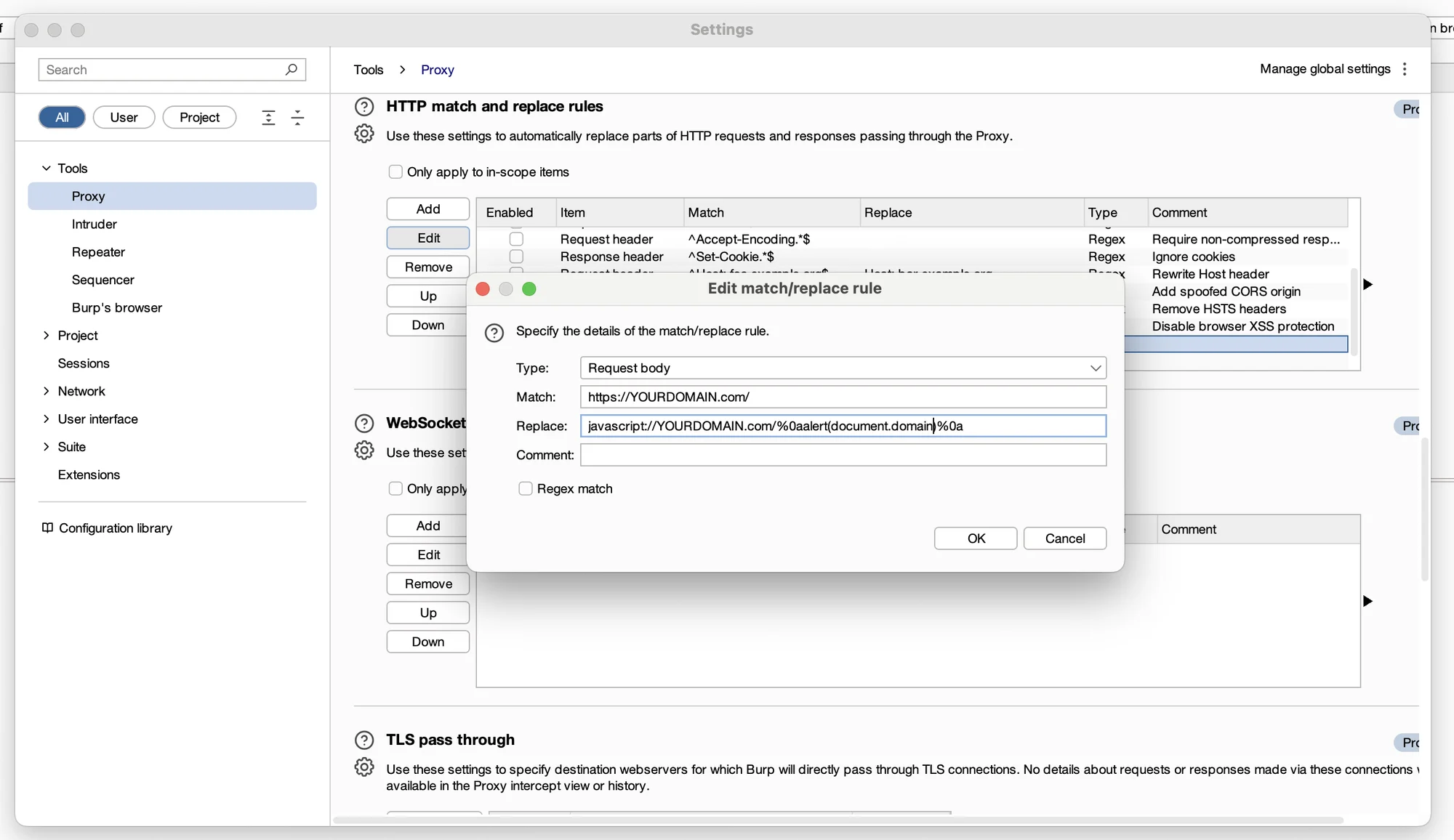
7. Use a proxy tool to do a match and replace on all traffic from your browser that looks like this
type: Request body
match: https://YOURDOMAIN.com/
replace: javascript://YOURDOMAIN.com/%0aalert(document.domain)%0a
- Now visit the URL from step 6. The page should make an "analytics request" but slightly modified
as the victim
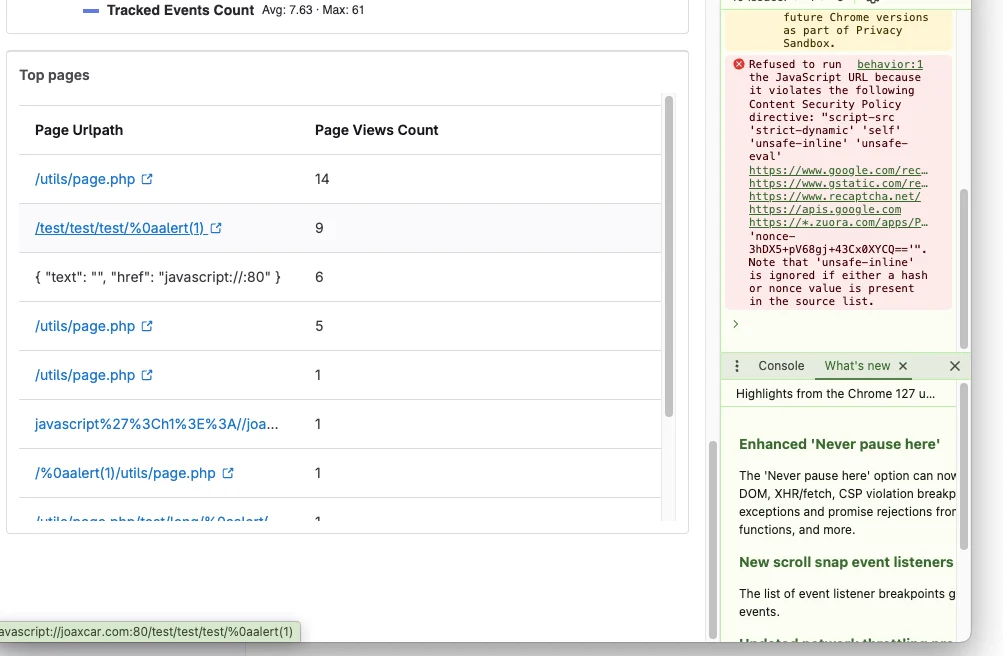
9. Go to https://gitlab.com/GROUPNAME/PROJECTNAME/-/analytics/dashboards/behavior 10. Under Top Pages` there should be a link, if you click it you should see a warning in devtools that javascript tried to execute but was blocked by CSP.
Impact
XSS on selfhosted services. As this is possible to be used unauthenticated as a blind xss against selfhosted servers that are not accessible from the wide web I think its could be seen as having a CVSS of
8.0 -> CVSS:3.1/AV:N/AC:H/PR:N/UI:R/S:C/C:H/I:H/A:N
as selfhosted servers that are not exposed to the internet are more likely to not have CSP in place.
If not I think it should be put on CVSS
6.1 -> CVSS:3.1/AV:N/AC:L/PR:N/UI:R/S:C/C:L/I:L/A:N
The complexity is only high if the attack is seen as blind XSS in my opinion, otherwise its the same as other javascript: based XSS's
What is the current bug behavior?
An attacker can spoof Top pages to point to anything. Like javascript urls
What is the expected correct behavior?
It should not allow any form of URL only safe ones
Impact
XSS on selfhosted services
Attachments
Warning: Attachments received through HackerOne, please exercise caution!
- Screenshot_2024-08-26_at_16.29.19.png
- Screenshot_2024-08-26_at_16.37.12.png
- Screenshot_2024-08-26_at_16.33.30.png
How To Reproduce
Please add reproducibility information to this section:
Not written yet. The AI write-up for this report has not been written yet. The Original tab links to the source.
How it worked
Root cause
Likely the application did not validate or sanitise the URL scheme of page paths before rendering them as clickable links in the 'Top pages' visualization.
Impact
On self-hosted GitLab instances without CSP, an unauthenticated attacker could achieve stored XSS by tricking a victim into clicking a malicious link in the 'Top pages' list; on GitLab.com the attack is blocked by CSP.
What the attacker needed
Victim has an Ultimate trial or self-hosted instance; Victim clicks the malicious link; Self-hosted instance lacks CSP
How it was found
- As the victim, create a trial Ultimate subscription and a new project.
- Go to the analytics dashboards page and set up Product Analytics, agreeing to event collection and using the GitLab-managed provider.
- Copy the HTML script code from the onboarding page and host it somewhere, noting the URL.
- As the attacker, use a proxy to match and replace requests containing the hosted URL with a javascript: URL payload.
- Visit the hosted page to send the modified analytics request.
- As the victim, go to the behavior dashboard and click the link under 'Top Pages'; on GitLab.com the JavaScript is blocked by CSP.
Explained by bugbounty.wiki with AI from the original and checked against quotes from it; it can still be wrong. Read the original before relying on a detail.
Not written yet. The AI write-up for this report has not been written yet. The Original tab links to the source.
GitLab has a feature that shows a list of the most visited pages in a project. The links in that list were not checked to ensure they were safe web addresses. An attacker could make a fake page visit that put a malicious link at the top of the list; if a victim clicked it, harmful code could run in their browser, but only on self-hosted GitLab instances without a security policy called CSP.
What is XSS?
Script an attacker supplies runs in another user's browser, on the target's origin, with that user's session.



