Unauthenticated users can access private PyPI packages that belong to a public group using /api/v4/groups/{id}/-/packages/pypi/simple
A private project's PyPI packages could be downloaded by unauthenticated users if the project belonged to a public group, even after the package registry was disabled. An attacker could access and download private packages without any authentication.

GitLab
Originally disclosed on GitLab
- Fixed in 4 months
- Disclosed after 4 months
⚠️ Please read the process on how to fix security issues before starting to work on the issue. Vulnerabilities must be fixed in a security mirror.
HackerOne report #2035173 by js_noob on 2023-06-22, assigned to @ottilia_westerlund:
Report | Attachments | How To Reproduce
Report
Summary
Hello team, as known when a package registry belongs to a private group it and Package registry is turned off in the project settings, this should block EVERY SINGLE user from accessing this project's package registries. However, if this project belonged to a public group, ANY UNAUTHENTICATED user can access and download those packages.
Steps to reproduce
As an owner:
- Create a new public group
- Create a private project in that group, with the content in the following zip file
- After the project creation change the content of
pyproject.tomland add your name and email
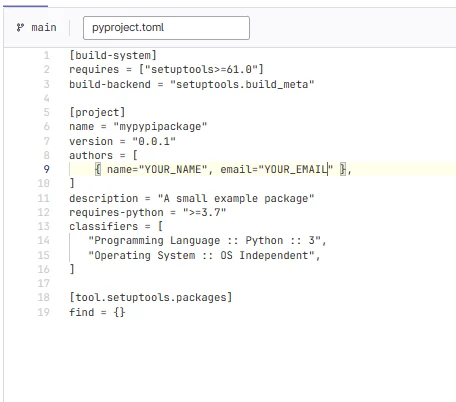
- Verify that a pipeline is triggered
- Wait a couple of minutes, then navigate to https://gitlab.com/GROUP/PROJECT/-/packages, and verify that a new package is created -- Now you can directly jump to step 9, or if you wanted to add another layer of security you can continue in order. But at this point, no external users should be able to access this package
.png)
- Navigate to the project settings https://gitlab.com/GROUP/PROJECT/edit and disable
Package registry
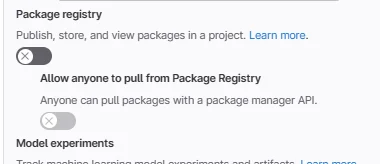
- Let's try to fetch the package as the owner, on your PC terminal run (you can create PAT here https://gitlab.com/-/profile/personal_access_tokens)
pip install mypypipackage --index-url https://__token__:[email protected]/api/v4/projects/PROJECT_ID/packages/pypi/simple
- Verify that the owner can't access it. Ideally, if the owner can't no one should be able to, right?
As an unauthenticated user:
- Navigate to https://gitlab.com/groups/GROUP/-/packages and verify that there are no packages you have access to
- Run the following command in your terminal
pip install mypypipackage --index-url https://__token__:[email protected]/api/v4/groups/GROUP_ID/-/packages/pypi/simple
- Verify that you can access that private package without using an access token, i.e. without being logged in
As a double check:
You can check my private packages at https://gitlab.com/groups/my-nice-group-new-version/-/packages, verify that you can't see any packages.
Run the following command and verify that you can download my private package
pip install mypypipackage --index-url https://__token__:[email protected]/api/v4/groups/68082643/-/packages/pypi/simple
Video/POC
Impact
Unauthenticated users can access private PyPI packages.
Attachments
Warning: Attachments received through HackerOne, please exercise caution!
How To Reproduce
Please add reproducibility information to this section:
Not written yet. The AI write-up for this report has not been written yet. The Original tab links to the source.
How it worked
Impact
Unauthenticated users can access private PyPI packages.
What the attacker needed
Public group; private project with package registry; package published
How it was found
- Create a new public group.
- Create a private project in that group with a Python package.
- Trigger a pipeline to publish the package.
- Disable the package registry in the project settings.
- As the owner, try to install the package using the project-level API and verify it fails.
- As an unauthenticated user, install the package using the group-level API and verify it succeeds.
Explained by bugbounty.wiki with AI from the original and checked against quotes from it; it can still be wrong. Read the original before relying on a detail.
Not written yet. The AI write-up for this report has not been written yet. The Original tab links to the source.
A package registry is a place where software packages are stored. The report shows that even when a project is private and its package registry is turned off, anyone on the internet can still download the packages if the project is inside a public group. This means private code could be exposed.
What is Access control?
A user can do something their role should not allow: reach an admin function, act on a feature they have not paid for, or skip a permission check. IDOR is the special case where the object belongs to someone else.

