Unrestricted file upload leads to Stored XSS
A file uploaded as a PNG to a GitLab wiki page was actually an SVG containing JavaScript, and the browser executed that script when the file was viewed. An attacker could use this to run script in the context of the GitLab site and access cookies or session tokens.

- Triaged in 8 days
- Fixed in 42 days
- Paid in 4 days
- Disclosed after 2 months
Summary
i found that i can upload png file with JavaScript code and execute it in wiki page.
Steps to reproduce
(Step-by-step guide to reproduce the issue, including:)
1-login to gitlab account
2-open your project
3-open Wiki page.
4-Click "New page" button.
5-attach png file which contain below code
<?xml version="1.0" standalone="no"?><!DOCTYPE svg PUBLIC "-//W3C//DTD SVG 1.1//EN" "http://www.w3.org/Graphics/SVG/1.1/DTD/svg11.dtd"><svg onload="alert(1)" xmlns="http://www.w3.org/2000/svg"> <polygon id="triangle" points="0,0 0,50 50,0" fill="#009900" stroke="#004400"/> </svg>
6-Click "Create page" button.
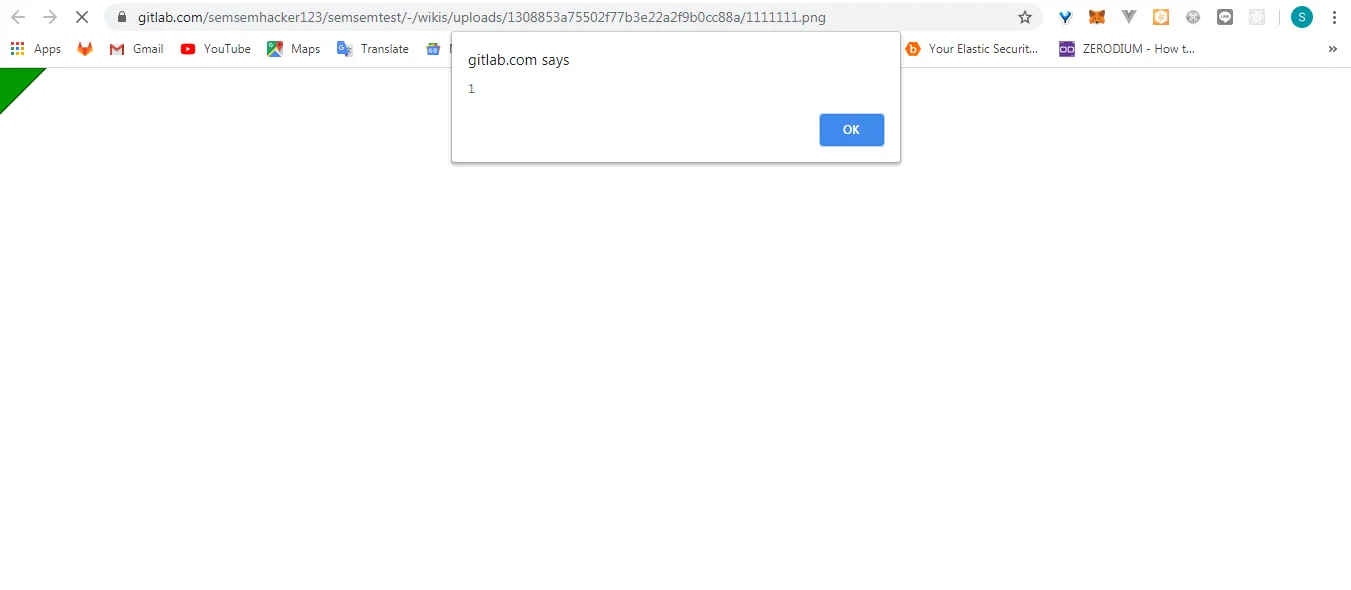
7-Click on green triangle
8-if The alert dialog not appears from first time just click on it one more time
Impact
If wiki pages created by using this vulnerability are visible to everyone (Wiki Visibility setting is set to "Everyone With Access") in "Public" project, there is a possibility that a considerable number of GitLab users and visitors click a malicious link.
Examples
gitlab.com
tested on Google Chrome
https://gitlab.com/semsemhacker123/semsemtest/-/wikis/ssaa-home https://gitlab.com/semsemhacker123/semsemtest/-/wikis/uploads/1308853a75502f77b3e22a2f9b0cc88a/1111111.png
What is the current bug behavior?
The alert dialog appears after clicking "green triangle " in created page.
What is the expected correct behavior?
the png file it must be not executed as image/svg+xml
Impact
An attacker can use XSS to send a malicious script to an unsuspecting user. The end user’s browser has no way to know that the script should not be trusted, and will execute the script. Because it thinks the script came from a trusted source, the malicious script can access any cookies, session tokens, or other sensitive information retained by the browser and used with that site. These scripts can even rewrite the content of the HTML page
Attachments
Not written yet. The AI write-up for this report has not been written yet. The Original tab links to the source.
How it worked
Root cause
Likely the upload feature checked only the file extension or declared type, not the actual content, and then served the file with an image type that the browser rendered as active SVG.
Impact
If the wiki is visible to everyone with access in a public project, many GitLab users and visitors could be tricked into clicking a malicious link and having script run in their browser; the report tested this only on Google Chrome.
What the attacker needed
A GitLab account; a project with a wiki; victim clicks the uploaded file
How it was found
- Log in to a GitLab account and open a project.
- Open the Wiki page and click 'New page'.
- Attach a file named with a .png extension whose content is an SVG with an onload handler.
- Click 'Create page'.
- Click the green triangle in the page; if the alert does not appear, click it again.
Explained by bugbounty.wiki with AI from the original and checked against quotes from it; it can still be wrong. Read the original before relying on a detail.
Not written yet. The AI write-up for this report has not been written yet. The Original tab links to the source.
A wiki page lets you attach files, and the site is supposed to treat an uploaded image as a harmless picture. Here the file was really a web page written in a format called SVG, which can contain instructions (JavaScript) that the browser runs. Because the browser ran that code as if it came from GitLab, it could read things like login cookies.
What is XSS?
Script an attacker supplies runs in another user's browser, on the target's origin, with that user's session.




