User Application OAuth flow allows for "cross window forgery" due to ID on accept button, leading to full API access as victim
The OAuth authorization page for user applications had an ID on the Authorize button, allowing an attacker to use a fragment identifier to auto-select the button. An attacker could trick a victim into holding the Enter key, causing the button to be pressed and granting the attacker's application full API access to the victim's account.

GitLab
Originally disclosed on GitLab
- Fixed in 4 months
- Disclosed after 4 months
⚠️ Please read the process on how to fix security issues before starting to work on the issue. Vulnerabilities must be fixed in a security mirror.
HackerOne report #2383443 by joaxcar on 2024-02-21, assigned to @truegreg:
Report | Attachments | How To Reproduce
Report
Summary
First of all, I did check, and clickjacking is not out of scope if the issue is on a sensitive page.
Secondly, I understand if the attack here could be considered in a gray area when it comes to user interaction, but as I build the POC I thought I might just report it and the team can decide what to do with it :)
I read this blog post about "cross window forgery" link. The researcher describes two attack scenarios that would both work on GitLab.com. I decided to check if I could make a POC of the attack against gitlab.com for user application permissions.
The idea is that a sensitive page such as the permission prompt for user applications
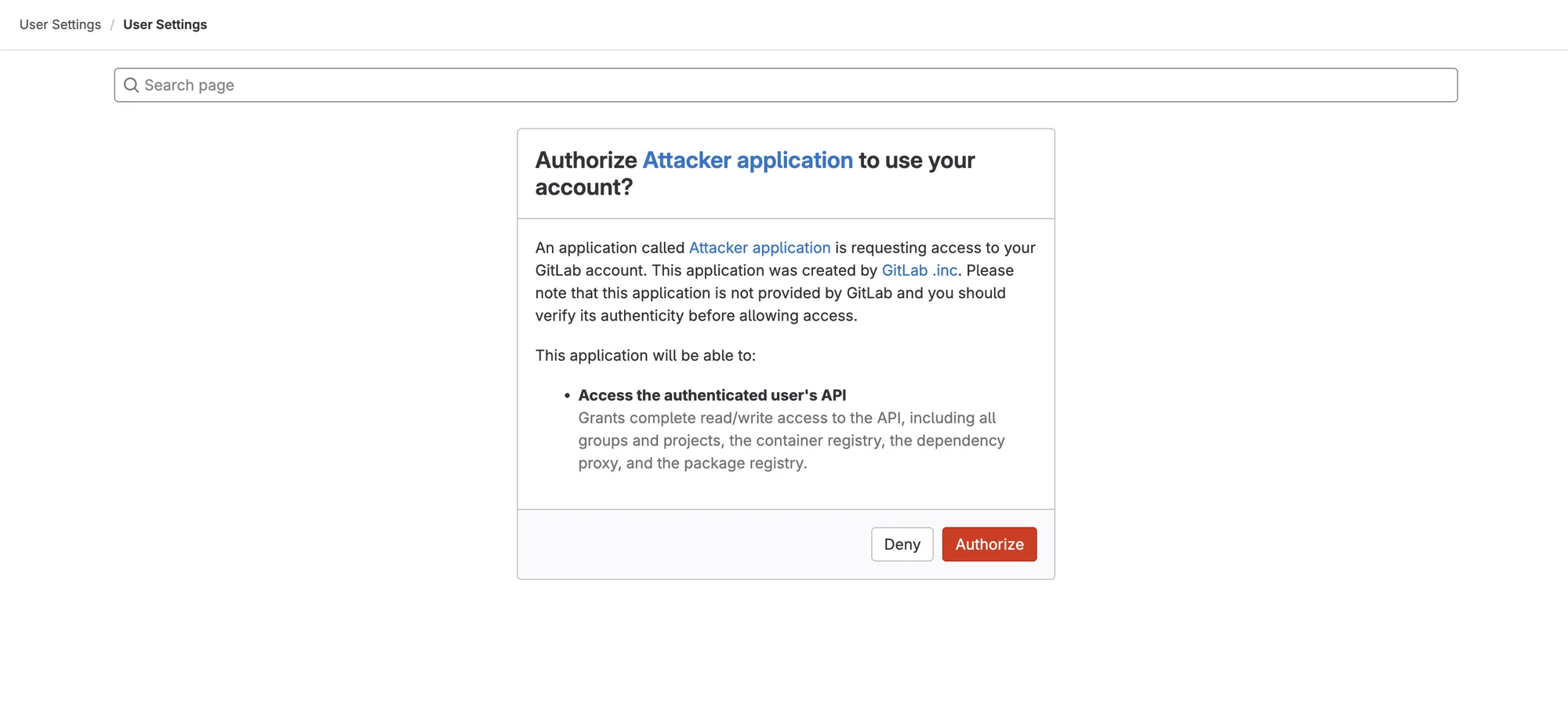
If a user clicks the "Authorize" button, the "Attacker application" will get hold of an access token with full access as the victim in the GitLab API. This page does not require any additional actions more than a click of that button. The problematic part that makes the attack possible is that the button has a HTML id attribute
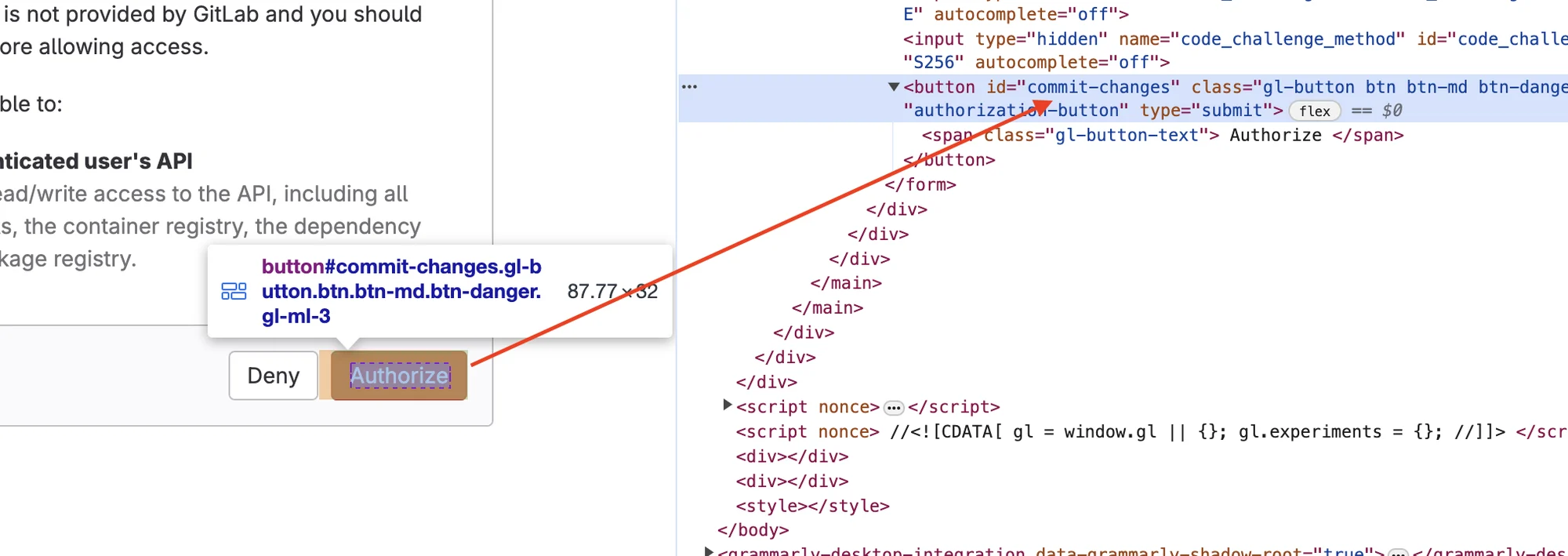
This allows for the usage of a fragment identifier to target the button on page load. An URL like this https://gitlab.com/oauth/authorize?client=...#commit-changes will have the button selected on load.
An attacker can then use this (see blog for details) to highjack a enter press from another site to accept this auto-selected button. The attacker creates a site that somehow tricks the victim into holding down enter for 1-3 seconds. The attacker page opens a small popup targeting the auth page and the button will get pressed. The attacker page then closes the popup, and the victim will not know that they have accepted the application and given away full API access to their account.
There are multiple ways to get victims to press down the enter key. Two options are to either create a small game (say flappy bird) or create a fake "captcha" page that the user interacts with. A downside of "prove you are a human" captchas are that they have made users of sites less restrictive on what types of actions they make. Drag and drop to solve puzzles or clicking buttons have become "standard".
Here is a video of how the attack looks. Note that the victim had no applications accepted when the video started. After visiting the attacker page, the attacker has full access. You can see some flickering but won't know what happened.
The remediation for this kind of attack is to remove the ID from the Authorize button. This will make it impossible to target the button on page load.
Steps to reproduce
Simple POC using my attack site
- Log into gitlab.com with a "burner" account
- Visit https://joaxcar.com/gitlab/click_attack_poc.html and press and hold enter for 3 seconds
- Go to https://gitlab.com/-/user_settings/applications and see that you have my attacker application in the
Authorized applicationslist. - Revoke my access by clicking revoke
Using your own application
- Log into gitlab.com
- Go to https://gitlab.com/-/user_settings/applications
- Click "add new application"
- Fill out the form and make sure to point the redirect URL to a place where you will host a "catch page". (you can always change this later). click
apias scope - Take note of
Application ID(this isclient_idin oauth),Secretandredirect URL - Host two web pages (my POC is written in PHP and HTML), the files are here
- Make sure to update these files with the appropriate IDs and secrets. Search for
client_idand replace the value withApplication ID, search forclient_secretand replace it with your secret, and search forredirect_urland replace it with your URL. NOTE the redirect URL is the URL to the hosted .PHP file - Now visit the hosted POC and it should work just as my example
Impact
The attacker gains full access to victim's account through API (read and write)
What is the current bug behavior?
The Authorize button has an ID and can thus be the target of a fragment identifier. This allows for the "cross window forgery" attack
What is the expected correct behavior?
Removing the ID from the button will stop the attack
Output of checks
This bug happens on GitLab.com
Impact
Full access to victim's account through API (read and write)
Attachments
Warning: Attachments received through HackerOne, please exercise caution!
- Screenshot_2024-02-21_at_11.50.32.png
- Screenshot_2024-02-21_at_11.53.55.png
- Screen_Recording_2024-02-21_at_11.39.29.mov
- poc_ato_click.php
- click_attack_poc.html
How To Reproduce
Please add reproducibility information to this section:
Not written yet. The AI write-up for this report has not been written yet. The Original tab links to the source.
How it worked
Root cause
The Authorize button on the OAuth consent page had an HTML id attribute, allowing it to be targeted and auto-selected via a URL fragment identifier.
Impact
The attacker gains full read and write access to the victim's account through the API.
What the attacker needed
Victim holds Enter key for 1-3 seconds; attacker has a registered OAuth application; victim visits attacker's page
The fix
The ID should be removed from the Authorize button to prevent it from being targeted via a fragment identifier.
How it was found
- Log into gitlab.com with a burner account.
- Visit the attacker's page and press and hold Enter for 3 seconds.
- Go to the applications settings page and see the attacker application in the authorized applications list.
- Revoke the attacker's access.
Explained by bugbounty.wiki with AI from the original and checked against quotes from it; it can still be wrong. Read the original before relying on a detail.
Not written yet. The AI write-up for this report has not been written yet. The Original tab links to the source.
When you connect an app to your GitLab account, you see a page asking you to approve it. This page had a button that could be automatically selected by adding a special code to the web address. An attacker could make a fake page that tricks you into pressing Enter, which would approve the app without you realising, giving the attacker control over your account.
What is UI spoofing?
The interface lies to the user: a framed page catches their clicks, or a browser shows the wrong address or a fake prompt. Paid when it leads to a sensitive action or convincing phishing.


