User with developer role (group) can leak group CI/CD variables through GitLab project import using tags protection
A user with the developer role in a GitLab group could export a project with protected tags and import it into another group, causing the protection settings to be imported as-is. This allowed the user to create a release with a protected tag and trigger a pipeline that leaked masked group CI/CD variables.

GitLab
Originally disclosed on GitLab
- Fixed in 22 days
- Disclosed after 22 days
⚠️ Please read the process on how to fix security issues before starting to work on the issue. Vulnerabilities must be fixed in a security mirror.
HackerOne report #1940141 by js_noob on 2023-04-09, assigned to @greg:
Report | Attachments | How To Reproduce
Report
Summary
Hello team, a user with a developer role (group) can steal protected group/project CI/CD variables by adding protected tags on a project, exporting it, and then importing it into a group where he has a developer role, the protection gets imported as it is. This is done with no victim interaction needed.
Steps to reproduce
- Create 2 accounts
- Create a group with account A and masked CI/CD group variables (Group settings -> CI/CD -> Variables)
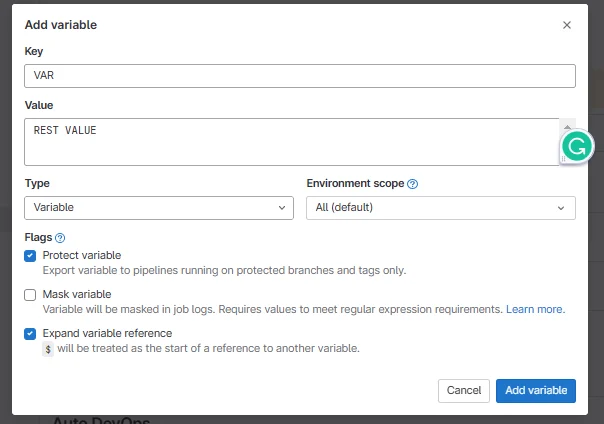
- Create a personal project with account B and add
.gitlab-ci.ymlfile with the following content
image: ruby:latest

job_name:
 script:
   - echo $VAR
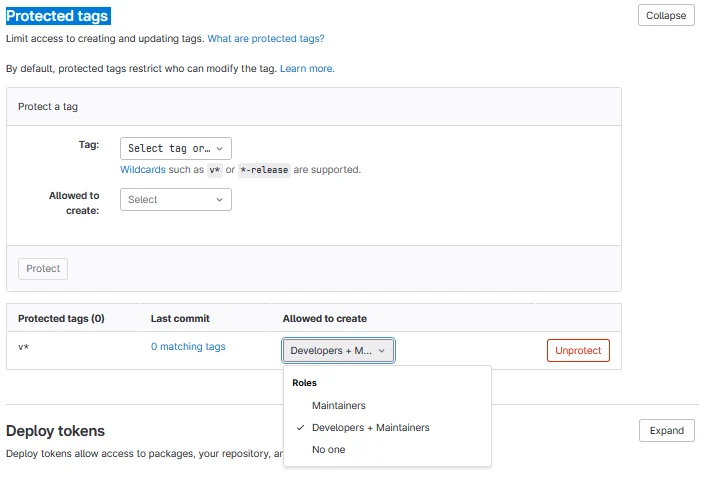
- In the same project from account B create tags protection (Project settings -> Repository -> Protected tags), with the following
v*and `Developers + Maintainers
- Export the project and save the tar/zip file
- Invite account B (developer) to account A's (owner) group
- Upload the project file (from step 5) to account A's group with account B
- Create a new release in the newly created/imported project with the following
- tag:
v.1.0.0 - Release title:
v.1.0.0
- tag:
- Verify the successful creation, navigate to the job/pipeline logs and verify the group CI/CD vars being leaked
Expected Behavior
Protected tags should either be blank by default or just be limited to maintainers (this is done for protected branches).
Video/POC
Redacted
Impact
Users with developer role (group) can steal masked group and project CI/CD variables
Attachments
Warning: Attachments received through HackerOne, please exercise caution!
How To Reproduce
Please add reproducibility information to this section:
Not written yet. The AI write-up for this report has not been written yet. The Original tab links to the source.
How it worked
Root cause
Likely, protected tag settings were imported without validating the importer's permissions, allowing a developer to create protected tags and trigger pipelines that expose group variables.
Impact
A user with the developer role could steal masked group and project CI/CD variables.
What the attacker needed
Two GitLab accounts; Developer role in a group; Group has masked CI/CD variables
The fix
Protected tags should be blank by default or limited to maintainers, as is done for protected branches.
How it was found
- Create two accounts and a group with masked CI/CD variables using the first account.
- With the second account, create a personal project with a CI configuration that echoes a variable.
- Add a protected tag pattern allowing developers to create tags.
- Export the project and save the archive.
- Invite the second account as a developer to the first account's group.
- Import the project into the group and create a release with a tag matching the protected pattern.
Explained by bugbounty.wiki with AI from the original and checked against quotes from it; it can still be wrong. Read the original before relying on a detail.
Not written yet. The AI write-up for this report has not been written yet. The Original tab links to the source.
In GitLab, CI/CD variables are secret values used in pipelines. A developer role normally cannot see these secrets. The bug let a developer copy a project with special tag protections into another group, then create a release that ran a pipeline and printed the secrets in the job log.
What is Access control?
A user can do something their role should not allow: reach an admin function, act on a feature they have not paid for, or skip a permission check. IDOR is the special case where the object belongs to someone else.

